Magic Zoom Plus







Magic Zoom Plus supports: OpenCart 3.x, OpenCart 2.x, OpenCart 1.5.x
The ultimate responsive image zoom for your product images!
Magic Zoom Plus has two beautiful effects:
1. Image zoom on hover
2. Enlarge images to full-screen on click
Try the demo here!
Customers can view all of your products in crisp, clear detail thanks to its options of zoom: magnify, zoom, preview, enlarge & deep zoom.
That's not all! Easily meet customer expectations with product videos. Display any YouTube & Vimeo videos alongside product images for an interactive gallery. Video, zoom & enlarge - a perfect combination for any OC2 or OC3 store!
Why it matters
Satisfying shoppers is vital. But every customer shops differently. So how can you please everyone?
For those in a rush that just want a quick peek on the Category, Manufacturers or Search results page - the Preview effect is ideal.
Customers with more time to browse product pages enjoy side zoom, internal zoom or magnifying glass for a close-up look.
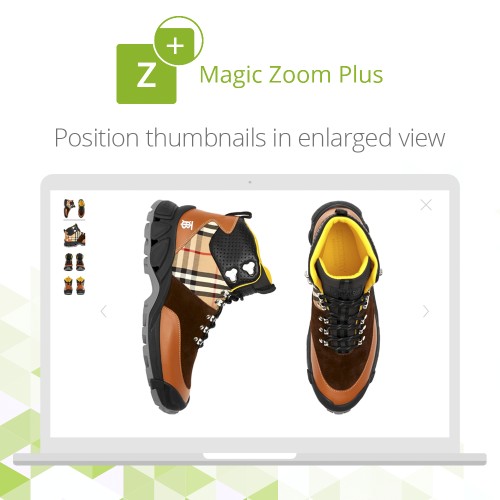
The pièce de résistance is its full-screen view. Enjoyed by all types of shoppers, the dramatic effect allows for quick browsing thanks to thumbnail images and smooth swipeability.
Features
For a one-off payment of $79 you'll enjoy incredible image zoom features:
- Study images in detail with a round magnifying glass.
- Swipe images left/right to browse images with speed on touchscreens.
- Include YouTube & Vimeo product videos on any OC2 or OC3 product page.
- Control the magnifier dimensions by spinning the mousewheel.
- Swift image previews at a defined size - perfect for a quick look on category pages.
- Immersive full-screen view shows even bigger images and thumbnails to switch between product items.
Even better...
- Zoom using pinch gestures on mobile devices to open/exit fullscreen and to zoom in/out of the fullscreen image.
- Highlight selected thumbnails with an underline.
- Set fullscreen thumbnails to the left by adding expand-thumbnails-left (in 'Extra CSS' option).
- Leave fullscreen using the browser back button.
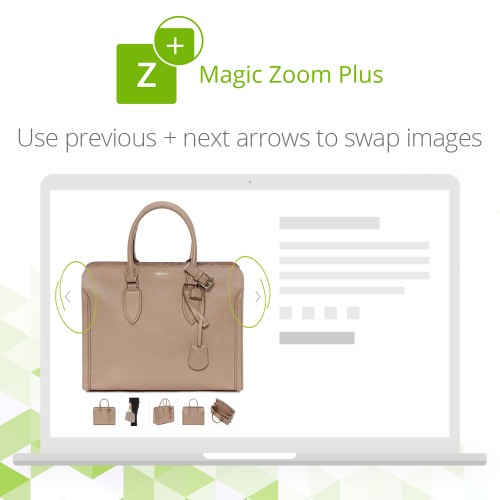
- Display previous/next arrows next to main image by using mz-show-arrows in the 'Extra CSS' setting.
- Retina ready - Show beautiful hi-res product images on the latest iPads, iPhones and other HD devices.
- Supports all versions of OpenCart including OpenCart 2.
- Works everywhere - created using JavaScript, Magic Zoom Plus works on iPad, iPhone & Android devices. Plus all major web browsers: Chrome, Internet Explorer 6+, Firefox, Safari and Opera.
- Enable Magic Zoom Plus as zoom & enlarge, zoom only, enlarge only throughout your OpenCart e-commerce store!: Product details page; Category page; Search page; Manufacturers page; Latest block; Featured block; Bestsellers block; Specials block; Manual install elsewhere.
Mobile ready
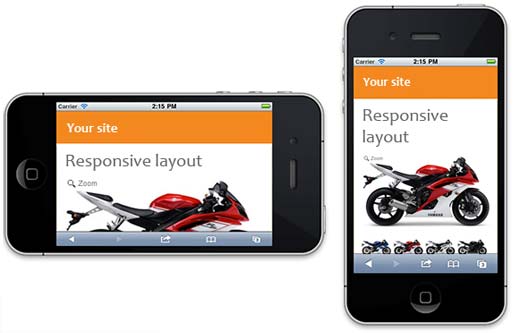
Touch is everything! Customers crave natural touch, tap & swipe gestures on any handheld device. Whether viewed on iPhone, iPad, Android your product images look fabulous.
Custom-built in JavaScript, this image zoomer has zero compatibility issues.
Responsive
It's essential to use a responsive image zoom tool on ecommerce stores. Product images need to look amazing on any device whether a customer is sat at their desk or on-the-go.
What does responsive mean? Images automatically scale up & down to instinctively fit your customer's screen size.
Easy to tweak
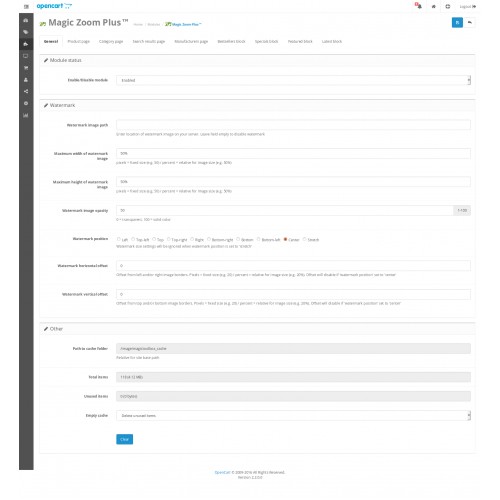
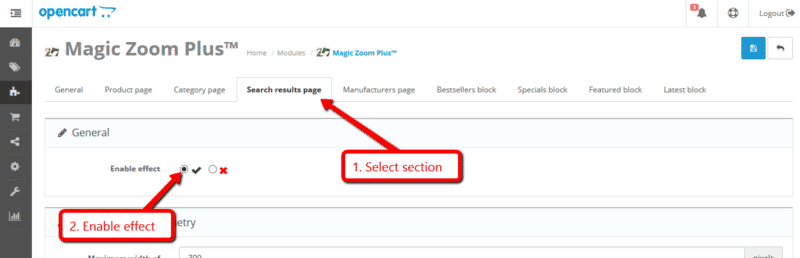
Customize this image zoomer extension exactly how you want your product images to look & feel. Choose from over 70 options using the Magic Zoom Plus Settings page. Simply go to Extensions > Modules > Magic Zoom Plus > Edit.
Bigger is definitely better
We recommend uploading large versions of your product images (1000+ pixel width) to create impressive zoom and enlarge effects. OpenCart will automatically resize images throughout your ecommerce store.
Product videos (OC2 & OC3)
Magic Zoom Plus also includes product videos. Add any YouTube & Vimeo product videos to your image gallery. Why? Because product videos can increase conversions by 32%.
Magic Zoom Plus works well with...
- Compatible with iProductVideo plug-and-play video module.
- Running OpenCart inside Joomla using AceShop, MijoShop or jCart.
- Magic Zoom Plus is vQmod ready. If you use the popular OpenCart extension on your store, no core files will be changed when Magic Zoom Plus is installed. Don't worry if you don't use vQmod. You can still install Magic Zoom on your website.
Try first, buy later
Either buy it right now - you're 100% protected by our 30-day moneyback guarantee.
Or install the free trial of Magic Zoom Plus. A red 'Trial version' message shows on the enlarged image - just buy a license to remove the red text once you're ready.
Let's get started
Install this responsive image zoom on your OpenCart store today and email us any questions about Magic Zoom Plus.
What customers say about Magic Zoom Plus

I love this product. I've used it on other platforms as well. Always a winner in my book!
~edsaxmoore
~edsaxmoore
Price
$79.00
- Developed by OpenCart Community
- 12 Months Free Support
- Documentation Included
Rating
Compatibility
1.5.4, 1.5.4.1, 1.5.5.1, 1.5.6, 1.5.6.1, 1.5.6.2, 1.5.6.3, 1.5.6.4, 2.0.0.0, 2.0.1.0, 2.0.1.1, 2.0.2.0, 2.0.3.1, 2.1.0.1, 2.1.0.2, 2.2.0.0, 2.3.0.0, 2.3.0.1, 2.3.0.2, 3.0.0.0, 3.0.1.1, 3.0.1.2, 3.0.2.0, 3.0.3.0, 3.0.3.1, 3.0.3.2, 3.0.3.3, 3.0.3.5, 3.0.3.6, 3.0.3.7, 3.0.3.8
Last Update
19 Apr 2022
Created
3 Jun 2011
198 Sales
102 Comments

Login and write down your comment.
Login my OpenCart Account