MX5 PosLaju (Flat Rate + Rate Per Item + Weight Based)
# Contact Support: opencartmy@gmail.com
- including support install service
- to get free support, please provide me with Order ID, opencart web admin, and FTP access
# Latest Update: Compatible with Opencart v2.3.x
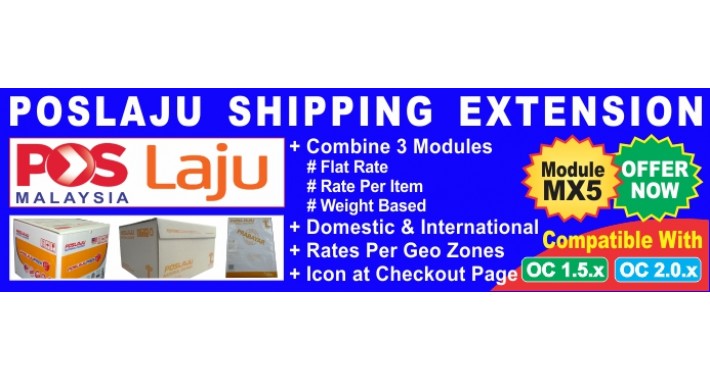
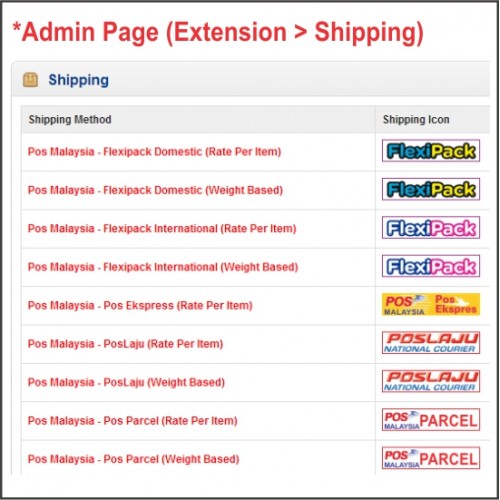
# This extension combine 3 modules:
1) Pos Malaysia - PosLaju (Flat Rate)
2) Pos Malaysia - PosLaju (Rate Per Item)
3) Pos Malaysia - PosLaju (Weight Based)
Supported OpenCart Versions
======================
* v1.5.3.x to v1.5.6.x / v2.0.x / 2.1.x / 2.2.x / 2.3.x
* 100% tested working on Default theme
* 100% new files, this extension will NOT replace any core files
* Available with default (English) and Malay language
* for opencart 1.5.x, u need install VQMOD first before using this module
* for opencart 2.x.x, easy installation using extension installer (OCMOD version)
* VQMOD version will be discontinue for opencart 2.x and above
# Description:
==========
1) Pos Malaysia - PosLaju (Flat Rate) :
- This method is suitable for you who do not want to use product weight & product quantity as your shipping rates, just depends on client geo zone address only
- Example: shipping rate for client from Sabah/Sarawak is RM30 flat rate, client from Peninsular RM20 flat rate, and client from Singapore RM50 flat rate.
2) Pos Malaysia - PosLaju (Rate Per Item) :
- This method is suitable for you who do not want to use product weight as your shipping rates. just depends on product quantity & client geo zone address
- Example: shipping rate for client from Sabah/Sarawak is RM20 per item, client from Peninsular RM10 per item, and client from Singapore RM30 per item.
3) Pos Malaysia - PosLaju (Weight Based) :
- Similar to opencart default extension "Weight Based Shipping", but with additional features such as:
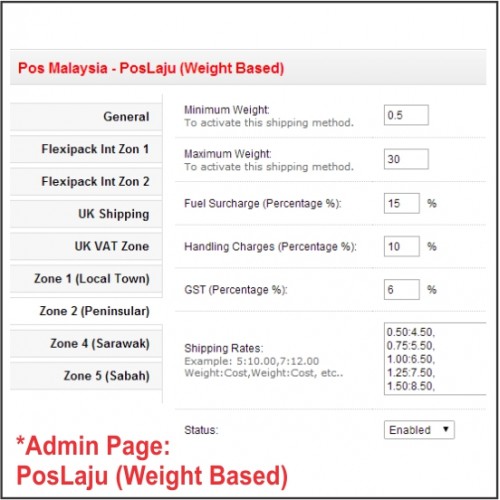
# admin can set range for "Minimum Weight" and "Maximum Weight" to activate this shipping method
# auto-hide the shipping method if weight is out of ranges "Minimum Weight" and "Maximum Weight"
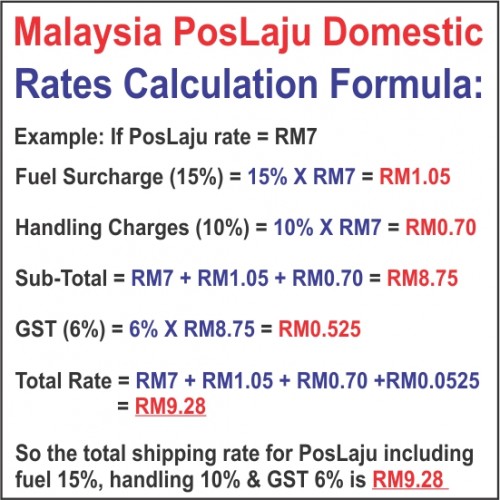
# admin can set percentage of fuel surcharge (15%), handling charges (10%) and GST (6%).
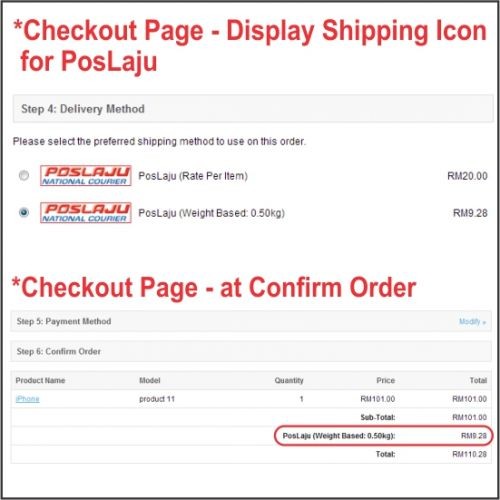
# auto-calculate total shipping plus additional charges in checkout page
# all the above features can configure per Geo Zones
- For PosLaju (weight based), you can compare my accurate calculation with the rates provided by this website (PosLaju Agent) http://www.ikobana.com/files/rates.pdf
# Additional features:
- Available with Geo Zones, you just only need to create Geo Zones first.
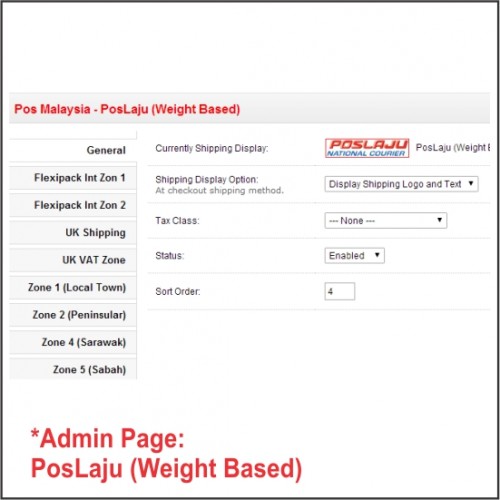
- Admin can set option to display shipping icon logo at checkout page
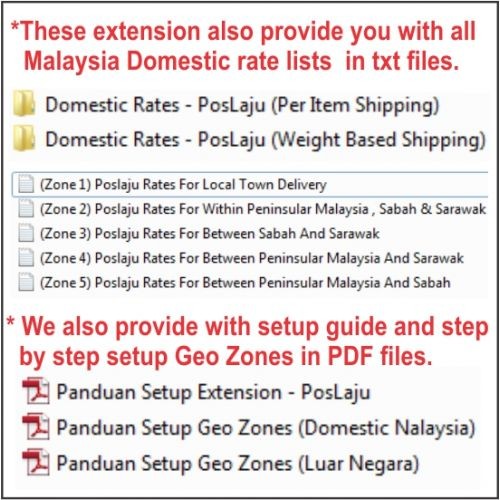
4) Installation guides with screenshot also provided, but available for BAHASA MELAYU only.
- Panduan Setup - PosLaju / Panduan Setup Geo Zones
5) Domestic shipping rate also provided :-
- PosLaju - Prepaid Box or Prepaid Envelope
- PosLaju - Domestic Rates For Zone 1 to Zone 5
# Live Demo:
customer demo login/pass: afendio@gmail.com / demo
admin demo login/pass: demo / demo
Demo for Opencart 2.x:
Demo Store: CLICK HERE
Demo Admin: CLICK HERE
- including support install service
- to get free support, please provide me with Order ID, opencart web admin, and FTP access
# Latest Update: Compatible with Opencart v2.3.x
# This extension combine 3 modules:
1) Pos Malaysia - PosLaju (Flat Rate)
2) Pos Malaysia - PosLaju (Rate Per Item)
3) Pos Malaysia - PosLaju (Weight Based)
Supported OpenCart Versions
======================
* v1.5.3.x to v1.5.6.x / v2.0.x / 2.1.x / 2.2.x / 2.3.x
* 100% tested working on Default theme
* 100% new files, this extension will NOT replace any core files
* Available with default (English) and Malay language
* for opencart 1.5.x, u need install VQMOD first before using this module
* for opencart 2.x.x, easy installation using extension installer (OCMOD version)
* VQMOD version will be discontinue for opencart 2.x and above
# Description:
==========
1) Pos Malaysia - PosLaju (Flat Rate) :
- This method is suitable for you who do not want to use product weight & product quantity as your shipping rates, just depends on client geo zone address only
- Example: shipping rate for client from Sabah/Sarawak is RM30 flat rate, client from Peninsular RM20 flat rate, and client from Singapore RM50 flat rate.
2) Pos Malaysia - PosLaju (Rate Per Item) :
- This method is suitable for you who do not want to use product weight as your shipping rates. just depends on product quantity & client geo zone address
- Example: shipping rate for client from Sabah/Sarawak is RM20 per item, client from Peninsular RM10 per item, and client from Singapore RM30 per item.
3) Pos Malaysia - PosLaju (Weight Based) :
- Similar to opencart default extension "Weight Based Shipping", but with additional features such as:
# admin can set range for "Minimum Weight" and "Maximum Weight" to activate this shipping method
# auto-hide the shipping method if weight is out of ranges "Minimum Weight" and "Maximum Weight"
# admin can set percentage of fuel surcharge (15%), handling charges (10%) and GST (6%).
# auto-calculate total shipping plus additional charges in checkout page
# all the above features can configure per Geo Zones
- For PosLaju (weight based), you can compare my accurate calculation with the rates provided by this website (PosLaju Agent) http://www.ikobana.com/files/rates.pdf
# Additional features:
- Available with Geo Zones, you just only need to create Geo Zones first.
- Admin can set option to display shipping icon logo at checkout page
4) Installation guides with screenshot also provided, but available for BAHASA MELAYU only.
- Panduan Setup - PosLaju / Panduan Setup Geo Zones
5) Domestic shipping rate also provided :-
- PosLaju - Prepaid Box or Prepaid Envelope
- PosLaju - Domestic Rates For Zone 1 to Zone 5
# Live Demo:
customer demo login/pass: afendio@gmail.com / demo
admin demo login/pass: demo / demo
Demo for Opencart 2.x:
Demo Store: CLICK HERE
Demo Admin: CLICK HERE
Price
$20.00
- Developed by OpenCart Community
- 12 Months Free Support
- Documentation Included
Rating
Compatibility
1.5.3, 1.5.3.1, 1.5.4, 1.5.4.1, 1.5.5, 1.5.5.1, 1.5.6, 1.5.6.1, 1.5.6.2, 1.5.6.3, 1.5.6.4, 2.0.0.0, 2.0.1.0, 2.0.1.1, 2.0.2.0, 2.0.3.1, 2.1.0.1, 2.1.0.2, 2.2.0.0, 2.3.0.0, 2.3.0.1, 2.3.0.2
Last Update
18 Mar 2018
Created
5 Jan 2014
29 Sales
10 Comments

Login and write down your comment.
Login my OpenCart Account