Admin Quick Search
Quick Search for OpenCart Admin Dashboard
Find any order, customer, product, or category in seconds — directly from your OpenCart admin panel. No more clicking through pages of data. Just type and get instant results.
Compatible with OpenCart 1.5x, 2.x, 3.x, and 4.x
▸ Try the Live Demo
The Problem
OpenCart's default admin has no unified search. Finding a specific order means navigating to the orders page, setting filters, waiting for results. Looking up a customer means doing the same in another section. Multiply that across dozens of daily lookups and you're losing real time every day.
How Quick Search Solves It
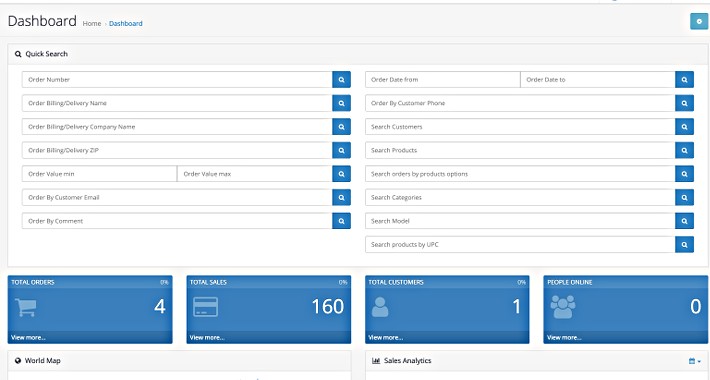
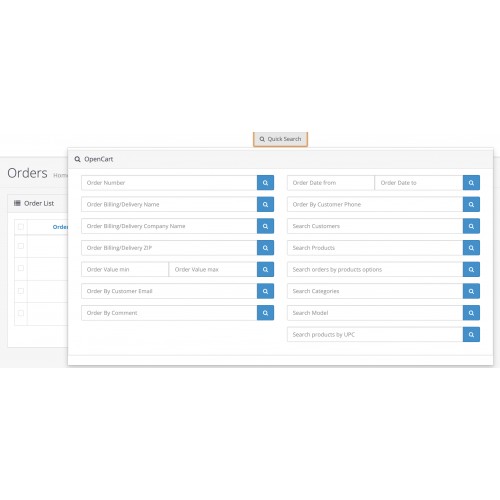
This extension adds a fast, centralized search block to your admin dashboard — and optionally a pop-up search accessible from every admin page. One search box, instant results across orders, customers, products, and categories.
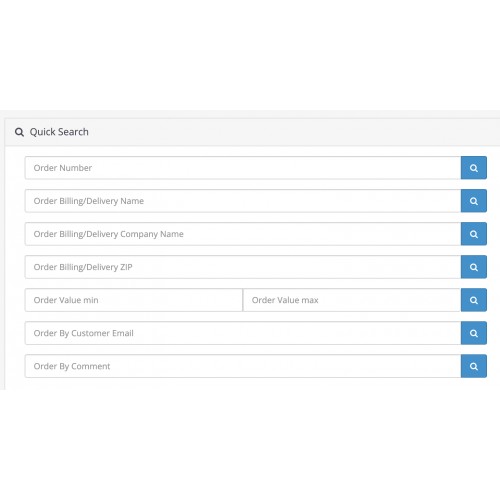
Search orders by: order number, billing/delivery name, company name, ZIP code, order value range, date range, customer email, customer phone, comment, product name, product model, and order options.
Search customers by: name.
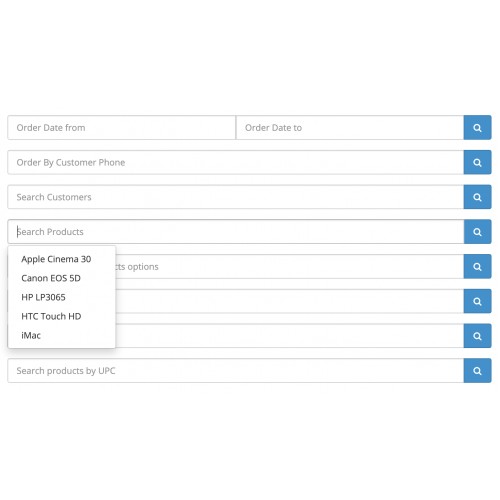
Search products by: name, model, and UPC code.
Search categories by: name.
What's New in v3.3
Installation
OpenCart 4.x:
OpenCart 3.x:
OpenCart 2.x:
Option 1 — Automatic:
Option 2 — Manual:
OpenCart 1.5x:
Requires vQmod. Copy the XML file to your vQmod xml folder. To disable, rename the file to .xml~ and contact support.

You may also be interested in:
Find any order, customer, product, or category in seconds — directly from your OpenCart admin panel. No more clicking through pages of data. Just type and get instant results.
Compatible with OpenCart 1.5x, 2.x, 3.x, and 4.x
▸ Try the Live Demo
The Problem
OpenCart's default admin has no unified search. Finding a specific order means navigating to the orders page, setting filters, waiting for results. Looking up a customer means doing the same in another section. Multiply that across dozens of daily lookups and you're losing real time every day.
How Quick Search Solves It
This extension adds a fast, centralized search block to your admin dashboard — and optionally a pop-up search accessible from every admin page. One search box, instant results across orders, customers, products, and categories.
Search orders by: order number, billing/delivery name, company name, ZIP code, order value range, date range, customer email, customer phone, comment, product name, product model, and order options.
Search customers by: name.
Search products by: name, model, and UPC code.
Search categories by: name.
What's New in v3.3
✔ Compact, redesigned interface
✔ Pop-up search available on every admin page (not just the dashboard)
✔ Toggle dashboard search and pop-up search independently
Installation
OpenCart 4.x:
- Upload & install adminquicksearch.ocmod.zip via Admin → Extensions → Installer
- Go to Admin → Extensions → Dashboard and install Admin Quick Search
- Click Edit to open the control panel, activate the module, and configure settings
OpenCart 3.x:
- Upload QuickSearch.ocmod via Admin → Extensions → Installer
- Go to Admin → Extensions → Modifications and click Refresh
- Go to Admin → Extensions → Extensions, select Dashboard from the dropdown
- Install Quick Search, then go to Edit and activate it
OpenCart 2.x:
Option 1 — Automatic:
- Upload quicksearch_opencart2x.ocmod.zip via Admin → Extensions → Installer
- Refresh Modifications, then install and activate from the Dashboard extensions list
Option 2 — Manual:
- Extract manual_installation.zip and copy contents to your shop's root folder
- Refresh Modifications, then install and activate from the Dashboard extensions list
OpenCart 1.5x:
Requires vQmod. Copy the XML file to your vQmod xml folder. To disable, rename the file to .xml~ and contact support.
You may also be interested in:
Admin filters pack
Simple admin manufacturers filter
Simple admin categories filter
Simple admin products by category filter
Simple admin infopages filter
Simple admin attributes filter
Simple admin options filter
GeoCurrency extension
Categories speedup extension
Admin Disabled Products Marker
Admin Disabled Categories Marker
Admin Quick Search
SEO Rich Snippet Reviews Microdata for Product page
SEO Rich Snippet Microdata for Product Page [FULL PACK]
SEO Canonical Pagination links
Customer Country Currency Switcher
Admin Products list Reviews
View Customer Orders extension
Clear Cart button extension
Admin manufacturer products
Admin products by location filter
Admin Save & Continue button for Products
Admin Products Apply button
What customers say about Admin Quick Search

Great and fast suport. Developer was very friendly and helped me. So if you have some troubles developer will definitely resolve it.
~saturnas5
~saturnas5
I cant understand why this does not have over 1000 sales yet, it`s absolutely brilliant !!
~The World Online
~The World Online
this extension works great and the developer is very nice and gives great support
~prepaidisraelisim
~prepaidisraelisim
Price
$30.00
- Developed by OpenCart Community
- 12 Months Free Support
- Documentation Included
Rating
Compatibility
4.x.x.x, 4.0.0.0, 4.0.1.0, 4.0.1.1, 4.0.2.0, 4.0.2.1, 4.0.2.2, 4.0.2.3, 4.1.0.0, 4.1.0.1, 4.1.0.2, 4.1.0.3, 3.0.0.0, 3.0.1.0, 3.0.1.1, 3.0.1.2, 3.0.1.3, 3.0.2.0, 3.0.3.0, 3.0.3.1, 3.0.3.2, 3.0.3.3, 3.0.3.5, 3.0.3.6, 3.0.3.7, 3.0.3.8, 3.x.x.x, 3.0.3.9, 3.0.4.0, 3.0.4.1, 3.0.5.0, 1.5.0, 1.5.0.1, 1.5.0.2, 1.5.0.3, 1.5.0.4, 1.5.0.5, 1.5.1, 1.5.1.1, 1.5.1.2, 1.5.1.3, 1.5.2, 1.5.2.1, 1.5.3, 1.5.3.1, 1.5.4, 1.5.4.1, 1.5.5, 1.5.5.1, 1.5.6, 1.5.6.1, 1.5.6.2, 1.5.6.3, 1.5.6.4, 2.0.0.0, 2.0.1.0, 2.0.1.1, 2.0.2.0, 2.0.3.1, 2.1.0.1, 2.1.0.2, 2.2.0.0, 2.3.0.0, 2.3.0.1, 2.3.0.2
Last Update
7 Jun 2026
Created
3 Sep 2014
141 Sales
61 Comments

Login and write down your comment.
Login my OpenCart Account