Sound Notification for new Orders (1.4.x,1.5.x,2.x.x,3.x.x)
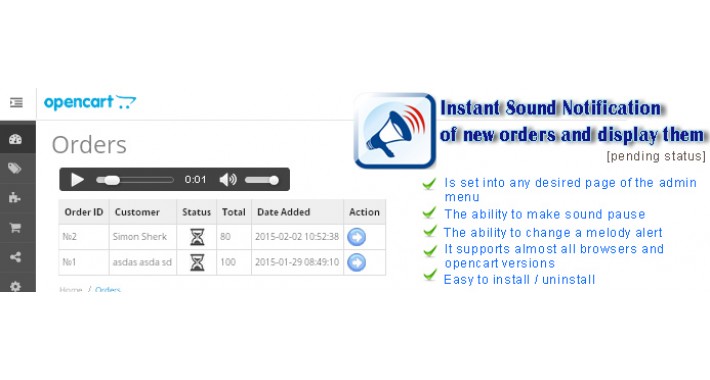
Instant Sound Notification of new orders and display them (pending status).
- Check for new orders every several seconds, and display them.
- Play Sound on new waiting orders.
This module allows you to instantly alert sound melody administrator / operator of the online store of the new order has arrived, displaying a list of new orders requiring processing.
It is very important when email- and sms- alerts are delayed, and the administrator / operator of an online store requires fast processing the order came (especially for shops "food delivery").
After installing, it is not necessary to monitor and verify each time the orders lists of the online store, update and monitor e-mail or expected sms.
Just leave open a browser connected to the module page, and it will immediately alert you (with melody) when will be a new order.
Client: Ordering -> Module: Instant notification sound -> Operator: Admission Order
After you change the status of the new order (from pending status) alert for this order will stop and the list of new orders will no longer be displayed.
You can also make a sound to pause, but do not forget to switch it back;)
FEATURES:
Is set into any desired page of the admin menu
The ability to make sound pause
The ability to change a melody alert
It supports almost all browsers and opencart versions
Easy to install / uninstall
DEMONSTRATION:
https://opencart-demo.web2step.ru/admin (username: demo, password: demo).
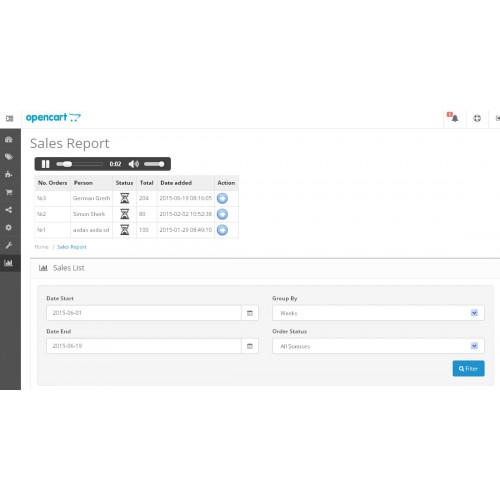
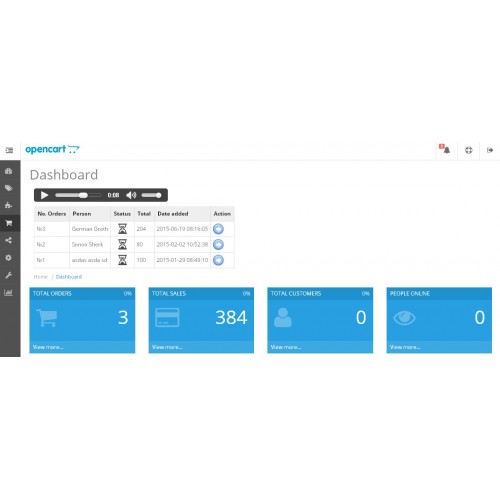
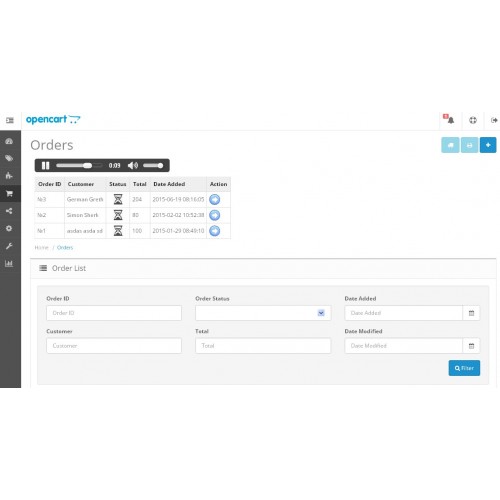
See any page: [Home]->Dashboard, [Reports]->Sales->Orders, [Box]->Orders and wait two seconds.
HOW TO INSTALL
It so easy:
1) EXTRACT ARCHIVE AND COPY TO BASE DIR OF OPENCART (folder “SoundOrderNotifier” to ADMIN/MODEL/ )
2) INSERT TEXT “<?php require('model/SoundOrderNotifier/show.php'); ?>” in needed template files to enable sound notification.
EXAMPLES FOR DIFFERENT PAGES OF THE ADMIN MENU AND OPENCART VERSIONS:
=======================================================
FOR 1.x VERSIONS
INSERT LINE “<?php require('model/SoundOrderNotifier/show.php'); ?>” ABOVE TEXT:
“<div class="box">
<div class="heading">”.
FOR PAGE [ADMIN MENU|HOME] IN admin/view/template/common/home.tpl
-----------------------------------------------------------------------------------------------------------
<?php require('model/SoundOrderNotifier/show.php'); ?>
<div class="box">
<div class="heading">
FOR PAGE [BOX]>ORDERS: in template/sale/order_list.tpl
<?php require('model/SoundOrderNotifier/show.php'); ?>
<div class="box">
<div class="heading">
FOR PAGE [REPORTS]>>SALES>>ORDERS: in admin/view/template/report/sale_order.tpl
-------------------------------------------------------------------------------------------------------------------------
<?php require('model/SoundOrderNotifier/show.php'); ?>
<div class="box">
<div class="heading">
====================================================
FOR 2.x VERSIONS
INSERT LINE “<?php require('model/SoundOrderNotifier/show.php'); ?>” BETWEEN TEXT:
“<h1><?php echo $heading_title; ?></h1>
…
<ul class="breadcrumb">“.
---
FOR PAGE [COMMON|DASHBOARD]>>ORDERS: in template/common/dashboard.tpl
------------------------------------------------------------------------------------------------------------
<h1><?php echo $heading_title; ?></h1>
<?php require('model/SoundOrderNotifier/show.php'); ?>
<ul class="breadcrumb">
FOR PAGE [BOX]>>ORDERS: in template/sale/order_list.tpl
----------------------------------------------------------------------------------------
<h1><?php echo $heading_title; ?></h1>
<?php require('model/SoundOrderNotifier/show.php'); ?>
<ul class="breadcrumb">
FOR PAGE [REPORTS]>>SALES>>ORDERS: in admin/view/template/report/sale_order.tpl
------------------------------------------------------------------------------------------------------------------------
<h1><?php echo $heading_title; ?></h1>
<?php require('model/SoundOrderNotifier/show.php'); ?>
<ul class="breadcrumb">
====================================================
FOR 3.x VERSIONS
FOR EXAMPLE - PAGE [DASHBOARD]
1) GOTO: /admin/view/template/common/dashboard.twig and insert one line between:
2) GOTO: /admin/controller/common/dashboard.php and insert two places:
a) add function (in head file):
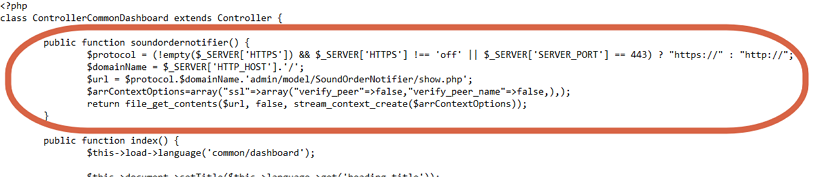
Between (INSERT PINK FUNCTION):
b) add output (in bottom file):
INSERT PINK LINE IN THIS:

---
You can enable notification similar to any other page of the “admin menu” if you need it.
- Check for new orders every several seconds, and display them.
- Play Sound on new waiting orders.
This module allows you to instantly alert sound melody administrator / operator of the online store of the new order has arrived, displaying a list of new orders requiring processing.
It is very important when email- and sms- alerts are delayed, and the administrator / operator of an online store requires fast processing the order came (especially for shops "food delivery").
After installing, it is not necessary to monitor and verify each time the orders lists of the online store, update and monitor e-mail or expected sms.
Just leave open a browser connected to the module page, and it will immediately alert you (with melody) when will be a new order.
Client: Ordering -> Module: Instant notification sound -> Operator: Admission Order
After you change the status of the new order (from pending status) alert for this order will stop and the list of new orders will no longer be displayed.
You can also make a sound to pause, but do not forget to switch it back;)
FEATURES:
Is set into any desired page of the admin menu
The ability to make sound pause
The ability to change a melody alert
It supports almost all browsers and opencart versions
Easy to install / uninstall
DEMONSTRATION:
https://opencart-demo.web2step.ru/admin (username: demo, password: demo).
See any page: [Home]->Dashboard, [Reports]->Sales->Orders, [Box]->Orders and wait two seconds.
HOW TO INSTALL
It so easy:
1) EXTRACT ARCHIVE AND COPY TO BASE DIR OF OPENCART (folder “SoundOrderNotifier” to ADMIN/MODEL/ )
2) INSERT TEXT “<?php require('model/SoundOrderNotifier/show.php'); ?>” in needed template files to enable sound notification.
EXAMPLES FOR DIFFERENT PAGES OF THE ADMIN MENU AND OPENCART VERSIONS:
=======================================================
FOR 1.x VERSIONS
INSERT LINE “<?php require('model/SoundOrderNotifier/show.php'); ?>” ABOVE TEXT:
“<div class="box">
<div class="heading">”.
FOR PAGE [ADMIN MENU|HOME] IN admin/view/template/common/home.tpl
-----------------------------------------------------------------------------------------------------------
<?php require('model/SoundOrderNotifier/show.php'); ?>
<div class="box">
<div class="heading">
FOR PAGE [BOX]>ORDERS: in template/sale/order_list.tpl
<?php require('model/SoundOrderNotifier/show.php'); ?>
<div class="box">
<div class="heading">
FOR PAGE [REPORTS]>>SALES>>ORDERS: in admin/view/template/report/sale_order.tpl
-------------------------------------------------------------------------------------------------------------------------
<?php require('model/SoundOrderNotifier/show.php'); ?>
<div class="box">
<div class="heading">
====================================================
FOR 2.x VERSIONS
INSERT LINE “<?php require('model/SoundOrderNotifier/show.php'); ?>” BETWEEN TEXT:
“<h1><?php echo $heading_title; ?></h1>
…
<ul class="breadcrumb">“.
---
FOR PAGE [COMMON|DASHBOARD]>>ORDERS: in template/common/dashboard.tpl
------------------------------------------------------------------------------------------------------------
<h1><?php echo $heading_title; ?></h1>
<?php require('model/SoundOrderNotifier/show.php'); ?>
<ul class="breadcrumb">
FOR PAGE [BOX]>>ORDERS: in template/sale/order_list.tpl
----------------------------------------------------------------------------------------
<h1><?php echo $heading_title; ?></h1>
<?php require('model/SoundOrderNotifier/show.php'); ?>
<ul class="breadcrumb">
FOR PAGE [REPORTS]>>SALES>>ORDERS: in admin/view/template/report/sale_order.tpl
------------------------------------------------------------------------------------------------------------------------
<h1><?php echo $heading_title; ?></h1>
<?php require('model/SoundOrderNotifier/show.php'); ?>
<ul class="breadcrumb">
====================================================
FOR 3.x VERSIONS
FOR EXAMPLE - PAGE [DASHBOARD]
1) GOTO: /admin/view/template/common/dashboard.twig and insert one line between:
{{ header }}{{ column_left }}

<div id="content">

{{ soundordernotifier }}

  <div class="page-header">
2) GOTO: /admin/controller/common/dashboard.php and insert two places:
a) add function (in head file):
Between (INSERT PINK FUNCTION):
class ControllerCommonDashboard extends Controller {

    public function soundordernotifier() {

    		$protocol = (!empty($_SERVER['HTTPS']) && $_SERVER['HTTPS'] !== 'off' || $_SERVER['SERVER_PORT'] == 443) ? "https://" : "http://";

   	        $domainName = $_SERVER['HTTP_HOST'].'/';

		$url = $protocol.$domainName.'admin/model/SoundOrderNotifier/show.php';

		$arrContextOptions=array("ssl"=>array("verify_peer"=>false,"verify_peer_name"=>false,),);

		return file_get_contents($url, false, stream_context_create($arrContextOptions));

 	}

	public function index() {
b) add output (in bottom file):
INSERT PINK LINE IN THIS:
	          $data['soundordernotifier'] = $this->soundordernotifier();

		$this->response->setOutput($this->load->view('common/dashboard', $data));

	}
---
You can enable notification similar to any other page of the “admin menu” if you need it.
Price
$20.00
- Developed by OpenCart Community
- 12 Months Free Support
- Documentation Included
Rating
Compatibility
1.4.7, 1.4.8, 1.4.8b, 1.4.9, 1.4.9.1, 1.4.9.2, 1.4.9.3, 1.4.9.4, 1.4.9.5, 1.5.0, 1.5.0.1, 1.5.0.2, 1.5.0.3, 1.5.0.4, 1.5.0.5, 1.5.1, 1.5.1.1, 1.4.9.6, 1.5.1.2, 1.5.1.3, 1.5.2, 1.5.2.1, 1.5.3, 1.5.3.1, 1.5.4, 1.5.4.1, 1.5.5, 1.5.5.1, 1.5.6, 1.5.6.1, 1.5.6.2, 1.5.6.3, 1.5.6.4, 2.0.0.0, 2.0.1.0, 2.0.1.1, 2.0.2.0, 2.0.3.1, 2.1.0.1, 2.1.0.2, 2.2.0.0, 2.3.0.0, 2.3.0.1, 2.3.0.2, 3.0.0.0, 3.0.1.0, 3.0.1.1, 3.0.1.2, 3.0.1.3, 3.0.2.0, 4.x.x.x, 3.0.3.0, 3.0.3.1, 3.0.3.2, 3.0.3.3, 3.0.3.5, 3.0.3.6, 3.0.3.7, 3.0.3.8, 4.0.0.0, 4.0.1.0, 4.0.1.1, 3.x.x.x, 4.0.2.0, 4.0.2.1
Last Update
28 May 2023
Created
19 Jun 2015
66 Sales
40 Comments

Login and write down your comment.
Login my OpenCart Account