Advanced Admin Notifications
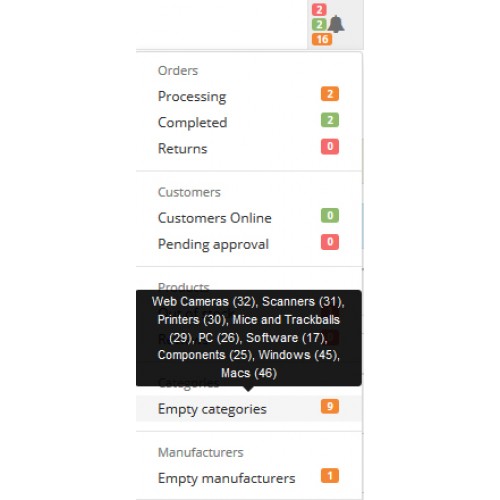
Advanced Admin Notifications
Description:
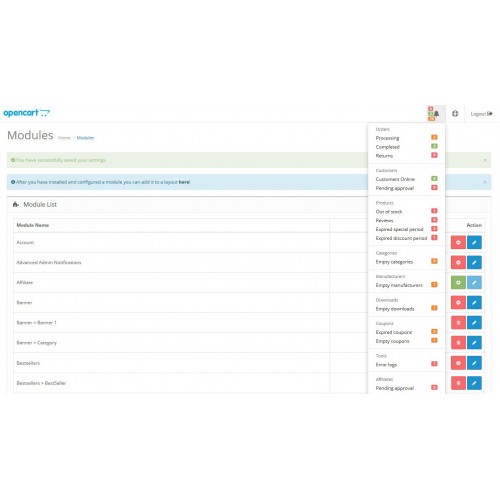
✔ This extension extends the admin notifications menu to show and notify about more eight hot aspects among the store.
✔ The new alerts will affect products, categories, manufacturers, downloads, coupons and error logs.
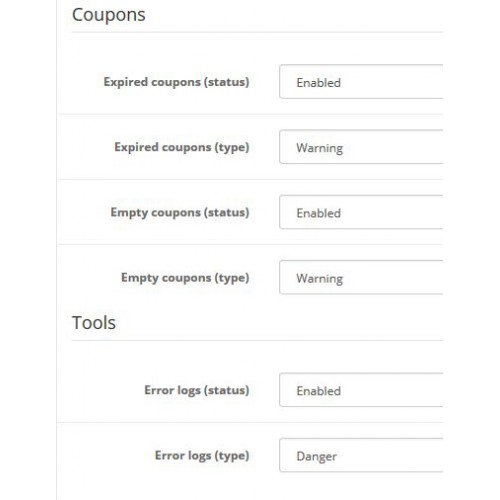
✔ Admins will have the ability to enable/disable the new menu items according to their needs, In addition to classify each menu to appear as danger or warning in the alert boxes.
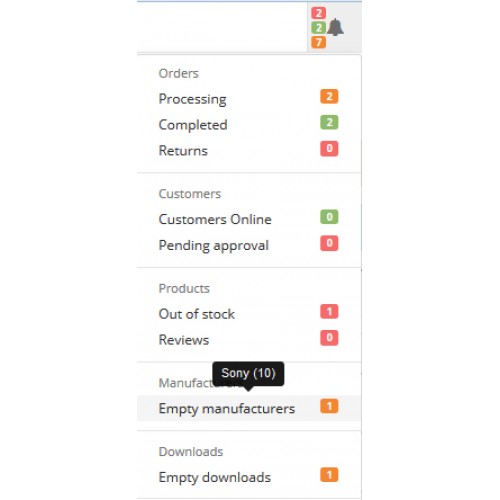
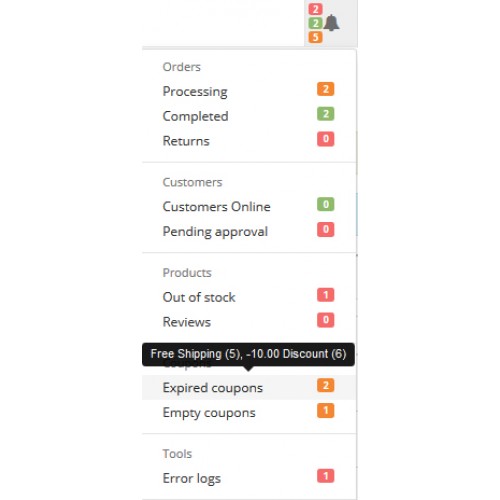
✔ The root menu item will summarize and count all danger, success and warning alerts to the admin.
How does it work:
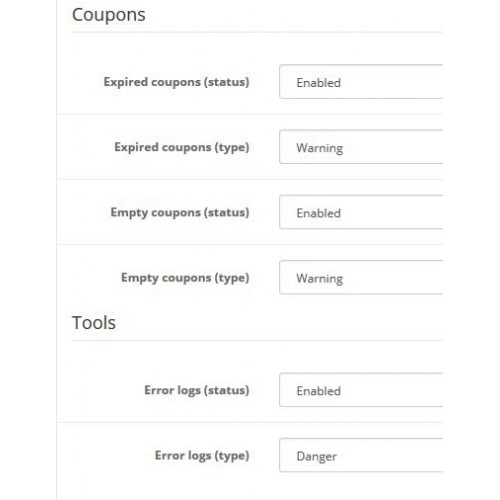
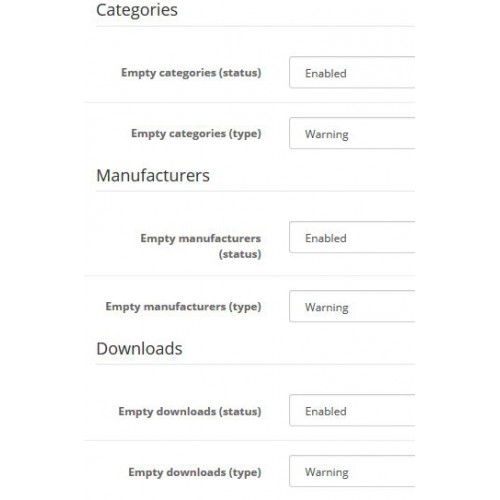
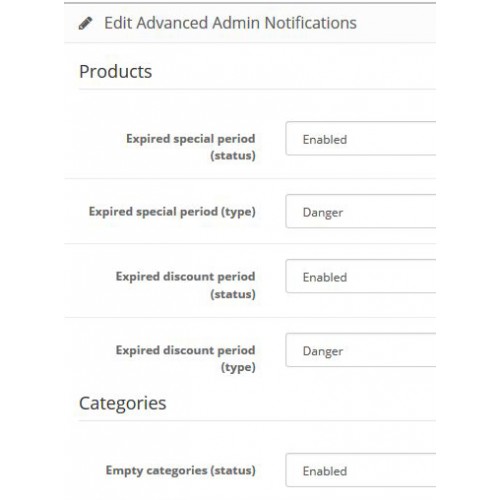
✔ Edit module page will enable you to turn on the alert method you want to be displayed in the admin notification menu, with the ability to change the appearance from danger to warning and vise versa.
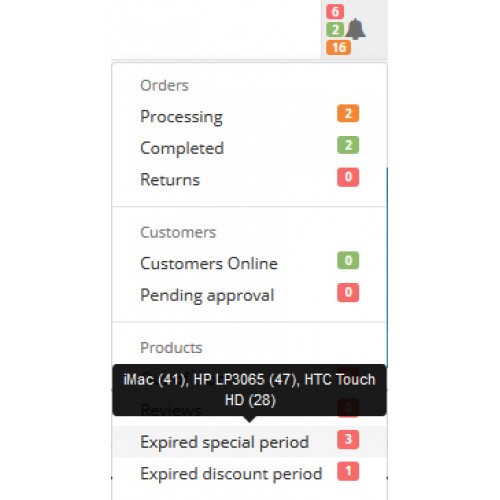
✔ Products (Expired special period): will count and notify about all products that have at least one expired end date for its special period, A tool tip over this menu item will display all those products among with their IDs.
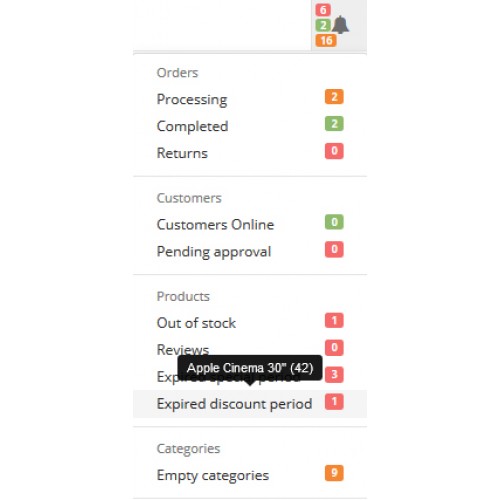
✔ Products (Expired discount period): will count and notify about all products that have at least one expired end date for its discount period, A tool tip over this menu item will display all those products among with their IDs.
✔ Categories (Empty categories): will count and notify about all categories that have no products assigned to them, A tool tip over this menu item will display all those categories among with their IDs.
✔ Manufacturers (Empty manufacturers): will count and notify about all manufacturers that have no products assigned to them, A tool tip over this menu item will display all those manufacturers among with their IDs.
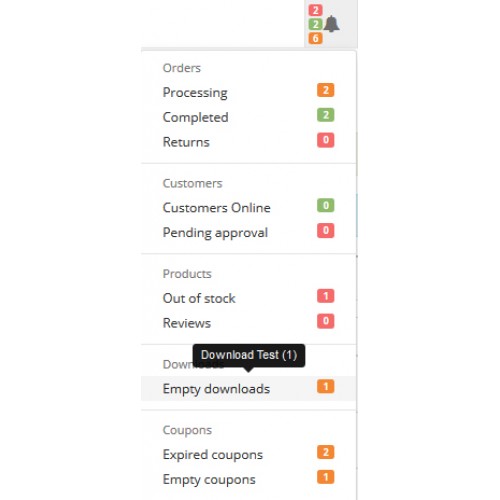
✔ Downloads (Empty downloads): will count and notify about all downloads that have no products assigned to them, A tool tip over this menu item will display all those downloads among with their IDs.
✔ Coupons (Expired coupons): will count and notify about all coupons that have an expired end date for its period, A tool tip over this menu item will display all those coupons among with their IDs.
✔ Coupons (Empty coupons): will count and notify about all coupons that are not assigned to any products or categories, A tool tip over this menu item will display all those coupons among with their IDs.
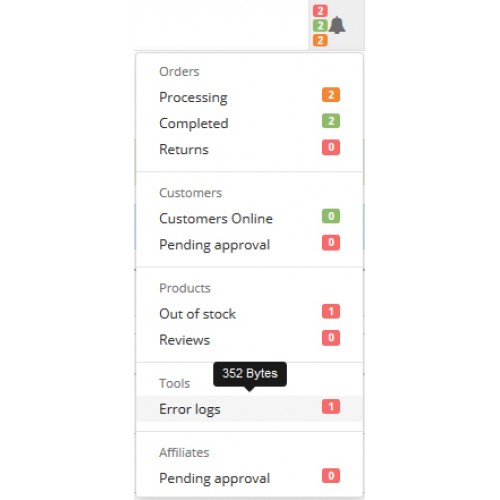
✔ Tools (Error logs): will determine and notify if there are an errors in the error log file, It will use a flag of 0,1 to represent the need to check the error log page, The menu item will redirect you to the error logs page so you can check the errors, However, A tool tip over this menu item will display the error file size in bytes.
Features:
✔ No core files overwritten.
✔ Plug and play extension.
✔ Eight in one extension.
✔ Can easily help you increase your sales by alerting you to update the needed values.
✔ keep you up to date with your campaigns.
✔ All notifications in one place.
✔ A cool tool tip to list all alerts results.
✔ Full admin control over the menu items.
✔ Save the time that you spend in searching the admin pages.
✔ Displayed in all admin pages header.
✔ Developed with best opencart practices.
✔ No coding skills required.
✔ Prevent your store from displaying categories or manufacturers with (0) products.
✔ Summarize a complicated queries in one number.
✔ Verify a complete relationships between the store areas.
✔ A quick reaction for the logged errors.
✔ Ability to classify the alerts between danger and warnings.
Requirements:
✔ Be sure that you have installed vQmod.
Notes:
✔ If the product has a special or discount periods with no end date, then it will not be counted.
✔ If the product has two or more expired periods, then it will be counted only once (to avoid duplicates).
✔ If the category has no assigned products, But has another child category, then it will not be counted.
✔ Error logs will represents only a flag to indicate that the file has data or not, If the file is not found, then you will get a (File not found) message in the tool tip.
✔ All queries are based on enabled products, categories, manufacturers, downloads and coupons (status = 1).
✔ For opencart version 2.0.0.0, this extension also solve the notifications menu style alignment bug.
✔ You will find an easy and direct installation guide attached with your download (with screenshots).
✔ The vQmod finds the syntax and replaces based on the default theme.
✔ This extension is a single domain license only, If you want to use it on more than one domain, you need to purchase additional licenses.
✔ Comments, ideas and suggestions are of course welcome in the comments section below but be aware that support questions will not be answered here, so please contact the email in the installation guide file or press on the support button above.
✔ Your rating is highly appreciated.
Description:
✔ This extension extends the admin notifications menu to show and notify about more eight hot aspects among the store.
✔ The new alerts will affect products, categories, manufacturers, downloads, coupons and error logs.
✔ Admins will have the ability to enable/disable the new menu items according to their needs, In addition to classify each menu to appear as danger or warning in the alert boxes.
✔ The root menu item will summarize and count all danger, success and warning alerts to the admin.
How does it work:
✔ Edit module page will enable you to turn on the alert method you want to be displayed in the admin notification menu, with the ability to change the appearance from danger to warning and vise versa.
✔ Products (Expired special period): will count and notify about all products that have at least one expired end date for its special period, A tool tip over this menu item will display all those products among with their IDs.
✔ Products (Expired discount period): will count and notify about all products that have at least one expired end date for its discount period, A tool tip over this menu item will display all those products among with their IDs.
✔ Categories (Empty categories): will count and notify about all categories that have no products assigned to them, A tool tip over this menu item will display all those categories among with their IDs.
✔ Manufacturers (Empty manufacturers): will count and notify about all manufacturers that have no products assigned to them, A tool tip over this menu item will display all those manufacturers among with their IDs.
✔ Downloads (Empty downloads): will count and notify about all downloads that have no products assigned to them, A tool tip over this menu item will display all those downloads among with their IDs.
✔ Coupons (Expired coupons): will count and notify about all coupons that have an expired end date for its period, A tool tip over this menu item will display all those coupons among with their IDs.
✔ Coupons (Empty coupons): will count and notify about all coupons that are not assigned to any products or categories, A tool tip over this menu item will display all those coupons among with their IDs.
✔ Tools (Error logs): will determine and notify if there are an errors in the error log file, It will use a flag of 0,1 to represent the need to check the error log page, The menu item will redirect you to the error logs page so you can check the errors, However, A tool tip over this menu item will display the error file size in bytes.
Features:
✔ No core files overwritten.
✔ Plug and play extension.
✔ Eight in one extension.
✔ Can easily help you increase your sales by alerting you to update the needed values.
✔ keep you up to date with your campaigns.
✔ All notifications in one place.
✔ A cool tool tip to list all alerts results.
✔ Full admin control over the menu items.
✔ Save the time that you spend in searching the admin pages.
✔ Displayed in all admin pages header.
✔ Developed with best opencart practices.
✔ No coding skills required.
✔ Prevent your store from displaying categories or manufacturers with (0) products.
✔ Summarize a complicated queries in one number.
✔ Verify a complete relationships between the store areas.
✔ A quick reaction for the logged errors.
✔ Ability to classify the alerts between danger and warnings.
Requirements:
✔ Be sure that you have installed vQmod.
Notes:
✔ If the product has a special or discount periods with no end date, then it will not be counted.
✔ If the product has two or more expired periods, then it will be counted only once (to avoid duplicates).
✔ If the category has no assigned products, But has another child category, then it will not be counted.
✔ Error logs will represents only a flag to indicate that the file has data or not, If the file is not found, then you will get a (File not found) message in the tool tip.
✔ All queries are based on enabled products, categories, manufacturers, downloads and coupons (status = 1).
✔ For opencart version 2.0.0.0, this extension also solve the notifications menu style alignment bug.
✔ You will find an easy and direct installation guide attached with your download (with screenshots).
✔ The vQmod finds the syntax and replaces based on the default theme.
✔ This extension is a single domain license only, If you want to use it on more than one domain, you need to purchase additional licenses.
✔ Comments, ideas and suggestions are of course welcome in the comments section below but be aware that support questions will not be answered here, so please contact the email in the installation guide file or press on the support button above.
✔ Your rating is highly appreciated.
Price
$20.00
- Developed by OpenCart Community
- 12 Months Free Support
- Documentation Included
Rating
Compatibility
2.0.1.0, 2.0.1.1, 2.0.2.0, 2.0.3.1, 2.1.0.1, 2.1.0.2, 2.2.0.0, 2.3.0.0, 2.3.0.1, 2.3.0.2
Last Update
28 Dec 2017
Created
17 Oct 2015
3 Sales
3 Comments

Login and write down your comment.
Login my OpenCart Account