Opencart Advanced Search


Opencart Advanced Search : This extension is useful in making deep research. The user will search for the product with the simplest parameter they want
The advanced search employs both simple and complex methods of searching. In basic searching, the research is centered on the product's name.
Whereas in complicated searching, the result is based on the criteria that you specify. The top outcomes, popular search results, and all search results will be displayed.

Usecase
When any store has more than a hundred SKUs then it is quite uneasy to look for that particular product from the search text bar.
Here the user has used the advanced search extension in the store backend functionality.
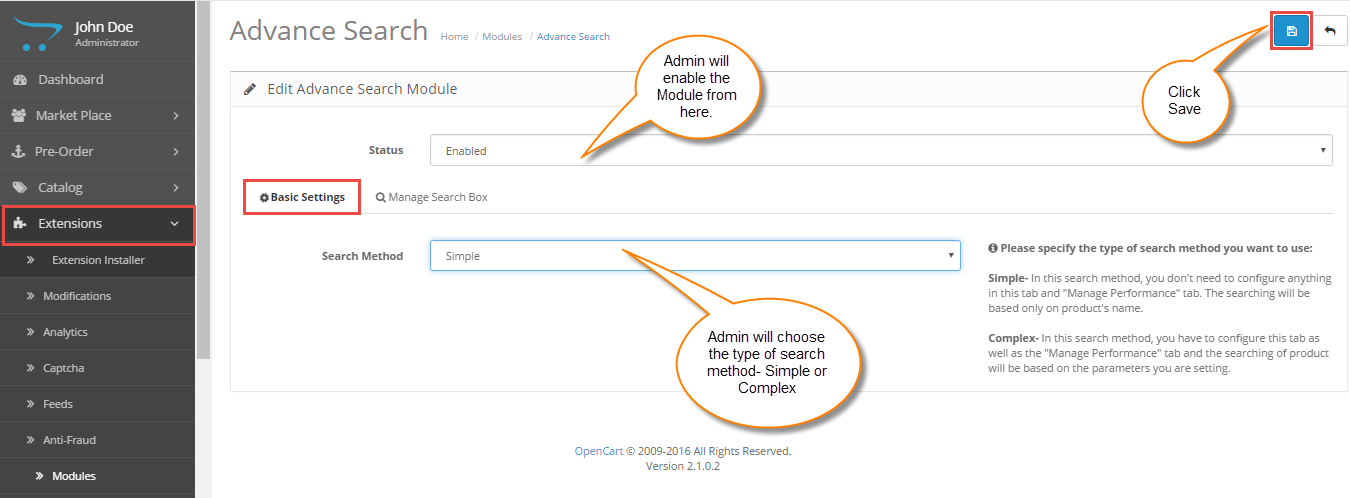
After this admin selects the search type. There are two types of searches accessible in advance search. The simple search strategy relies solely on the product name.
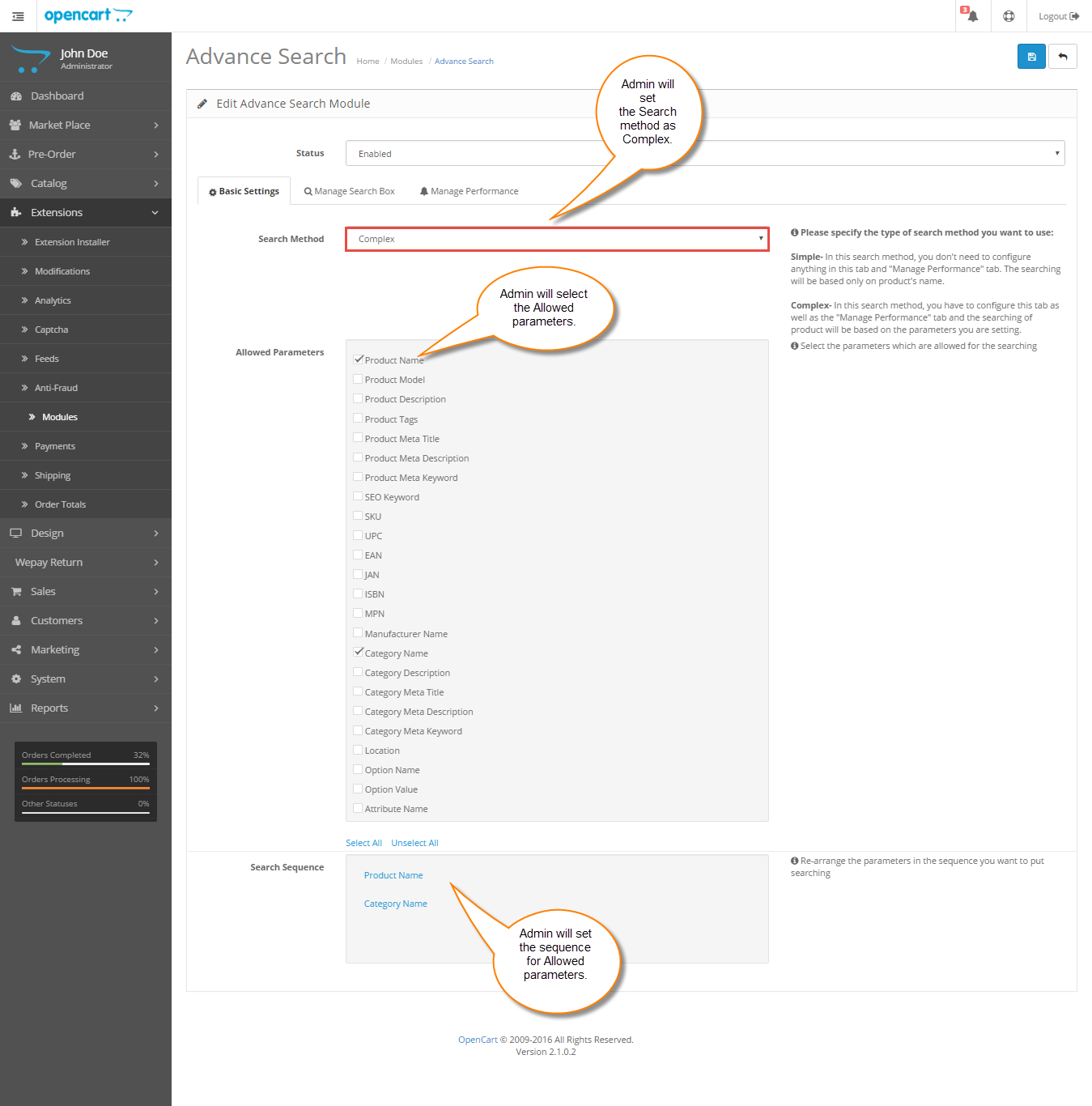
In a complex search, you can specify the basis and sequence on which the search algorithm will operate.
How the user will do a search?
Simple search
As the name suggests the simple search does not need any extra keywords to search.
Here the search is done on the basis of the product name.
Complex search
When the user sets the complex search, they set the few parameters upon which the search is processed.
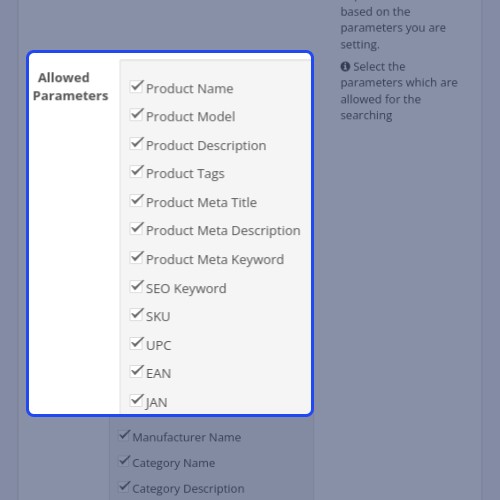
Based on the authorized choices, the administrator sets up a search at the complex. For example, description of product name, model tags, meta tags, and so on.
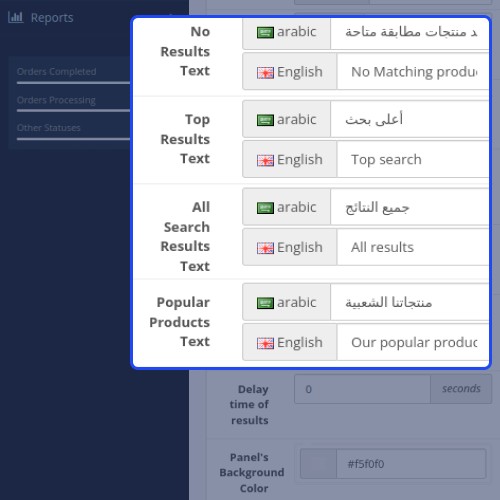
The administrator can choose the order in which the preferences are authorized. The admin can customize the design of the search box and other parameters based on the text that is visible during the search.



Opencart Advanced Search Features -
Workflow Video
Here we will discuss the workflow of the search box settings and how to manage the performance.
The user will need to arrange the approaches (Search from the start, Search in the middle, Missed Characters, etc.) to the relevant product search criteria (Product model, Product Name, Product Description, etc.).
The user can arrange the methods in the order in which they want to search.





Some Moments Of Appreciation



Support Policy
The advanced search employs both simple and complex methods of searching. In basic searching, the research is centered on the product's name.
Whereas in complicated searching, the result is based on the criteria that you specify. The top outcomes, popular search results, and all search results will be displayed.
Usecase
When any store has more than a hundred SKUs then it is quite uneasy to look for that particular product from the search text bar.
Here the user has used the advanced search extension in the store backend functionality.
After this admin selects the search type. There are two types of searches accessible in advance search. The simple search strategy relies solely on the product name.
In a complex search, you can specify the basis and sequence on which the search algorithm will operate.
How the user will do a search?
Simple search
As the name suggests the simple search does not need any extra keywords to search.
Here the search is done on the basis of the product name.
Complex search
When the user sets the complex search, they set the few parameters upon which the search is processed.
Based on the authorized choices, the administrator sets up a search at the complex. For example, description of product name, model tags, meta tags, and so on.
The administrator can choose the order in which the preferences are authorized. The admin can customize the design of the search box and other parameters based on the text that is visible during the search.
Opencart Advanced Search Features -
- Easy to use search box for Advanced Searching.
- Specify the type of search method to use- Simple or Complex.
- Show the price, images, and description of products in search results.
- Rearrange the parameters in the sequence you want to put for searching in a simple method.
- Rearrange the approaches in the sequence you want to put for searching in a complex method.
- Select the different available approaches(search from start, search in the middle, etc.) for the allowed parameters(Product name, Product Model, Product Description, etc.).
Workflow Video
Here we will discuss the workflow of the search box settings and how to manage the performance.
The user will need to arrange the approaches (Search from the start, Search in the middle, Missed Characters, etc.) to the relevant product search criteria (Product model, Product Name, Product Description, etc.).
The user can arrange the methods in the order in which they want to search.
Some Moments Of Appreciation
Support Policy
Price
$119.00
- Developed by OpenCart Partner
- 3 Months Free Support
- Documentation Included
Rating
Compatibility
3.0.0.0, 3.0.1.0, 3.0.1.1, 3.0.1.2, 3.0.1.3, 3.0.2.0, 3.0.3.0, 3.0.3.1, 3.0.3.2, 3.0.3.3, 3.0.3.5, 3.0.3.6, 3.0.3.7, 3.0.3.8, 3.0.3.9, 3.0.4.0, 3.0.4.1
Last Update
17 Jul 2025
Created
19 May 2016
16 Sales
9 Comments

Login and write down your comment.
Login my OpenCart Account