Delivery Date And Time Slot At Checkout

Title
Delivery Date And Time Slot At Checkout – OpenCart 2.x + 3.x + 4.x
Short Description
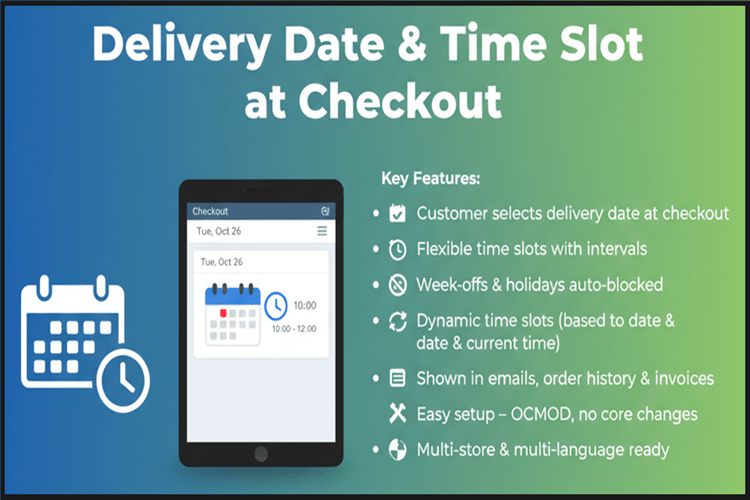
Allow customers to select their preferred delivery date and time slot directly at checkout using a smart date picker and dynamic time interval system.
Supports:
✔ Holidays
✔ Week-off days
✔ Custom delivery windows
✔ Time interval configuration
✔ Full frontend & backend integration
✔ Fully automated, lightweight, and compatible with all OpenCart themes.
Free Dedicated Support Included
We provide dedicated technical support to ensure smooth installation and usage of this module.
✔ Fast response time
✔ Installation guidance
✔ Bug fixes assistance
Email Support: opencarttools@gmail.com
WhatsApp Live Chat: Click Here
Live Demo
See the module in action before purchase.
Admin:
Admin > Extension > Module
Admin > Sales > Orders
Admin > Sales > Orders > Info
Admin > Sales > Orders > Invoice
Front:
Add To Cart & Checkout
Key Features
Delivery Selection at Checkout
✔ Delivery Date & Time selection at Checkout Step 4 (Shipping Method)
✔ Required Field Option (Customer must select before placing order)
✔ Smart Date Picker System
✔ Dynamic Time Slot Dropdown
Advanced Date Control
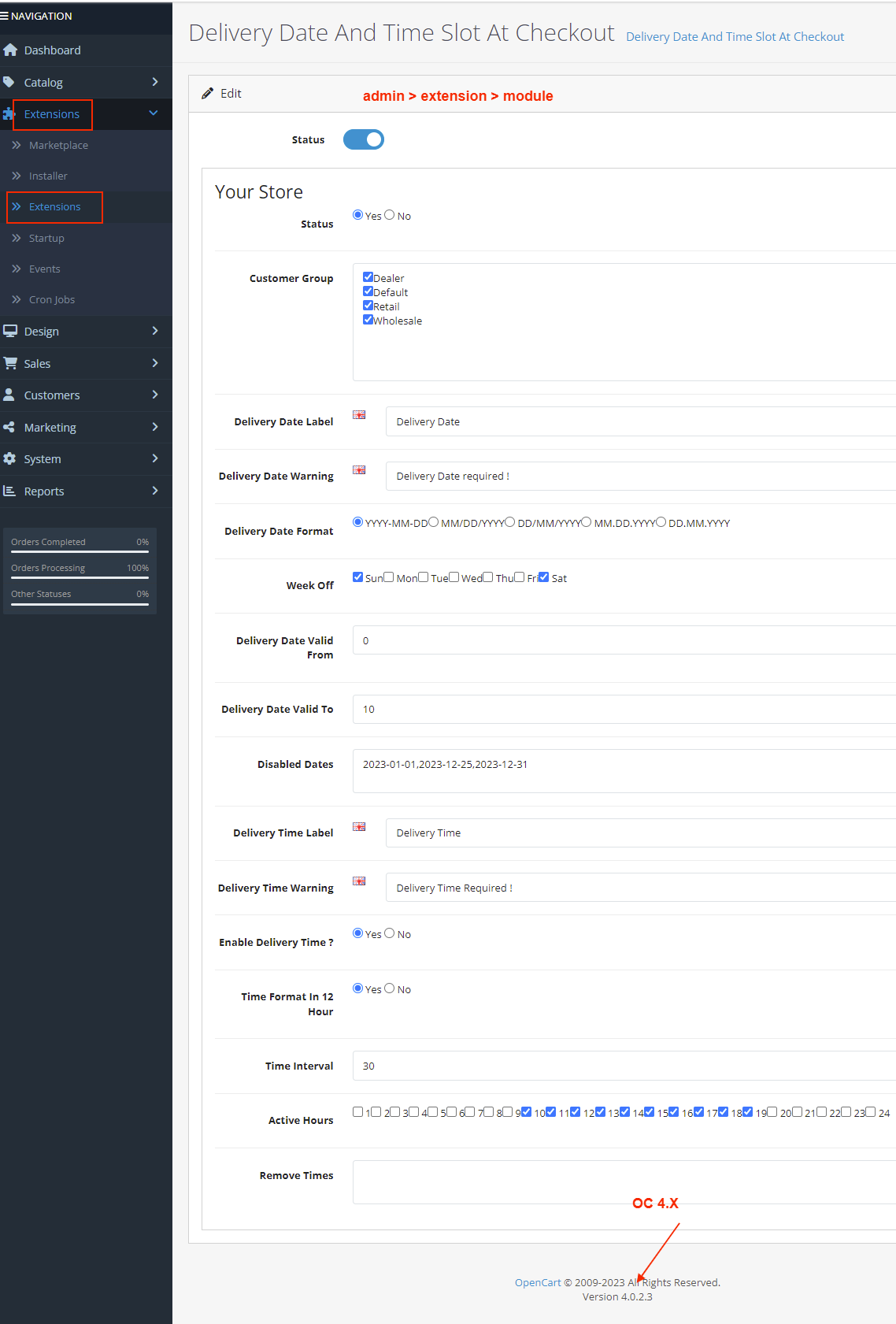
✔ Set available delivery days
✔ Define week-off days (e.g., Saturday, Sunday)
✔ Block past dates automatically
✔ Set valid delivery range using From / To logic
Example:
If set from 0 to 10
0 = Today
1 = Tomorrow
Up to next 10 days available
All other future dates blocked automatically
✔ Add custom holiday dates (comma separated)
✔ Prevent invalid & restricted date selection
Smart Time Slot System
✔ Enable / Disable delivery time option
✔ Define active delivery hours (e.g., 10 AM – 8 PM)
✔ Set time interval in minutes
Example:
Interval = 30 minutes
Slots generated automatically:
10:00 – 10:30
10:30 – 11:00
11:00 – 11:30
✔ Time slots load based on selected delivery date
✔ Auto-removal of past time slots (same-day logic)
✔ Dynamic update when customer changes date
Full Order Integration
Delivery Date & Time displayed in:
✔ Order Confirmation Email
✔ Customer Order History
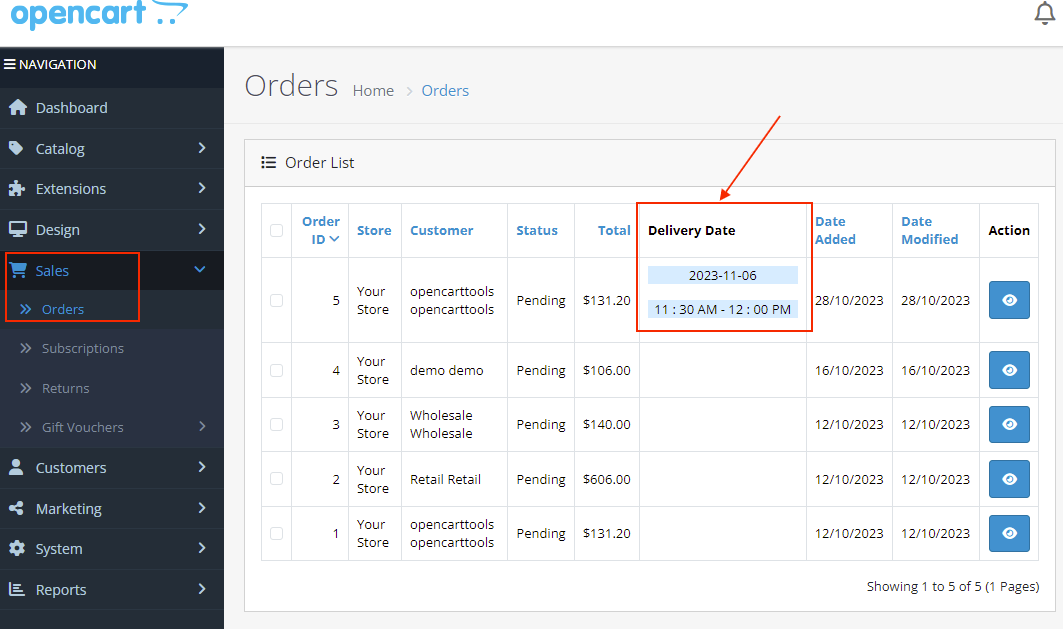
✔ Admin Order List
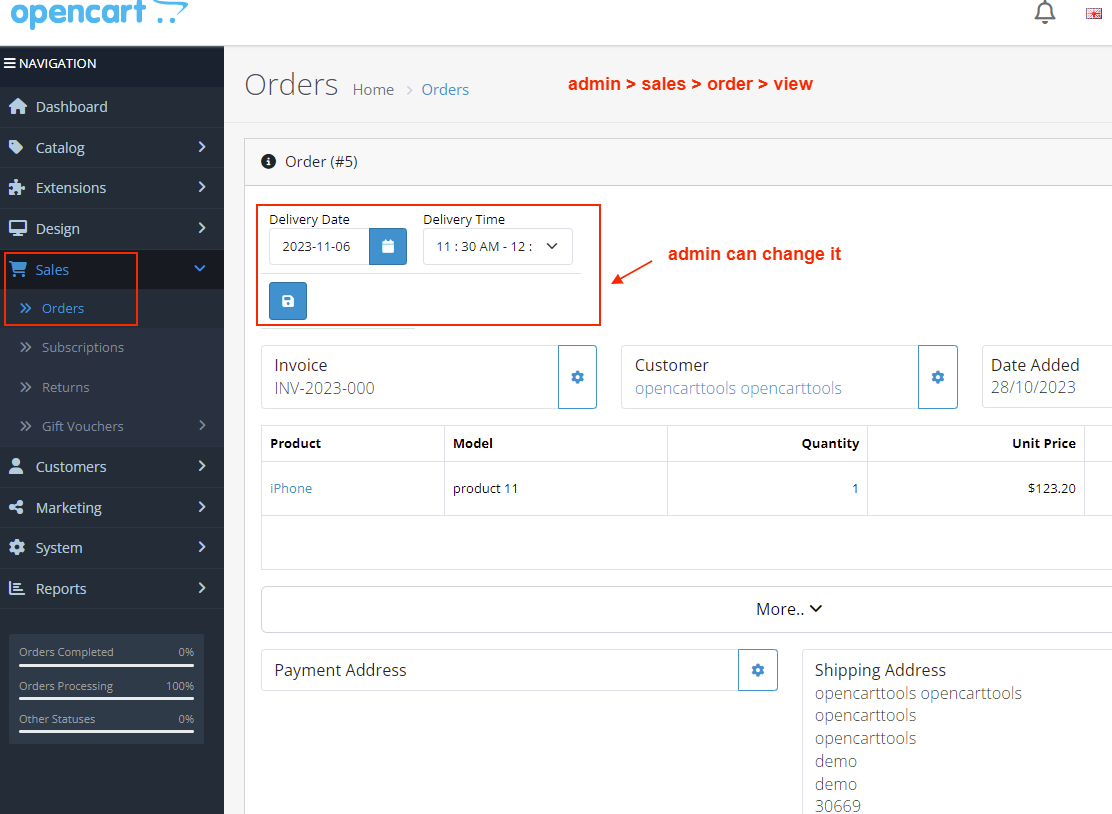
✔ Admin Order View
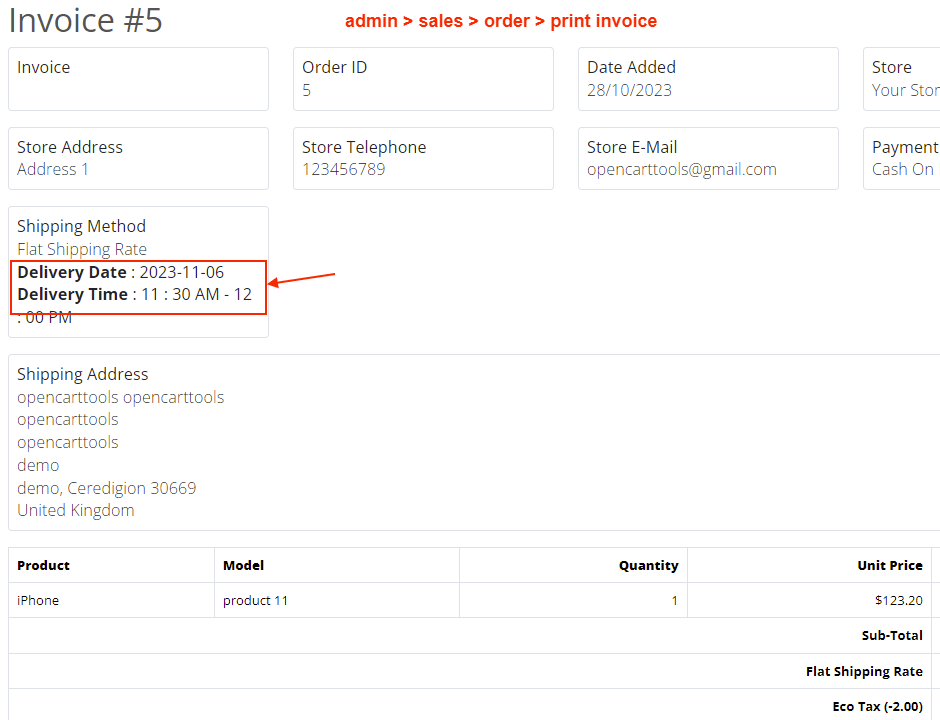
✔ Invoice
✔ Shipping Label
How It Works
1 Install the module.
2 Configure week-off days.
3 Add holidays.
4 Set delivery valid range.
5 Configure active delivery hours.
6 Set time interval (e.g., 30 minutes).
7 Save settings.
✔ Customers will see delivery date & time selection automatically during checkout.
✔ No coding required.
Installation Steps
1 Go to Admin → Extensions → Installer
2 Upload the extension ZIP file
3 Go to Extensions → Modifications → Refresh
4 Go to Extensions → Modules
5 Install “Delivery Date And Time Slot At Checkout”
6 Configure week-offs, holidays, delivery range, and time intervals
7 Save settings
Why Choose This Module?
✔ Improves Customer Satisfaction
✔ Reduces Delivery Disputes
✔ Prevents Invalid Delivery Selection
✔ Fully Automated System
✔ Flexible Date & Time Rules
✔ Works with All Major Themes
✔ Lightweight & Performance Friendly
✔ Easy Admin Configuration
✔ Give customers control over their delivery experience.
Money-Back Guarantee
We stand behind the quality of our module.
If the extension does not work as described or is incompatible with your supported OpenCart version, we offer a 7-Day Money-Back Guarantee.
✔ Full refund if confirmed technical issue
✔ Dedicated support before refund decision
✔ Transparent and fair resolution process
Your satisfaction and store performance are our priority.
Requirements
✔ OpenCart 2.X + 3.X + 4.X
✔ Supports PHP 5.6 – 8.3
✔ No core file changes
✔ Built using OpenCart coding standards
Ideal For
✔ Grocery Stores
✔ Food Delivery Stores
✔ Florists
✔ Gift Shops
✔ Bakery Stores
✔ Local Delivery Businesses
✔ Same-Day Delivery Stores
Images & Screenshots View all screenshots
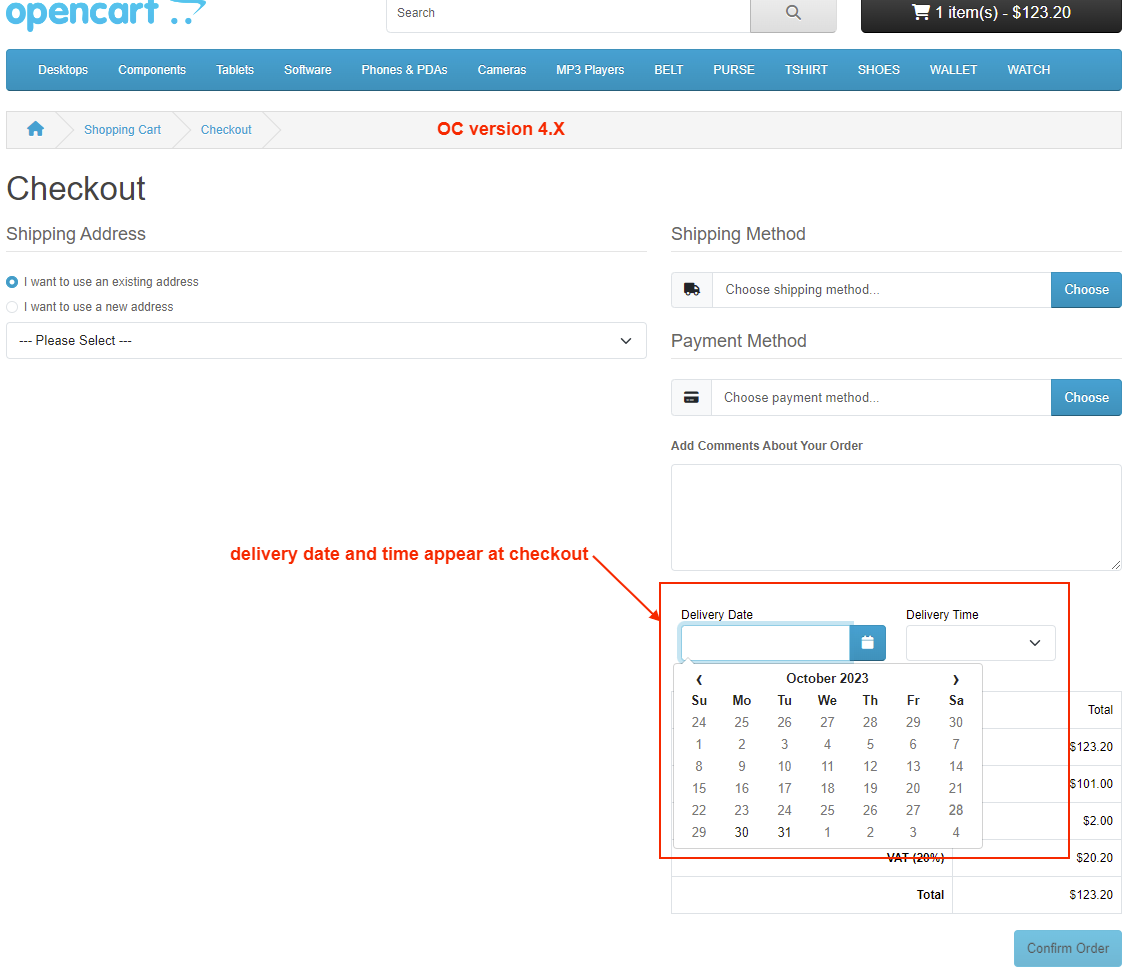
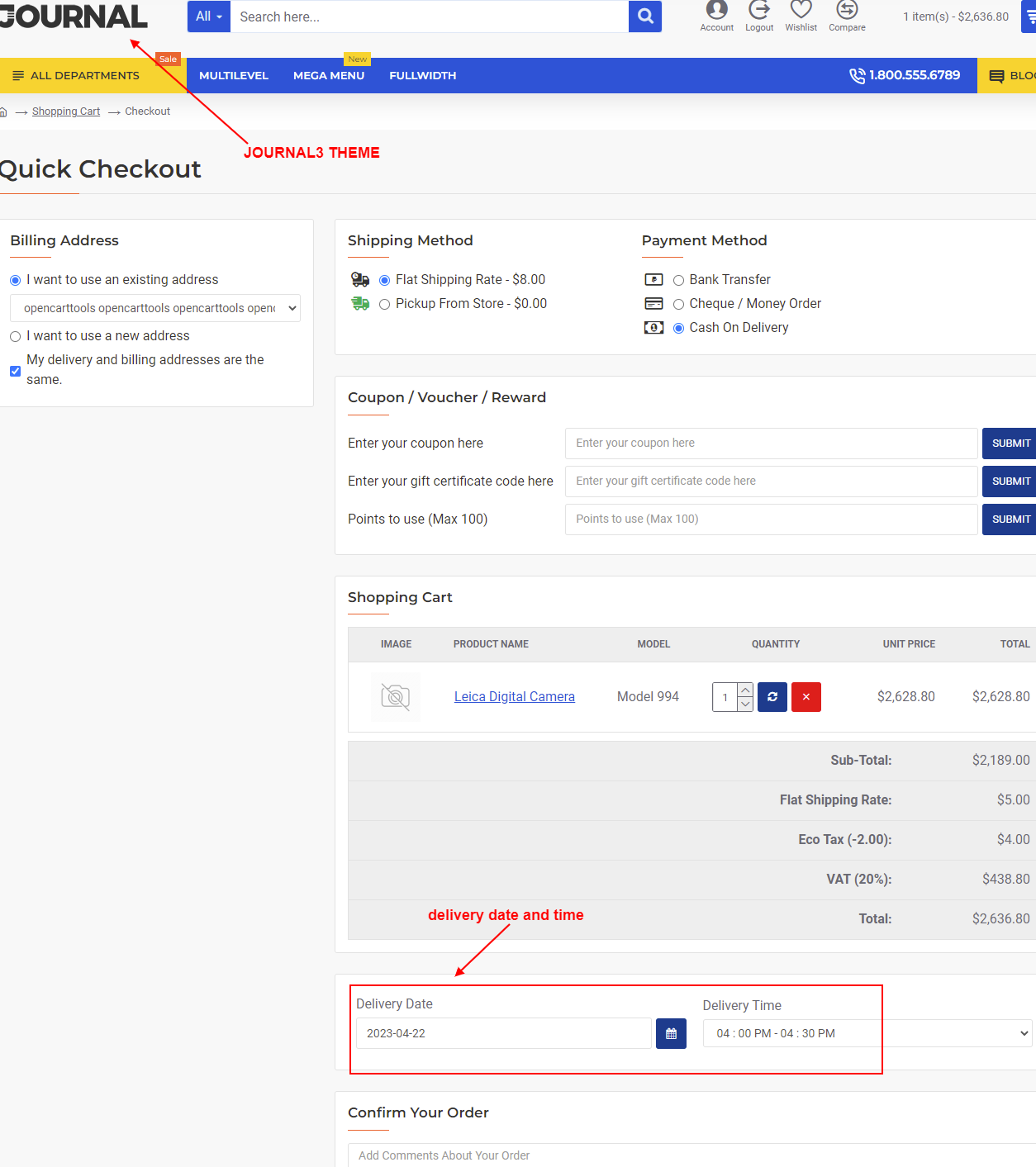
✔ Checkout Page – date & time slot selection at checkout
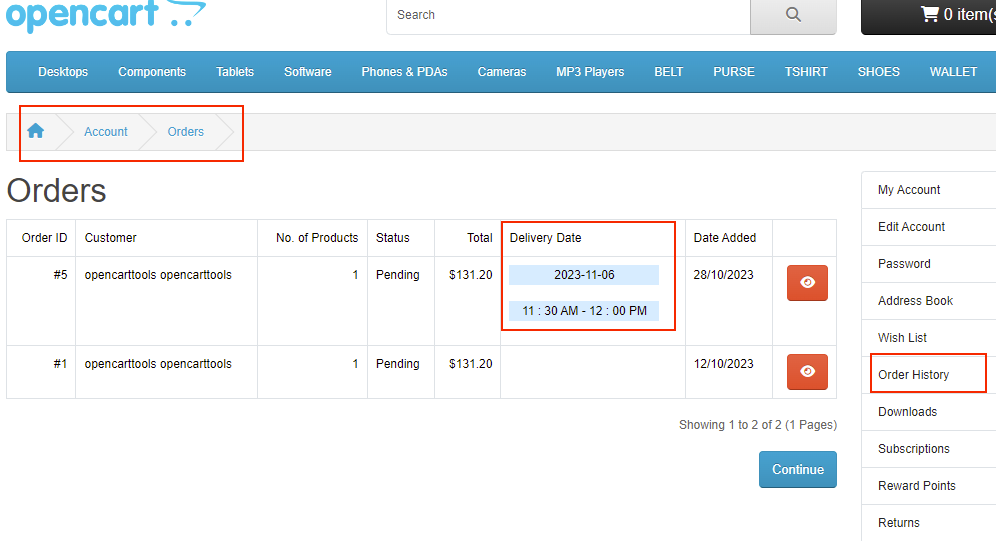
✔ Customer Order History Page – displaying delivery details.
✔ Admin Orders List – new delivery date/time column.
✔ Admin Order View Page – delivery details section.
✔ Admin Invoice & Shipping Label – with delivery date/time.
✔ Module Settings Page – options for week-off days, holidays, intervals, etc.
What customers say about Delivery Date And Time Slot At Checkout

simple installation works perfectly
~peterharfsen
~peterharfsen
The module works perfectly, the support is very good. I recommend it.
~marinicamarin
~marinicamarin
Great extension! 5 stars!
~digutah
~digutah
Price
$30.00
- Developed by OpenCart Community
- 12 Months Free Support
- Documentation Included
Rating
Compatibility
2.0.0.0, 2.0.1.0, 2.0.1.1, 2.0.2.0, 2.0.3.1, 2.1.0.1, 2.1.0.2, 2.2.0.0, 2.3.0.0, 2.3.0.1, 2.3.0.2, 3.0.0.0, 3.0.1.0, 3.0.1.1, 3.0.1.2, 3.0.1.3, 3.0.2.0, 4.x.x.x, 3.0.3.0, 3.0.3.1, 3.0.3.2, 3.0.3.3, 3.0.3.5, 3.0.3.6, 3.0.3.7, 3.0.3.8, 4.0.0.0, 4.0.1.0, 4.0.1.1, 3.x.x.x, 4.0.2.0, 4.0.2.1, 4.0.2.2, 4.0.2.3, 3.0.3.9, 3.0.4.0, 4.1.0.0, 4.1.0.1, 4.1.0.2, 4.1.0.3, 3.0.4.1, 3.0.5.0
Last Update
4 May 2026
Created
8 Oct 2016
214 Sales
32 Comments

Login and write down your comment.
Login my OpenCart Account