Show all options of product on popup
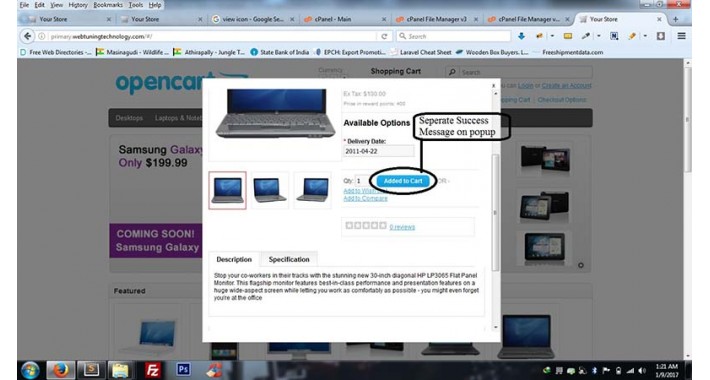
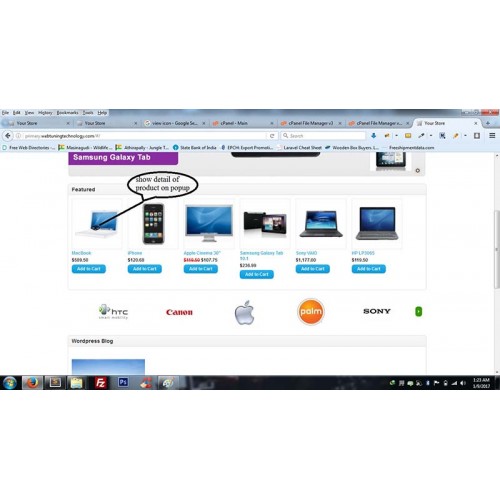
Show all options of product on popup
Instructions:
Step 1: Backup all the files
Step 2: Just copy and paste contents of folder to your Root directory.
For support : waseem@webtuningtechnology.com / er.waseem123@gmail.com / www.webtuningtechnology.com
For More Extensions visit http://www.opencart.com/index.php?route=extension/extension&filter_username=webtuningtechnology
Just copy and paste all files to the root folder and install it.
- Features:
1: Show all detail and attribute of product on popup with add to cart, wishlist and compare button.
2: Responsive Popup.
3: Light Weight.
4: Show popup icon on cart,wishlist,category,search,manufacturer,featuered,special etc page.
5: W3C verified
6: Not hard coded anything.
7: Easy to Install.
8: No File Overwrite
9: VQMOD required
10: use external .CSS and js
11: Without overwrite any file
12: SEO Friendly, supports multi-languages and install it with any theme
13: 24x7 support
14: If you are unable to install it then our team will install it for you
For
You must have vQmod installed to use this!
Download vQmod here: http://www.vqmod.com
For demo please go through the link http://webtuningtechnology.com/opencart-2101
For Old Version Demo http://primary.webtuningtechnology.com/
Instructions:
Step 1: Backup all the files
Step 2: Just copy and paste contents of folder to your Root directory.
For support : waseem@webtuningtechnology.com / er.waseem123@gmail.com / www.webtuningtechnology.com
For More Extensions visit http://www.opencart.com/index.php?route=extension/extension&filter_username=webtuningtechnology
Just copy and paste all files to the root folder and install it.
- Features:
1: Show all detail and attribute of product on popup with add to cart, wishlist and compare button.
2: Responsive Popup.
3: Light Weight.
4: Show popup icon on cart,wishlist,category,search,manufacturer,featuered,special etc page.
5: W3C verified
6: Not hard coded anything.
7: Easy to Install.
8: No File Overwrite
9: VQMOD required
10: use external .CSS and js
11: Without overwrite any file
12: SEO Friendly, supports multi-languages and install it with any theme
13: 24x7 support
14: If you are unable to install it then our team will install it for you
For
You must have vQmod installed to use this!
Download vQmod here: http://www.vqmod.com
For demo please go through the link http://webtuningtechnology.com/opencart-2101
For Old Version Demo http://primary.webtuningtechnology.com/
Price
$49.99
- Developed by OpenCart Community
- 12 Months Free Support
- Documentation Included
Rating
Compatibility
1.4.7, 1.4.8, 1.4.8b, 1.4.9, 1.4.9.1, 1.4.9.2, 1.4.9.3, 1.4.9.4, 1.4.9.5, 1.5.0, 1.5.0.1, 1.5.0.2, 1.5.0.3, 1.5.0.4, 1.5.0.5, 1.5.1, 1.5.1.1, 1.4.9.6, 1.5.1.2, 1.5.1.3, 1.5.2, 1.5.2.1, 1.5.3, 1.5.3.1, 1.5.4, 1.5.4.1, 1.5.5, 1.5.5.1, 1.5.6, 1.5.6.1, 1.5.6.2, 1.5.6.3, 1.5.6.4, 2.0.0.0, 2.0.1.0, 2.0.1.1, 2.0.2.0, 2.0.3.1, 2.1.0.1, 2.1.0.2, 2.2.0.0, 2.3.0.0, 2.3.0.1, 2.3.0.2, 3.0.0.0, 3.0.1.0, 3.0.1.1, 3.0.1.2, 3.0.1.3, 3.0.2.0, 4.x.x.x
Last Update
30 Apr 2025
Created
9 Jan 2017
0 Sales
0 Comments

Login and write down your comment.
Login my OpenCart Account