OpenCart Add PDF to Product Pages



OpenCart Add/Attach PDF to Products
This OpenCart PDF Extension easily adds and displays PDF files on OpenCart product pages. Upload multiple PDFs for each product, assign custom titles, and showcase them with a clean and attractive icon for a better customer experience.
- Add PDF files to product pages in your OpenCart store easily
- Upload multiple PDFs for each product
- Assign a custom title/name to every PDF
- Display PDFs on the product page with a clean and attractive icon
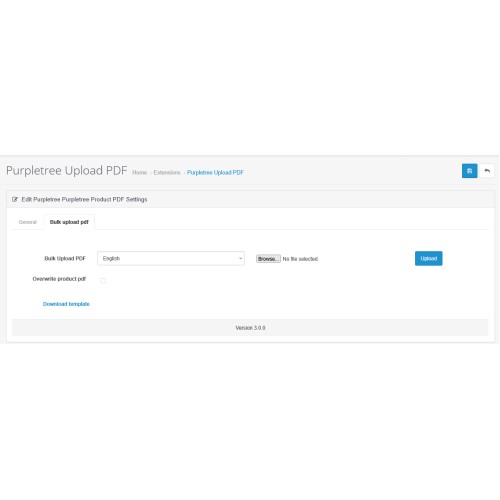
Admins can upload PDFs in two ways: individually or in bulk using an Excel file. This makes the process quick, simple, and convenient for any store to manage.
Multilingual ready. You can also add strings in your own language with little addition.
✔Attach Multiple PDFs to Products
Attach user manuals, brochures, or guides directly to the Product Description page.
✔ Upload Multiple PDFs for a Single Product (NEW!)
Add more than one PDF per product.
✔ Custom Title for PDFs (NEW!)
Choose custom names for PDFs for better organisation.
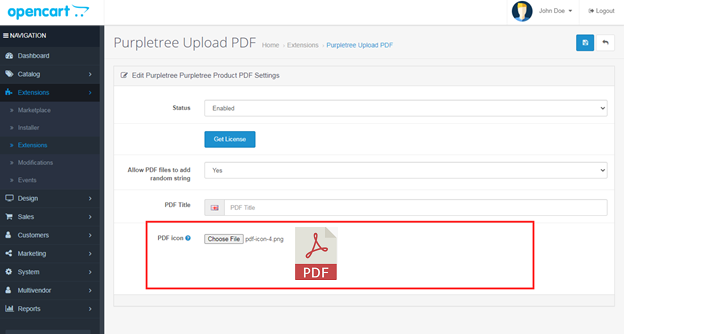
✔ Showcase PDFs with Your Own Icon(NEW!)
You can upload any attractive custom icon for the PDF, which will appear on the product page.
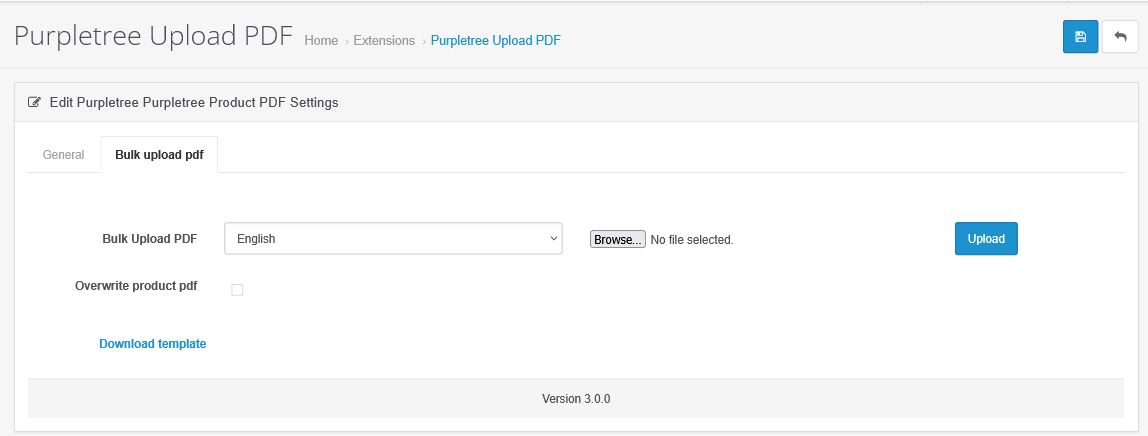
✔ Bulk PDF Upload(NEW!)
Easily upload multiple PDFs for different products in bulk using Excel.
OCMod code is available to avoid a clash with OpenCart core code.


Link: click here
admin username: admin
admin password: demo123

Link: click here
User guide is available here.
How to Upload PDFs
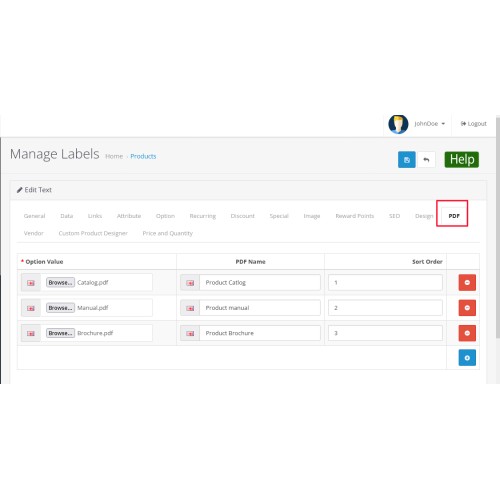
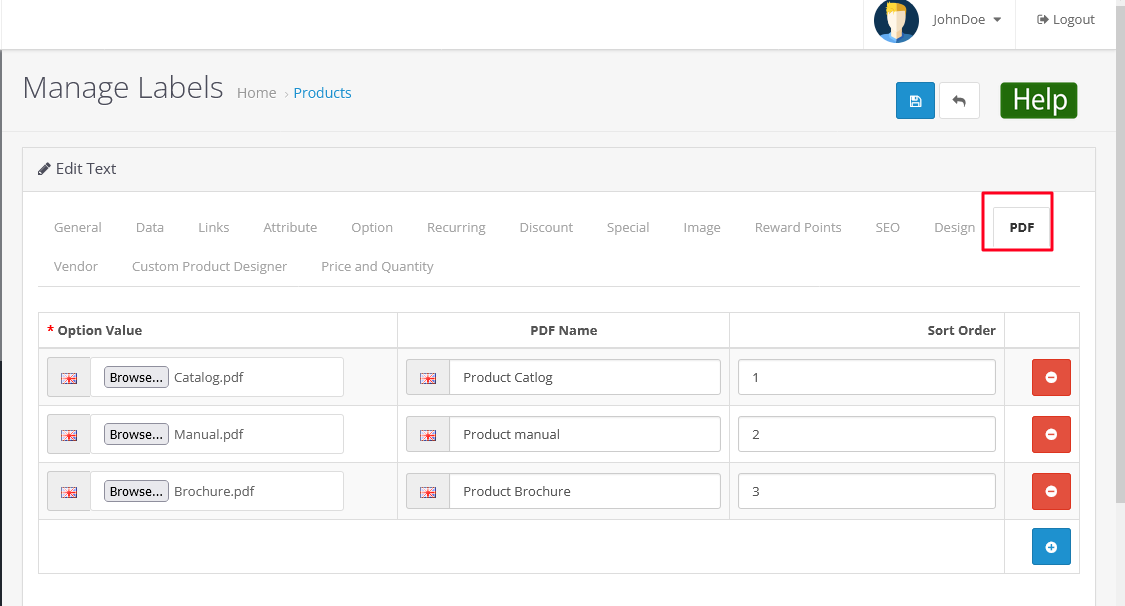
Navigate to: Admin → Catalog → Products → Edit.
Open the PDF Tab.
Click on Upload Multiple PDFs.
Use the Browse button to select a PDF file.
Enter a PDF Name.
Assign a Sort Order value (lower numbers appear higher on the product page).
Save changes.
Frontend Display
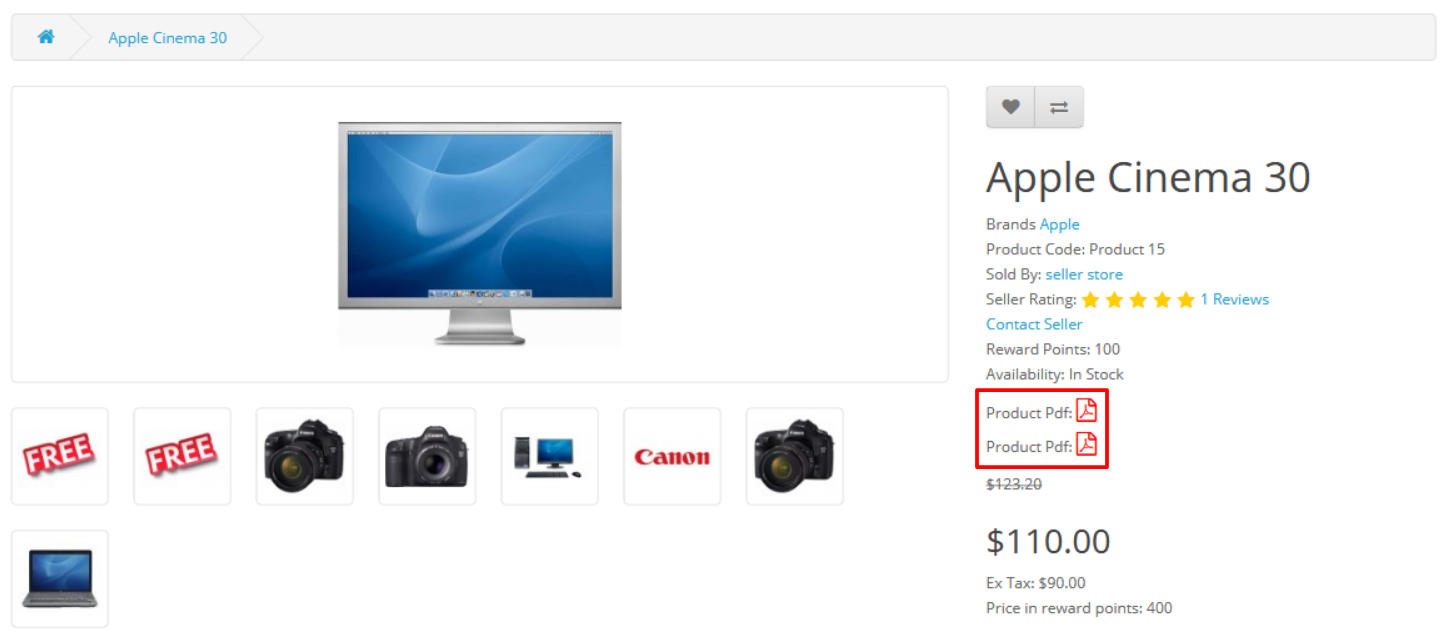
Once uploaded, PDFs automatically appear on the product description page.
Customers can view and download them instantly.
The order of display follows the sort values set in admin.
Note:
i) You need OCMod to use this extension, which comes with opencart. If not sure about it, we will handle it for you.
ii) This extension works for most of the themes including journal theme, but if you see it doesn't work for yours [possible if the theme uses a heavily customized product page template], please raise a ticket and we will have a look for you.
SCREENSHOTS
Front View
Upload PDF Files from Admin
Upload Custom Icon
Bulk Upload PDFs

User guide is available here.
To get quick help from our technical staff, raise a ticket using this link.
Note: Our extensions have a licensing policy, explained here.
Why to buy from an OpenCart Partner?
An OpenCart partner has more mature solutions.
Partners have a very good track record in terms of customer support and quality of products.


What customers say about OpenCart Add PDF to Product Pages

Being in Brazil, I was afraid to buy... but the whole process was smooth. I needed support to make a correction and I was surprised by the service, Everyone was very attentive, I recommend it!!
~FMiguez
~FMiguez

They promote themselves, as you can use it for lifetime, but once the first 6 months up, they are not flexible at all. Very bad customer service.
~timar.matyas
~timar.matyas

You will not get any help if you need any adjustments. The only help is "that will require custom changes in coding" all the time. If you are not experienced extensions developer don't buy it. This money is to much for this. I want my money back.
~nse.online
~nse.online
Price
$29.99
- Developed by OpenCart Partner
- 6 Months Free Support
- Documentation Included
Rating
Compatibility
4.0.0.0, 4.0.1.0, 4.0.1.1, 4.0.2.1, 4.0.2.2, 4.0.2.3, 4.1.0.0, 4.1.0.1, 4.1.0.2, 4.1.0.3, 2.2.0.0, 3.0.0.0, 3.0.1.0, 3.0.1.1, 3.0.1.2, 3.0.1.3, 3.0.2.0, 4.x.x.x, 3.0.3.0, 3.0.3.1, 3.0.3.2, 3.0.3.3, 3.0.3.5, 3.0.3.6, 3.0.3.7, 3.0.3.8, 3.0.3.9, 3.0.4.0, 3.0.4.1, 3.0.5.0, 2.2.0.0, 2.3.0.0, 2.3.0.1, 2.3.0.2, 2.0.0.0, 2.0.1.0, 2.0.1.1, 2.0.2.0, 2.0.3.1, 2.1.0.1, 2.1.0.2
Last Update
25 May 2026
Created
24 Jun 2017
128 Sales
24 Comments

Login and write down your comment.
Login my OpenCart Account