Auto Apply Coupon + Allow To Apply Multi Coupon


Email Support: opencarttools@gmail.com
WhatsApp Live Chat: Click Here
Live Demo
See the module in action before purchase.
Admin
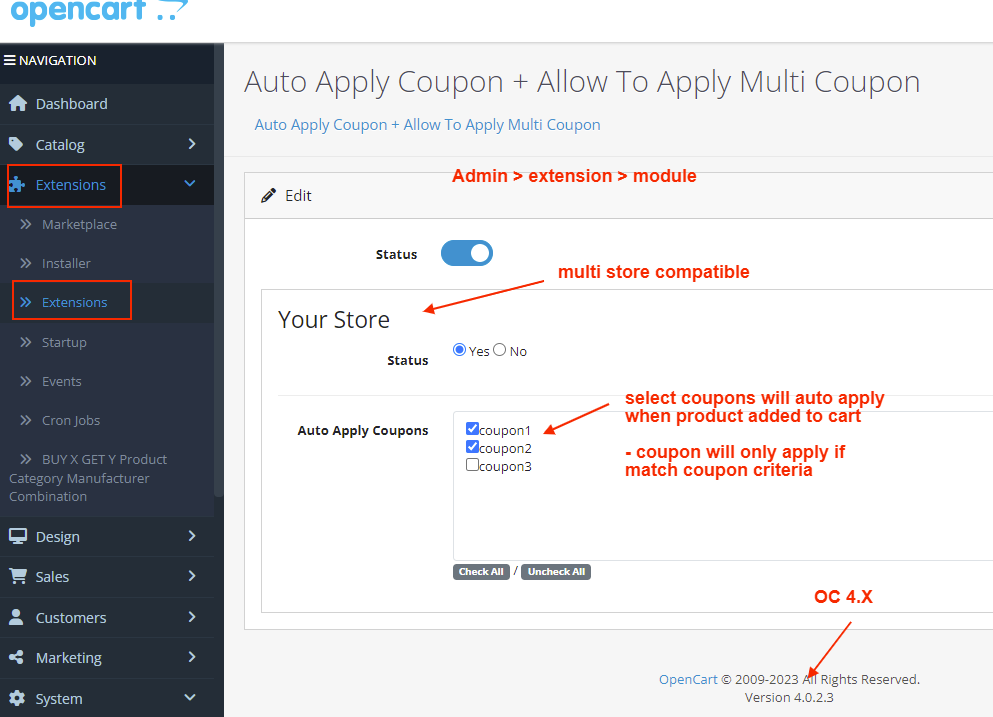
Admin > Extension > Module
Admin > marketing > coupon list
Front
Add to cart & use below coupons
coupon1
coupon2
coupon3
Title
Auto Apply Coupon + Allow Multiple Coupons – OpenCart 2.x + 3.x + 4.x
Short Description
Supercharge your OpenCart store with powerful 2-in-1 coupon functionality:
✔ Automatically apply selected coupons when products are added to cart
✔ Allow customers to use multiple coupons in a single order
Boost conversions, improve customer experience, and unlock advanced promotional strategies beyond OpenCart’s default limitations.
Free Dedicated Support Included
We provide dedicated technical support to ensure smooth installation and usage of this module.
✔ Fast response time
✔ Installation guidance
✔ Bug fixes assistance
Key Features
2-in-1 Powerful Coupon System
✔ Auto Apply Coupons
✔ Allow Multiple Coupon Usage
✔ Combine Both Features in One Extension
Auto Apply Coupons
✔ Automatically apply 1 or more pre-selected coupons
✔ Trigger when products are added to cart
✔ No manual coupon entry required
✔ Ideal for promotional campaigns
Multi-Coupon Support
✔ Remove OpenCart’s default single-coupon restriction
✔ Customers can stack multiple coupons in one order
✔ Apply percentage + fixed discount together
✔ Apply store credit + promotion coupon together
Business Benefits
✔ Increase Sales & Order Value
✔ Encourage Coupon Usage
✔ Improve Customer Satisfaction
✔ Run Flexible Marketing Campaigns
✔ Reduce Missed Coupon Opportunities
Technical Highlights
✔ OCMOD-Based Implementation
✔ No Core File Changes
✔ Built Using OpenCart Coding Standards
✔ Lightweight & Performance Friendly
✔ Multi-store Supported
✔ Multi-language Supported
How It Works
✔ Install the extension.
✔ Select coupons to auto-apply.
✔ Enable multi-coupon option.
✔ Save settings.
Customers can now:
✔ Get automatic discounts
✔ Apply multiple coupon codes
✔ Enjoy a smoother shopping experience
No coding required.
Installation Steps
✔ Go to Admin → Extensions → Installer
✔ Upload the extension ZIP file
✔ Go to Extensions → Extensions → Modules
✔ Install “Auto Apply Coupon + Allow Multiple Coupons”
✔ Configure coupon settings
✔ Save
Why Choose This Module?
✔ Boost Conversions with Stacked Discounts
✔ Automatically Apply Marketing Coupons
✔ Go Beyond Default OpenCart Limitations
✔ Easy Setup – No Technical Knowledge Required
✔ Flexible & Advanced Promotional Strategy
✔ Improve Customer Loyalty
Stand out from competitors by offering smarter coupon flexibility.
Money-Back Guarantee
We stand behind the quality of our module.
If the extension does not work as described or is incompatible with your supported OpenCart version, we offer a 7-Day Money-Back Guarantee.
✔ Full refund if confirmed technical issue
✔ Dedicated support before refund decision
✔ Transparent and fair resolution process
Your satisfaction and store performance are our priority.
Requirements
✔ OpenCart 2.X + 3.X + 4.X
✔ Supports PHP 5.6 – 8.3
✔ No core file changes
✔ Built using OpenCart coding standards
Ideal For
✔ Stores Running Frequent Promotions
✔ Seasonal Campaign Stores
✔ Coupon-Based Marketing Stores
✔ Loyalty & Reward Programs
✔ High-Competition Ecommerce Stores
✔ Stores Offering Store Credit + Discount Coupons
Images & Screenshots View all screenshots
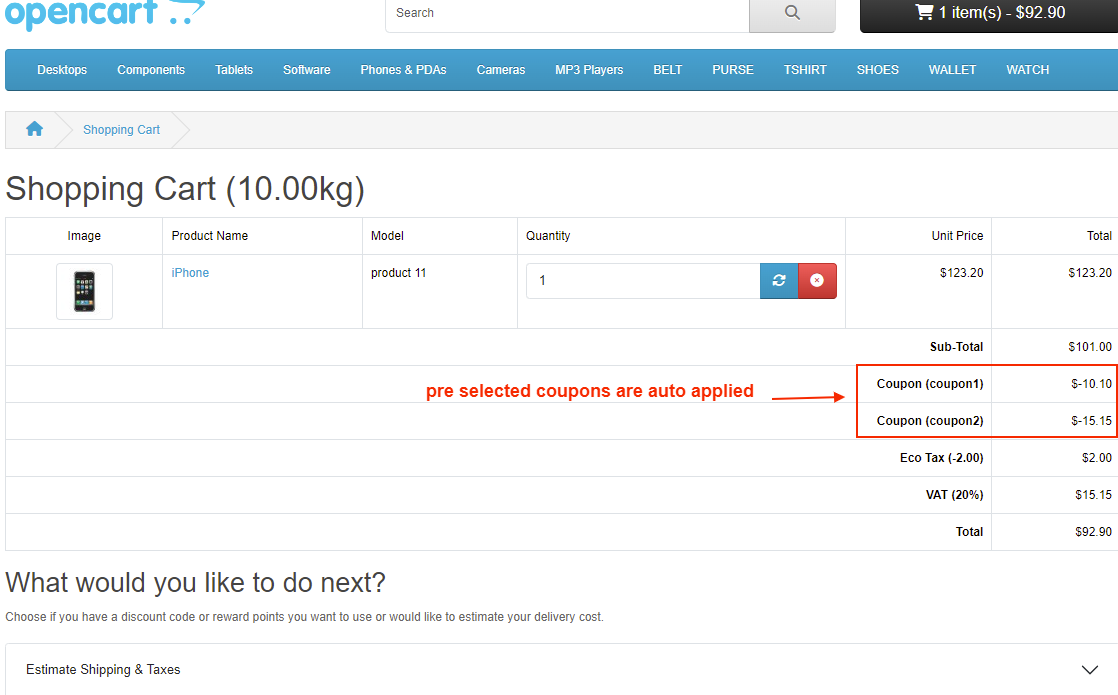
✔ Cart page showing multiple coupons applied together.
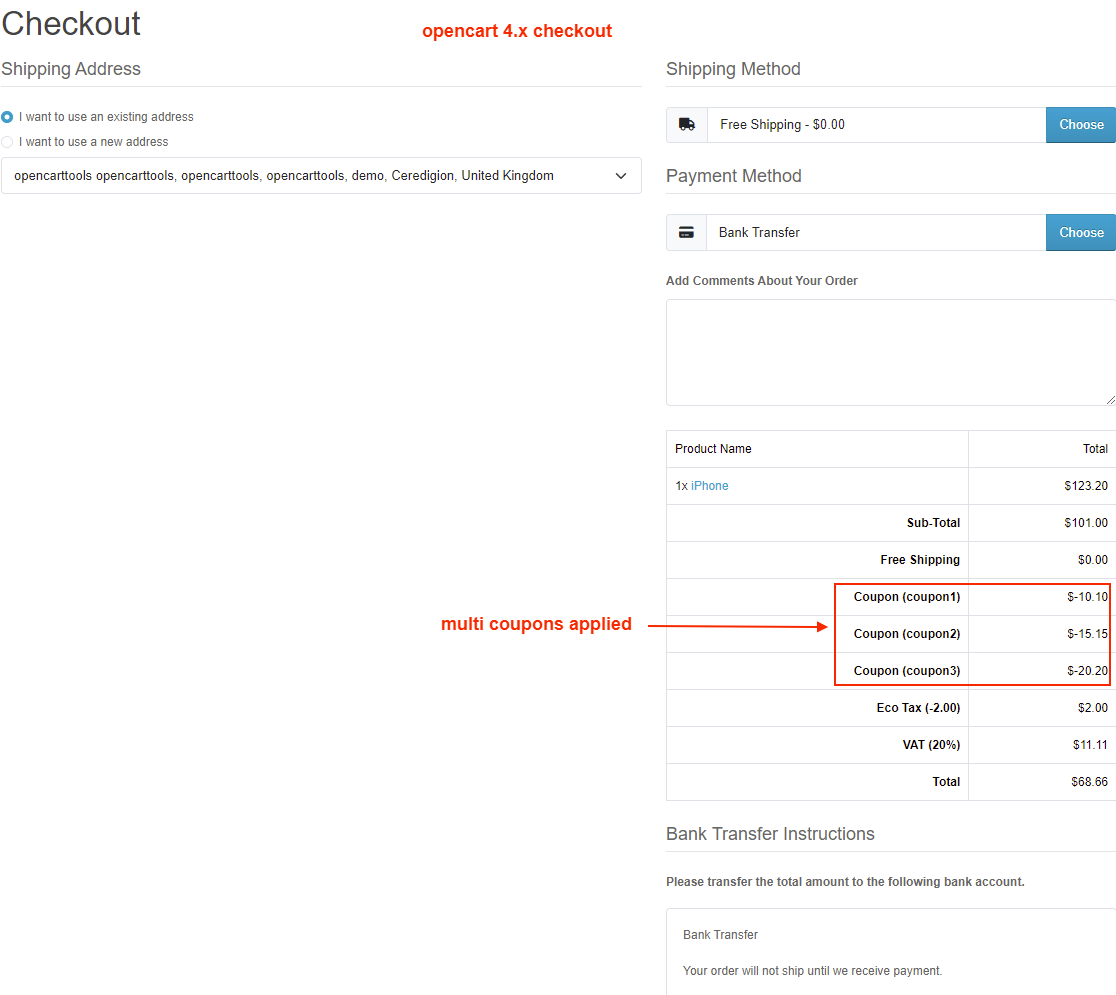
✔ Checkout page with stacked coupon discounts.
✔ Admin module settings (where you can select auto-apply coupons).
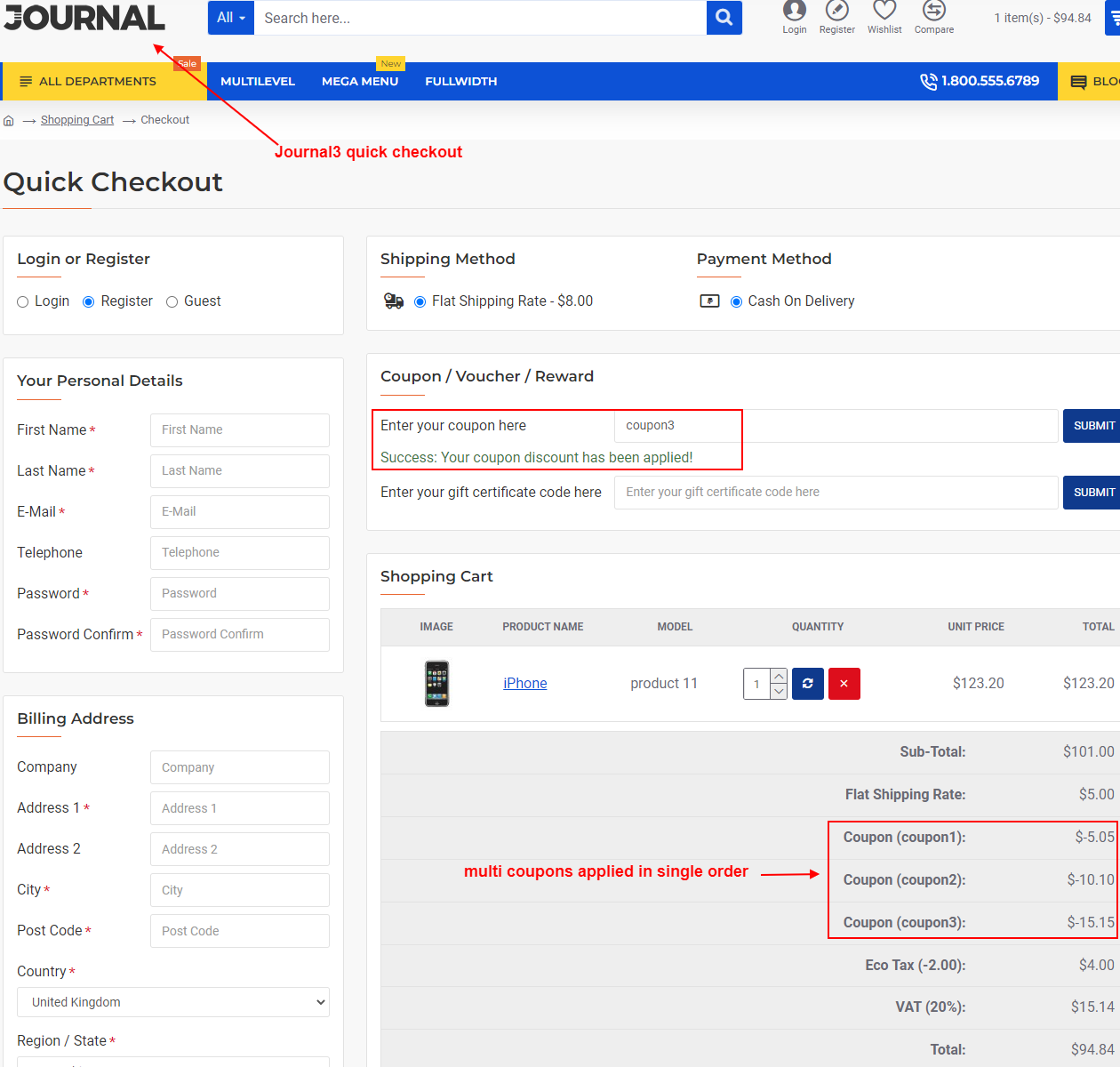
✔ Order total section displaying combined coupon discounts.
What customers say about Auto Apply Coupon + Allow To Apply Multi Coupon

Great extension. Excellent and fast support. THE BEST!!!!
~krin
~krin
Works flawlessly and support is great, answer very fast and solves everything
~augu123
~augu123
Bought this module and we encountered problems that did not work with our third party checkout.
They helped us solve this.
Thanks for a supper quick support :)
~Beautyparadise
~Beautyparadise
Price
$25.00
- Developed by OpenCart Community
- 12 Months Free Support
- Documentation Included
Rating
Compatibility
2.0.0.0, 2.0.1.0, 2.0.1.1, 2.0.2.0, 2.0.3.1, 2.1.0.1, 2.1.0.2, 2.2.0.0, 2.3.0.0, 2.3.0.1, 2.3.0.2, 3.0.0.0, 3.0.1.0, 3.0.1.1, 3.0.1.2, 3.0.1.3, 3.0.2.0, 4.x.x.x, 3.0.3.0, 3.0.3.1, 3.0.3.2, 3.0.3.3, 3.0.3.5, 3.0.3.6, 3.0.3.7, 3.0.3.8, 4.0.0.0, 4.0.1.0, 4.0.1.1, 3.x.x.x, 4.0.2.0, 4.0.2.1, 4.0.2.2, 4.0.2.3, 3.0.3.9, 3.0.4.0, 4.1.0.0, 4.1.0.1, 4.1.0.2, 4.1.0.3, 3.0.4.1, 3.0.5.0
Last Update
2 May 2026
Created
27 Aug 2017
67 Sales
2 Comments

Login and write down your comment.
Login my OpenCart Account