Opencart 3.x Obligr SMS Order Alert with Customized Admin Email
(For Indian Merchants Only) Opencart 3.x Obligr Admin SMS Order Alert with Customized Admin Order Alert Email
This extension will send you (the merchant/admin) an SMS alert, when a customer places an Order on your Opencart Store alongside a Highly Customized Alert Email which includes:
Apart from all this, you can also Enable/Disable SMS Alerts and add multiple Admin/Retailer Mobile Numbers for receiving SMS Alerts upon a customer order in Opencart Admin.
Steps for Installation:-
If you have any Questions, then please email me at: ar27111994@gmail.com
Note:- Image taken from https://mahalaxmishoppee.com/
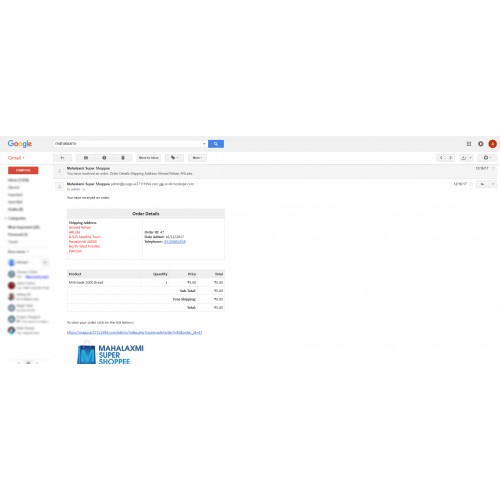
This extension will send you (the merchant/admin) an SMS alert, when a customer places an Order on your Opencart Store alongside a Highly Customized Alert Email which includes:
- Store Logo.
- Customer's Billing and Shipping Addresses.
- Order Details including Products and Total Cost etc.
- A link to Admin page for current Order, so that you can take immediate action for fulfilling this Order.
Apart from all this, you can also Enable/Disable SMS Alerts and add multiple Admin/Retailer Mobile Numbers for receiving SMS Alerts upon a customer order in Opencart Admin.
Steps for Installation:-
- Firstly, make sure that you have the latest VQMod Version installed on your Opencart Instance. If it is not installed then download and install VQMod from the following link: https://github.com/vqmod/vqmod/wiki
- Secondly extract and merge the files provided in the Attached Zip file in your Opencart installation's Root directory.
- Goto
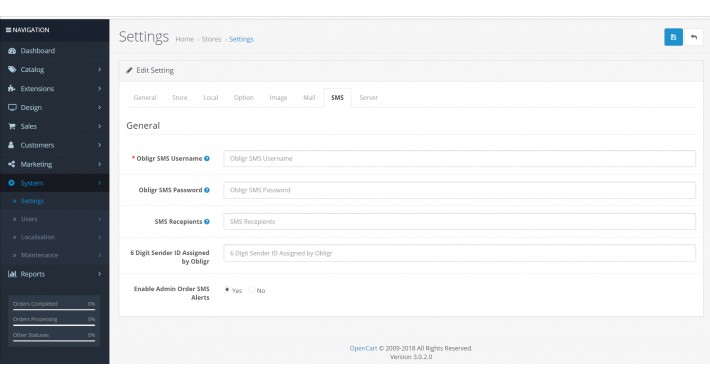
Admin > Settings > Click Store Settings Edit (Pencil) Button > SMS Taband Fill out Your Obligr Details.
- Add your Opencart Admin URL at the end of your Root Directory Configuration file called
config.php. For Example, the following code will be appended to the Configuration file if the name of Opencart Admin Directory is admin:
// HTTP Admin
define('HTTP_ADMIN', 'https://your-opencart-store-website-url/admin/');
// HTTPS Admin
define('HTTPS_ADMIN', 'https://your-opencart-store-website-url/admin/');
- Enjoy!
If you have any Questions, then please email me at: ar27111994@gmail.com
Note:- Image taken from https://mahalaxmishoppee.com/
Download
- Developed by OpenCart Community
- Documentation Included
Rating
Compatibility
3.0.0.0, 3.0.1.0, 3.0.1.1, 3.0.1.2, 3.0.1.3, 3.0.2.0
Last Update
25 Mar 2018
Created
3 Feb 2018
224 Downloads
4 Comments

Login and write down your comment.
Login my OpenCart Account