Uras Circle Photo Gallery Module




It is a photo gallery module. You do not need to attach files. Files do not conflict. It will not overwrite it. You can view the installation video for installation.
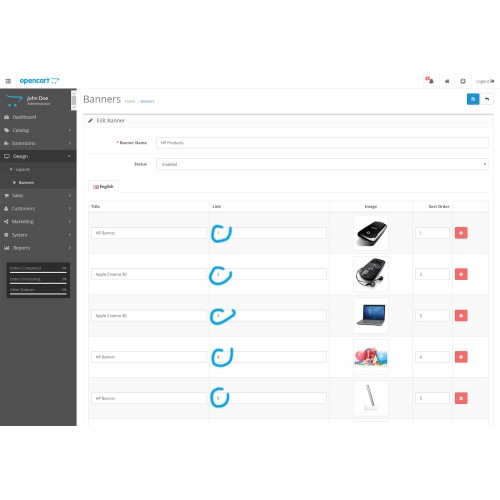
Note: You need to note that in the banner section you need to give the link sequence numbers that you need to link to.
Installitation
1 - Export the upload.zip file and select the version that matches your system.
2 - Send your admin and catalog folders via ftp
3 - Yönetim paneline gidin.
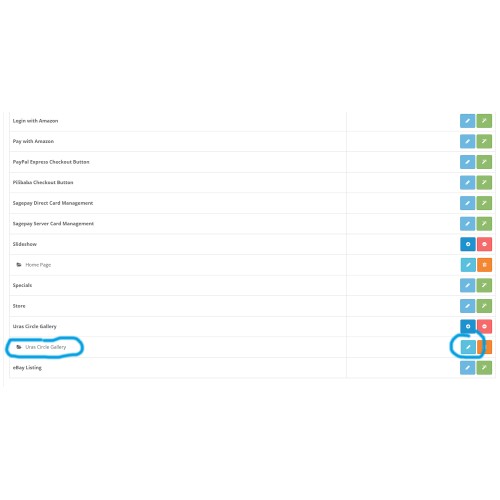
4 - Go to Extensions / extensions / modules
5 - Find and load the Uras Circle Gallery module.
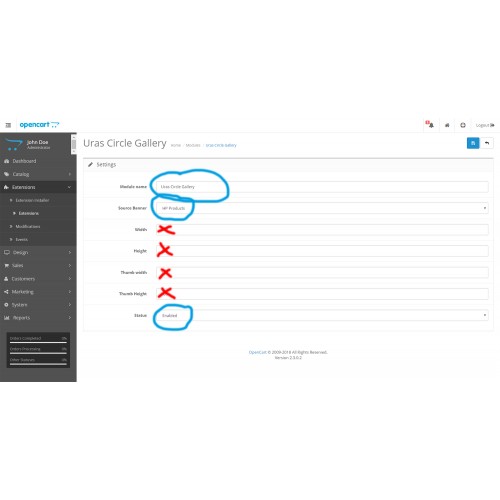
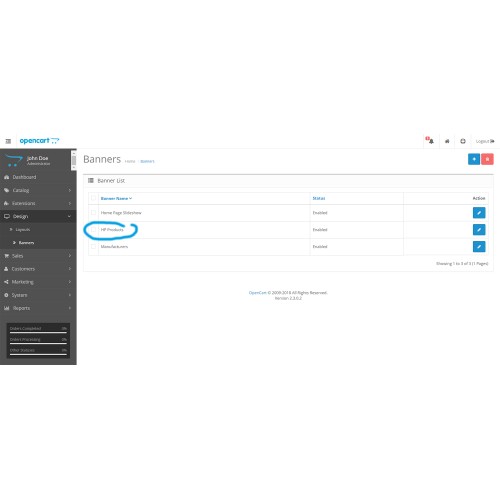
6 - Edit the module you have installed. Then match the module to the banner and save it.
7 - View on the page you want. Installation is that simple.
Youtube Link : https://www.youtube.com/watch?v=x_T1-4D4cVw&feature=youtu.be
Note: You need to note that in the banner section you need to give the link sequence numbers that you need to link to.
Installitation
1 - Export the upload.zip file and select the version that matches your system.
2 - Send your admin and catalog folders via ftp
3 - Yönetim paneline gidin.
4 - Go to Extensions / extensions / modules
5 - Find and load the Uras Circle Gallery module.
6 - Edit the module you have installed. Then match the module to the banner and save it.
7 - View on the page you want. Installation is that simple.
Youtube Link : https://www.youtube.com/watch?v=x_T1-4D4cVw&feature=youtu.be
Download
- Developed by OpenCart Community
- Documentation Included
Rating
Compatibility
2.0.0.0, 2.0.1.0, 2.0.1.1, 2.0.2.0, 2.0.3.1, 2.1.0.1, 2.1.0.2, 2.2.0.0, 2.3.0.0, 2.3.0.1, 2.3.0.2
Last Update
8 Jan 2021
Created
20 Feb 2018
55 Downloads
1 Comments

Login and write down your comment.
Login my OpenCart Account