Category Based Quantity Discount

Email Support: opencarttools@gmail.com
WhatsApp Live Chat: Click Here
Live Demo
See the module in action before purchase.
Admin
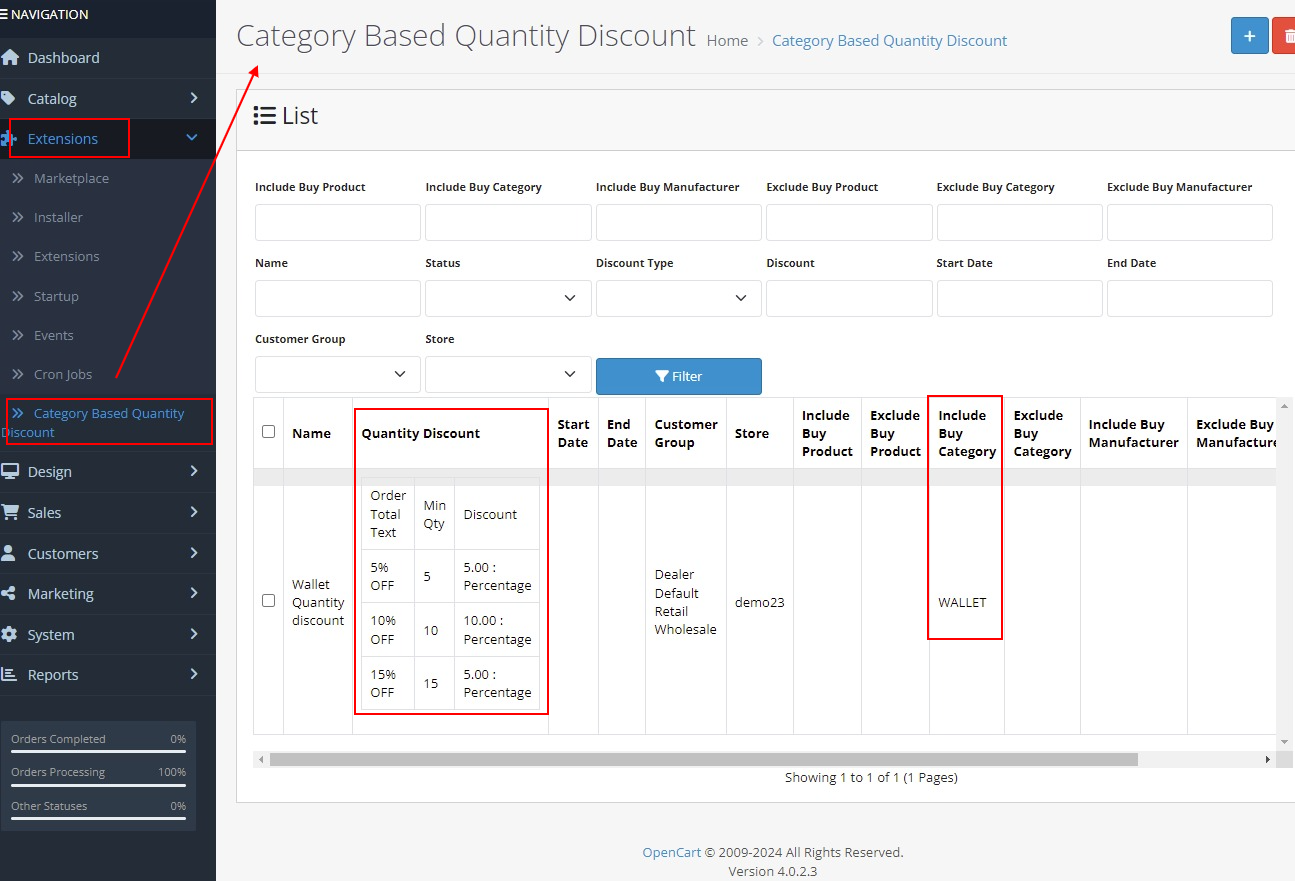
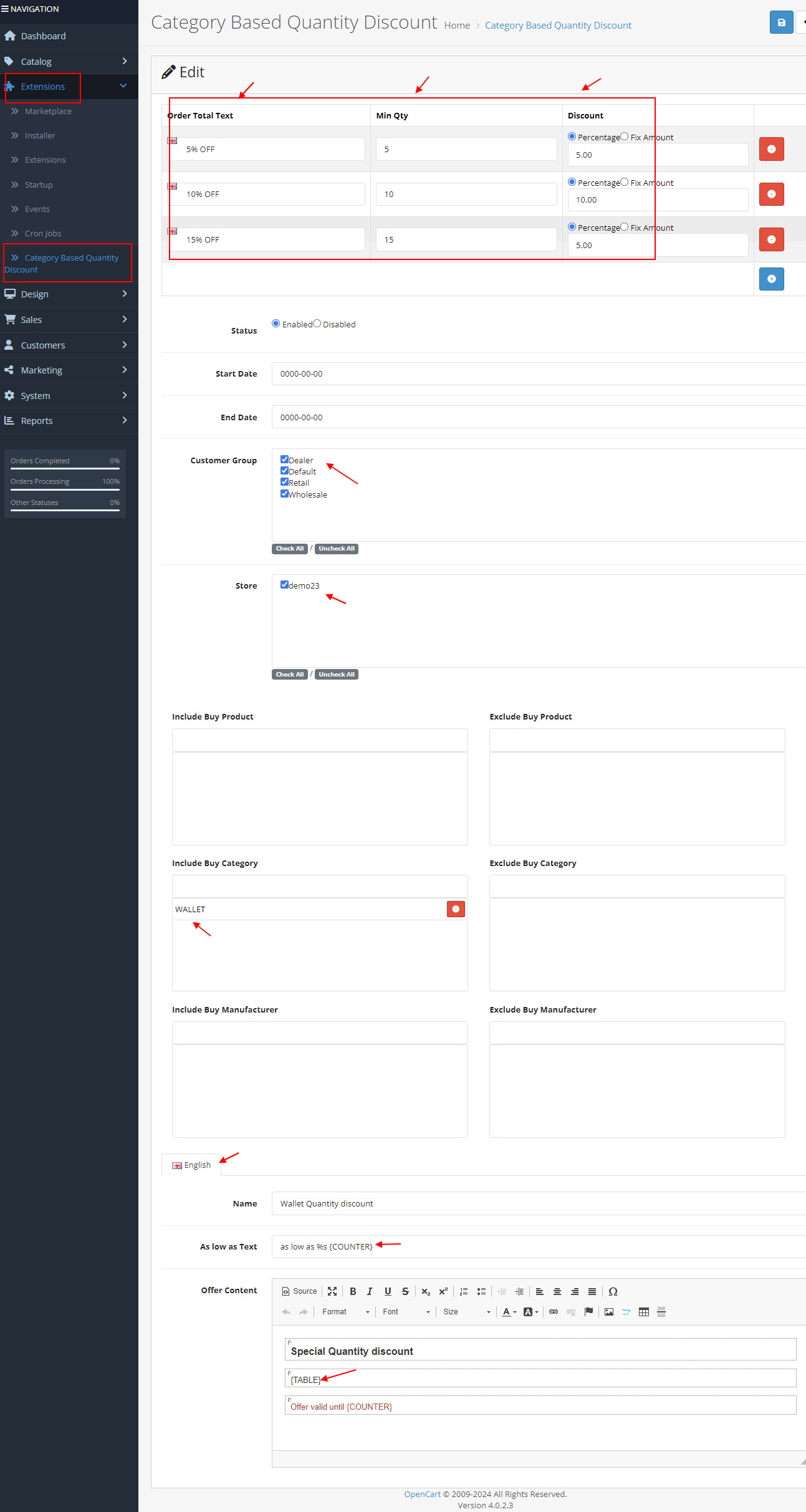
Admin > Extension > Category Based Quantity Discount
Category page
Product Details page
Title
Category Based Quantity Discount – OpenCart 2.x + 3.x + 4.x
Short Description
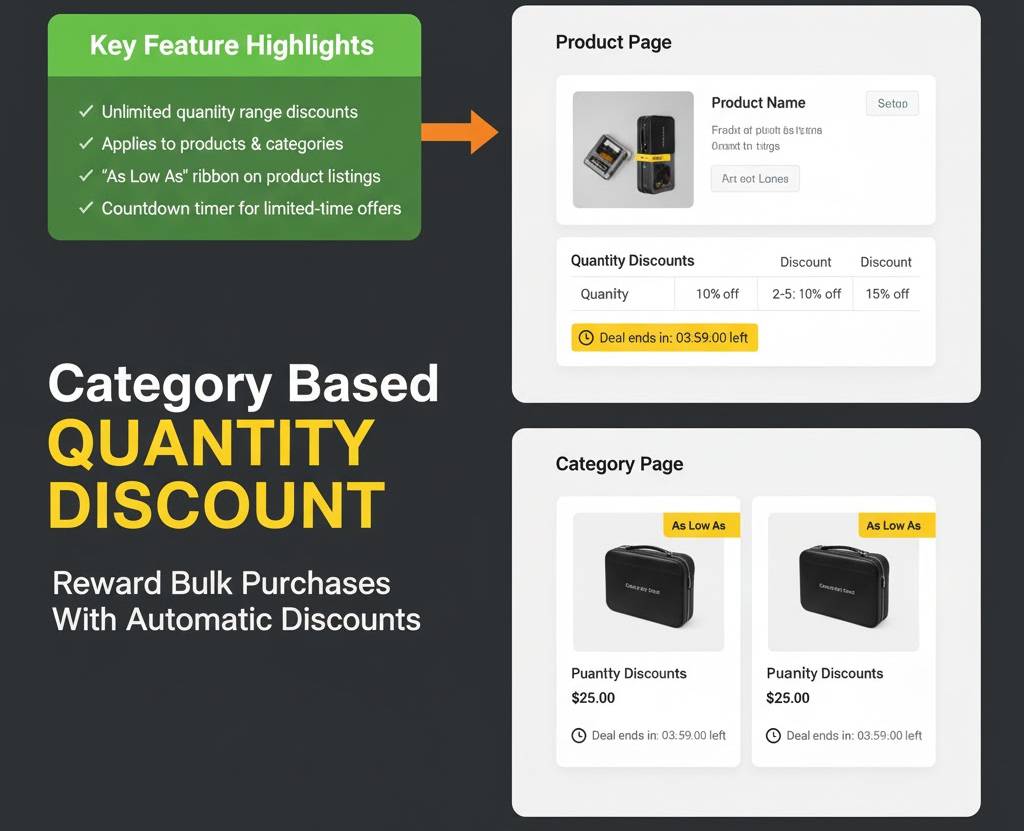
Create unlimited quantity-based discounts for selected products, categories, and subcategories.
Automatically apply discounts at order total level and display attractive “As Low As” pricing across your store to encourage bulk purchases.
Free Dedicated Support Included
We provide dedicated technical support to ensure smooth installation and usage of this module.
✔ Fast response time
✔ Installation guidance
✔ Bug fixes assistance
Key Features
Unlimited Quantity Range Discounts
✔ Create unlimited quantity discount ranges
✔ Apply discounts to selected products
✔ Apply discounts to entire categories
✔ Include child categories automatically
✔ Flexible quantity brackets (e.g., 5–10, 11–100)
Flexible Discount Types
✔ Percentage-based discounts
✔ Fixed amount discounts
✔ Applied automatically at order total
✔ Works seamlessly with OpenCart pricing system
Smart Date & Timer Control
✔ Set start date for automatic activation
✔ Set end date for automatic expiry
✔ Leave date empty to disable date validation
✔ Countdown timer appears when start & end date are set
Perfect for seasonal and limited-time campaigns.
Product Page Discount Table
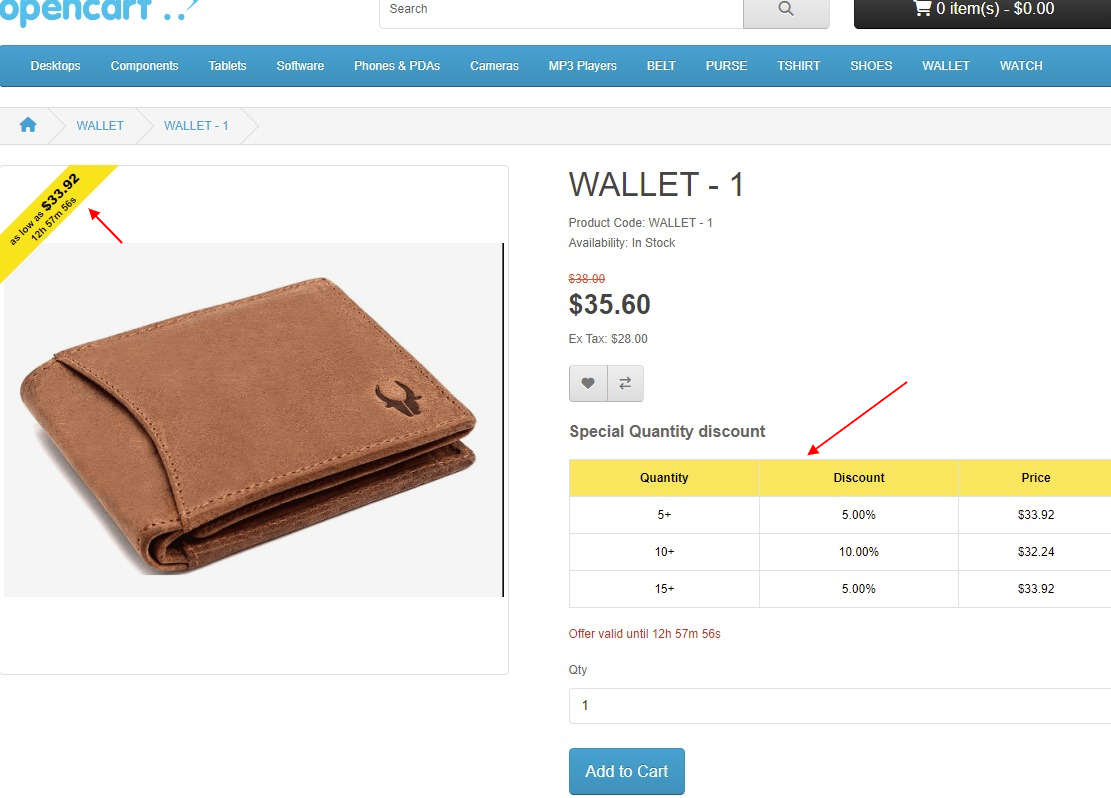
✔ Quantity discount table appears before Add to Cart button
✔ Clearly displays quantity ranges and discount values
✔ Transparent pricing for customers
✔ Encourages bulk purchases
“As Low As” Ribbon Display
✔ Automatically calculates highest quantity discount
✔ Displays lowest possible price in ribbon
✔ Appears on Home page
✔ Appears on Category page
✔ Appears on Search results
✔ Appears on Manufacturer pages
✔ Appears on Product detail page
Boosts visual impact and increases conversion rate.
Exclusion Rules
✔ Exclude specific products
✔ Exclude categories
✔ Maintain full pricing flexibility
Example Scenario
✔ Category “Desktop” contains:
MacBook = $500
iPhone = $100
✔ Discount Rules:
5–10 items = 5% discount
11–100 items = 10% discount
✔ “As Low As” ribbon shows highest range (-10%)
MacBook → As Low As $450
iPhone → As Low As $95
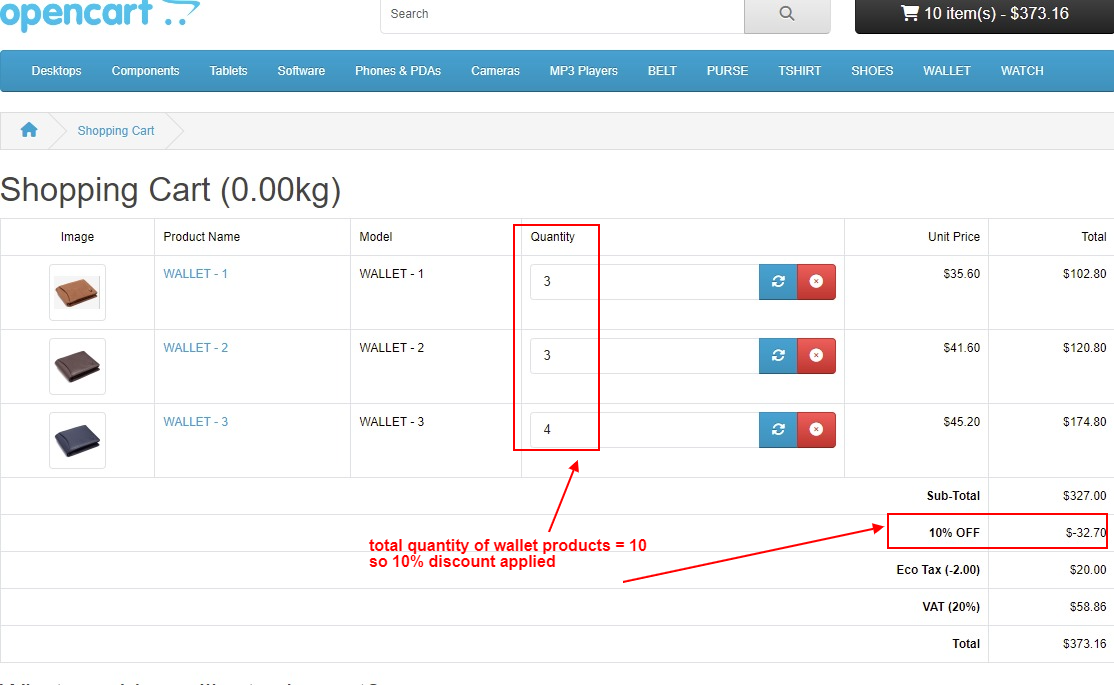
✔ Cart Example:
3 x iPhone = $300
2 x MacBook = $1000
Subtotal = $1300
Total quantity from Desktop category = 5
5% discount applied → $65
Final total = $1235
Technical Highlights
✔ Order Total based calculation
✔ 100% OCMOD Based
✔ No Core File Changes
✔ Lightweight & Performance Friendly
✔ Built using OpenCart Coding Standards
✔ Multi-language & Multi-store Supported
✔ Compatible with OpenCart 2.x, 3.x & 4.x
✔ Supports PHP 5.6 – 8.3
✔ Tested with Default Theme & Journal 3
Installation Steps
✔ Upload the extension via Admin → Extensions → Installer
✔ Go to Admin → Extensions → Modules
✔ Install and enable the module
✔ Configure quantity discount rules
✔ Save settings and activate
How It Works
✔ Admin defines quantity ranges
✔ Customer adds products from selected category
✔ System calculates total quantity
✔ Appropriate discount applied automatically
✔ “As Low As” ribbon updates dynamically
No coupon code required.
Why Choose This Module
✔ Increase sales by encouraging bulk buying
✔ Boost average order value
✔ Transparent discount table builds trust
✔ Countdown timer creates urgency
✔ “As Low As” ribbon improves conversions
✔ Perfect for wholesale and volume-selling stores
✔ Fully compatible with multi-store & customer groups
Money-Back Guarantee
We stand behind the quality of our module.
If the extension does not work as described or is incompatible with your supported OpenCart version, we offer a 7-Day Money-Back Guarantee.
✔ Full refund if confirmed technical issue
✔ Dedicated support before refund decision
✔ Transparent and fair resolution process
Your satisfaction and store performance are our priority.
Requirements
✔ OpenCart 2.X + 3.X + 4.X
✔ Supports PHP 5.6 – 8.3
✔ No core file changes
✔ Built using OpenCart coding standards
Ideal For
✔ Wholesale & bulk-selling stores
✔ Electronics & accessories retailers
✔ Multi-category stores
✔ Seasonal promotions
✔ High-volume inventory businesses
✔ Multi-store OpenCart setups
Images & Screenshots View all screenshots
✔ Admin interface to set start/end date, discount type, and exclusions
✔ “As Low As” ribbon displayed on homepage, category, search, manufacturer pages, and product grids
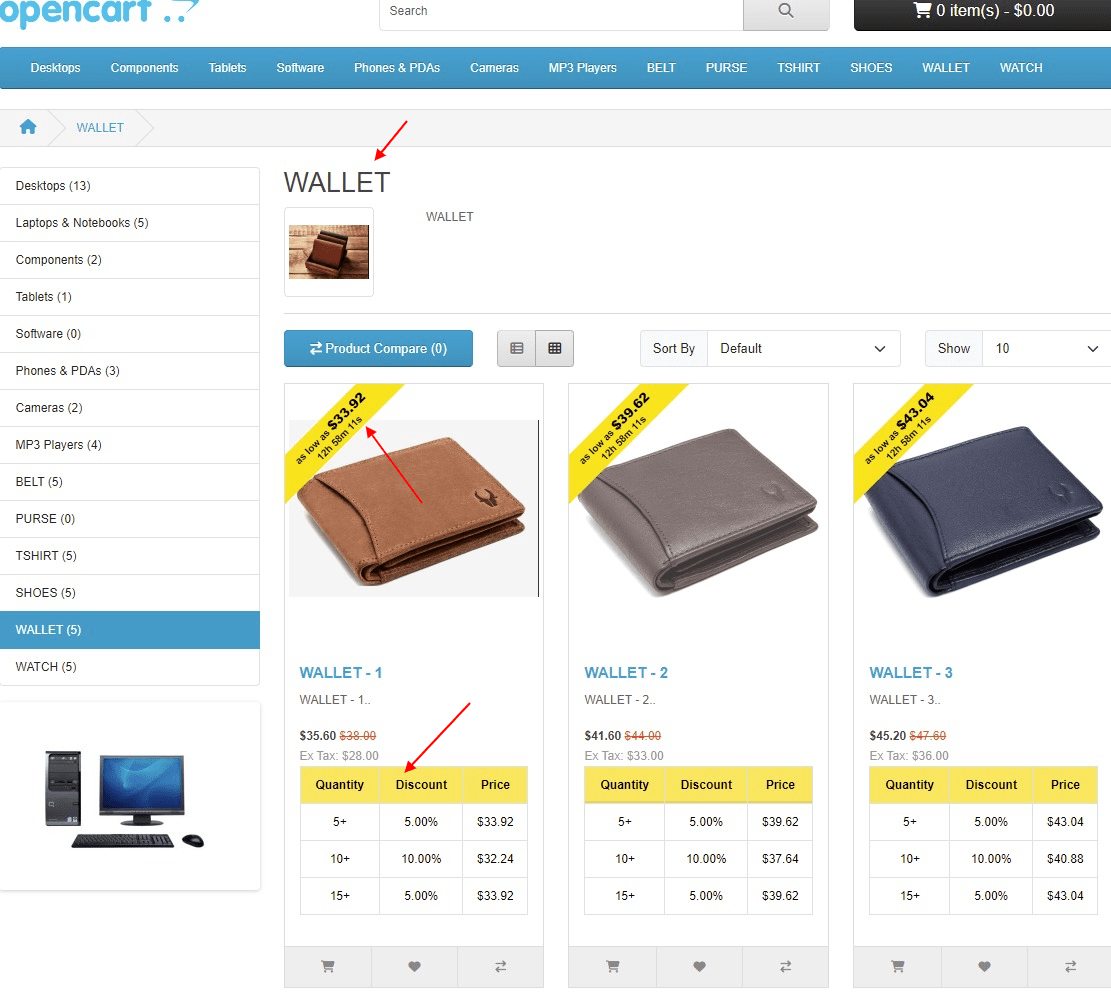
✔ Quantity range discount table appears on product detail page before add-to-cart button
✔ Discount automatically applied in shopping cart based on total purchased quantity
Price
$25.00
- Developed by OpenCart Community
- 12 Months Free Support
- Documentation Included
Rating
Compatibility
2.0.0.0, 2.0.1.0, 2.0.1.1, 2.0.2.0, 2.0.3.1, 2.1.0.1, 2.1.0.2, 2.2.0.0, 2.3.0.0, 2.3.0.1, 2.3.0.2, 3.0.0.0, 3.0.1.0, 3.0.1.1, 3.0.1.2, 3.0.1.3, 3.0.2.0, 4.x.x.x, 3.0.3.0, 3.0.3.1, 3.0.3.2, 3.0.3.3, 3.0.3.5, 3.0.3.6, 3.0.3.7, 3.0.3.8, 4.0.0.0, 4.0.1.0, 4.0.1.1, 3.x.x.x, 4.0.2.0, 4.0.2.1, 4.0.2.2, 4.0.2.3, 3.0.3.9, 3.0.4.0, 4.1.0.0, 4.1.0.1, 4.1.0.2, 4.1.0.3, 3.0.4.1, 3.0.5.0
Last Update
4 May 2026
Created
18 Jun 2018
54 Sales
2 Comments

Login and write down your comment.
Login my OpenCart Account