Module MMS (Kits)
The module allows you to create a set of products.
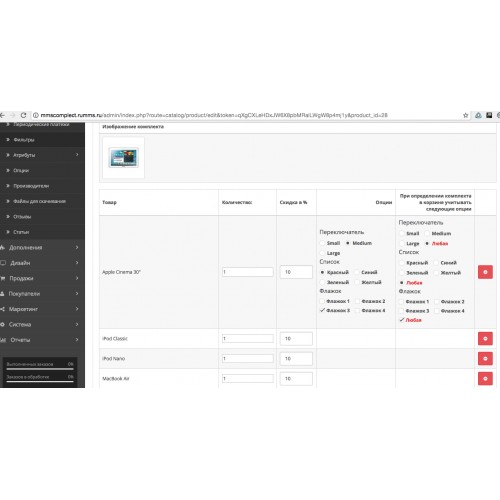
Any goods in store can be presented as a set of other goods in store with a certain set of options.
Each product in the bundle can be assigned with a personal discount.
The display of the Kit at the front does not differ in any way from the withdrawal of an ordinary commodity, with one exception,
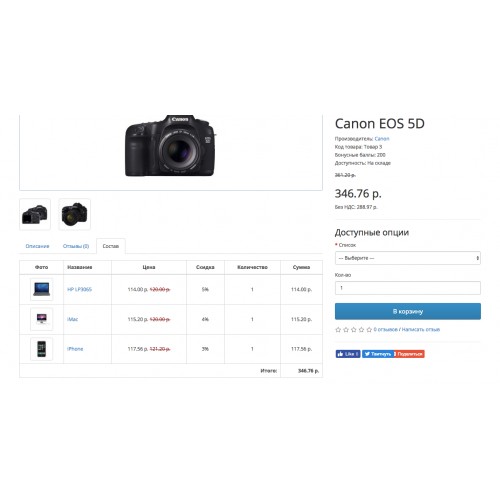
in the goods card of the Kit, an additional tab "Composition" is added, in which the funerior is made up the composition of the kit.
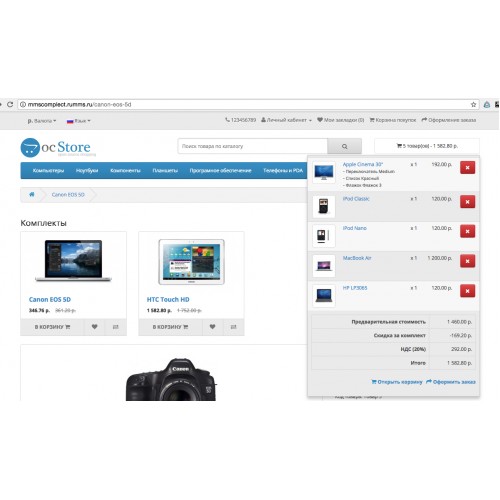
When adding a set to the cart, add all the goods from the kit to the cart.
At the same time, there is a discount for the kit, which is calculated on the basis of a personal discount on the goods in the kit.
Module allows you to automatically determine the set in the basket, in the event that the customer added to the cart the goods included in the basket
any of the kits from the catalog, thereby the client will be given a discount for the kit.
The module also includes:
1. MMS module Kits Banner (MMS Kits Banner) with which you can display a set of kits anywhere on the site, according to page layouts.
2. MMS module Together cheaper (MMS Kits Together Cheaper) with which you can display the kits on the Goods page with the product included.
Demonstration of the module:
Front:
http://mmscomplect.rumms.ru/htc-touch-hd
Admin panel:
http://mmscomplect.rumms.ru/admin
demo / demo
How to install:
1. Move content from the folder "upload" in the archive to the server at the root of your site.
2. Go to module settings Modules -> Extensions.
3. Update the modification cache.
4. Install the module "MMS Sets".
5. Go to the "MMS Sets" settings and turn it on.
6. To calculate the discount in the shopping cart, include the module "Take into account in the order" -> "MMS Discount per set".
Compatible with 2.3.
Any goods in store can be presented as a set of other goods in store with a certain set of options.
Each product in the bundle can be assigned with a personal discount.
The display of the Kit at the front does not differ in any way from the withdrawal of an ordinary commodity, with one exception,
in the goods card of the Kit, an additional tab "Composition" is added, in which the funerior is made up the composition of the kit.
When adding a set to the cart, add all the goods from the kit to the cart.
At the same time, there is a discount for the kit, which is calculated on the basis of a personal discount on the goods in the kit.
Module allows you to automatically determine the set in the basket, in the event that the customer added to the cart the goods included in the basket
any of the kits from the catalog, thereby the client will be given a discount for the kit.
The module also includes:
1. MMS module Kits Banner (MMS Kits Banner) with which you can display a set of kits anywhere on the site, according to page layouts.
2. MMS module Together cheaper (MMS Kits Together Cheaper) with which you can display the kits on the Goods page with the product included.
Demonstration of the module:
Front:
http://mmscomplect.rumms.ru/htc-touch-hd
Admin panel:
http://mmscomplect.rumms.ru/admin
demo / demo
How to install:
1. Move content from the folder "upload" in the archive to the server at the root of your site.
2. Go to module settings Modules -> Extensions.
3. Update the modification cache.
4. Install the module "MMS Sets".
5. Go to the "MMS Sets" settings and turn it on.
6. To calculate the discount in the shopping cart, include the module "Take into account in the order" -> "MMS Discount per set".
Compatible with 2.3.
Price
$20.00
- Developed by OpenCart Community
- 12 Months Free Support
- Documentation Included
Rating
Compatibility
2.3.0.0
Last Update
27 Apr 2019
Created
14 Jul 2018
0 Sales
0 Comments

Login and write down your comment.
Login my OpenCart Account