Barcode, QRcode, Dimension, Weight, RTL (PDF Invoice Plus)
https://www.youtube.com/watch?v=8DKtJwZ7eWk
PDF Invoice Plus
Enhanced extension module of PDF Invoice by Opencart-Templates
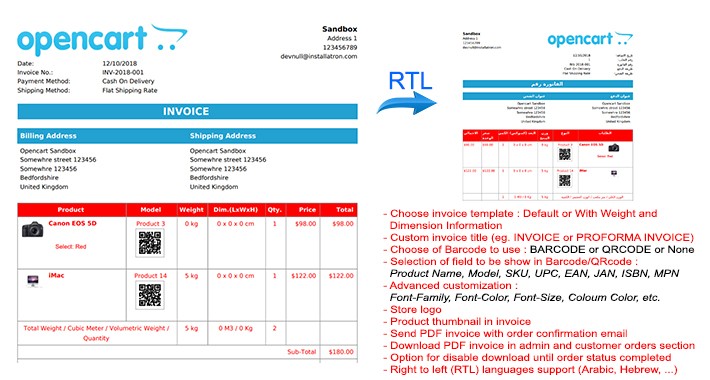
- Choose invoice template : Default, with Weight and Dimension Information, Dispatch Note/Picking List
- Custom invoice title (eg. 'invoice, 'proforma invoice' , 'dispatch note, etc)
- Choose of Barcode to use : BARCODE or QRCODE or None
- Selection of field to be show in Barcode/QRcode : Product Name, Model, SKU, UPC, EAN, JAN, ISBN, MPN
- Advanced customization : Font-Family, Font-Color, Font-Size, Column Color, etc.
- Store logo
- Product thumbnail in invoice
- Send PDF invoice with order confirmation email
- Download PDF invoice in admin and customer orders section
- Option for disable download until order status completed
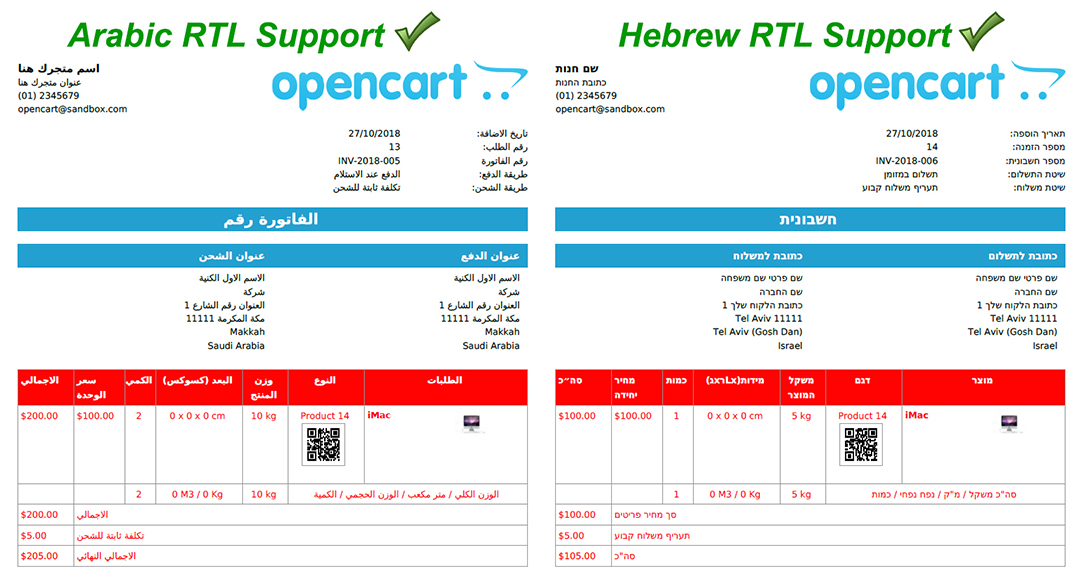
- Right to left languages support (Arabic, Hebrew, ...)
Change log :
1.0.1 :
- Add dispatch note/picking list print feature -Fixes LTR template
1.0.2 :
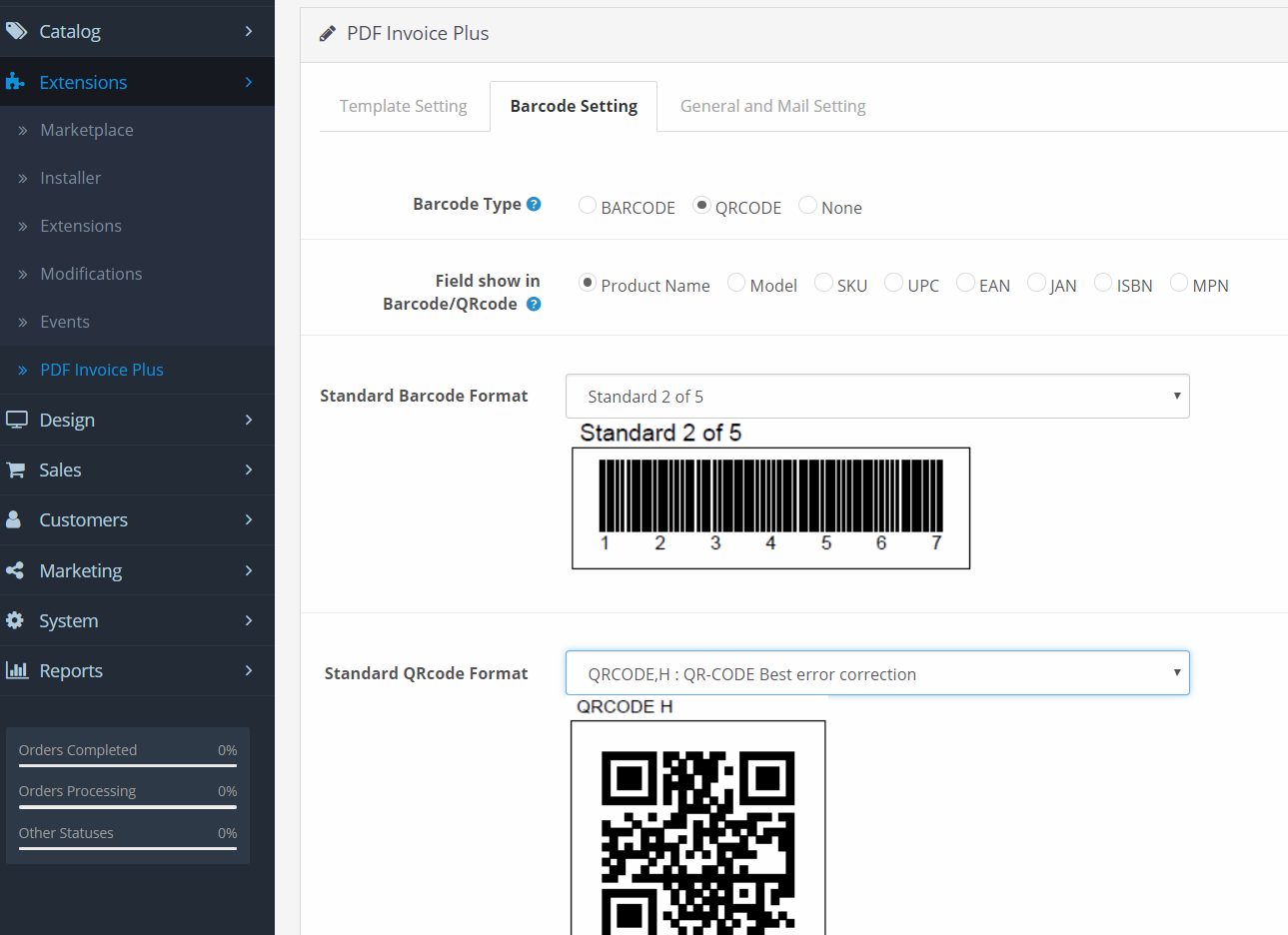
- Add 29 International Barcode Standard Format in barcode setting menu :
CODE 39 - ANSI MH10.8M-1983 - USD-3 - 3 of 9, CODE 39 + CHECKSUM, CODE 39 EXTENDED, CODE 39 EXTENDED + CHECKSUM, CODE 93 - USS-93, Standard 2 of 5, Standard 2 of 5 + CHECKSUM, Interleaved 2 of 5, Interleaved 2 of 5 + CHECKSUM, CODE 128 AUTO, CODE 128 A, CODE 128 B, CODE 128 C, EAN 8, EAN 13, UPC-A, UPC-E, 5-Digits UPC-Based Extension, 2-Digits UPC-Based Extension, MSI, MSI + CHECKSUM (module 11), CODABAR, CODE 11, PHARMACODE, PHARMACODE TWO-TRACKS, IMB - Intelligent Mail Barcode - Onecode - USPS-B-3200, POSTNET, PLANET, RMS4CC (Royal Mail 4-state Customer Code) - CBC (Customer Bar Code)
- Add 5 International QRcode Standard Format in barcode setting menu :
QRCODE,L : QR-CODE Low error correction, QRCODE,M : QR-CODE Medium error correction, QRCODE,Q : QR-CODE Better error correction, QRCODE,H : QR-CODE Best error correction, DATAMATRIX (ISO/IEC 16022:2006)
1.0.3
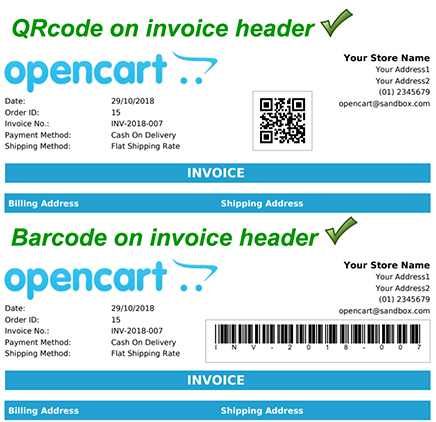
- Add Barcode/QRcode on Invoice Header
- Add selection data and custom text to show on Barcode/Qrcode on Invoice Header
- Add custom barcode adjustment position
- Add selection data and custom text to show on Invoice Title
1.0.4 (Paid Version)
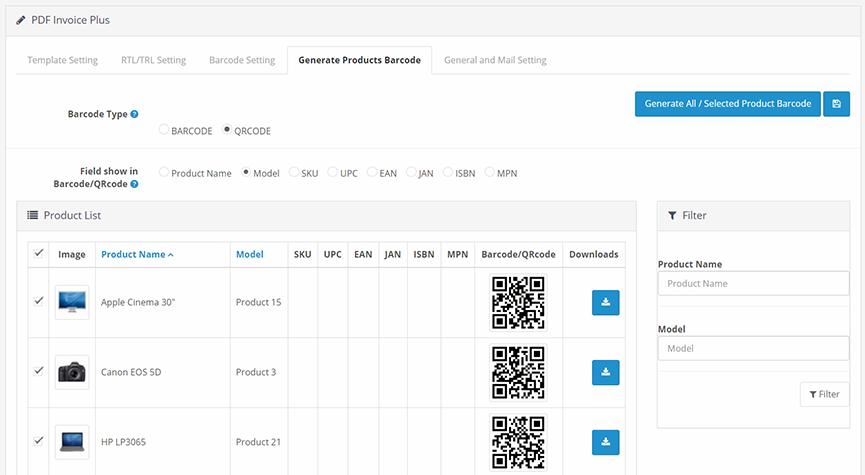
- Add Generate Products Barcode / QRcode
- Option to select data to generate : Product Name, Model, SKU, UPC, EAN, JAN, ISBN, MPN
- Option to generate selected product barcode
- Option to generate all products barcode in one click
- Option to download barcode image file in .PNG format
- Option to choose different barcode type for each product
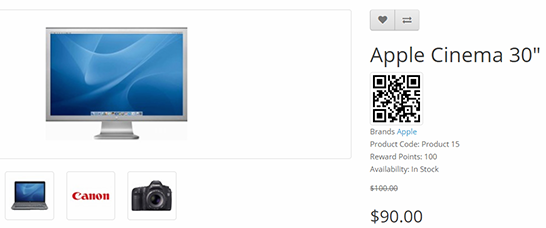
- Show barcode/Qrcode at front-end Product Page
- Option to show different barcode type for different product at front-end Product Page
- Some bug fixes of previous version, improvement function and relayout menu.
- Possible to use later in more wide scale purpose i.e. Point of Sales (POS), Inventory System, Warehouse Management, etc.
1.0.5 (Paid Version)
- Print Product Barcode List
- Quick product Edit with Barcode scan
PDF Invoice Plus
Enhanced extension module of PDF Invoice by Opencart-Templates
- Choose invoice template : Default, with Weight and Dimension Information, Dispatch Note/Picking List
- Custom invoice title (eg. 'invoice, 'proforma invoice' , 'dispatch note, etc)
- Choose of Barcode to use : BARCODE or QRCODE or None
- Selection of field to be show in Barcode/QRcode : Product Name, Model, SKU, UPC, EAN, JAN, ISBN, MPN
- Advanced customization : Font-Family, Font-Color, Font-Size, Column Color, etc.
- Store logo
- Product thumbnail in invoice
- Send PDF invoice with order confirmation email
- Download PDF invoice in admin and customer orders section
- Option for disable download until order status completed
- Right to left languages support (Arabic, Hebrew, ...)
Change log :
1.0.1 :
- Add dispatch note/picking list print feature -Fixes LTR template
1.0.2 :
- Add 29 International Barcode Standard Format in barcode setting menu :
CODE 39 - ANSI MH10.8M-1983 - USD-3 - 3 of 9, CODE 39 + CHECKSUM, CODE 39 EXTENDED, CODE 39 EXTENDED + CHECKSUM, CODE 93 - USS-93, Standard 2 of 5, Standard 2 of 5 + CHECKSUM, Interleaved 2 of 5, Interleaved 2 of 5 + CHECKSUM, CODE 128 AUTO, CODE 128 A, CODE 128 B, CODE 128 C, EAN 8, EAN 13, UPC-A, UPC-E, 5-Digits UPC-Based Extension, 2-Digits UPC-Based Extension, MSI, MSI + CHECKSUM (module 11), CODABAR, CODE 11, PHARMACODE, PHARMACODE TWO-TRACKS, IMB - Intelligent Mail Barcode - Onecode - USPS-B-3200, POSTNET, PLANET, RMS4CC (Royal Mail 4-state Customer Code) - CBC (Customer Bar Code)
- Add 5 International QRcode Standard Format in barcode setting menu :
QRCODE,L : QR-CODE Low error correction, QRCODE,M : QR-CODE Medium error correction, QRCODE,Q : QR-CODE Better error correction, QRCODE,H : QR-CODE Best error correction, DATAMATRIX (ISO/IEC 16022:2006)
1.0.3
- Add Barcode/QRcode on Invoice Header
- Add selection data and custom text to show on Barcode/Qrcode on Invoice Header
- Add custom barcode adjustment position
- Add selection data and custom text to show on Invoice Title
1.0.4 (Paid Version)
- Add Generate Products Barcode / QRcode
- Option to select data to generate : Product Name, Model, SKU, UPC, EAN, JAN, ISBN, MPN
- Option to generate selected product barcode
- Option to generate all products barcode in one click
- Option to download barcode image file in .PNG format
- Option to choose different barcode type for each product
- Show barcode/Qrcode at front-end Product Page
- Option to show different barcode type for different product at front-end Product Page
- Some bug fixes of previous version, improvement function and relayout menu.
- Possible to use later in more wide scale purpose i.e. Point of Sales (POS), Inventory System, Warehouse Management, etc.
1.0.5 (Paid Version)
- Print Product Barcode List
- Quick product Edit with Barcode scan
What customers say about Barcode, QRcode, Dimension, Weight, RTL (PDF Invoice Plus)

This is the single best invoice mod I have seen so far.
~neatpleats
~neatpleats
Download
- Developed by OpenCart Community
- Documentation Included
Rating
Compatibility
3.0.2.0, 3.0.2.0, 3.0.0.0, 3.0.1.0, 3.0.1.1, 3.0.1.2, 3.0.1.3, 3.0.2.0
Last Update
14 Oct 2025
Created
23 Oct 2018
991 Downloads
16 Comments

Login and write down your comment.
Login my OpenCart Account