Admin Product Quantity, Price and Status change without refresh
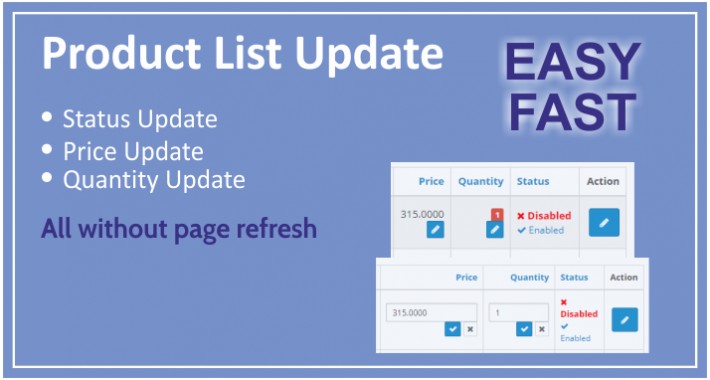
Product quantity, price and status update from Product List page.
This extension help us to update product quantity and status without open the edit page of product.
Just open product's page where all product be available.
Installation instruction
This installation instructions assume that you are running either fresh (just-installed) or customized installation of OpenCart.
Installation Using the Extension Installer
---------------------------------------------------
1) Login to your OpenCart admin panel. Once you do that, go to Extensions -> Extension Installer.
2) Click on the Upload button.
3) Find product-list-data-update-ZC.ocmod on your computer and Select File as per your version And load it.
4) OpenCart will begin the installation of the module along with the OCMod and when the operation is done you will receive the following message - Success: You have installed your extension!
5) Go to Extensions -> Modifications in order for the OCMod to be applied. Click the refresh icon to load the new files.
6) Go to Catalog -> Product -> you can see the status Enable / disable
Thank you
Support & Feature Requests
======================================================
Please address your questions, comments or issues by opening a support ticket at support@zapscart.com
=======================
Thanks for your choise!
If you liked this module - please Comment / rate him on module page or into your downloads
This extension help us to update product quantity and status without open the edit page of product.
Just open product's page where all product be available.
Installation instruction
This installation instructions assume that you are running either fresh (just-installed) or customized installation of OpenCart.
Installation Using the Extension Installer
---------------------------------------------------
1) Login to your OpenCart admin panel. Once you do that, go to Extensions -> Extension Installer.
2) Click on the Upload button.
3) Find product-list-data-update-ZC.ocmod on your computer and Select File as per your version And load it.
4) OpenCart will begin the installation of the module along with the OCMod and when the operation is done you will receive the following message - Success: You have installed your extension!
5) Go to Extensions -> Modifications in order for the OCMod to be applied. Click the refresh icon to load the new files.
6) Go to Catalog -> Product -> you can see the status Enable / disable
Thank you
Support & Feature Requests
======================================================
Please address your questions, comments or issues by opening a support ticket at support@zapscart.com
=======================
Thanks for your choise!
If you liked this module - please Comment / rate him on module page or into your downloads
What customers say about Admin Product Quantity, Price and Status change without refresh

After making the changes I noted on the Extension OC marketplace ad, it worked exactly as it should. Makes it much faster to edit price, quantity, and enable/disable the product.
~jrr
~jrr
Download
- Developed by OpenCart Community
- Documentation Included
Rating
Compatibility
3.0.0.0, 3.0.1.0, 3.0.1.1, 3.0.1.2, 3.0.1.3, 3.0.2.0, 4.x.x.x
Last Update
14 May 2020
Created
30 Nov 2018
485 Downloads
3 Comments

Login and write down your comment.
Login my OpenCart Account