Improved Search & Filter Engine

Opencart 3 Admin (login&password: userSearch)
Opencart 3 Public
iSellSoft Search & Filter Engine (ISSE) - is a new engine, that provides global engine changes in order to enhance searching possibilities of your website. Our engine also speeds up loading of all pages, that are related to products or categories.
Detailed overview
The old standard Opencart engine, that deals with getting the list of product on your website has many drawbacks. In addition to inaccuracies, the main disadvantage is low speed. Extraction of the list of products from the database is carried out in a very inefficient way, thus greatly slows down the loading of all pages related to products and categories.
iSellSoft Search & Filter Engine replaces the old standard engine and eliminates all its limitations. It is generally a new system that allows you to speed up interaction with the database. Imperfection of the old engine is not so significant in a case, if there are about 20-30 products in your database. But, if we are talking about several hundreds of products, such drawbacks will be too noticeable and impossible to be ignored. Our engine doesn’t fix errors of the old engine. Our engine replaces the old one. The system of extracting products from the database is built in a radically different way, which makes it possible to speed up the work of the site several times.
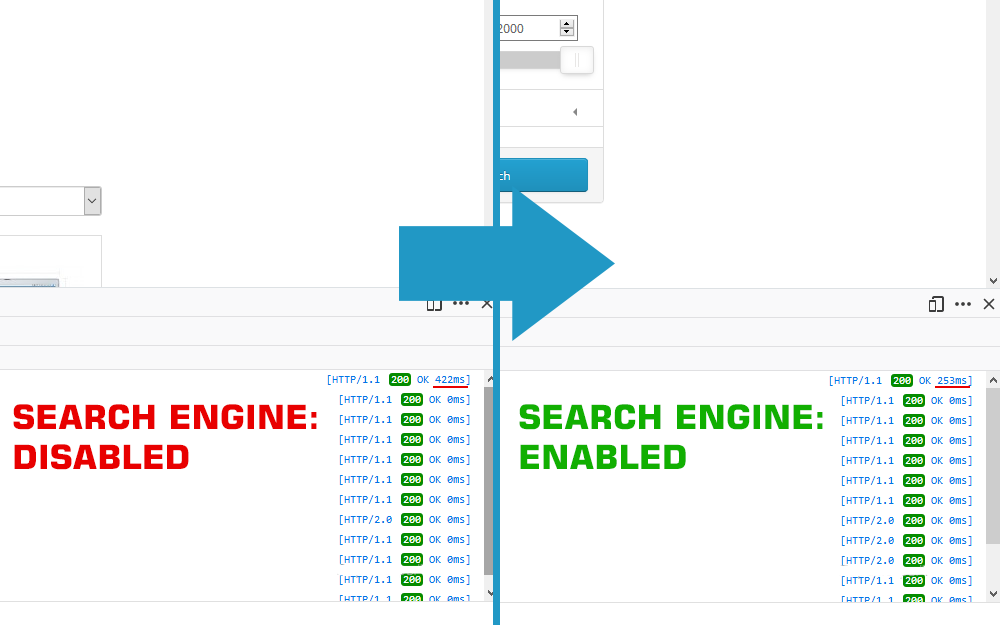
This new engine is implemented ElasticSearch technology. This technology allows you to use search based on the morphology of the language. It supports multithreading and increases the speed of the search. In addition to this, our search system is based on the principle of results ranking, which means result that most similar to the query will be displayed higher, i.e. first of all you will see those results that are more similar to the query in the search field.
Our system also concerns changes in the standard Opencart filter. In front-end, the filter remained almost unchanged. However, actually, it is a completely new filter, unlike the previous one and works 10 times faster. Moreover, using our system, a user can interact with filter on the search page to sort products directly during the searching process. This function is very convenient for quick search and selection of products that contain necessary characteristics. However, for unknown reasons, this function was not available within the old standard Opencart engine.
The new engine has a built-in price filter, which also doesn’t exist in the native Opencart system. We didn’t release it as a separate plug-in, which should be installed on the native search engine, because the old system is not designed for such a filter and, therefore, it will seriously slow down filtering. With our new system, the price filter is as fast as possible.
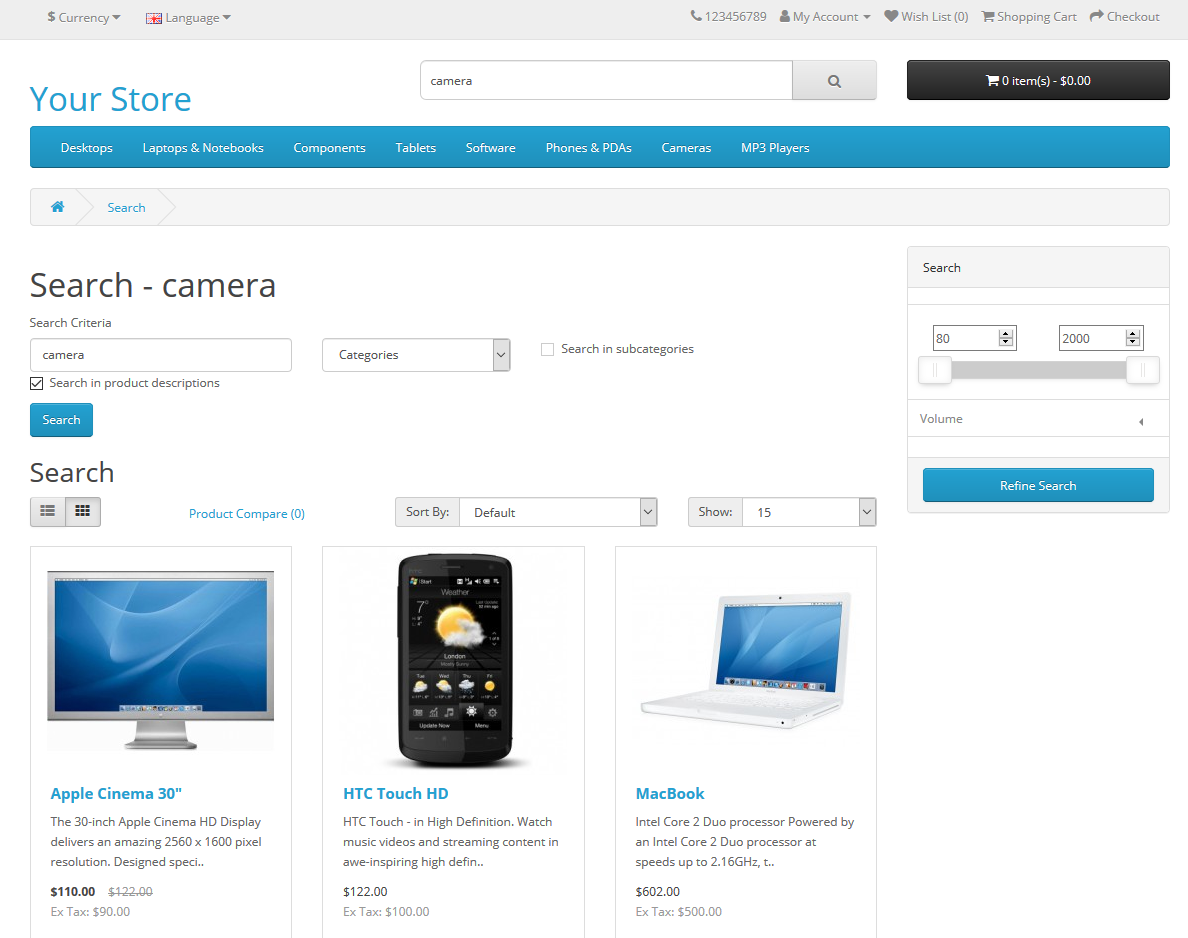
In iSellSoft Search & Filter Engine it’s also possible to search by product codes: model, mpn (Manufacturer Product Number), barcode etc. and description.
Feedback
Dear user, if you have any question about this product, just check documentation or write your question in comments section. We would be glad to answer and satisfy your interests.
And don't forget also to leave your feedback. Any notice about the product is very important for our team and its further development.
Documentation
IMPORTANT NOTE: you need to disable Count products within Category menu. The reason for such changes is that standart product count system meets conflict working together with our engine. In addition, such disabling will also speed up the loading of category page on your website. Just go to System -> Settings, choose Option tab and within the first row you will see Category Product Count option. Set it to No.
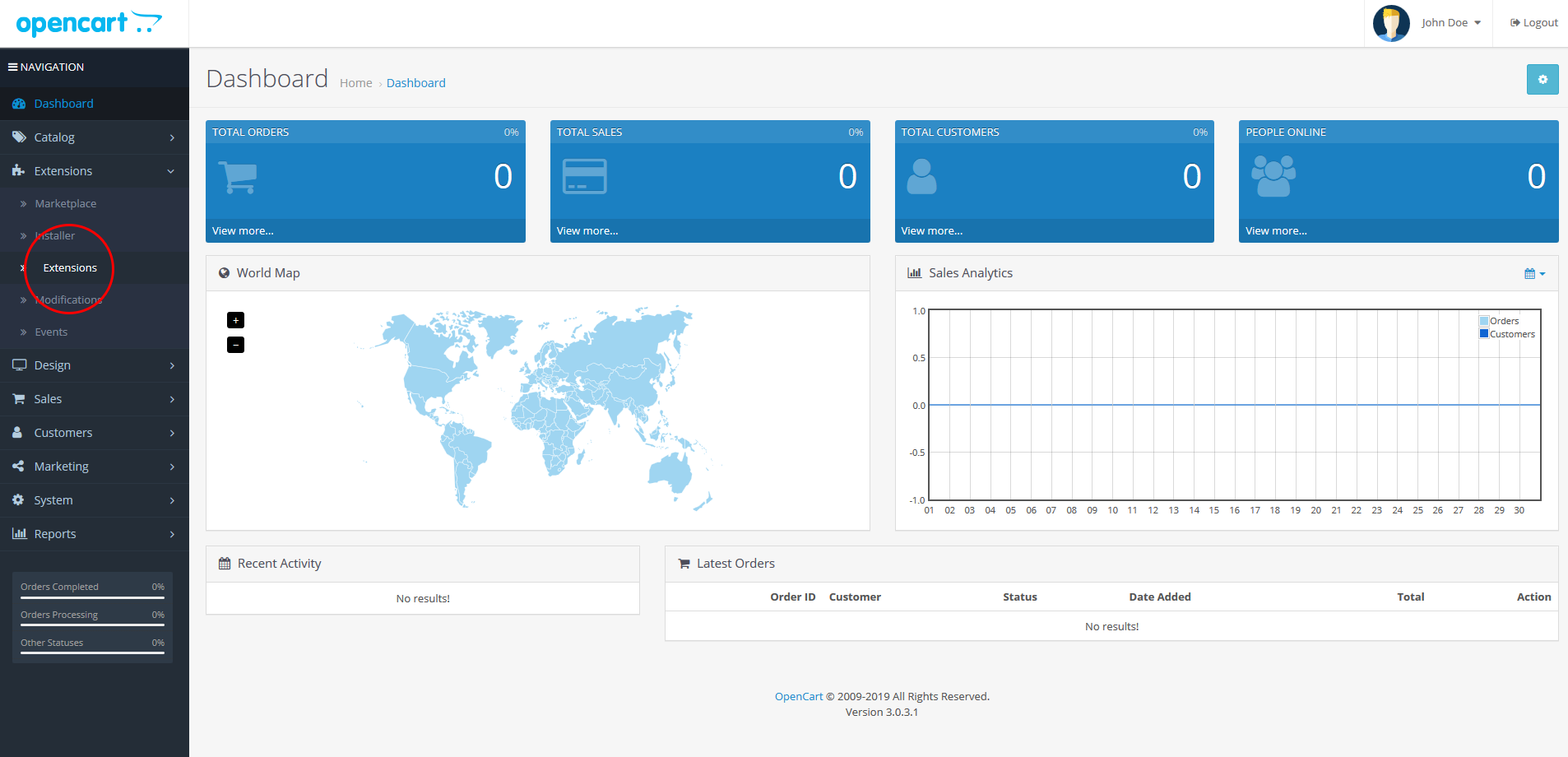
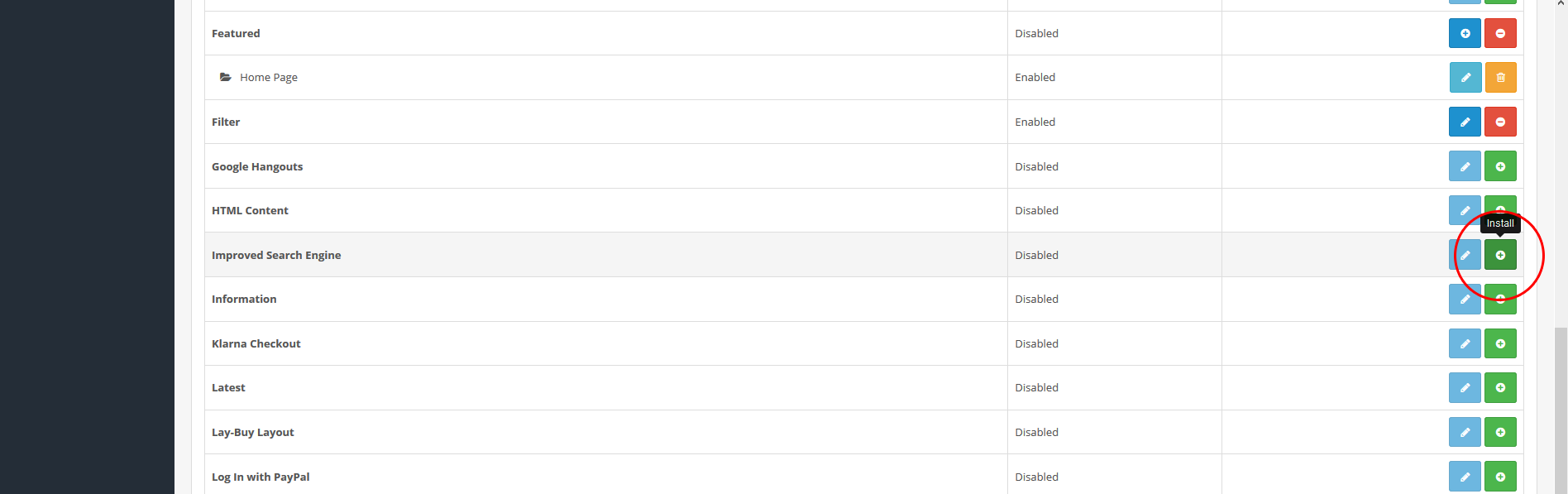
First of all, you need to upload zip file to your website in Extensions -> Installer. Then, go to Extensions -> Extensions and select Modules option:
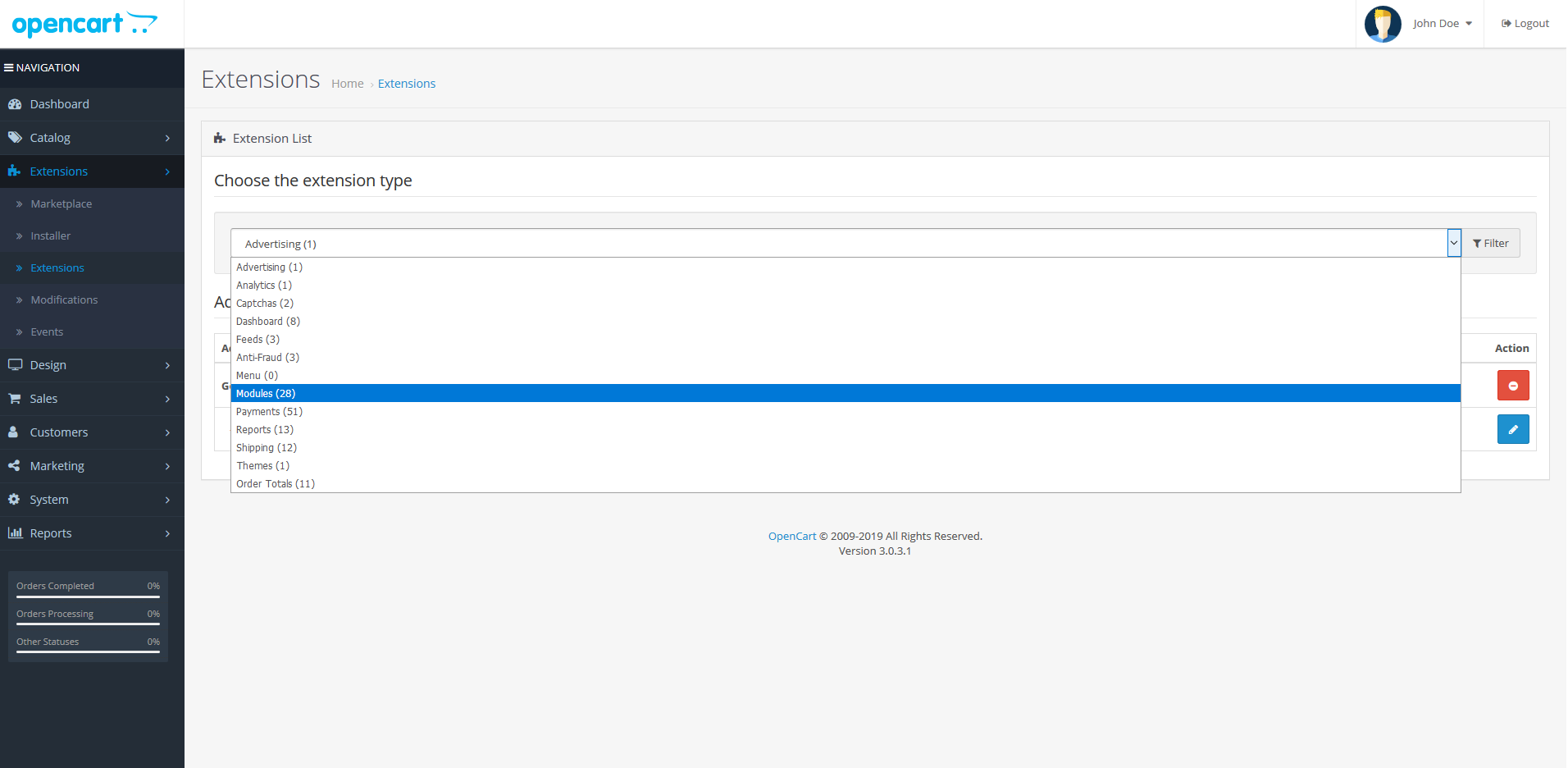
Here install the plug-in and click Edit:
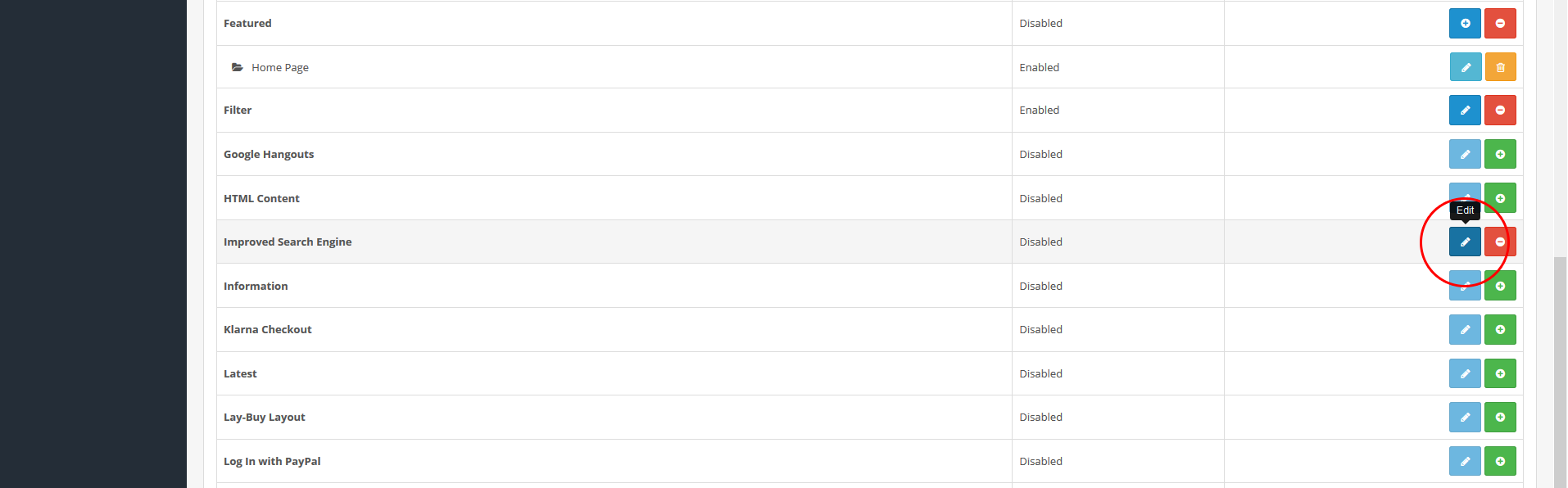
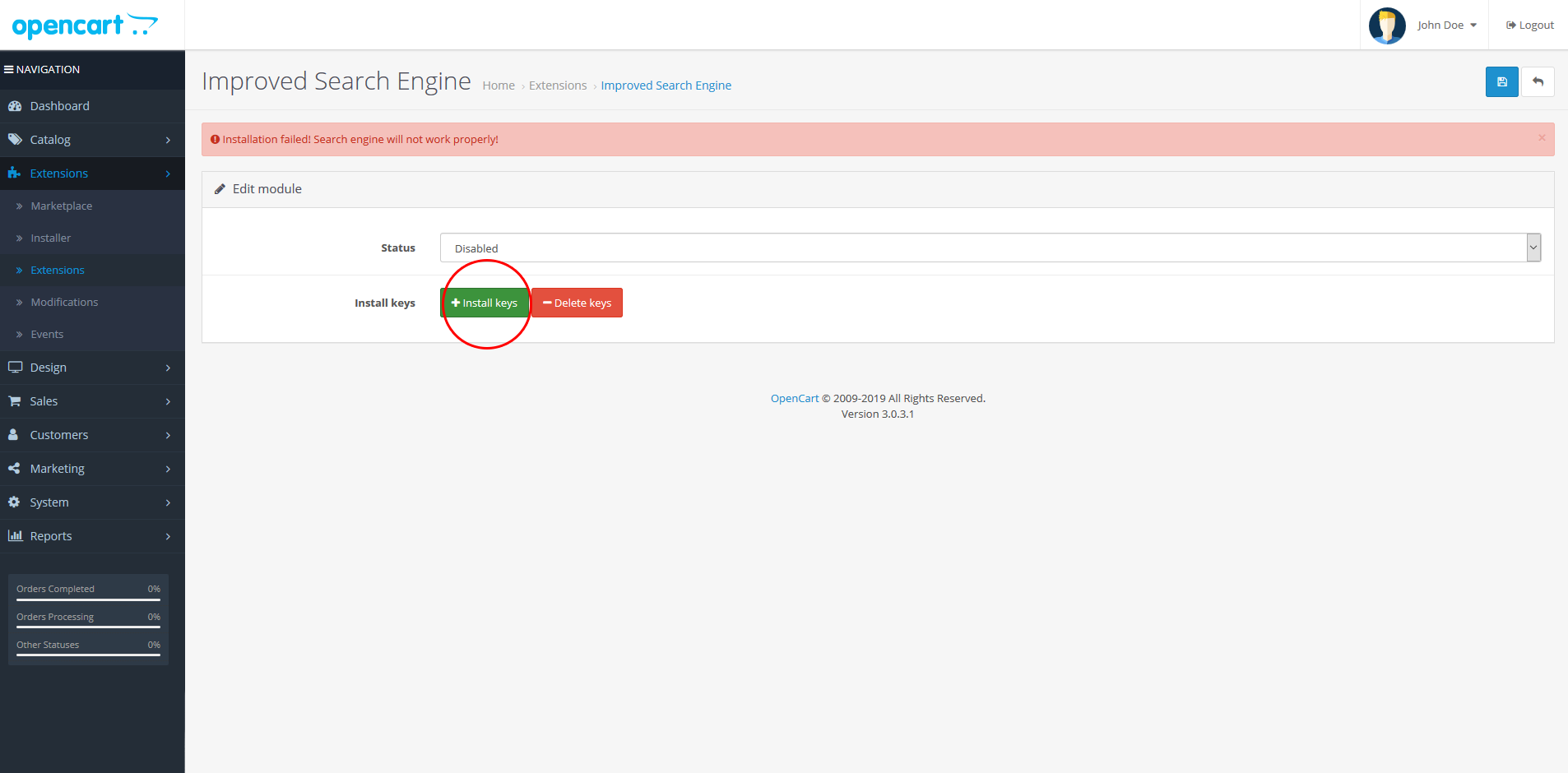
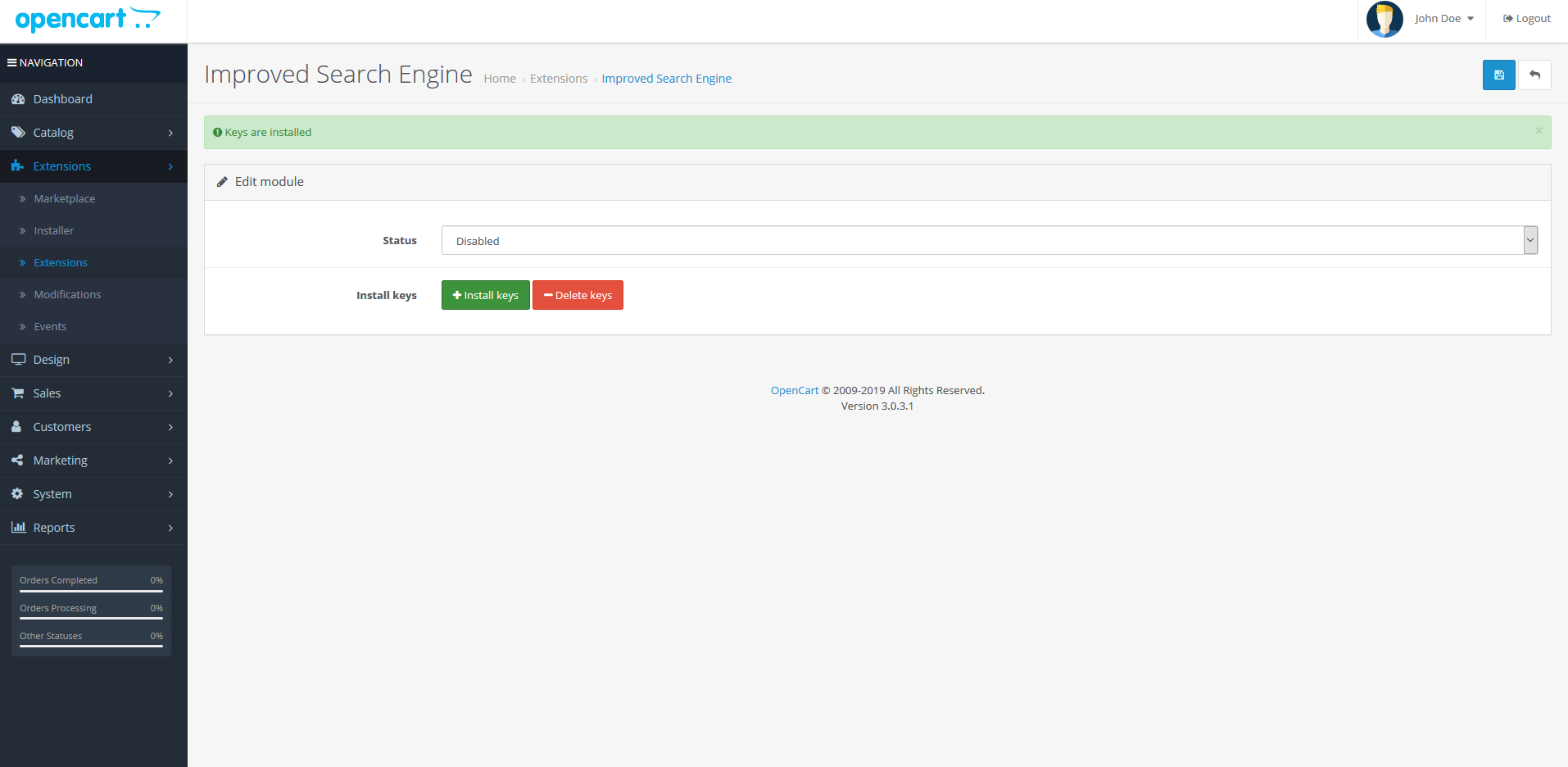
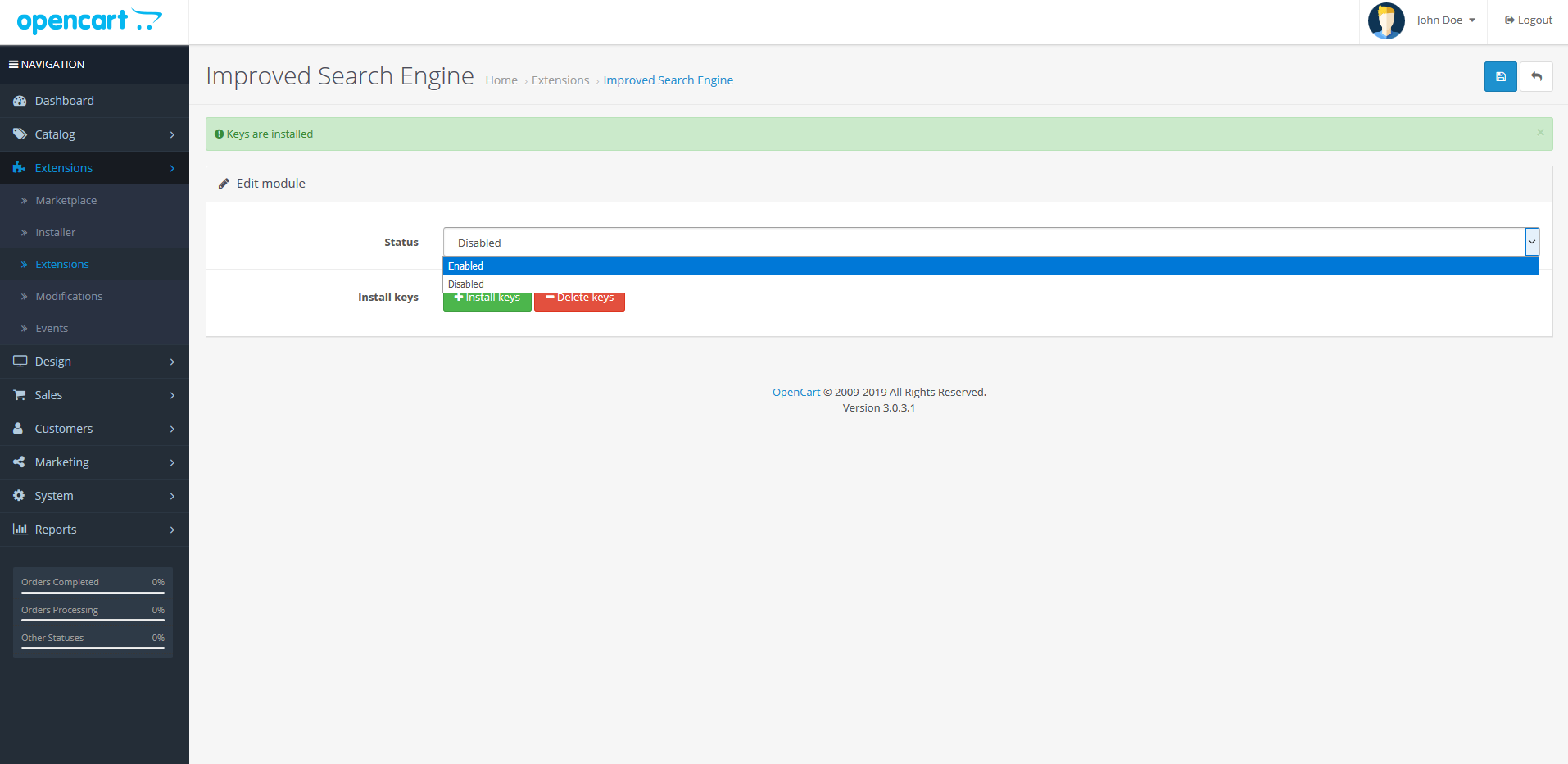
Now you can see plug-in page, where you are suggested to install keys in order to prepare your database for new Search Engine features. Click Install Keys and when keys are installed enable plug-in by choosing Enable option:
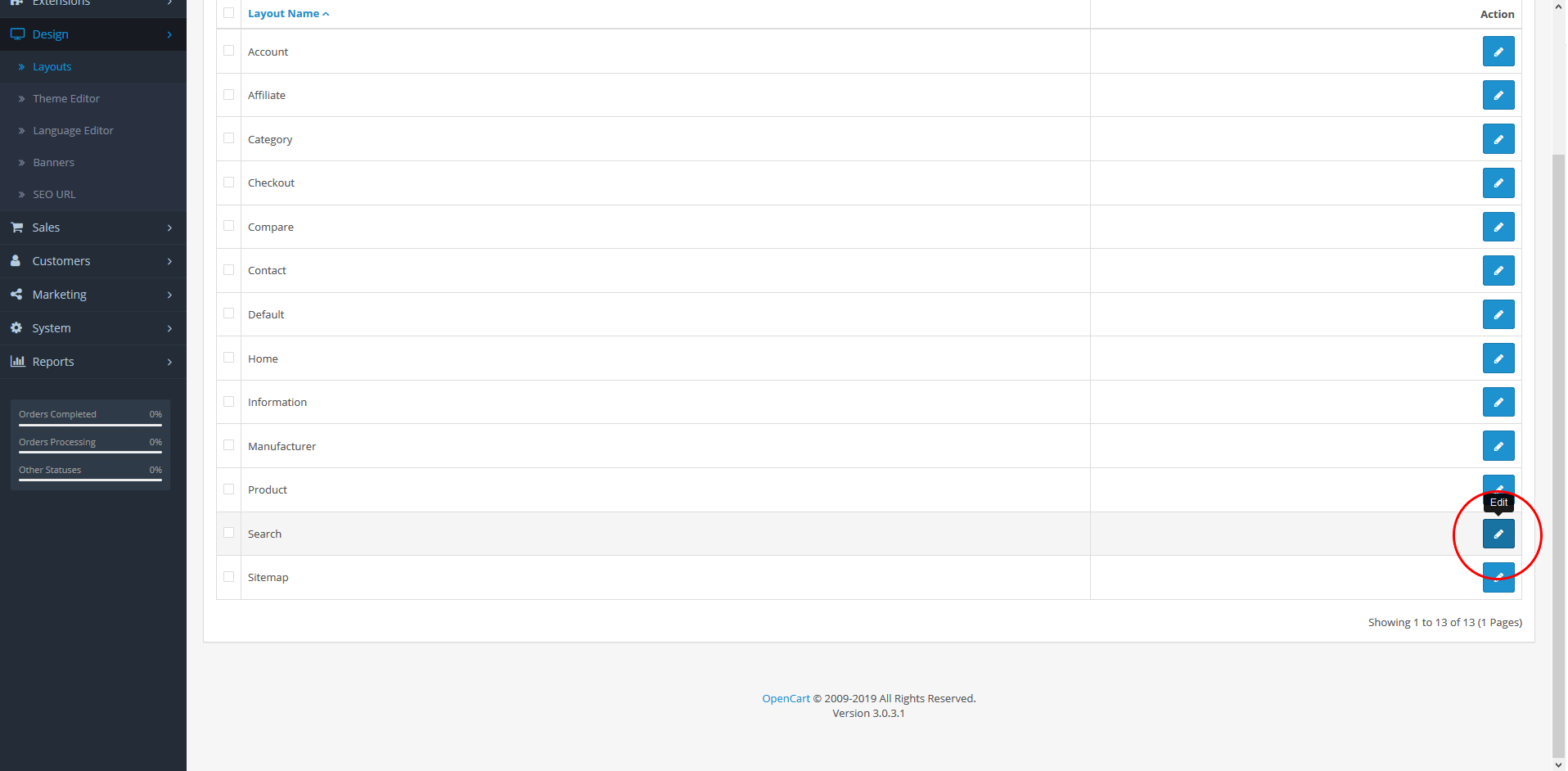
The next step is to enable the filter on search page of your front-end. Go to Design -> Layouts, find Search and click Edit:
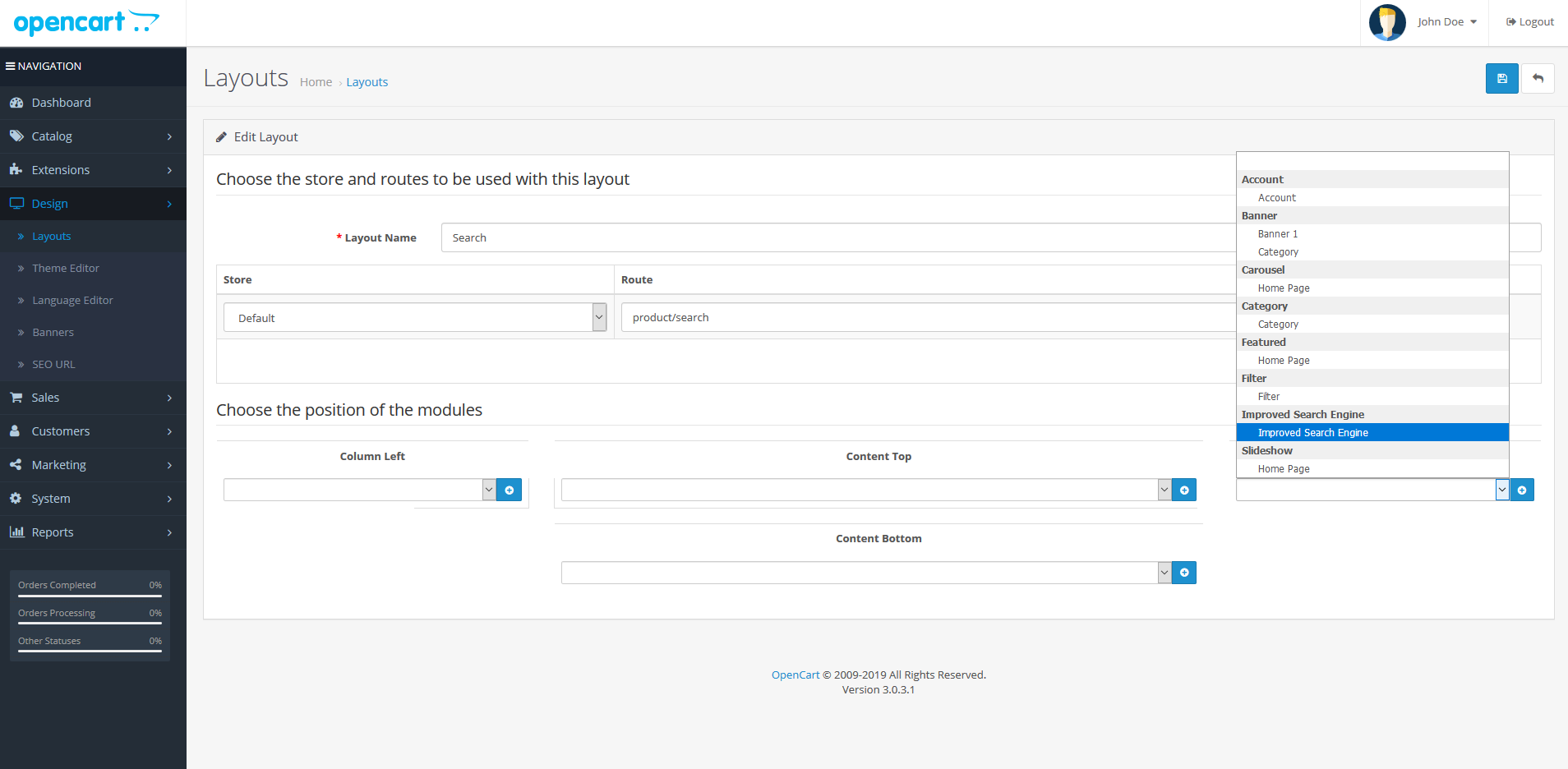
On the Layout Editor page choose needed place (Right or Left column, Top or Bottom content) and select Improved Search Engine in the list as below:
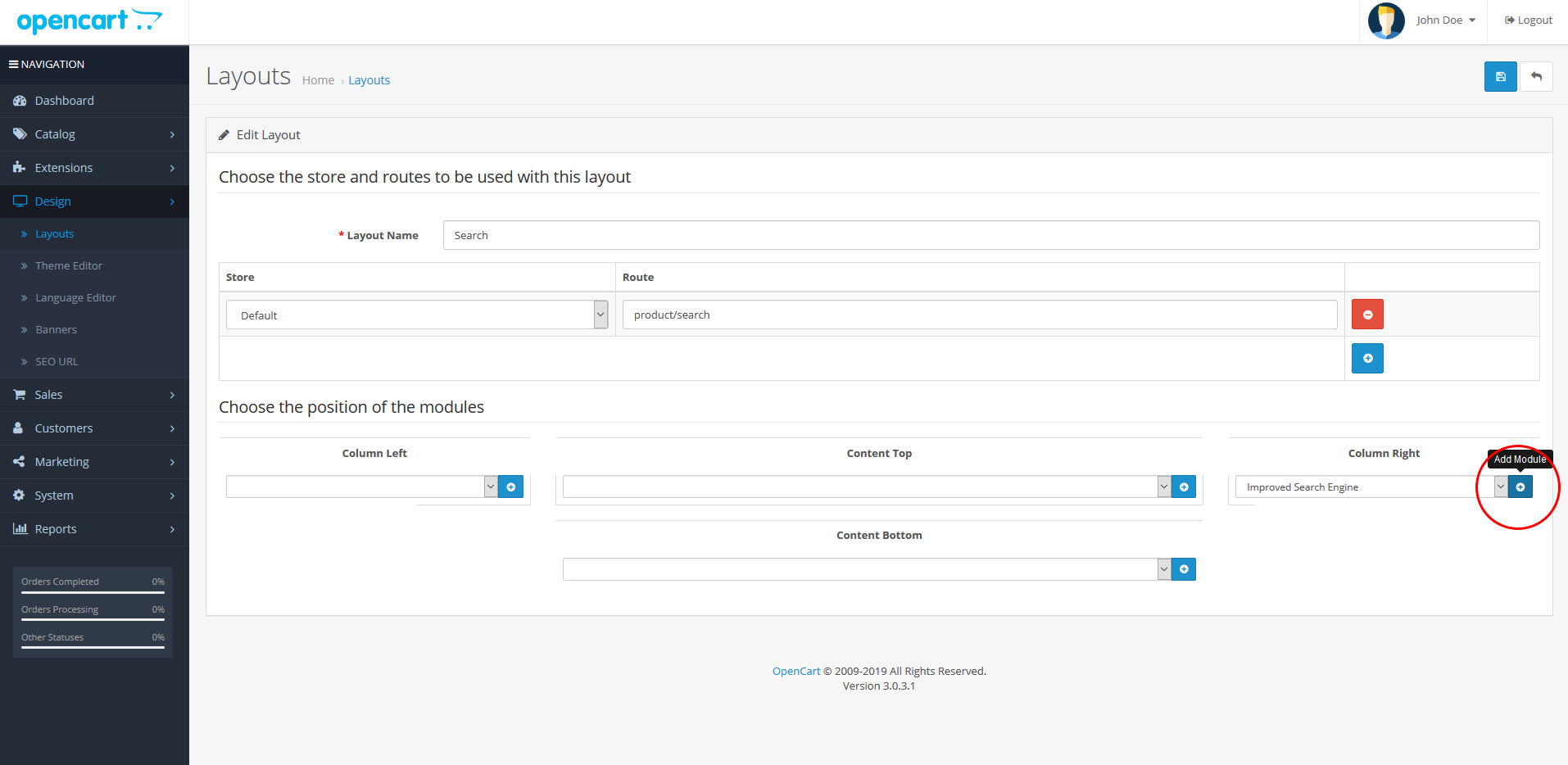
Click Add Module (blue button with white "plus" icon inside) and than click Save at the top of the page:
If you want to enable filter elsewhere, go to Design -> Layouts, select needed layout and repeat last operation.
Finally, go to front-end of your website and get amazed with how much your search system has become faster and more precise. Congratulations! You have installed Improved Search & Filter Engine to your website!
Have any problems? Just contact us on info@isellsoft.ru or leave a comment where describe your problem. Any issue will be solved in short time.
Thank you, dear friend.
Opencart 3 Public
iSellSoft Search & Filter Engine (ISSE) - is a new engine, that provides global engine changes in order to enhance searching possibilities of your website. Our engine also speeds up loading of all pages, that are related to products or categories.
Detailed overview
The old standard Opencart engine, that deals with getting the list of product on your website has many drawbacks. In addition to inaccuracies, the main disadvantage is low speed. Extraction of the list of products from the database is carried out in a very inefficient way, thus greatly slows down the loading of all pages related to products and categories.
iSellSoft Search & Filter Engine replaces the old standard engine and eliminates all its limitations. It is generally a new system that allows you to speed up interaction with the database. Imperfection of the old engine is not so significant in a case, if there are about 20-30 products in your database. But, if we are talking about several hundreds of products, such drawbacks will be too noticeable and impossible to be ignored. Our engine doesn’t fix errors of the old engine. Our engine replaces the old one. The system of extracting products from the database is built in a radically different way, which makes it possible to speed up the work of the site several times.
This new engine is implemented ElasticSearch technology. This technology allows you to use search based on the morphology of the language. It supports multithreading and increases the speed of the search. In addition to this, our search system is based on the principle of results ranking, which means result that most similar to the query will be displayed higher, i.e. first of all you will see those results that are more similar to the query in the search field.
Our system also concerns changes in the standard Opencart filter. In front-end, the filter remained almost unchanged. However, actually, it is a completely new filter, unlike the previous one and works 10 times faster. Moreover, using our system, a user can interact with filter on the search page to sort products directly during the searching process. This function is very convenient for quick search and selection of products that contain necessary characteristics. However, for unknown reasons, this function was not available within the old standard Opencart engine.
The new engine has a built-in price filter, which also doesn’t exist in the native Opencart system. We didn’t release it as a separate plug-in, which should be installed on the native search engine, because the old system is not designed for such a filter and, therefore, it will seriously slow down filtering. With our new system, the price filter is as fast as possible.
In iSellSoft Search & Filter Engine it’s also possible to search by product codes: model, mpn (Manufacturer Product Number), barcode etc. and description.
Feedback
Dear user, if you have any question about this product, just check documentation or write your question in comments section. We would be glad to answer and satisfy your interests.
And don't forget also to leave your feedback. Any notice about the product is very important for our team and its further development.
Documentation
IMPORTANT NOTE: you need to disable Count products within Category menu. The reason for such changes is that standart product count system meets conflict working together with our engine. In addition, such disabling will also speed up the loading of category page on your website. Just go to System -> Settings, choose Option tab and within the first row you will see Category Product Count option. Set it to No.
First of all, you need to upload zip file to your website in Extensions -> Installer. Then, go to Extensions -> Extensions and select Modules option:
Here install the plug-in and click Edit:
Now you can see plug-in page, where you are suggested to install keys in order to prepare your database for new Search Engine features. Click Install Keys and when keys are installed enable plug-in by choosing Enable option:
The next step is to enable the filter on search page of your front-end. Go to Design -> Layouts, find Search and click Edit:
On the Layout Editor page choose needed place (Right or Left column, Top or Bottom content) and select Improved Search Engine in the list as below:
Click Add Module (blue button with white "plus" icon inside) and than click Save at the top of the page:
If you want to enable filter elsewhere, go to Design -> Layouts, select needed layout and repeat last operation.
Finally, go to front-end of your website and get amazed with how much your search system has become faster and more precise. Congratulations! You have installed Improved Search & Filter Engine to your website!
Have any problems? Just contact us on info@isellsoft.ru or leave a comment where describe your problem. Any issue will be solved in short time.
Thank you, dear friend.
Price
$35.00
- Developed by OpenCart Community
- Documentation Included
Rating
Compatibility
3.0.0.0, 3.0.1.0, 3.0.1.1, 3.0.1.2, 3.0.1.3, 3.0.2.0, 4.x.x.x, 3.0.3.0, 3.0.3.1, 3.0.3.2
Last Update
20 Jul 2020
Created
8 Apr 2019
0 Sales
2 Comments

Login and write down your comment.
Login my OpenCart Account