Keep Customer Logged In

By default your customers need to log in every time they close their browser.
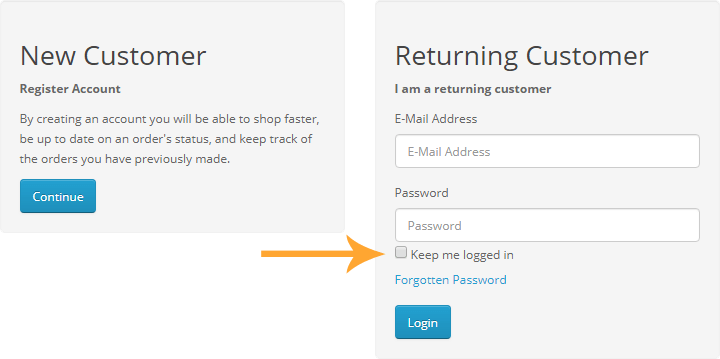
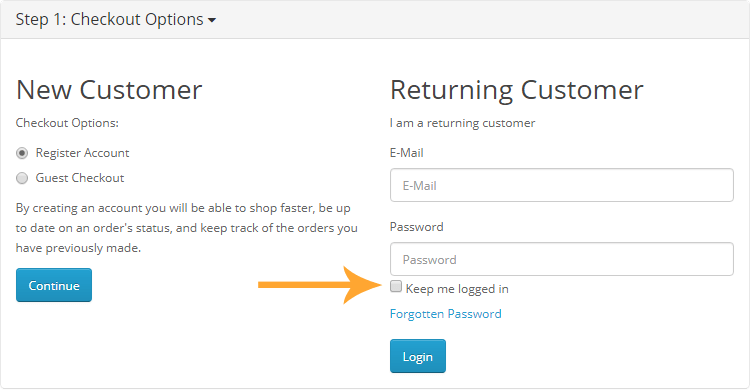
This extension adds a "Remember me" checkbox to the login form. when submitting the login form, if this checkbox is checked, they won’t have to login again in their next visits.
In the module settings you can define how many days customers should be logged in.
Live demo
Module settings
Front-end

Install Instructions
- Login to your OpenCart Administration panel
- Go to Extensions > Installer and upload zip file suited for your OpenCart version
- Go to Extensions > Extensions > module > Keep Customer Logged In > Install and configure it.
- Go to Extensions > Modifications and click Refresh
- Go to Dashboard > Developer Settings (gear icon) > Refresh
Free Installation and Support
No core files are changed or replaced.
This extension adds a "Remember me" checkbox to the login form. when submitting the login form, if this checkbox is checked, they won’t have to login again in their next visits.
In the module settings you can define how many days customers should be logged in.
Live demo
Module settings
Front-end
Install Instructions
- Login to your OpenCart Administration panel
- Go to Extensions > Installer and upload zip file suited for your OpenCart version
- Go to Extensions > Extensions > module > Keep Customer Logged In > Install and configure it.
- Go to Extensions > Modifications and click Refresh
- Go to Dashboard > Developer Settings (gear icon) > Refresh
Free Installation and Support
- sabeti05 [AT] gmail.com
- DigitCart Support
No core files are changed or replaced.
What customers say about Keep Customer Logged In

greate extension and developer. thanks for all.
~fatihcr
~fatihcr
Works perfectly on v 3.0.3.2, Thanks you for developing so great extension!
~muhip
~muhip
Price
$20.00
- Developed by OpenCart Community
- 12 Months Free Support
- Documentation Included
Rating
Compatibility
2.1.0.1, 2.1.0.2, 2.2.0.0, 2.3.0.2, 3.0.0.0, 3.0.1.0, 3.0.1.1, 3.0.1.2, 3.0.1.3, 3.0.2.0, 3.0.3.0, 3.0.3.1, 3.0.3.2, 3.0.3.3, 3.0.3.5, 3.0.3.6, 3.0.3.7, 3.0.3.8, 3.x.x.x, 3.0.3.9, 3.0.4.0, 3.0.4.1, 3.0.5.0
Last Update
26 May 2026
Created
1 Nov 2019
40 Sales
7 Comments

Login and write down your comment.
Login my OpenCart Account