SEO Last modified
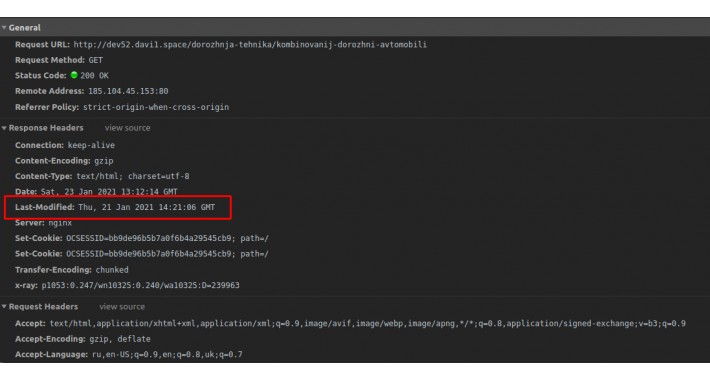
The last modified response header is a header sent by the server specifying the date of the last modification of the requested source. This is the formal definition of Last-Modified of HTTP headers, let’s break it down.
Suppose you have created a website and set the last-modified header. When a user browses your website, the user’s browser temporarily stores (caches) some information like HTML, images, style-sheets and even some infrequently changing dynamic content. All browsers always cache the resources by default, so no special header response is required.
Now the user likes your website and visits it again! This time you are even better than before. The server will check whether you have updated the website since the user’s last visit. If there is no change, the server sends a “304 not modified” reply to the browser, and the information loads from the local cache.
The last-modified header is a response header used with a request header called “If modified” header. The If-modified header sends a request to the server to know when the resource was last modified. The last-modified header tells the browser when the resource was last modified, and whether it should use the cached copy or download the newer version of the website. These are cache-control headers.
Only for product and category pages
Suppose you have created a website and set the last-modified header. When a user browses your website, the user’s browser temporarily stores (caches) some information like HTML, images, style-sheets and even some infrequently changing dynamic content. All browsers always cache the resources by default, so no special header response is required.
Now the user likes your website and visits it again! This time you are even better than before. The server will check whether you have updated the website since the user’s last visit. If there is no change, the server sends a “304 not modified” reply to the browser, and the information loads from the local cache.
The last-modified header is a response header used with a request header called “If modified” header. The If-modified header sends a request to the server to know when the resource was last modified. The last-modified header tells the browser when the resource was last modified, and whether it should use the cached copy or download the newer version of the website. These are cache-control headers.
Only for product and category pages
Download
- Developed by OpenCart Community
- Documentation Included
Rating
Compatibility
3.0.0.0, 3.0.1.0, 3.0.1.1, 3.0.1.2, 3.0.1.3, 3.0.2.0, 3.0.3.0, 3.0.3.1, 3.0.3.2
Last Update
23 Jan 2021
Created
18 Dec 2019
578 Downloads
5 Comments

Login and write down your comment.
Login my OpenCart Account