Auto Clear Shopping Cart After X Time

Email Support: opencarttools@gmail.com
WhatsApp Live Chat: Click Here
Live Demo
See the module in action before purchase.
Admin
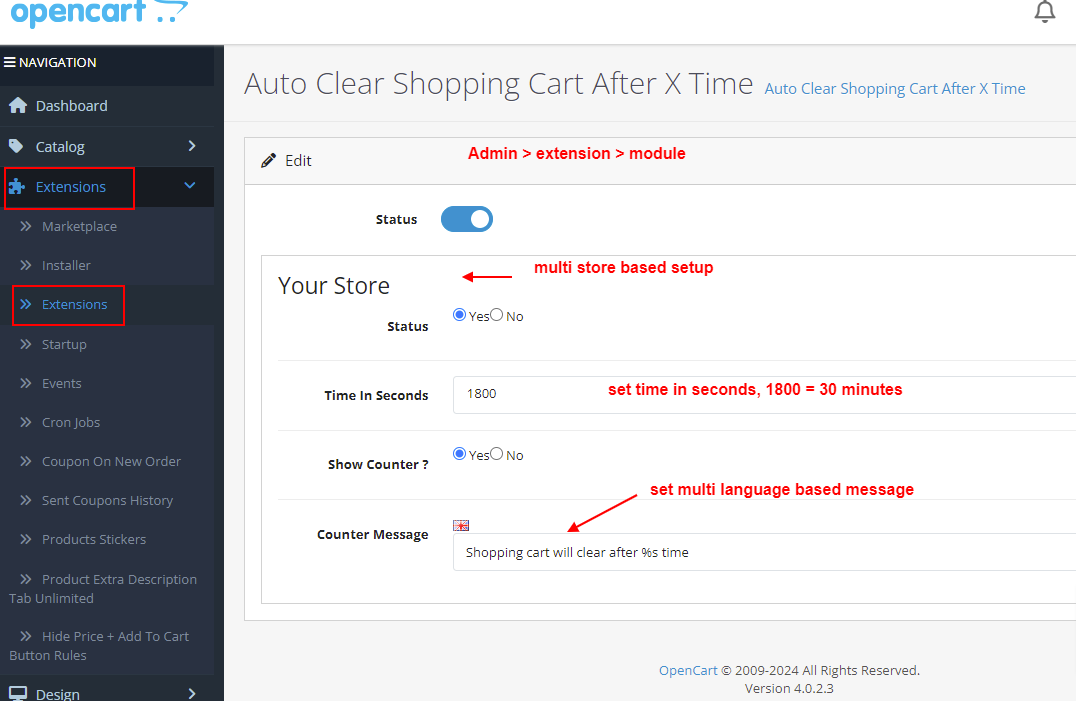
Admin > Extension > Module
Front
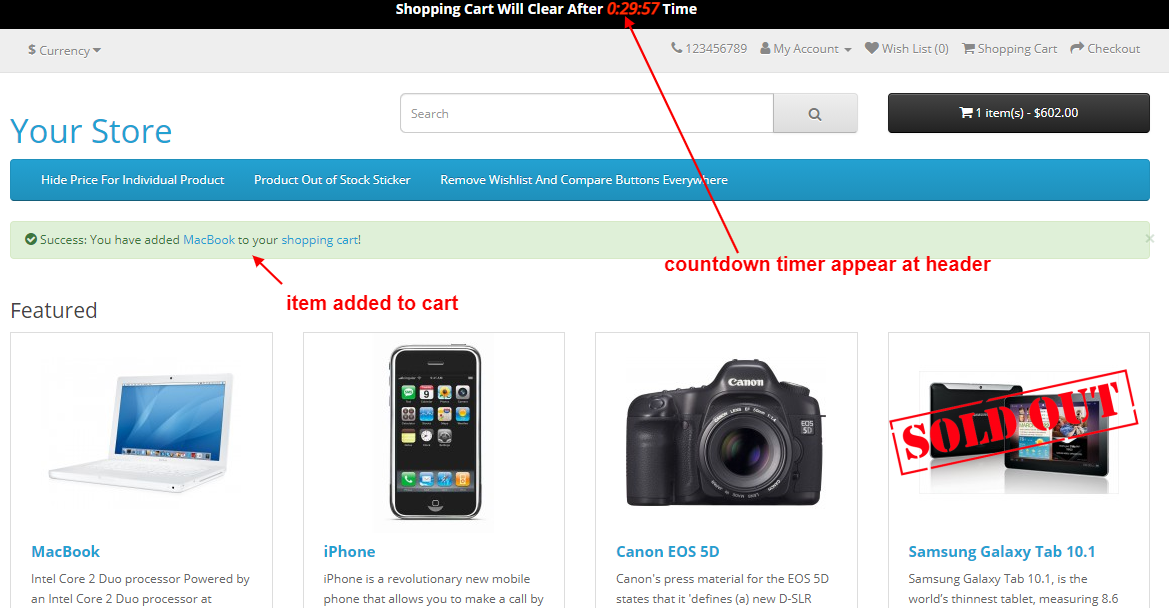
Home Page - add to cart any product
Title
Auto Clear Shopping Cart After X Time – OpenCart 2.x + 3.x + 4.x
Short Description
Automatically clear the shopping cart after a configurable timeout period.
Start the timer when a product is added to the cart and optionally display a real-time countdown timer in the header to inform customers before cart expiration.
Free Dedicated Support Included
We provide dedicated technical support to ensure smooth installation and usage of this module.
✔ Fast response time
✔ Installation guidance
✔ Bug fixes assistance
Key Features
Automatic Cart Expiration
✔ Auto clear shopping cart after configurable timeout
✔ Timeout set in seconds (e.g., 3600 = 1 hour, 7200 = 2 hours)
✔ Timer starts when first product is added to cart
✔ Works automatically without manual intervention
Real-Time Countdown Timer
✔ Optional countdown timer in header
✔ Displays remaining cart time to customers
✔ Real-time timer updates
✔ Clean and non-intrusive design
Improves transparency and urgency.
Flexible Configuration
✔ Enable or disable feature anytime
✔ Fully configurable timeout value
✔ Works per session automatically
✔ Suitable for flash sales and limited stock products
Stock & Cart Management
✔ Helps maintain accurate stock availability
✔ Prevents long-term abandoned carts
✔ Keeps cart contents fresh
✔ Reduces blocked inventory
Seamless Integration
✔ Does not affect checkout process
✔ No interference with payment gateways
✔ Works with default and custom themes
✔ Fully compatible with quick checkout modules
Technical Highlights
✔ 100% OCMOD Based
✔ No Core File Changes
✔ Lightweight & Performance Friendly
✔ Built using OpenCart Coding Standards
✔ Multi-language & Multi-store Supported
✔ Compatible with OpenCart 2.x, 3.x & 4.x
✔ Supports PHP 5.6 – 8.3
✔ Tested with Default Theme & Journal 3
Installation Steps
✔ Upload the extension via Admin → Extensions → Installer
✔ Go to Admin → Extensions → Modules
✔ Install and enable the module
✔ Set cart timeout duration
✔ Enable countdown timer if required
✔ Save settings
How It Works
✔ Customer adds product to cart
✔ Timer starts automatically
✔ Optional countdown timer displays remaining time
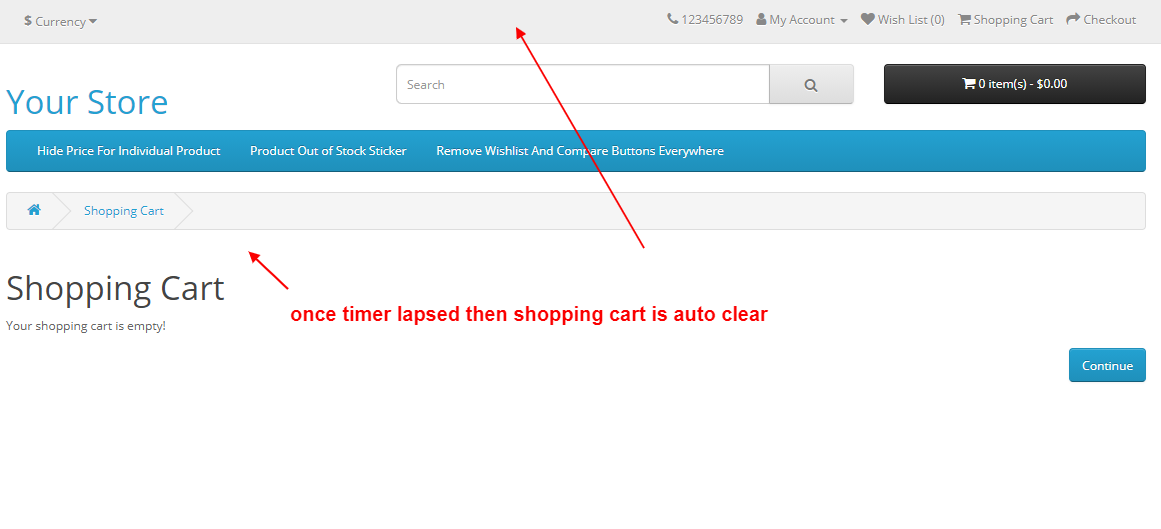
✔ When timeout is reached, cart is cleared automatically
✔ Customer must re-add products if needed
Simple, automatic cart control.
Why Choose This Module
✔ Automatically manage abandoned carts
✔ Maintain accurate stock availability
✔ Improve urgency with countdown timer
✔ Ideal for flash sales and limited stock stores
✔ Flexible timeout configuration
✔ Easy plug-and-play installation
✔ Safe and lightweight solution
Money-Back Guarantee
We stand behind the quality of our module.
If the extension does not work as described or is incompatible with your supported OpenCart version, we offer a 7-Day Money-Back Guarantee.
✔ Full refund if confirmed technical issue
✔ Dedicated support before refund decision
✔ Transparent and fair resolution process
Your satisfaction and store performance are our priority.
Requirements
✔ OpenCart 2.X + 3.X + 4.X
✔ Supports PHP 5.6 – 8.3
✔ No core file changes
✔ Built using OpenCart coding standards
Ideal For
✔ Flash sale stores
✔ Limited stock inventory businesses
✔ High-demand product sellers
✔ Event-based promotions
✔ Multi-store OpenCart setups
✔ Stores wanting automatic cart management
Images & Screenshots View all screenshots
✔ Header showing countdown timer
✔ Admin panel to set timeout value in seconds
✔ Cart auto-clear after timeout demonstration
Price
$25.00
- Developed by OpenCart Community
- 12 Months Free Support
- Documentation Included
Rating
Compatibility
2.0.0.0, 2.0.1.0, 2.0.1.1, 2.0.2.0, 2.0.3.1, 2.1.0.1, 2.1.0.2, 2.2.0.0, 2.3.0.0, 2.3.0.1, 2.3.0.2, 3.0.0.0, 3.0.1.0, 3.0.1.1, 3.0.1.2, 3.0.1.3, 3.0.2.0, 4.x.x.x, 3.0.3.0, 3.0.3.1, 3.0.3.2, 3.0.3.3, 3.0.3.5, 3.0.3.6, 3.0.3.7, 3.0.3.8, 4.0.0.0, 4.0.1.0, 4.0.1.1, 3.x.x.x, 4.0.2.0, 4.0.2.1, 4.0.2.2, 4.0.2.3, 3.0.3.9, 3.0.4.0, 4.1.0.0, 4.1.0.1, 4.1.0.2, 4.1.0.3, 3.0.4.1, 3.0.5.0
Last Update
2 May 2026
Created
6 Jun 2020
16 Sales
0 Comments

Login and write down your comment.
Login my OpenCart Account