Advanced product meta data generator

The module is designed for automatically generate meta data and additional product data.
The extension was tested on all versions of Opencart from 2.0.0.0 to 3.1.0.0
Installing an extension:
The extension is installed automatically by installing the extensions.
Just select the file that suits your version and install.
After installation, you need to update the modifiers.
The module does not replace any files.
Next, go to the Modules section and activate it, and then configure it as you need.
Why is this extension needed?
Using keywords, you can create unique meta tags for your product.
Advantages:
It is possible to set templates for each category separately, which significantly increases the uniqueness of product tags and will increase the site in the ranking among competitors.
The module has the ability to add an H2 tag to the product card - even if it is not in the template. This makes the product page content more structured for search engines.
Supports multilingualism - you can create separate templates for each language.
Supports multi store mode - you can add your own tags for each store (+ each category).
Product name templates can be defined for the category page, manufacturer page, and discount page.
You can add word variations, attribute values, options and filters.
All data is generated on the fly and written to the database, after which it is cached, the cache is updated only when editing a product or template. Therefore, the module does not create additional load on the site.
Functional:
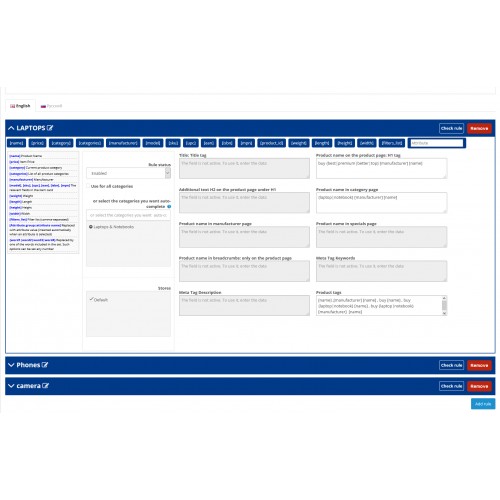
using keywords you can generate unique meta tags, product tags and product names. List of keywords:
[name] Product name;
[price] Product price;
[category] Current product category;
[categories] List of all product categories;
[manufacturer] Manufacturer;
[model],[sku],[upc],[ean],[isbn],[mpn] The corresponding fields in the product card;
[weight] Weight;
[length] Lenght;
[height] Height;
[width] Width;
[filters_list] Filter list (separated by commas);
[Attribute group :: attribute name] Replaced with the attribute value (inserted automatically when the attribute is selected);
{word1 | word2 | word3 | word4} Replaced with one of the words included in the set. You can set as many such options as you like.
Extension configuration procedure:
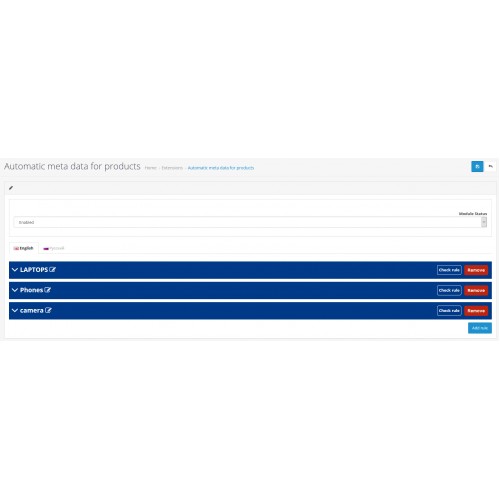
1. Open the module, add a rule for the required language.
2. Enter templates for the required fields.
3. Select the categories you need - if necessary. All are selected by default.
4. Select a store. All are selected by default
5. Activate the extension, and activate the template. Each template can be turned on and off as needed.
If you notice any problems, or you have a suggestion for improving this extension, write to the personal messages of this service, after which I will definitely answer you.
The extension was tested on all versions of Opencart from 2.0.0.0 to 3.1.0.0
Installing an extension:
The extension is installed automatically by installing the extensions.
Just select the file that suits your version and install.
After installation, you need to update the modifiers.
The module does not replace any files.
Next, go to the Modules section and activate it, and then configure it as you need.
Why is this extension needed?
Using keywords, you can create unique meta tags for your product.
Advantages:
It is possible to set templates for each category separately, which significantly increases the uniqueness of product tags and will increase the site in the ranking among competitors.
The module has the ability to add an H2 tag to the product card - even if it is not in the template. This makes the product page content more structured for search engines.
Supports multilingualism - you can create separate templates for each language.
Supports multi store mode - you can add your own tags for each store (+ each category).
Product name templates can be defined for the category page, manufacturer page, and discount page.
You can add word variations, attribute values, options and filters.
All data is generated on the fly and written to the database, after which it is cached, the cache is updated only when editing a product or template. Therefore, the module does not create additional load on the site.
Functional:
using keywords you can generate unique meta tags, product tags and product names. List of keywords:
[name] Product name;
[price] Product price;
[category] Current product category;
[categories] List of all product categories;
[manufacturer] Manufacturer;
[model],[sku],[upc],[ean],[isbn],[mpn] The corresponding fields in the product card;
[weight] Weight;
[length] Lenght;
[height] Height;
[width] Width;
[filters_list] Filter list (separated by commas);
[Attribute group :: attribute name] Replaced with the attribute value (inserted automatically when the attribute is selected);
{word1 | word2 | word3 | word4} Replaced with one of the words included in the set. You can set as many such options as you like.
Extension configuration procedure:
1. Open the module, add a rule for the required language.
2. Enter templates for the required fields.
3. Select the categories you need - if necessary. All are selected by default.
4. Select a store. All are selected by default
5. Activate the extension, and activate the template. Each template can be turned on and off as needed.
If you notice any problems, or you have a suggestion for improving this extension, write to the personal messages of this service, after which I will definitely answer you.
Price
$20.00
- Developed by OpenCart Community
- Documentation Included
Rating
Compatibility
3.0.0.0, 3.0.1.0, 3.0.1.1, 3.0.1.2, 3.0.1.3, 3.0.2.0, 4.x.x.x, 3.0.3.0, 3.0.3.1, 3.0.3.2, 3.0.3.3, 3.0.3.5, 3.0.3.6, 2.3.0.0, 2.3.0.1, 2.3.0.2
Last Update
5 Oct 2020
Created
5 Oct 2020
0 Sales
0 Comments

Login and write down your comment.
Login my OpenCart Account