Clean Unused Images

Introducing Clean Unused Images: The Essential OpenCart Module for Efficient Image Management
Are you tired of dealing with unused and cluttered images in your OpenCart store? Do you want to streamline your image workflow and optimize your server costs? Look no further! Clean Unused Images is the ultimate solution for all your image management needs.
Clean Unused Images is a versatile OpenCart module that empowers you to effortlessly maintain a clean and organized images folder, resulting in improved performance and reduced server expenses. With a range of powerful features, this module revolutionizes the way you handle images in your store.
Key Features:
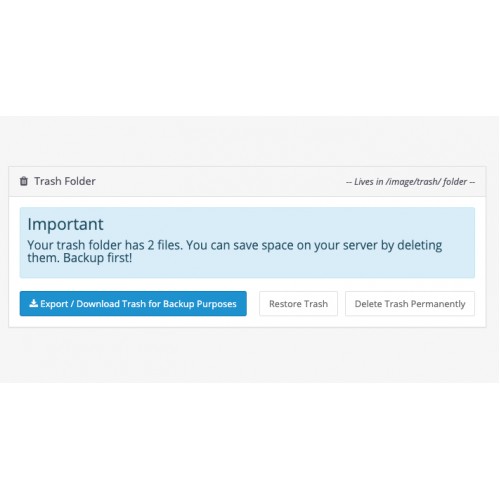
One-Click Full Backup: Enjoy the convenience of a single-click backup feature. Clean Unused Images enables you to download a comprehensive backup of all unused images, ensuring you have a copy readily available whenever needed.
Permanent Deletion: For images you no longer require, Clean Unused Images provides a permanent deletion option. This ensures that they are completely removed from your server, freeing up storage space and enhancing overall performance.
Auto Updates: Keep your active images up-to-date effortlessly. Clean Unused Images automatically updates images in use, ensuring they are preserved during the cleanup process. You can confidently optimize your image library without worrying about unintentional deletions.
Cache Image Management: In addition to organizing primary images, Clean Unused Images clears cache images, optimizing your OpenCart store's performance. Say goodbye to redundant and outdated cache files, and enjoy faster loading times.
Exclusion of Cache Images from Backup: Exclude cache images from the backup process, saving valuable storage space and streamlining your backup operations. Focus on preserving essential images without including unnecessary cache files.
Theme Indypendent: Clean Unused Images seamlessly integrates with any theme, allowing you to optimize your image management while maintaining the aesthetics and functionality of your store.
Supports Journal 2 and 3 Blog: Clean Unused Images introduces a new feature that supports Blog from the popular Journal 2 and 3 themes, ensuring compatibility and smooth operation.
Easy Installation with Ocmod: Installing Clean Unused Images is quick and hassle-free with the Ocmod installation method. Get started in no time and start benefiting from enhanced image management capabilities.
[/list]
Experience the difference with Clean Unused Images and unlock the full potential of your OpenCart store. Say goodbye to cluttered images, streamline your workflow, and optimize your server costs effortlessly. Try Clean Unused Images today and witness the transformation in your image management process!
A great tool to keep your images folder clean
A great tool to help you work with your images faster
A great tool that helps you reduce your server costs
Shorthand Features
Here's a concise overview of the key features provided by Clean Unused Images:
Ask anything
Cheers!
Are you tired of dealing with unused and cluttered images in your OpenCart store? Do you want to streamline your image workflow and optimize your server costs? Look no further! Clean Unused Images is the ultimate solution for all your image management needs.
Clean Unused Images is a versatile OpenCart module that empowers you to effortlessly maintain a clean and organized images folder, resulting in improved performance and reduced server expenses. With a range of powerful features, this module revolutionizes the way you handle images in your store.
Key Features:
- Comprehensive Image Checks: Clean Unused Images thoroughly scans all tables in your OpenCart store to identify images that are no longer in use. It helps you reclaim valuable disk space by removing unnecessary images and keeping your images folder tidy.
- Inline Image Checking: This new feature allows you to efficiently check inline images directly from descriptions. This means you can easily compare them with the images on your server, ensuring that only essential images are retained.
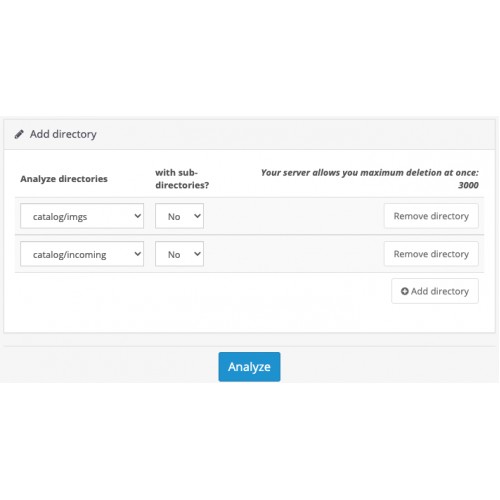
- Customizable Image Comparison: Choose between scanning images from the entire server or specific folders, giving you complete control over the cleanup process. Adapt Clean Unused Images to fit your unique requirements.
- Soft-Delete Support: With soft-deletion support, Clean Unused Images offers a secure method to remove unused images. It allows you to keep a backup of deleted images, providing peace of mind and the ability to restore them if necessary.
Experience the difference with Clean Unused Images and unlock the full potential of your OpenCart store. Say goodbye to cluttered images, streamline your workflow, and optimize your server costs effortlessly. Try Clean Unused Images today and witness the transformation in your image management process!
A great tool to keep your images folder clean
A great tool to help you work with your images faster
A great tool that helps you reduce your server costs
Shorthand Features
Here's a concise overview of the key features provided by Clean Unused Images:
- - Checks Images from all tables
- - Checks local only inline images from descriptions (new feature)
- - Compare them with all images on server
- - or just a specific folder
- - Supports Soft-Delete
- - Download Full Backup of Unused Images with one click
- - Option to restore Unused Images back
- - Permanently Deletion
- - Auto Updates to Image in Use (not Deletes)
- - Clears Cache Images too!
- - Excludes Cache Images from Backup
- - Theme indypendent
- - Supports Journal 2 and 3 Blog (new feature)
- - Ocmod
Ask anything
Cheers!
What customers say about Clean Unused Images

Even after several months since the purchased extension, excellent and fast support, all recommendations
~eurovik
~eurovik
Price
$39.00
- Developed by OpenCart Community
- 12 Months Free Support
- Documentation Included
Rating
Compatibility
2.3.0.2, 3.0.1.1, 3.0.1.2, 3.0.1.3, 3.0.3.0, 3.0.3.1, 3.0.3.2, 3.0.3.3, 3.0.3.5, 3.0.3.6, 3.0.3.7, 3.0.3.8, 2.0.3.1
Last Update
1 May 2025
Created
26 Jan 2021
26 Sales
10 Comments

Login and write down your comment.
Login my OpenCart Account