Opencart Zoom Pro - The image Zoom for your product

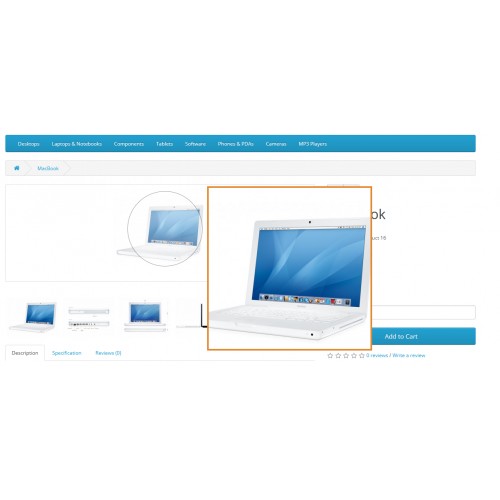
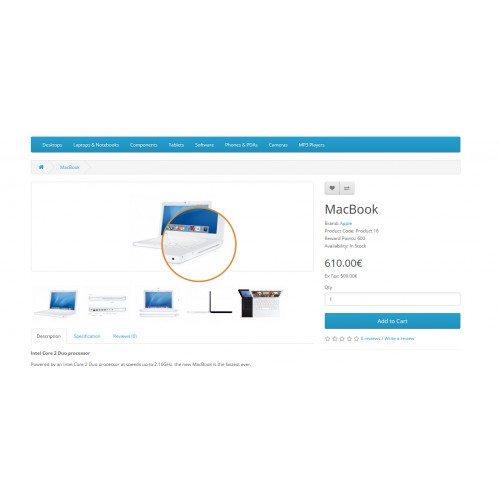
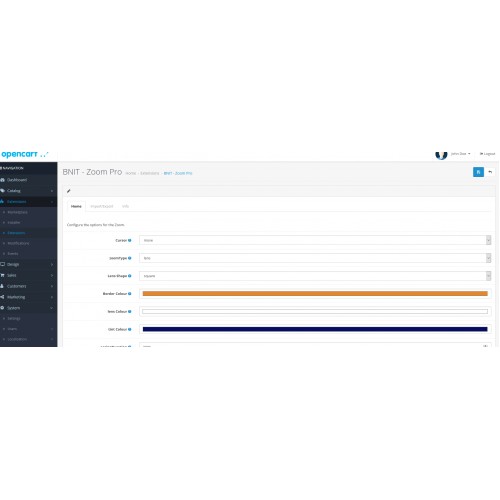
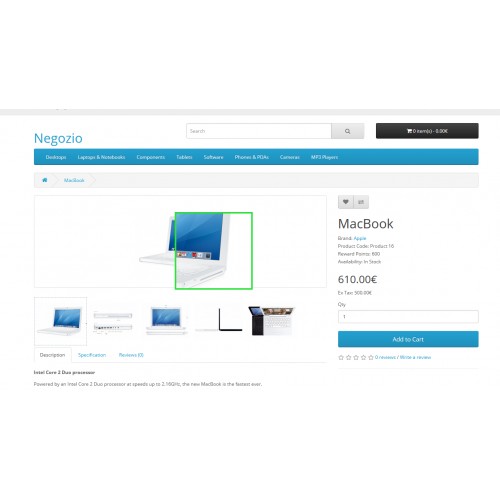
Opencart Zoom PRO - the zoom for your product pages.
-
-Main features-
Selection between different zoom types: Window, Inner (inside the image), Lens.
Differen Form of the Lens: square or round (on supported browsers).
Selection of cursors for you zoom: alias, all-scroll, auto, cell, context-menu, col-resize, copy, crosshair, default, e-resize, ew-resize, grab, grabbing, help, move, n-resize, ne-resize, nesw-resize, ns-resize, nw-resize, nwse-resize, no-drop, none, not-allowed, pointer, progress, row-resize, s-resize, se-resize, sw-resize, text, vertical-text, w-resize, wait, zoom-in, zoom-out.
Selection of a different Lens Colour.
Zoom Border Color..
Zoom Window Tint colour for the outer part of the lens.
Transitions with custom selection of the duration.
Lens sizes.
Lens opacity.
Zoom window sizes.
Window Position.
Scroll zoom.
Import, export and reset of the main configuration so that you can experiment all the features without being afraid of doing something wrong.
The smaller thumbnails of the product (gallery) on click are loaded in place of the main image thumbnail. They can be zoomed and they all activate the popup on click.
The support for the opencart default theme and for the popup keeps the default magnific scripts to reduce extra scripts.
Languages: English and Italian. Contact us to get the translations for your language!
-DEMO-
Admin
User: demo
Password: demo
Frontend
-Note-
Extension works correctly on Opencart 3.x core. For opencart 3.0.3.5 and 3.0.3.6 you must install the fix for Ocmod (as for any other extension that is using ocmod). We are still reorganizing the extension's features, translations, etc and you could encounter some difficulties.
The version for Opencar 2 has been tested for Opencart 2.0.3.1.
We do not support non-standard themes. Please contact us with the theme package so that we can evaluate if we can make a custom fix.
One license for each site.
-OCMOD- 3.x Installation
After installing the package you must update the SASS and Cache.
Click on the "gear" icon in the upper-right side of the admin's dashboard.
Make also sure that you updated the extensions in marketplace/modification area.
You can follow this video for the installation:
English Opencart - https://youtu.be/zGHLtNb9HaY
Italian Opencart - https://www.youtube.com/watch?v=TPVqu46Tv7o
-
-Main features-
Selection between different zoom types: Window, Inner (inside the image), Lens.
Differen Form of the Lens: square or round (on supported browsers).
Selection of cursors for you zoom: alias, all-scroll, auto, cell, context-menu, col-resize, copy, crosshair, default, e-resize, ew-resize, grab, grabbing, help, move, n-resize, ne-resize, nesw-resize, ns-resize, nw-resize, nwse-resize, no-drop, none, not-allowed, pointer, progress, row-resize, s-resize, se-resize, sw-resize, text, vertical-text, w-resize, wait, zoom-in, zoom-out.
Selection of a different Lens Colour.
Zoom Border Color..
Zoom Window Tint colour for the outer part of the lens.
Transitions with custom selection of the duration.
Lens sizes.
Lens opacity.
Zoom window sizes.
Window Position.
Scroll zoom.
Import, export and reset of the main configuration so that you can experiment all the features without being afraid of doing something wrong.
The smaller thumbnails of the product (gallery) on click are loaded in place of the main image thumbnail. They can be zoomed and they all activate the popup on click.
The support for the opencart default theme and for the popup keeps the default magnific scripts to reduce extra scripts.
Languages: English and Italian. Contact us to get the translations for your language!
-DEMO-
Admin
User: demo
Password: demo
Frontend
-Note-
Extension works correctly on Opencart 3.x core. For opencart 3.0.3.5 and 3.0.3.6 you must install the fix for Ocmod (as for any other extension that is using ocmod). We are still reorganizing the extension's features, translations, etc and you could encounter some difficulties.
The version for Opencar 2 has been tested for Opencart 2.0.3.1.
We do not support non-standard themes. Please contact us with the theme package so that we can evaluate if we can make a custom fix.
One license for each site.
-OCMOD- 3.x Installation
After installing the package you must update the SASS and Cache.
Click on the "gear" icon in the upper-right side of the admin's dashboard.
Make also sure that you updated the extensions in marketplace/modification area.
You can follow this video for the installation:
English Opencart - https://youtu.be/zGHLtNb9HaY
Italian Opencart - https://www.youtube.com/watch?v=TPVqu46Tv7o
Price
$22.00
- Developed by OpenCart Community
- 6 Months Free Support
- Documentation Included
Rating
Compatibility
2.0.0.0, 2.0.1.0, 2.0.1.1, 2.0.2.0, 2.0.3.1, 2.1.0.1, 2.1.0.2, 2.0.0.0, 2.0.1.0, 2.0.1.1, 2.0.2.0, 2.0.3.1, 2.1.0.1, 2.1.0.2, 3.0.3.0, 3.0.3.1, 3.0.3.2, 3.0.3.3, 3.0.3.5, 3.0.3.6, 3.0.3.7, 3.0.3.8, 3.0.3.0, 3.0.3.1, 3.0.3.2, 3.0.3.3, 3.0.3.5, 3.0.3.6, 3.0.3.7, 3.0.3.8
Last Update
27 May 2023
Created
19 Apr 2021
1 Sales
0 Comments

Login and write down your comment.
Login my OpenCart Account