ECP Quick Module Editor
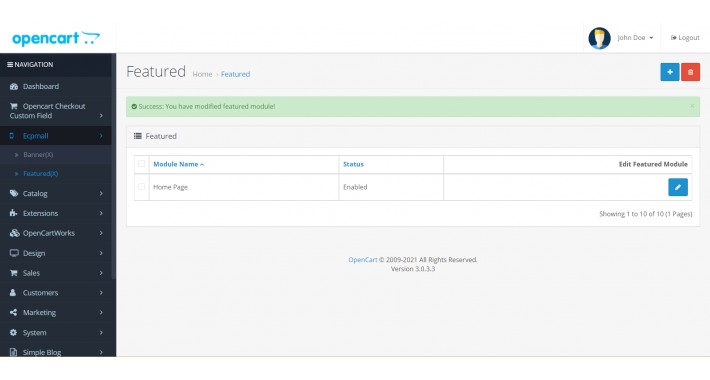
ECP Quick Module Editor
Traditional way to modify the module, the steps are a bit cumbersome.
Such as:
Step 1-> Click Extensions
Step 2-> Click Extension List
Step 3-> Click Choose the extension type
Step 4-> Click seacrh the extension you want
Step 5-> do some action and save.
If you want to edit that module ,you need do 5 Steps one more.
With ECP Quick Module Editor,do the job within some seconds.
=====================================================
2021.11.18
[Vserson 1.3]
Support modules:
1.Settings
2.Banner
3.Fetured
4.Cash On Delivery
2021.07.29
[Vserson 1.2]
Support modules:
1.Settings
2.Banner
3.Fetured
2021.07.21
[Vserson 1]
Support modules:
1.Banner
2.Fetured
======================================================
Important:
OC 3 is limitating allowed folders to write when installing an extension, but some do require to put files elsewhere than pre-defined directories.
Please install This Extension First.
https://www.opencart.com/index.php?route=marketplace/extension/info&extension_id=33410
Instructions:
Install instructions
1.Open Admin backend and go to Extensions -> Extension Installer.
2.Upload ocmod file.
3.If ocmod file isn't auto-upload.Upload all admin category file via FTP manualy.
4.Go to Modifications and press the Refresh button.
5.Go to System->Users->User Groups-> select all premission.
That's all. Extension is enabled now.
Enjoy!
Traditional way to modify the module, the steps are a bit cumbersome.
Such as:
Step 1-> Click Extensions
Step 2-> Click Extension List
Step 3-> Click Choose the extension type
Step 4-> Click seacrh the extension you want
Step 5-> do some action and save.
If you want to edit that module ,you need do 5 Steps one more.
With ECP Quick Module Editor,do the job within some seconds.
=====================================================
2021.11.18
[Vserson 1.3]
Support modules:
1.Settings
2.Banner
3.Fetured
4.Cash On Delivery
2021.07.29
[Vserson 1.2]
Support modules:
1.Settings
2.Banner
3.Fetured
2021.07.21
[Vserson 1]
Support modules:
1.Banner
2.Fetured
======================================================
Important:
OC 3 is limitating allowed folders to write when installing an extension, but some do require to put files elsewhere than pre-defined directories.
Please install This Extension First.
https://www.opencart.com/index.php?route=marketplace/extension/info&extension_id=33410
Instructions:
Install instructions
1.Open Admin backend and go to Extensions -> Extension Installer.
2.Upload ocmod file.
3.If ocmod file isn't auto-upload.Upload all admin category file via FTP manualy.
4.Go to Modifications and press the Refresh button.
5.Go to System->Users->User Groups-> select all premission.
That's all. Extension is enabled now.
Enjoy!
Download
- Developed by OpenCart Community
- Documentation Included
Rating
Compatibility
3.0.0.0, 3.0.1.0, 3.0.1.1, 3.0.1.2, 3.0.1.3, 3.0.2.0, 3.0.3.0, 3.0.3.1, 3.0.3.2, 3.0.3.3, 3.0.1.3, 3.0.2.0, 3.0.3.0, 3.0.3.1, 3.0.3.2, 3.0.3.3, 3.0.1.3, 3.0.2.0, 3.0.3.0, 3.0.3.1, 3.0.3.2, 3.0.3.3
Last Update
18 Nov 2021
Created
21 Jul 2021
66 Downloads
0 Comments

Login and write down your comment.
Login my OpenCart Account