Popup Newsletter & Email Tracker
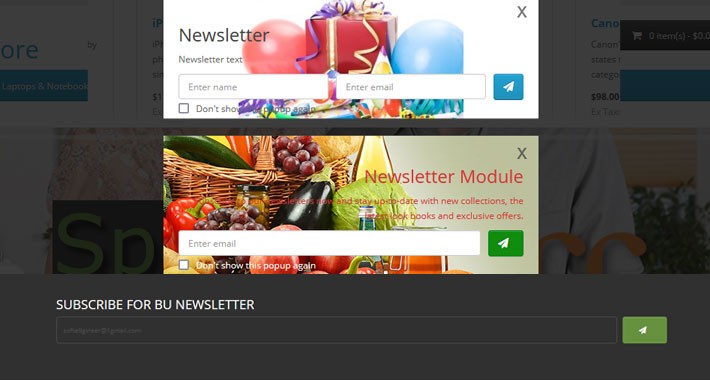
BU Newsletter allows you to display the email field on Popup, Footer or any page of the site in any position. BU Newsletter provides you email marketing functionality. Your customers will be able to subscribe to your newsletter without creating an account. This module also helps your customers to subscribe for newsletter without refresh of page.
Main Advantages
How it work
Admin Demo
Click Here for Live Admin Demo
User: demo
Password: demo
Demo page
Click Here for Live Demo
Why Choose us
Install via Extension Installer (OC Mode) or Upload Manually
Support
OFFER
Available only in $24 instead of$50 limited offer.
Feedback
If you like this extension don't forget to rate it.
Main Advantages
- Provides you email marketing functionality with guest users as you can with registered users.
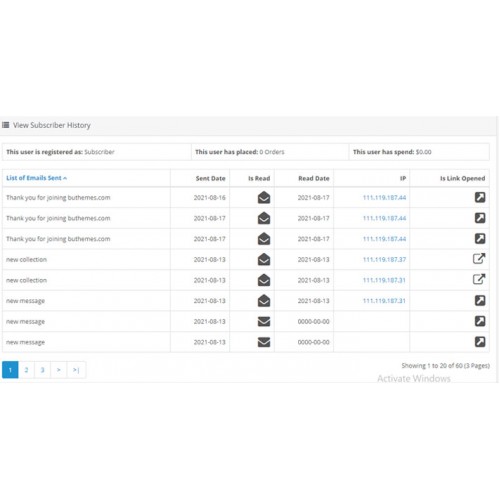
- It will track the user behavior if he open the email or not, clicked on link or not, If yes show date.
- Multi language compatible
- Option to send newsletter to guest subscribers or all subscribers
- Send newsletter with UN-subscribe link.
- You can import or export list of subscribers
- You can upload background image and style of popup and block
- You can show icon or text for subscribe button
- You can change heading and text of popup from admin.
- You can show email field only or email and name field on front end.
- You can show email and name field in one row or multiple rows.
- You can show newsletter block in popup, footer and content area.
- Email validation and duplication check.
- It will check if customer has account and will mark it as subscribed.
- Will not double send a newsletter to user with account and subscribed.
- Add status when subscriber enter email e.g. Pending, Subscribed or UN-subscribed.
- Add success Message.
- Send confirmation email e.g. Say Thanks for subscribing newsletter.
- Send confirmation email with subscribe/UN-scribe link.
- Add short code {{subscribe_url}} and {{un_subscribe_url}} for subscribe/UN-scribe link if you want to add inside message, otherwise will be shown at the end of message.
- Add confirmation email subject/body.
- View, sort by email, add, edit and delete list of subscribers.
- Ocmod (No core file will be changed).
How it work
Admin Demo
Click Here for Live Admin Demo
User: demo
Password: demo
Demo page
Click Here for Live Demo
Why Choose us
- Free instalation/support
- Free bug fixes
- Lightweight
- 200+ Admin features
- Easy to use admin panel
- Well documented
- Mobile friendliness
- SEO ready
- Multipurpose
- Created by great and friendly developers
Install via Extension Installer (OC Mode) or Upload Manually
- Login to admin and go to Extension > Extension Installer then select and upload downloaded zip file. Now go to Extension > Modification and press refresh button on top right corner of the page.
- Extract the archive you downloaded from marketplace and Find upload folder and Upload the all folders found inside (admin, catalog, image) to your OpenCart root installation and merge them with the existing ones.
Support
- If you have any question I will appreciate but before asking questions please be sure that you have read installation and usage notes above.
- Please don't ask for support in comments bellow as comments are for pre-sale questions and ratings only.
- If you need installation and support from us, let us know at ajeed.software@outlook.com it is free.
OFFER
Available only in $24 instead of
Feedback
If you like this extension don't forget to rate it.
Price
$24.00
- Developed by OpenCart Community
- 12 Months Free Support
- Documentation Included
Rating
Compatibility
3.0.0.0, 3.0.1.0, 3.0.1.1, 3.0.1.2, 3.0.1.3, 3.0.2.0, 3.0.3.0, 3.0.3.1, 3.0.3.2, 3.0.3.3, 3.0.3.5, 3.0.3.6, 3.0.3.7, 2.0.3.1, 2.1.0.1, 2.1.0.2, 2.2.0.0, 2.3.0.0, 2.3.0.1, 2.3.0.2
Last Update
19 Aug 2021
Created
18 Aug 2021
0 Sales
0 Comments

Login and write down your comment.
Login my OpenCart Account