American English Language pack en_US

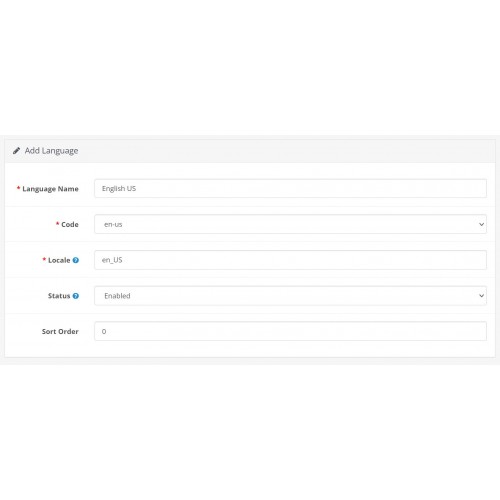

American English Language pack en_US for Opencart v3.x
Thank for your interest in my extension.
This Language pack adds the en_US language translation to Opencart v3.x
English Flag is replaced with the American Flag.
Changes phrases like "colour to color" and "Post Code to Zip Code" etc
Please let me know if i missed something and i will update the extension.
To install the Opencart ocmod extension follow these steps.
1. Log in to your admin panel
2. Navigate to "Extensions -> Installer" and click on Upload
3. Locate the file named "opencart_us.ocmod.zip" and click open
If everything installed you will see opencart_us.ocmod.zip in the Install History
4. Navigate to "System -> Localisation -> Languages"
5. Click the blue + symbol on to right
6. Give the language a name like "American us"
7. change code to en_us
8. Change Locale to en_US
9. Change Status to enabled
10. Change Sort Order to 0
11. click on the blue data disk symbol to save the settings
12. Navigate to "System -> Settings"
13. click on the blue pen symbol to edit your store
14. Navigate to the Tab "Local"
15. Change Language to the name you set earlier under point 6. "6. Give the language a name like "American us"
16. Change Administrator Language to the name you set earlier under point 6. "6. Give the language a name like "American us"
Now the language extension is active and set to default.
No system files are overwritten!
NOTE: Do not forget to reload the page!
Thank for your interest in my extension.
This Language pack adds the en_US language translation to Opencart v3.x
English Flag is replaced with the American Flag.
Changes phrases like "colour to color" and "Post Code to Zip Code" etc
Please let me know if i missed something and i will update the extension.
To install the Opencart ocmod extension follow these steps.
1. Log in to your admin panel
2. Navigate to "Extensions -> Installer" and click on Upload
3. Locate the file named "opencart_us.ocmod.zip" and click open
If everything installed you will see opencart_us.ocmod.zip in the Install History
4. Navigate to "System -> Localisation -> Languages"
5. Click the blue + symbol on to right
6. Give the language a name like "American us"
7. change code to en_us
8. Change Locale to en_US
9. Change Status to enabled
10. Change Sort Order to 0
11. click on the blue data disk symbol to save the settings
12. Navigate to "System -> Settings"
13. click on the blue pen symbol to edit your store
14. Navigate to the Tab "Local"
15. Change Language to the name you set earlier under point 6. "6. Give the language a name like "American us"
16. Change Administrator Language to the name you set earlier under point 6. "6. Give the language a name like "American us"
Now the language extension is active and set to default.
No system files are overwritten!
NOTE: Do not forget to reload the page!
Price
$20.00
- Developed by OpenCart Community
- Documentation Included
Rating
Compatibility
3.0.3.7, 3.0.3.8
Last Update
16 Oct 2021
Created
8 Oct 2021
7 Sales
1 Comments

Login and write down your comment.
Login my OpenCart Account