Live Advance Search
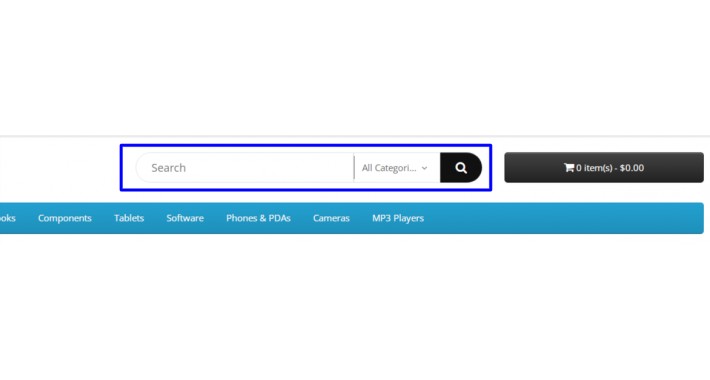
Techcodes Advance Search brings you beneficial use of Search .
Features:-
✯ Multi Language supported.
✯ Set your search
✯ Set your thumbnail product image size.
✯ Set your display (Category ,price, thumbnail)
✯ Click product to select supported.
✯ No files will be overwritten.
✯ OCMOD version Opencart 3.x.x.x
Instructions
INSTALLATION:
Use ocmod
(1) Download the extension from the Downloads area below.
(2) Do NOT extract the XML file from the ZIP file. Also, do NOT rename the zip file.
(3) Log in to your Admin area and go to "Extensions >> Installer".
(4) Click the "Upload" button and locate the zip file and select it.
(5) Wait until the Install Progress bar reaches the end and you get a message that says "Success: You have modified extensions!"
(6) Visit Extensions => Modifications => Refresh button in the top right to refresh nav.
(7)Create a Module
-> Click Extension => Extensions => Select Modules as the extension type => Find Techcodes Advance Search and click Edit to create a Techcodes Advance Search module.
If You Install without ocmod:
extract the ZIP file and upload the content of the folder "upload" to your website
At Admin Side:
►Go to Extensions->Modules .
► Click [Install] green button at the right of 'Techcodes Advance Search'. (install success message should appear)
► Click [Edit] blue button at the right of 'Techcodes Advance Search'
► Only one field to enable/disable the module status
► Go to System->Design->layout and choose a layout to add to Select 'Techcodes Advance Search' from dropdown list & position and Save.
►Now Go to The User View...
PS: If this extension was useful for you, please vote for it by clicking Star rating above. It makes us a bit more happy :)
Actually, this extension is default theme supported perfectly, if you using third party theme, try install it first, if can not runnig well you can contact me.
Who are purchasing this module , If they get any issues , We ll help via
email :- techcodes1991@gmail.com
Features:-
✯ Multi Language supported.
✯ Set your search
✯ Set your thumbnail product image size.
✯ Set your display (Category ,price, thumbnail)
✯ Click product to select supported.
✯ No files will be overwritten.
✯ OCMOD version Opencart 3.x.x.x
Instructions
INSTALLATION:
Use ocmod
(1) Download the extension from the Downloads area below.
(2) Do NOT extract the XML file from the ZIP file. Also, do NOT rename the zip file.
(3) Log in to your Admin area and go to "Extensions >> Installer".
(4) Click the "Upload" button and locate the zip file and select it.
(5) Wait until the Install Progress bar reaches the end and you get a message that says "Success: You have modified extensions!"
(6) Visit Extensions => Modifications => Refresh button in the top right to refresh nav.
(7)Create a Module
-> Click Extension => Extensions => Select Modules as the extension type => Find Techcodes Advance Search and click Edit to create a Techcodes Advance Search module.
If You Install without ocmod:
extract the ZIP file and upload the content of the folder "upload" to your website
At Admin Side:
►Go to Extensions->Modules .
► Click [Install] green button at the right of 'Techcodes Advance Search'. (install success message should appear)
► Click [Edit] blue button at the right of 'Techcodes Advance Search'
► Only one field to enable/disable the module status
► Go to System->Design->layout and choose a layout to add to Select 'Techcodes Advance Search' from dropdown list & position and Save.
►Now Go to The User View...
PS: If this extension was useful for you, please vote for it by clicking Star rating above. It makes us a bit more happy :)
Actually, this extension is default theme supported perfectly, if you using third party theme, try install it first, if can not runnig well you can contact me.
Who are purchasing this module , If they get any issues , We ll help via
email :- techcodes1991@gmail.com
Price
$20.00
- Developed by OpenCart Community
- 3 Months Free Support
- Documentation Included
Rating
Compatibility
3.0.0.0, 3.0.1.0, 3.0.1.1, 3.0.1.2, 3.0.1.3, 3.0.2.0, 3.0.3.0, 3.0.3.1, 3.0.3.2, 3.0.3.3, 3.0.3.5, 3.0.3.6, 3.0.3.7, 3.0.3.8, 3.x.x.x, 3.0.3.9, 3.0.4.0
Last Update
23 Sep 2024
Created
13 Oct 2021
0 Sales
1 Comments

Login and write down your comment.
Login my OpenCart Account