Fractional Product Quantity (Decimal quantity)

✓ Does not change or replace files
✓ Does not require IonCube Loader
✓ Clean and clear code
✓ Unlimited support
---------------------------
Demo
Admin area: demo.helpforsite.com/3032/admin/
Login: demo
Password: demo
User area: Default
Journal3
Compatibility
OpenCart version: 2.3, 3.0.x
Template: Default, Journal3
Other
Interface Language: UA, EN, RU
---------------------------
Description
Version 2.3.3 supports PHP 8 and Journal 3.2.8
By default, opencart allows you to specify only the integer quantity of a product, which creates certain inconveniences for those sellers who sell weighted or detachable goods and need to sell tenths, hundredths or less of the products.
Opencart module Fractional product quantity completely solves this problem.
Features of the Fractional product quantity module:
Flexible settings

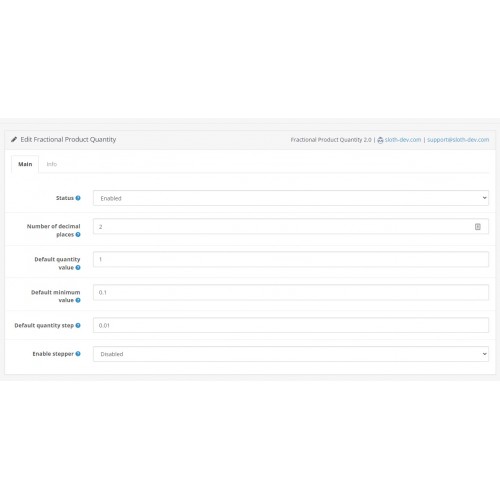
You can set the required number of decimal places, as well as the default number and minimum value. In addition, users of the Journal3 template and the Simple module will find it useful to be able to specify a default value for the increase / decrease step.
Attention! The Status field does not affect the operation of the module, because changes occur at the database level. The field is left to maintain the correct module structure.
Full integration of fractional quantities into opencart

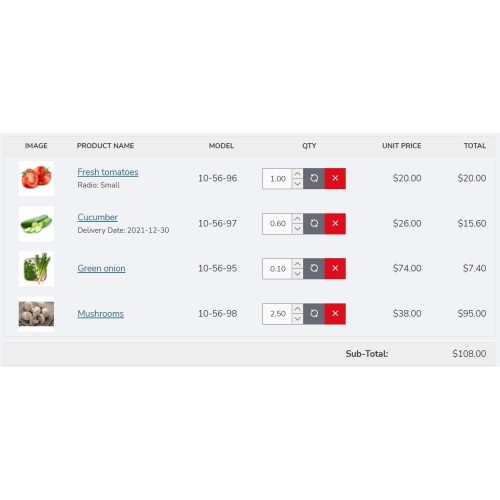
Product quantity, minimum product quantity, a discount from quantity, options - all these settings of a product support fractional quantity. In addition, the same support is introduced for the return functionality. You can place orders with a decimal quantity both on the website and from the admin panel. In other words, all standard product quantity fields are converted to decimal fractions.
Attention! It is necessary to use a point, instead of a comma:
Special settings

The module adds a new field in the product from, where you can specify the individual value of the step of changing product quantity (multiplicity).
So you can apply fractional quantity only to the selected items.
Extra functions

You can enable a stepper buttons on the product page in the module settings. This is relevant for users of the default template.
Incorrect quantity warning

If a customer is trying to add to cart incorrect quantity, a popup with warning message appears.
You can customize this message in the module settings using shortcodes:
Full support for popular extensions

Support is automatic and does not require manual file editing.
Attention! Внимание!
Russia is killing civilians in Ukraine. I do not provide any support services to russian and belorussian developers.
Россия убивает мирных граждан в Украине. Я не предоставляю поддержку проектам и разработчикам, которые имеют отношение к россии или беларуси.
Support Ukraine here
✓ Does not require IonCube Loader
✓ Clean and clear code
✓ Unlimited support
---------------------------
Demo
Admin area: demo.helpforsite.com/3032/admin/
Login: demo
Password: demo
User area: Default
Journal3
Compatibility
OpenCart version: 2.3, 3.0.x
Template: Default, Journal3
Other
Interface Language: UA, EN, RU
---------------------------
Description
Version 2.3.3 supports PHP 8 and Journal 3.2.8
By default, opencart allows you to specify only the integer quantity of a product, which creates certain inconveniences for those sellers who sell weighted or detachable goods and need to sell tenths, hundredths or less of the products.
Opencart module Fractional product quantity completely solves this problem.
Features of the Fractional product quantity module:
Flexible settings
You can set the required number of decimal places, as well as the default number and minimum value. In addition, users of the Journal3 template and the Simple module will find it useful to be able to specify a default value for the increase / decrease step.
Attention! The Status field does not affect the operation of the module, because changes occur at the database level. The field is left to maintain the correct module structure.
Full integration of fractional quantities into opencart
Product quantity, minimum product quantity, a discount from quantity, options - all these settings of a product support fractional quantity. In addition, the same support is introduced for the return functionality. You can place orders with a decimal quantity both on the website and from the admin panel. In other words, all standard product quantity fields are converted to decimal fractions.
Attention! It is necessary to use a point, instead of a comma:
- 5.89 is correct;
- 5,89 is incorrect.
Special settings
The module adds a new field in the product from, where you can specify the individual value of the step of changing product quantity (multiplicity).
- if step = 1, you only can buy an integer value of the product
- if step = 0.5, you can buy 0.5, 1, 3.5, etc.
- if step = 0.1, you can buy 0.1, 0.2, 0.8, 1.1, etc.
So you can apply fractional quantity only to the selected items.
Extra functions
You can enable a stepper buttons on the product page in the module settings. This is relevant for users of the default template.
Incorrect quantity warning
If a customer is trying to add to cart incorrect quantity, a popup with warning message appears.
You can customize this message in the module settings using shortcodes:
- {quantity} - entered quantity;
- {step} - multiplicity, step of changing the product quantity.
Full support for popular extensions
Support is automatic and does not require manual file editing.
- Journal3: increase / decrease the product quantity in sections, on the product page and on the checkout page. The price is recalculated taking into account the fractional quantity
- Admin Quick Edit: full support for quick editing of product quantity in product list and return list.
- Simple registration and checkout Simple: full support for editing the quantity in the cart.
- Ajax Quick Checkout 6.6.x: full support for editing the quantity in the cart.
- Megashop theme: increase / decrease quantity on a product page.
Attention! Внимание!
Russia is killing civilians in Ukraine. I do not provide any support services to russian and belorussian developers.
Россия убивает мирных граждан в Украине. Я не предоставляю поддержку проектам и разработчикам, которые имеют отношение к россии или беларуси.
Support Ukraine here
Price
$20.00
- Developed by OpenCart Community
- 12 Months Free Support
- Documentation Included
Rating
Compatibility
3.0.0.0, 3.0.1.0, 3.0.1.1, 3.0.1.2, 3.0.1.3, 3.0.2.0, 3.0.3.0, 3.0.3.1, 3.0.3.2, 3.0.3.3, 3.0.3.5, 3.0.3.6, 3.0.3.7, 3.0.3.8, 3.0.3.9, 3.0.4.0, 3.0.4.1, 2.3.0.0, 2.3.0.1, 2.3.0.2
Last Update
19 Dec 2025
Created
15 Nov 2021
41 Sales
1 Comments

Login and write down your comment.
Login my OpenCart Account