ILM City Dropdown

Demo for OpenCart 3x


Journal 3 Theme Compatible
Product Description
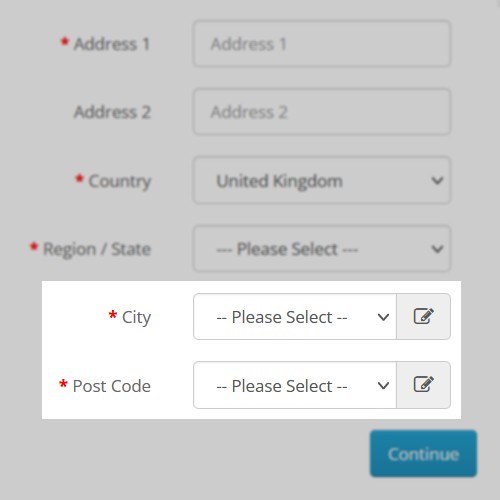
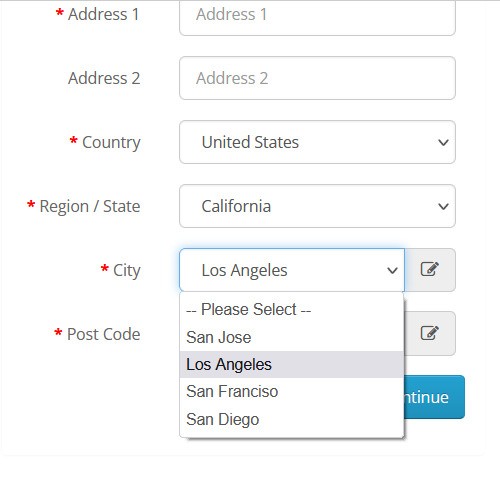
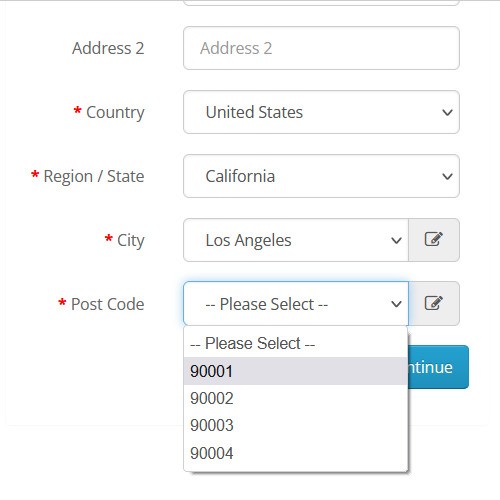
ILM City Dropdown gives solutions for both Merchant and Customers. Opencart displays the City and Postal/Zip Code field in the text input type. Now with ILM City Dropdown, you can convert the City and Postal/Zip Code Input field into a dropdown field for your customers. This will help your customer to find an appropriate City and Postal/Zip Code when specifying their Shipping or Billing address.
Merchant can easily get a customer's city and Postal/Zip Code without mistake it will save a lot of time while creating an Invoice and Shipment
Features
Admin
• Manage City and Postal/Zip Code with ajax based functionality
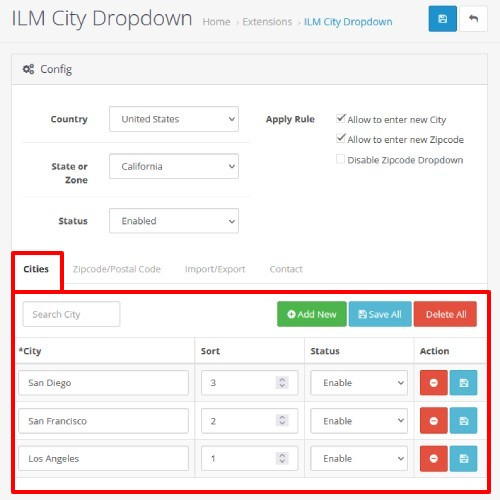
• Simplified Add/Edit/Delete the City and Postal/Zip Code in one place
• Easy menu access for configuration
• Bulk update and delete actions for City and Postal/Zip Code
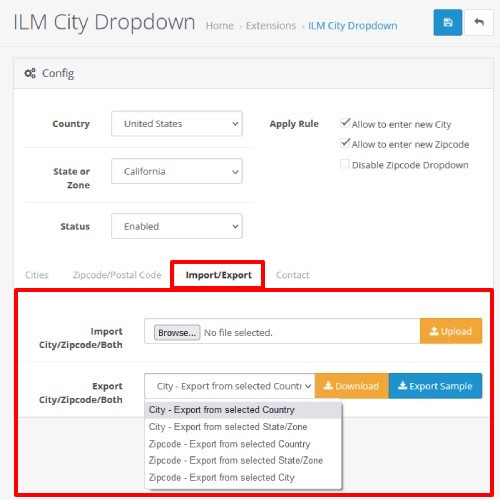
• Import/Export based on Country, Zone, and City
• Sample Export Available
• Postal/Zip Code dropdown with enable/disable functionality
• Switch between Dropdown and Input field for City and Postal/Zip Code
• Enable/Disable switch between Dropdown and Input field for Postal/Zip Code
Customer
• Easily select city from dropdown based on Country and Zone selection
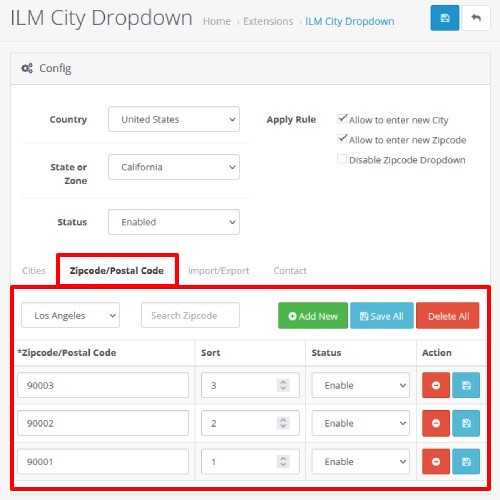
• Easily select Postal/Zip Code based on City
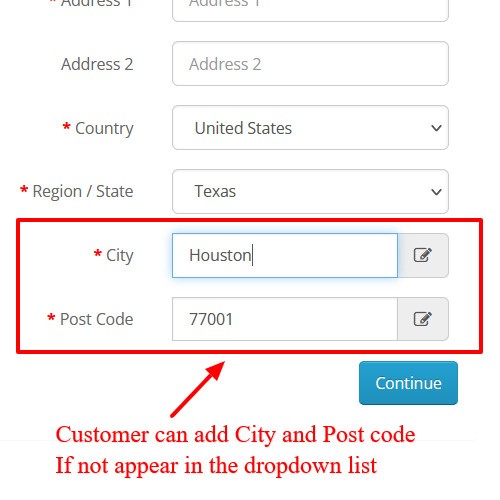
• Switch between Select and Input field (only if admin enables this option)
Import/Export
Admins can quickly upload the whole list of City and Postal/Zip Code using a CSV file. This will save a lot of time rather than entering City and Zipcode one by one. It is also possible to export the existing data of City and Postal/Zip Code in a CSV format.
Dropdown Field
Using this handy Dropdown field, customers quickly select the City and Postal/Zip Code rather than entering. This will save a lot of time and mainly avoid input mistakes. A major headache for the owner is the shipping address. Using this we can overcome entering incorrect shipping addresses.
Install Instructions
Step 1: Left Column Menu -> Extensions -> Installer
Step 2: Click Upload button and Upload the ocmod.zip file
Step 3: Left Column Menu -> Extensions -> Modifications -> Click Refresh Button
Step 4: Left Column Menu -> System -> Users -> User Groups
Step 5: Edit the User Group (Eg: Administrator)
Step 6: Give Access and Modify Permission for ILM City Dropdown
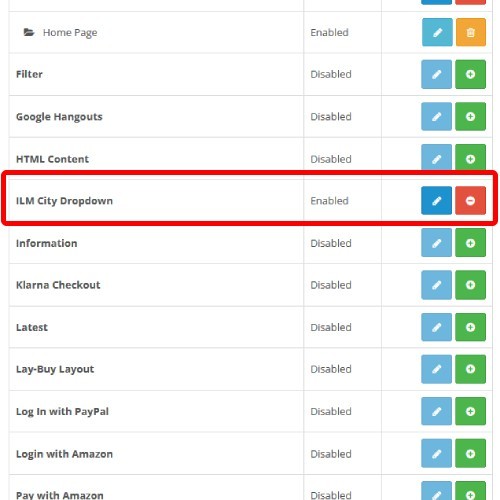
Step 7: Left Column Menu -> Extensions -> Extensions -> Choose the Extension Type(Modules)
Step 8: Install ILM City Dropdown
Query/Support:
You can directly mail us at "support@ilmtech.in"
Journal 3 Theme Compatible
Product Description
ILM City Dropdown gives solutions for both Merchant and Customers. Opencart displays the City and Postal/Zip Code field in the text input type. Now with ILM City Dropdown, you can convert the City and Postal/Zip Code Input field into a dropdown field for your customers. This will help your customer to find an appropriate City and Postal/Zip Code when specifying their Shipping or Billing address.
Merchant can easily get a customer's city and Postal/Zip Code without mistake it will save a lot of time while creating an Invoice and Shipment
Features
Admin
• Manage City and Postal/Zip Code with ajax based functionality
• Simplified Add/Edit/Delete the City and Postal/Zip Code in one place
• Easy menu access for configuration
• Bulk update and delete actions for City and Postal/Zip Code
• Import/Export based on Country, Zone, and City
• Sample Export Available
• Postal/Zip Code dropdown with enable/disable functionality
• Switch between Dropdown and Input field for City and Postal/Zip Code
• Enable/Disable switch between Dropdown and Input field for Postal/Zip Code
Customer
• Easily select city from dropdown based on Country and Zone selection
• Easily select Postal/Zip Code based on City
• Switch between Select and Input field (only if admin enables this option)
Import/Export
Admins can quickly upload the whole list of City and Postal/Zip Code using a CSV file. This will save a lot of time rather than entering City and Zipcode one by one. It is also possible to export the existing data of City and Postal/Zip Code in a CSV format.
Dropdown Field
Using this handy Dropdown field, customers quickly select the City and Postal/Zip Code rather than entering. This will save a lot of time and mainly avoid input mistakes. A major headache for the owner is the shipping address. Using this we can overcome entering incorrect shipping addresses.
Install Instructions
Step 1: Left Column Menu -> Extensions -> Installer
Step 2: Click Upload button and Upload the ocmod.zip file
Step 3: Left Column Menu -> Extensions -> Modifications -> Click Refresh Button
Step 4: Left Column Menu -> System -> Users -> User Groups
Step 5: Edit the User Group (Eg: Administrator)
Step 6: Give Access and Modify Permission for ILM City Dropdown
Step 7: Left Column Menu -> Extensions -> Extensions -> Choose the Extension Type(Modules)
Step 8: Install ILM City Dropdown
Query/Support:
You can directly mail us at "support@ilmtech.in"
What customers say about ILM City Dropdown

Amazing work, if anyone has issues with 3.0.3.8 Journal 3, ask the dev for the updated version, he will help you.
~pasare26
~pasare26
Awesome extension. Works perfectly with Journal3 theme. Developer is great guy. A++++
~Katalin2k
~Katalin2k
Price
$20.00
- Developed by OpenCart Community
- 12 Months Free Support
- Documentation Included
Rating
Compatibility
4.0.2.0, 4.0.2.1, 3.0.0.0, 3.0.1.0, 3.0.1.1, 3.0.1.2, 3.0.1.3, 3.0.2.0, 3.0.3.0, 3.0.3.1, 3.0.3.2, 3.0.3.3, 3.0.3.5, 3.0.3.6, 3.0.3.7, 3.0.3.8, 3.0.3.9
Last Update
18 Jul 2024
Created
13 Feb 2022
16 Sales
4 Comments

Login and write down your comment.
Login my OpenCart Account