Scaleflex DAM





Scaleflex DAM, a scalable and performance-oriented Digital Asset Management platform with integrated image and video optimizers to store, organize, optimize, and deliver your media assets such as images, videos, PDFs and many other brand assets fast all around the world to all device types.
The Scaleflex DAM Module is an extension which adds Asset Management to Opencart Admin (Summernote Field and Image Field).
To use the module, please either contact us via the Scaleflex Contact form for opening an account, or via the Scaleflex DAM Demo page to immediately get your DAM token and setup assistance. The token is required to configure and use the Opencart Module.
If you need more features or storage capacity, feel free to look into our Scaleflex Pricing page.
There are 3 simple steps for enabling the plugin on your Opencart 2 website:
- Step 1: Obtain a Scaleflex token (request it here)
- Step 2: Install the Scaleflex DAM module for Opencart
- Step 3: Add your security configuration parameters to access your Scaleflex library
Limitation
- There are some limitations with the Scaleflex DAM FMAW. It supports only multiple files, but Opencart can use only one, so if you choose more than 1 image in the DAM Widget, you must remove one to make it work.
- Summernote: Image resize function is removed. We can change the image size by remove the old one and add new
with new dimensions
Installation
- Step 1: Upload the folder admin in upload/admin to your OpenCart source code
- Step 2: Login to the Admin Dashboard, go to Extensions/Installers, and upload the file filerobot.ocmod.zip.
Then go to Modification, click reload to update the Installer
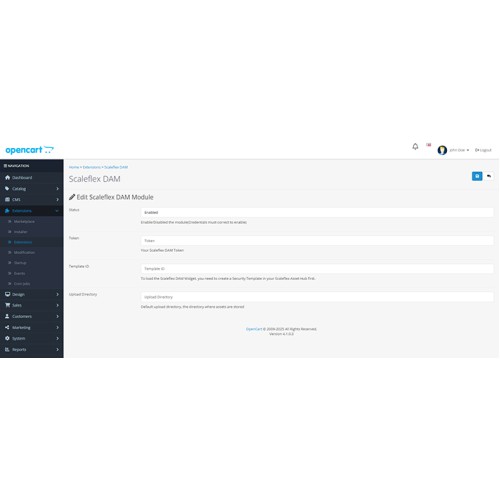
- Step 3: Go to Extensions/Extensions, choose Modules from the Dropdowns -> Then click on Scaleflex DAM
and update all configurations
- Step 4: In any Page, click on Image, and you can start using the Scaleflex DAM
The Scaleflex DAM Module is an extension which adds Asset Management to Opencart Admin (Summernote Field and Image Field).
To use the module, please either contact us via the Scaleflex Contact form for opening an account, or via the Scaleflex DAM Demo page to immediately get your DAM token and setup assistance. The token is required to configure and use the Opencart Module.
If you need more features or storage capacity, feel free to look into our Scaleflex Pricing page.
There are 3 simple steps for enabling the plugin on your Opencart 2 website:
- Step 1: Obtain a Scaleflex token (request it here)
- Step 2: Install the Scaleflex DAM module for Opencart
- Step 3: Add your security configuration parameters to access your Scaleflex library
Limitation
- There are some limitations with the Scaleflex DAM FMAW. It supports only multiple files, but Opencart can use only one, so if you choose more than 1 image in the DAM Widget, you must remove one to make it work.
- Summernote: Image resize function is removed. We can change the image size by remove the old one and add new
with new dimensions
Installation
- Step 1: Upload the folder admin in upload/admin to your OpenCart source code
- Step 2: Login to the Admin Dashboard, go to Extensions/Installers, and upload the file filerobot.ocmod.zip.
Then go to Modification, click reload to update the Installer
- Step 3: Go to Extensions/Extensions, choose Modules from the Dropdowns -> Then click on Scaleflex DAM
and update all configurations
- Step 4: In any Page, click on Image, and you can start using the Scaleflex DAM
Download
- Developed by OpenCart Community
- Documentation Included
Rating
Compatibility
4.x.x.x, 3.x.x.x
Last Update
23 Oct 2025
Created
26 May 2022
14 Downloads
0 Comments

Login and write down your comment.
Login my OpenCart Account