Product Bundle PRO
Bariklabs Product Bundle PRO — Smart Bundling for OpenCart 3.x
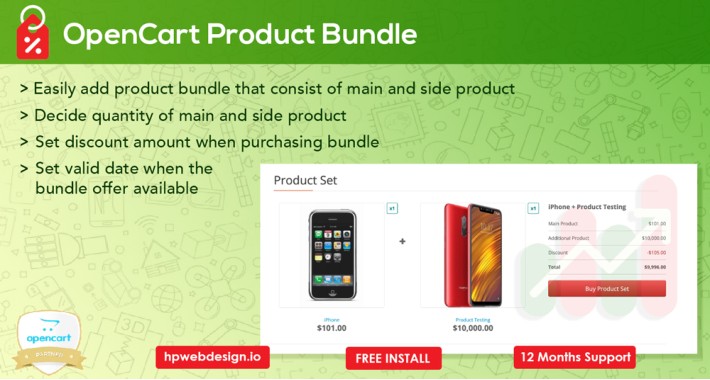
Boost your average order value by letting customers buy product bundles at a discount — no coding required. Bariklabs Product Bundle PRO adds a powerful cross-sell and upsell system directly into your OpenCart product pages, helping you move more inventory while giving customers a reason to spend more.
◈ TRY THE DEMO


◈ WHY PRODUCT BUNDLING WORKS
Customers buy more when they see clear value. Product bundles with visible discounts reduce decision fatigue and create a natural "this is a deal" moment right on the product page — at exactly the right time in the purchase journey.
Bariklabs Product Bundle PRO makes this possible in OpenCart without custom development. Set it up from the admin panel, apply bundles to individual products or in bulk, and let the module handle the rest.
◈ KEY FEATURES
Bundle Management
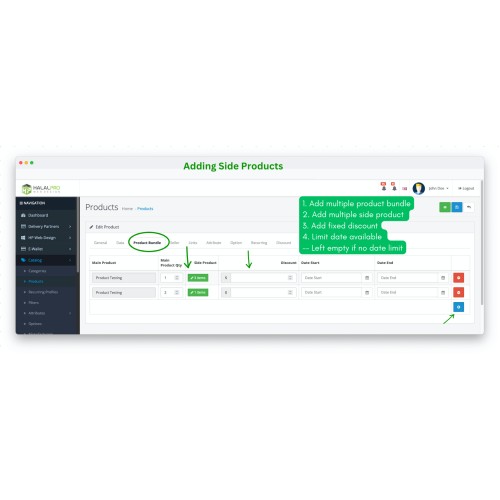
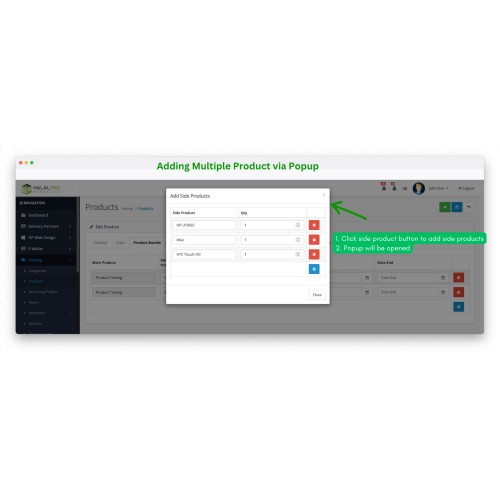
✪ Add multiple bundle combinations per product (main product + one or more secondary products)
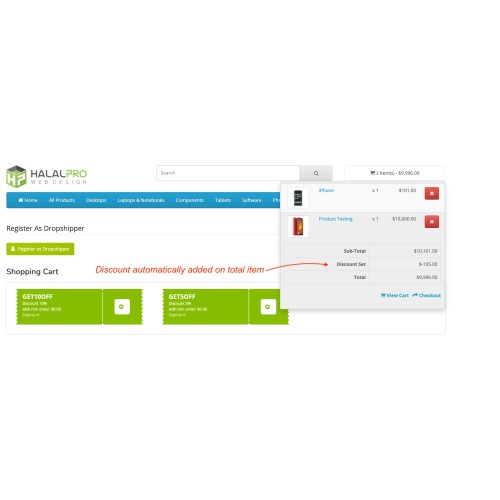
✪ Set custom discount amounts for each specific product pair
✪ Set availability dates for limited-time bundle promotions — or leave blank for ongoing offers
✪ Dedicated "Product Bundle" tab added directly inside the product edit page
Storefront Display
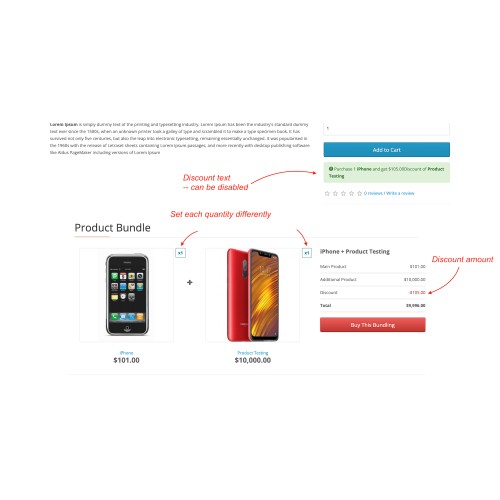
✪ Displays bundle packages with product images and discount info directly on the product page
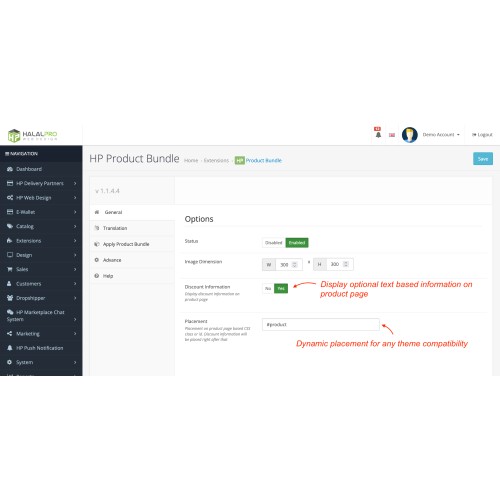
✪ Fully compatible with any OpenCart theme — place the bundle widget using any CSS class or ID
✪ Customizable image dimensions for bundle display
✪ Enable or disable bundle discount labels independently
Admin Productivity
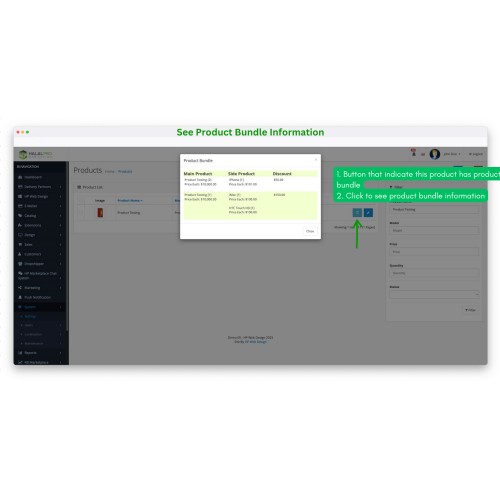
✪ Product list shows a bundle indicator so you can instantly see which products have bundles configured
✪ Click the indicator to view bundle details without opening the full product edit page
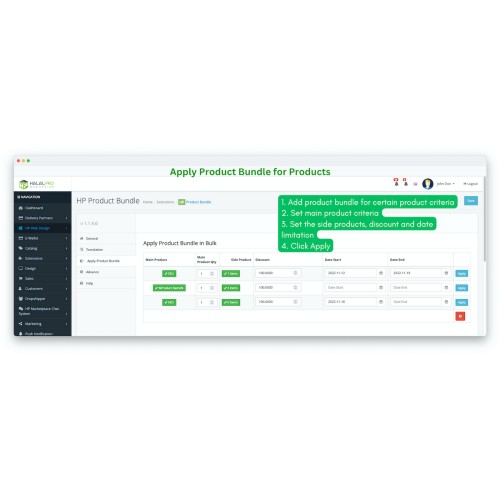
✪ Bulk bundle creation: apply bundles to multiple products at once by SKU or product name
Localization
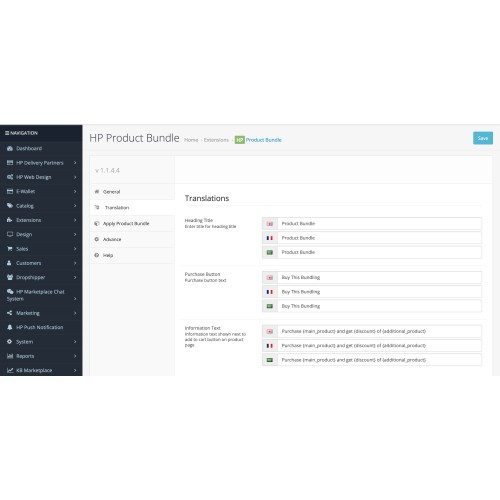
✪ Full translation support — customize all bundle-related text in any language via the admin panel
◈ HOW IT WORKS
1. Go to any product in your OpenCart admin and open the Product Bundle tab
2. Add one or more secondary products to pair with the current product
3. Set the bundle discount and optional availability window
4. Save — the bundle appears automatically on your product page
That's it. No template edits, no OCMOD conflicts to worry about, and no developer needed.
◈ WHO THIS IS FOR
✪ Electronics & accessories stores — pair devices with peripherals or cases
✪ Fashion & apparel — complete the outfit bundles
✪ Health & beauty — skincare sets, supplement combos
✪ Food & FMCG — buy-together promotions and seasonal bundles
✪ Any store wanting to increase cart size without running sitewide discounts
◈ TECHNICAL DETAILS
✪ Compatible with: OpenCart 3.x
✪ Installation: OCMOD (no core file modifications)
✪ Theme compatibility: 100% — works with any theme via CSS class injection
✪ Multi-language: Yes — all frontend text is translatable via admin
✪ Multi-store: Supported
◈ SUPPORT & INSTALLATION


◈ FREE OPENCART CONSULTING
Email: support@bariklabs.com
Telegram: t.me/bariklabs

◈ MORE FROM BARIKLABS
Download Free OpenCart Extensions →


Boost your average order value by letting customers buy product bundles at a discount — no coding required. Bariklabs Product Bundle PRO adds a powerful cross-sell and upsell system directly into your OpenCart product pages, helping you move more inventory while giving customers a reason to spend more.
◈ TRY THE DEMO
◈ WHY PRODUCT BUNDLING WORKS
Customers buy more when they see clear value. Product bundles with visible discounts reduce decision fatigue and create a natural "this is a deal" moment right on the product page — at exactly the right time in the purchase journey.
Bariklabs Product Bundle PRO makes this possible in OpenCart without custom development. Set it up from the admin panel, apply bundles to individual products or in bulk, and let the module handle the rest.
◈ KEY FEATURES
Bundle Management
✪ Add multiple bundle combinations per product (main product + one or more secondary products)
✪ Set custom discount amounts for each specific product pair
✪ Set availability dates for limited-time bundle promotions — or leave blank for ongoing offers
✪ Dedicated "Product Bundle" tab added directly inside the product edit page
Storefront Display
✪ Displays bundle packages with product images and discount info directly on the product page
✪ Fully compatible with any OpenCart theme — place the bundle widget using any CSS class or ID
✪ Customizable image dimensions for bundle display
✪ Enable or disable bundle discount labels independently
Admin Productivity
✪ Product list shows a bundle indicator so you can instantly see which products have bundles configured
✪ Click the indicator to view bundle details without opening the full product edit page
✪ Bulk bundle creation: apply bundles to multiple products at once by SKU or product name
Localization
✪ Full translation support — customize all bundle-related text in any language via the admin panel
◈ HOW IT WORKS
1. Go to any product in your OpenCart admin and open the Product Bundle tab
2. Add one or more secondary products to pair with the current product
3. Set the bundle discount and optional availability window
4. Save — the bundle appears automatically on your product page
That's it. No template edits, no OCMOD conflicts to worry about, and no developer needed.
◈ WHO THIS IS FOR
✪ Electronics & accessories stores — pair devices with peripherals or cases
✪ Fashion & apparel — complete the outfit bundles
✪ Health & beauty — skincare sets, supplement combos
✪ Food & FMCG — buy-together promotions and seasonal bundles
✪ Any store wanting to increase cart size without running sitewide discounts
◈ TECHNICAL DETAILS
✪ Compatible with: OpenCart 3.x
✪ Installation: OCMOD (no core file modifications)
✪ Theme compatibility: 100% — works with any theme via CSS class injection
✪ Multi-language: Yes — all frontend text is translatable via admin
✪ Multi-store: Supported
◈ SUPPORT & INSTALLATION
✪ Free installation — we handle setup for you
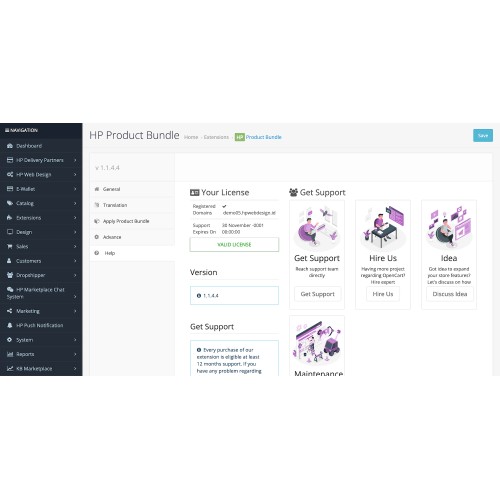
✪ 12 months technical support — included with every purchase
✪ Fast response via email and Telegram
◈ FREE OPENCART CONSULTING
Email: support@bariklabs.com
Telegram: t.me/bariklabs
◈ MORE FROM BARIKLABS
Download Free OpenCart Extensions →
Price
$29.99
- Developed by OpenCart Partner
- 12 Months Free Support
- Documentation Included
Rating
Compatibility
3.0.0.0, 3.0.1.0, 3.0.1.1, 3.0.1.2, 3.0.1.3, 3.0.2.0, 3.0.3.0, 3.0.3.1, 3.0.3.2, 3.0.3.3, 3.0.3.5, 3.0.3.6, 3.0.3.7, 3.0.3.8, 3.0.0.0, 3.0.1.0, 3.0.1.1, 3.0.1.2, 3.0.1.3, 3.0.2.0, 4.x.x.x, 3.0.3.0, 3.0.3.1, 3.0.3.2, 3.0.3.3, 3.0.3.5, 3.0.3.6, 3.0.3.7, 3.0.3.8, 3.x.x.x
Last Update
12 Apr 2026
Created
13 Jun 2022
6 Sales
1 Comments

Login and write down your comment.
Login my OpenCart Account