Abandoned Cart Extension
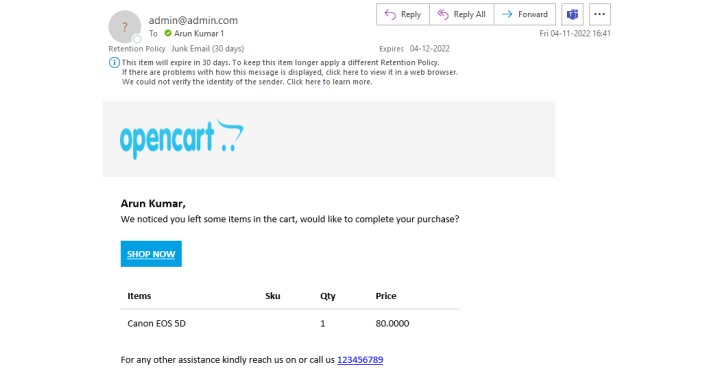
It will send the mail to the customers who left something in the cart!
Easily configure this extension so that :
1) First Extract the zip file of the module and upload the admin folder in the respective admin and catalog folder in the site's root directory.
2) Go to Extension->Extension->Module->abandone Cart Edit the module and enable the status.
3) Now you need to set up a Cron over the server to send the mail.
Additional features:
▪ Admin can send the mail to the customers once a day.
▪ Admin can send the mail to the customers in after 1 hour of adding the product.
▪ Admin can send the mail to the customers in after 2 days of adding the product.
▪ Admin can send the mail to the customers in after 4 days of adding the product.
▪ Admin can send the mail to the customers in after 5 days of adding the product.
Cron is the following:
BaseURL + /index.php?route=account/abondoned_cart For all the customers
BaseURL+ /index.php?route= account/abondoned_cart/hourlyMail mail from the store after 1 hour of adding the product in the cart
BaseURL+ /index.php?route= account/abondoned_cart/twoDaysMail mail from the store after 2 days of adding the product in the cart
BaseURL+ /index.php?route= account/abondoned_cart/fourDaysMail mail from the store after 4 days of adding the product in the cart
BaseURL+ /index.php?route= account/abondoned_cart/fiveDaysMail mail from the store after 5 days of adding the product in the cart
Easily configure this extension so that :
1) First Extract the zip file of the module and upload the admin folder in the respective admin and catalog folder in the site's root directory.
2) Go to Extension->Extension->Module->abandone Cart Edit the module and enable the status.
3) Now you need to set up a Cron over the server to send the mail.
Additional features:
▪ Admin can send the mail to the customers once a day.
▪ Admin can send the mail to the customers in after 1 hour of adding the product.
▪ Admin can send the mail to the customers in after 2 days of adding the product.
▪ Admin can send the mail to the customers in after 4 days of adding the product.
▪ Admin can send the mail to the customers in after 5 days of adding the product.
Cron is the following:
BaseURL + /index.php?route=account/abondoned_cart For all the customers
BaseURL+ /index.php?route= account/abondoned_cart/hourlyMail mail from the store after 1 hour of adding the product in the cart
BaseURL+ /index.php?route= account/abondoned_cart/twoDaysMail mail from the store after 2 days of adding the product in the cart
BaseURL+ /index.php?route= account/abondoned_cart/fourDaysMail mail from the store after 4 days of adding the product in the cart
BaseURL+ /index.php?route= account/abondoned_cart/fiveDaysMail mail from the store after 5 days of adding the product in the cart
Price
$10.00
- Developed by OpenCart Community
- 3 Months Free Support
- Documentation Included
Rating
Compatibility
2.3.0.0, 2.3.0.1, 2.3.0.2, 3.0.0.0, 3.0.1.0, 3.0.1.1, 3.0.1.2, 3.0.1.3, 3.0.2.0, 3.0.3.0, 3.0.3.1, 3.0.3.2, 3.0.3.3, 3.0.3.5, 3.0.3.6, 3.0.3.7, 3.0.3.8, 3.x.x.x
Last Update
4 Nov 2022
Created
4 Nov 2022
0 Sales
0 Comments

Login and write down your comment.
Login my OpenCart Account