Internal Node for Admin
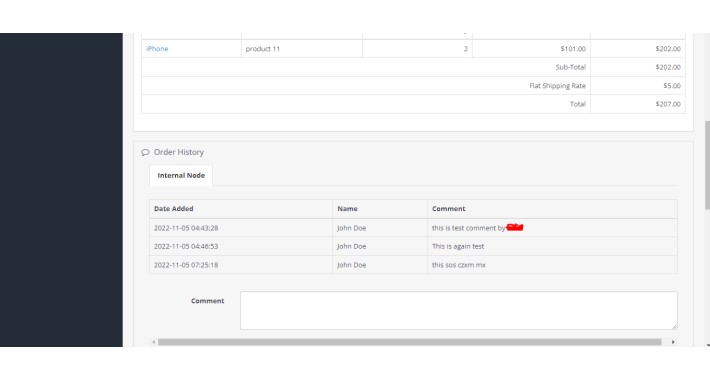
It will add the nodes on the basis of the orders!
Easily configure this extension so that :
1) First Extract the zip file of the module and upload the admin folder in the respective admin folder in the site's root directory.
2) Go to Extension->Installer section in the admin end and upload the file with the name salereport.ocmod.zip then go to Extension->Modification section and click over the refresh button is available on the top right corner of the page.
3) Go to Extension->Extension->Module->Internal Node Edit the module and enable the status.
Additional features:
▪ Admin can see the information related to the order which is provided by the Support Team, All of them need to add the same in the orders section.
▪ Easy to track the communication
Easily configure this extension so that :
1) First Extract the zip file of the module and upload the admin folder in the respective admin folder in the site's root directory.
2) Go to Extension->Installer section in the admin end and upload the file with the name salereport.ocmod.zip then go to Extension->Modification section and click over the refresh button is available on the top right corner of the page.
3) Go to Extension->Extension->Module->Internal Node Edit the module and enable the status.
Additional features:
▪ Admin can see the information related to the order which is provided by the Support Team, All of them need to add the same in the orders section.
▪ Easy to track the communication
Price
$10.00
- Developed by OpenCart Community
- 3 Months Free Support
- Documentation Included
Rating
Compatibility
2.3.0.0, 2.3.0.1, 2.3.0.2, 3.0.0.0, 3.0.1.0, 3.0.1.1, 3.0.1.2, 3.0.1.3, 3.0.2.0, 3.0.3.0, 3.0.3.1, 3.0.3.2, 3.0.3.3, 3.0.3.5, 3.0.3.6, 3.0.3.7, 3.0.3.8, 3.x.x.x
Last Update
5 Nov 2022
Created
5 Nov 2022
0 Sales
0 Comments

Login and write down your comment.
Login my OpenCart Account