Installment Simulation Opencart



◈ Bariklabs Installment Simulation — Bank Installment Calculator for OpenCart
Shoppers abandon carts when they can't quickly answer: "Can I afford this monthly?" This extension answers that question right on the product page — automatically, for every item, across every bank you support — so buyers decide with confidence instead of leaving your store.
◈ TRY THE DEMO


◈ Who This Is For
This extension is built for OpenCart store owners selling to customers in markets where bank installment plans are a primary purchase driver:
◈ Turn Installment Anxiety into Purchase Confidence
When a customer sees a high price tag without installment context, many will leave — not because they can't afford it, but because the mental math feels like too much work. By surfacing a clear, bank-by-bank monthly breakdown directly on the product page, you remove the friction that kills high-AOV conversions.
◈ How It Works — 4 Simple Steps
Getting installment simulation live on your store requires no coding:
◈ Installment Simulation on Every Product Page — Calculated Automatically
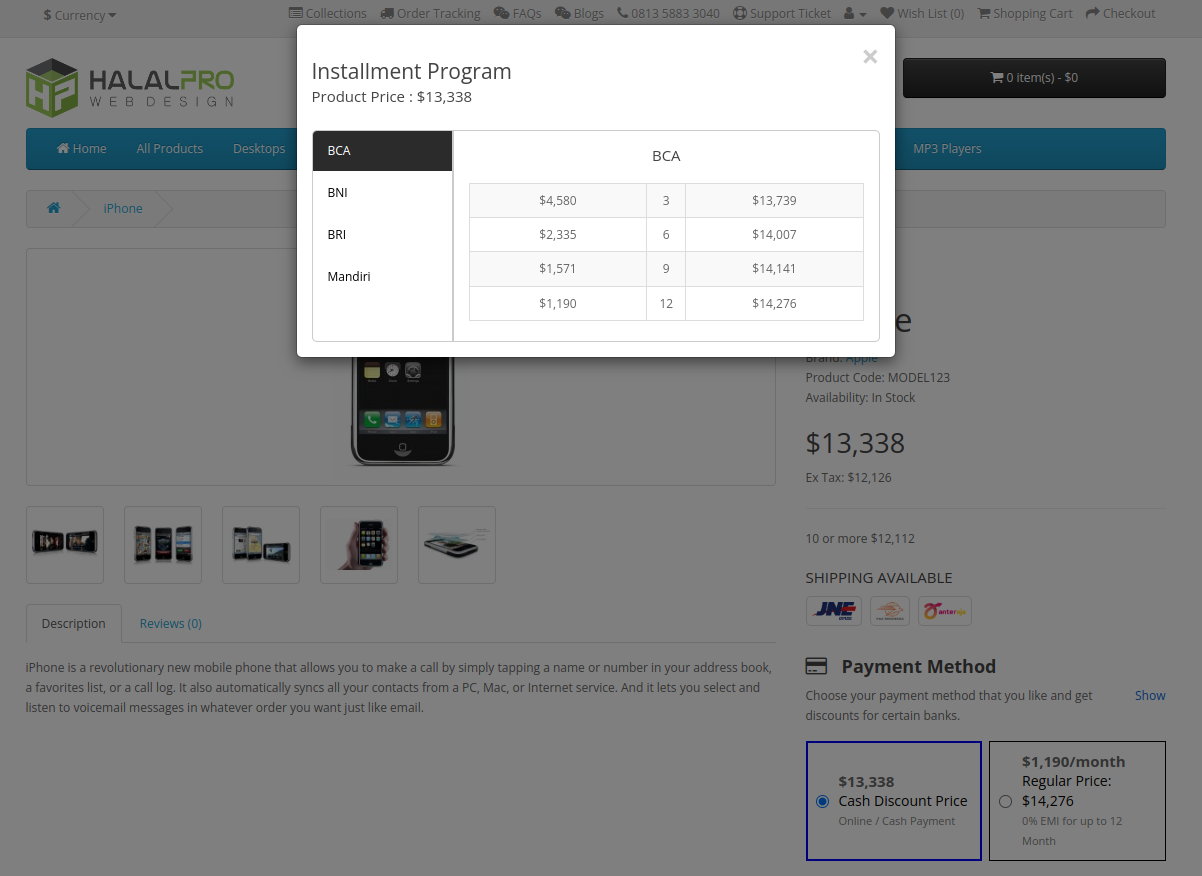
The core feature is a simulation widget that appears on all product pages. It pulls the current product price, applies your configured bank schemes and interest rates, and renders a per-bank, per-tenor breakdown in real time. Customers immediately see what they'd pay monthly — for each bank they hold a card with — without leaving the page.
◈ Installment Status Tracking in the Admin Order List
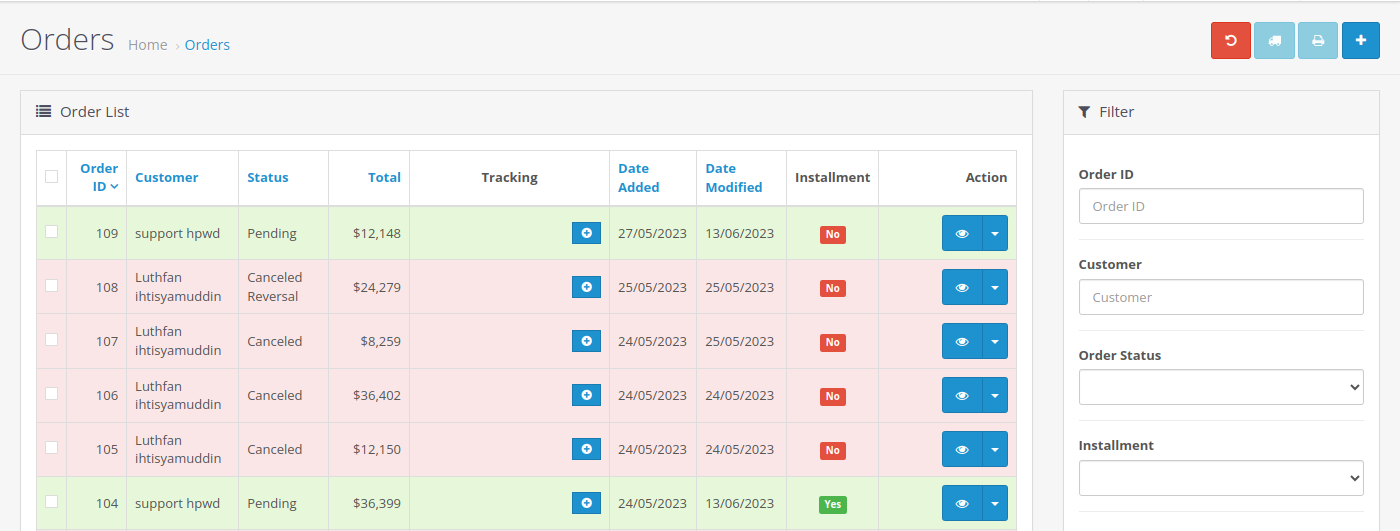
Beyond the storefront, the extension adds an installment status column directly to your admin order list. At a glance, see which orders were placed using an installment plan — and filter the list by installment status to segment, report, or follow up efficiently.
◈ Main Settings — Enable, Disable, and Position the Widget
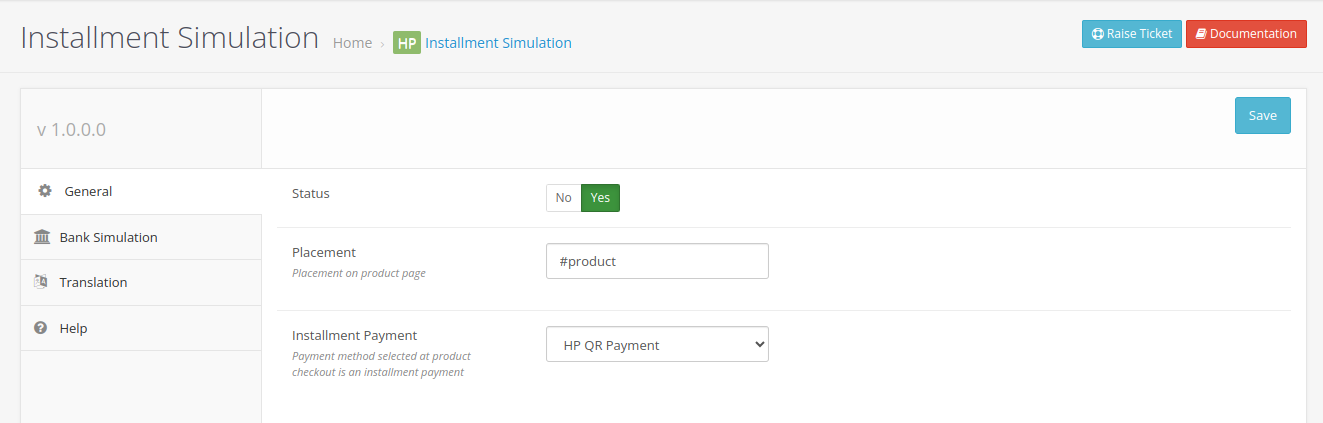
The main settings screen gives full control over the module's global behavior. Toggle the entire feature on or off with a single switch, and use the dynamic placement field to position the simulation widget anywhere on the product page without touching template files.
◈ Bank and Scheme Management — Add as Many Banks as You Need
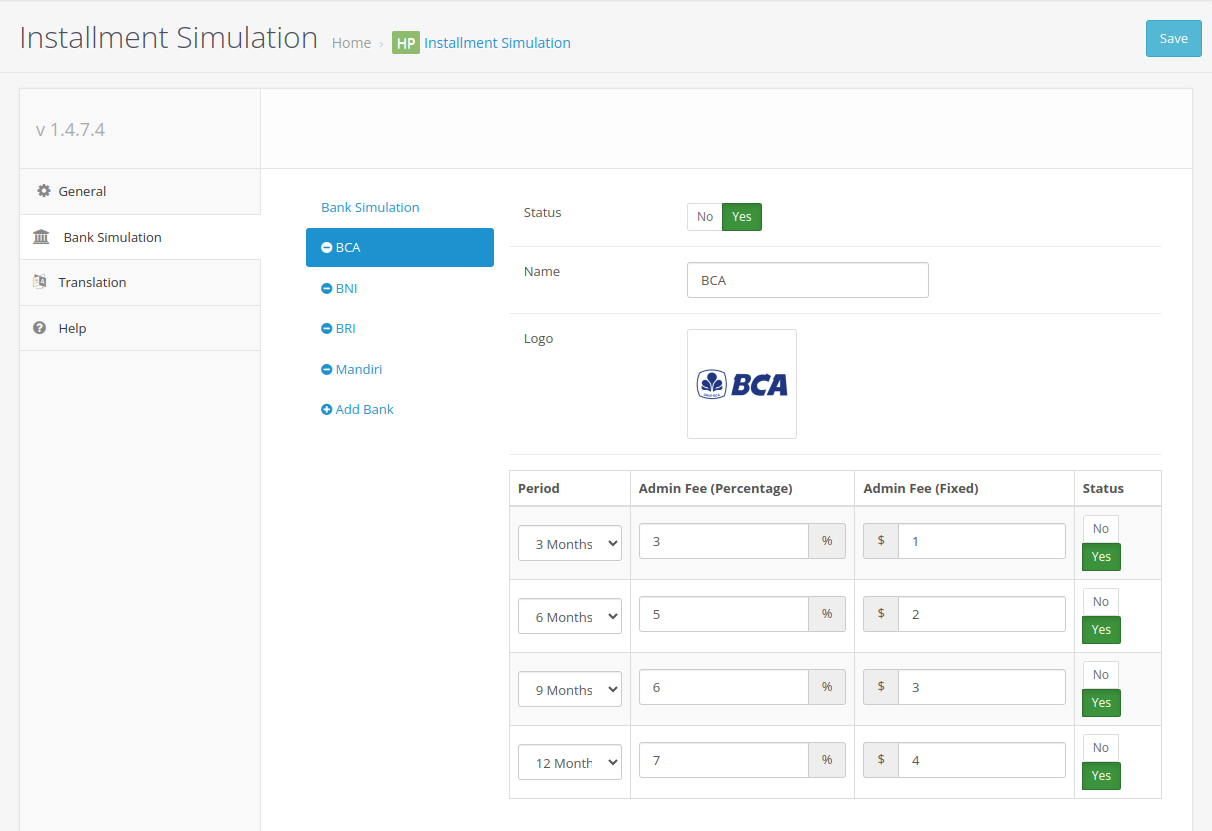
Each bank you support gets its own simulation entry. Add the bank name, configure installment schemes (interest rates, available tenors), and set its active status. Toggle individual banks on or off without deleting their configuration — useful during promotional periods when certain banks are temporarily featured.
◈ Multi-Language Text Customization — Localize for Any Market
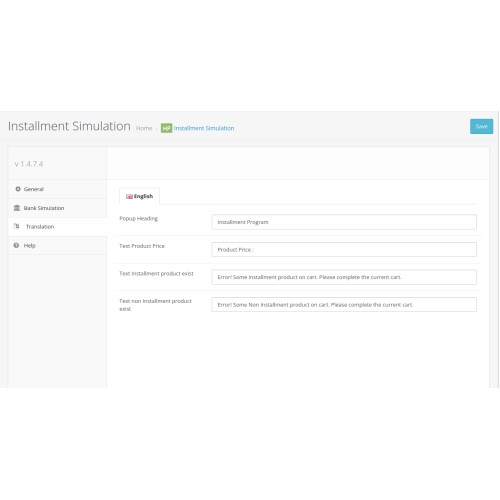
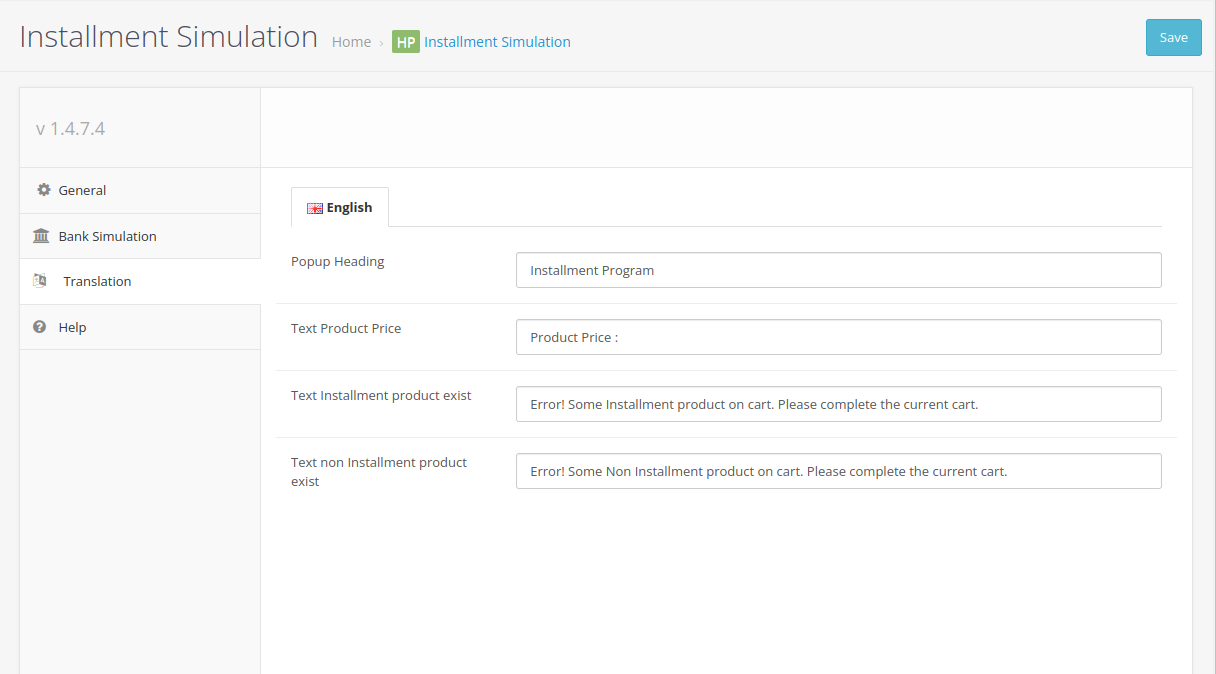
All customer-facing text in the simulation widget is editable through the translation settings panel. Configure labels and messages per language so installment information reads naturally for each market. Need help with a specific language? Contact the Bariklabs support team.
◈ TRY THE DEMO
◈ SUPERB TECHNICAL SUPPORT
We've got you covered!


◈ FREE OPENCART CONSULTING
Email: support@bariklabs.com
Telegram: t.me/bariklabs

OPENCART EXTENSION DEVELOPMENT | OPENCART ECOMMERCE
◈ DOWNLOAD FREE OPENCART EXTENSIONS
DOWNLOAD FREE EXTENSION
◈ EXPLORE OUR PREMIUM EXTENSIONS

◈ GET THE BEST FOR YOUR ONLINE STORE

Shoppers abandon carts when they can't quickly answer: "Can I afford this monthly?" This extension answers that question right on the product page — automatically, for every item, across every bank you support — so buyers decide with confidence instead of leaving your store.
◈ TRY THE DEMO
◈ Who This Is For
This extension is built for OpenCart store owners selling to customers in markets where bank installment plans are a primary purchase driver:
- ▸ Electronics and gadget stores where ticket prices push customers toward installment options
- ▸ Furniture and home appliance retailers offering multi-tenor payment plans
- ▸ Fashion and lifestyle brands partnered with multiple banks for 0% installment promotions
- ▸ Any store in Indonesia, Southeast Asia, or the Middle East where bank installments are table stakes for conversion
◈ Turn Installment Anxiety into Purchase Confidence
When a customer sees a high price tag without installment context, many will leave — not because they can't afford it, but because the mental math feels like too much work. By surfacing a clear, bank-by-bank monthly breakdown directly on the product page, you remove the friction that kills high-AOV conversions.
- ▸ Reduce cart abandonment on high-ticket items by answering "can I afford this?" before checkout
- ▸ Increase average order value by making expensive items feel financially accessible
- ▸ Build trust through transparent, upfront pricing — not surprises at checkout
- ▸ Let customers self-select their preferred bank and tenor without leaving your store
◈ How It Works — 4 Simple Steps
Getting installment simulation live on your store requires no coding:
- Install and activate the extension from your OpenCart admin panel
- Add your banks — enter each bank's name, interest rate, and available tenors (3, 6, 12, 24 months, etc.)
- Set the display position — use the jQuery selector field to place the widget exactly where you want it on the product page
- Go live — the system automatically calculates and displays the correct monthly amount for every product based on its price
◈ Installment Simulation on Every Product Page — Calculated Automatically
The core feature is a simulation widget that appears on all product pages. It pulls the current product price, applies your configured bank schemes and interest rates, and renders a per-bank, per-tenor breakdown in real time. Customers immediately see what they'd pay monthly — for each bank they hold a card with — without leaving the page.
- ▸ Shown on all product pages — no manual per-product setup
- ▸ Monthly amounts calculated automatically from each product's price
- ▸ Display position controlled via jQuery/JS selector — no template edits needed
- ▸ Supports cash and installment options side by side
◈ Installment Status Tracking in the Admin Order List
Beyond the storefront, the extension adds an installment status column directly to your admin order list. At a glance, see which orders were placed using an installment plan — and filter the list by installment status to segment, report, or follow up efficiently.
- ▸ Installment status column added to the native admin order list
- ▸ Filter orders by installment status (Yes / No)
- ▸ No separate report screen needed — integrated into native order management
◈ Main Settings — Enable, Disable, and Position the Widget
The main settings screen gives full control over the module's global behavior. Toggle the entire feature on or off with a single switch, and use the dynamic placement field to position the simulation widget anywhere on the product page without touching template files.
- ▸ Master enable/disable toggle for all installment simulation features
- ▸ Dynamic placement via jQuery selector — controls where the widget renders on the product page
◈ Bank and Scheme Management — Add as Many Banks as You Need
Each bank you support gets its own simulation entry. Add the bank name, configure installment schemes (interest rates, available tenors), and set its active status. Toggle individual banks on or off without deleting their configuration — useful during promotional periods when certain banks are temporarily featured.
- ▸ Add unlimited banks with custom installment schemes
- ▸ Show or hide individual banks by toggling status — no deletion required
- ▸ Each bank supports multiple tenors and independent interest rate configuration
◈ Multi-Language Text Customization — Localize for Any Market
All customer-facing text in the simulation widget is editable through the translation settings panel. Configure labels and messages per language so installment information reads naturally for each market. Need help with a specific language? Contact the Bariklabs support team.
- ▸ Full control over all customer-facing labels and messages
- ▸ Per-language configuration for multi-language OpenCart stores
- ▸ Translation assistance available from the Bariklabs support team on request
◈ TRY THE DEMO
◈ SUPERB TECHNICAL SUPPORT
We've got you covered!
- ▸ Free 12 Months Technical Support
- ▸ Free Installation!
◈ FREE OPENCART CONSULTING
Email: support@bariklabs.com
Telegram: t.me/bariklabs
OPENCART EXTENSION DEVELOPMENT | OPENCART ECOMMERCE
◈ DOWNLOAD FREE OPENCART EXTENSIONS
DOWNLOAD FREE EXTENSION
◈ EXPLORE OUR PREMIUM EXTENSIONS
◈ GET THE BEST FOR YOUR ONLINE STORE
Price
$29.99
- Developed by OpenCart Partner
- 12 Months Free Support
- Documentation Included
Rating
Compatibility
3.0.3.0, 3.0.3.1, 3.0.3.2, 3.0.3.3, 3.0.3.5, 3.0.3.6, 3.0.3.7, 3.0.3.8, 3.0.0.0, 3.0.1.0, 3.0.1.1, 3.0.1.2, 3.0.1.3, 3.0.2.0, 3.0.3.0, 3.0.3.1, 3.0.3.2, 3.0.3.3, 3.0.3.5, 3.0.3.6, 3.0.3.7, 3.0.3.8
Last Update
27 Apr 2026
Created
28 Jul 2023
1 Sales
0 Comments

Login and write down your comment.
Login my OpenCart Account