reCaptcha v.3 for OpenCart v.4 [updated:2024.08.22-15:34]
Image based, detailed installation steps inside of archive.
Unpack downloaded google_captcha_v3_for_oc4.zip file.
Archive google_captcha.ocmod.zip is your extension.
Folder captcha-images contains 20 images containing 20 easy steps how to install this module.
Steps 12 to 15 show how to get captcha keys: site (public) and secret.
Just follow these steps and you are done.
For free.
You are welcome.
;)
---------------------------------
Update: 2024.08.22-15:08
There was a small error in admin/controller file.
As a result keys you updated/entered anew were not showing after you came back to admin page again.
They were being added to database, just not fetched at page refresh.
Corrected.
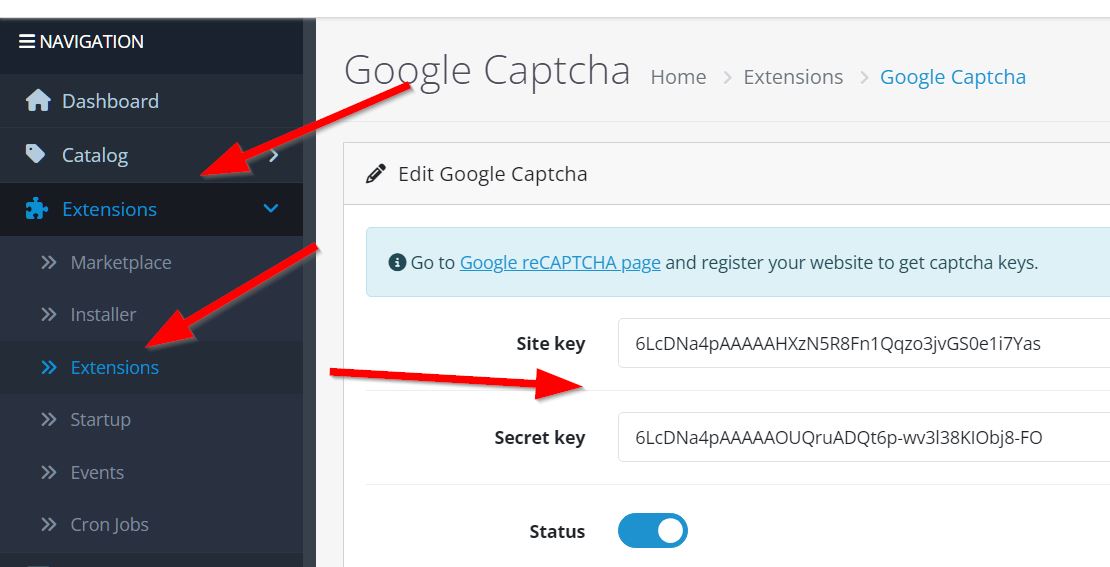
Admin page for Captcha 3 keys entry I mentioned can be found at:
A new version uploaded: google_captcha_v3_for_oc4_v1.1
If you have installed older version, just go to this file in your code:
public\extension\google_captcha\admin\controller\captcha\google.php
... and add these two lines:
$data['captcha_google_key'] = $this->config->get('captcha_google_key');
$data['captcha_google_secret'] = $this->config->get('captcha_google_secret');
... after this line (ca. code line #40):
$data['captcha_google_status'] = $this->config->get('captcha_google_status');
If you wish to see, if keys were added to your database:
1. go to table: settings
2. find in column 'key' these keys:
- captcha_google_key
- captcha_google_secret
... and see if you can find your keys in corresponding column 'value'.
Any more problems, report them please and will try to address them as time allows.
Unpack downloaded google_captcha_v3_for_oc4.zip file.
Archive google_captcha.ocmod.zip is your extension.
Folder captcha-images contains 20 images containing 20 easy steps how to install this module.
Steps 12 to 15 show how to get captcha keys: site (public) and secret.
Just follow these steps and you are done.
For free.
You are welcome.
;)
---------------------------------
Update: 2024.08.22-15:08
There was a small error in admin/controller file.
As a result keys you updated/entered anew were not showing after you came back to admin page again.
They were being added to database, just not fetched at page refresh.
Corrected.
Admin page for Captcha 3 keys entry I mentioned can be found at:
A new version uploaded: google_captcha_v3_for_oc4_v1.1
If you have installed older version, just go to this file in your code:
public\extension\google_captcha\admin\controller\captcha\google.php
... and add these two lines:
$data['captcha_google_key'] = $this->config->get('captcha_google_key');
$data['captcha_google_secret'] = $this->config->get('captcha_google_secret');
... after this line (ca. code line #40):
$data['captcha_google_status'] = $this->config->get('captcha_google_status');
If you wish to see, if keys were added to your database:
1. go to table: settings
2. find in column 'key' these keys:
- captcha_google_key
- captcha_google_secret
... and see if you can find your keys in corresponding column 'value'.
Any more problems, report them please and will try to address them as time allows.
Download
- Developed by OpenCart Community
- Documentation Included
Rating
Compatibility
4.0.2.3
Last Update
22 Aug 2024
Created
4 Apr 2024
461 Downloads
13 Comments

Login and write down your comment.
Login my OpenCart Account