Logout Button for Journal 3 theme
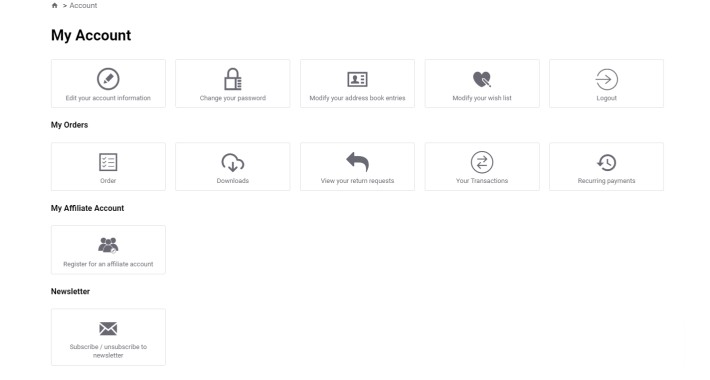
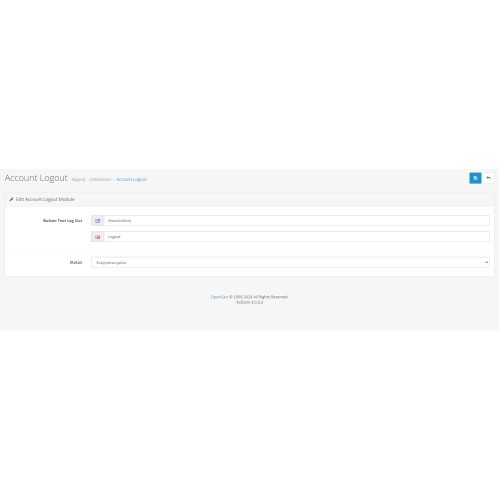
Resolve the crucial user experience dilemma in your OpenCart store, fueled by Journal 3 theme, utilizing our groundbreaking Logout Button Extension. Seamlessly embed a logout button onto the account page, empowering users to effortlessly log out. With our intuitive admin panel, toggle the extension on/off and tailor button text, ensuring a personalized experience. Furthermore, our extension supports multiple languages, enriching accessibility. Elevate user satisfaction and optimize browsing efficiency today!
How to install:
1. Access your OpenCart admin panel.
2. Navigate to Admin -> Extensions -> Extension Installer.
3. Upload the compatible zip file for your OpenCart version.
4. Proceed to Admin -> Extensions -> Modifications.
5. Clear Modification Cache and refresh modifications.
6. Finally, go to Admin -> Extensions -> Module.
7. Locate and install the "Account Logout" module.
8. Customize the button text for each language to your preference and enable the module.
9. Save changes.
How to install:
1. Access your OpenCart admin panel.
2. Navigate to Admin -> Extensions -> Extension Installer.
3. Upload the compatible zip file for your OpenCart version.
4. Proceed to Admin -> Extensions -> Modifications.
5. Clear Modification Cache and refresh modifications.
6. Finally, go to Admin -> Extensions -> Module.
7. Locate and install the "Account Logout" module.
8. Customize the button text for each language to your preference and enable the module.
9. Save changes.
Price
$20.00
- Developed by OpenCart Community
- 6 Months Free Support
- Documentation Included
Rating
Compatibility
3.0.0.0, 3.0.1.0, 3.0.1.1, 3.0.1.2, 3.0.1.3, 3.0.2.0, 3.0.3.0, 3.0.3.1, 3.0.3.2, 3.0.3.3, 3.0.3.5, 3.0.3.6, 3.0.3.7, 3.0.3.8, 3.x.x.x, 3.0.3.9
Last Update
16 Apr 2024
Created
10 Apr 2024
0 Sales
0 Comments

Login and write down your comment.
Login my OpenCart Account