Product Stickers and Labels
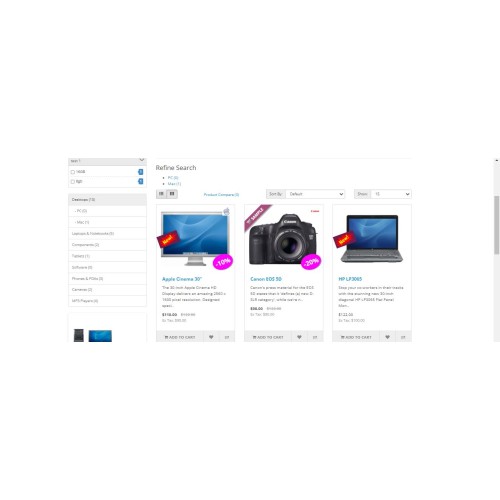
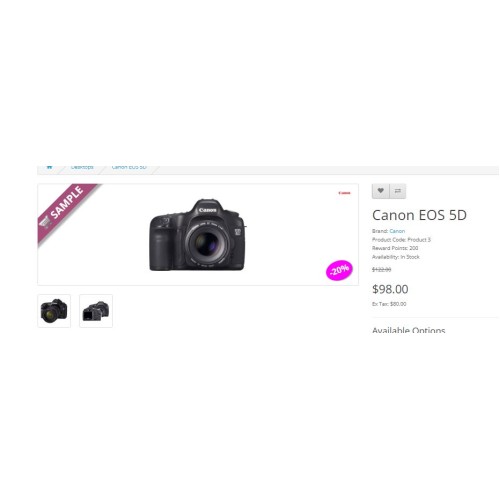

The label of a box is completely separate and is placed on the product image or under its name and does not change the image. This helps to have full control for where the label is displayed, and full control for the label layout.
SELECTION
By categories
By product name (autocomplete)
By stock status (when the product is not in stock)
By Manufacturer
By special price (you can choose products that have a special price)
By the latest products (for example, if you enter the number 10 in this box, the last 10 products of your store will be selected)
By Best-selling Products (select your best-selling products by entering a number, for example, by entering the number 5, select your five best-selling products to display the label)
LAYOUT DESIGN
There is a live demo in the design section (module settings) and what you create you can see there
Some styles are done by Text Editor and are not included in the module options, which makes the extension smaller (font-weight, font-size, image selection, font-color, direction, etc.)
If you wish, you can add different Border styles to your label, you can also choose its color and width.
With the Border Radius option, you can circle the shape of the label, or create rounded corners for the label
Adjust the height and width of the label
Adjust the height and width for the image inside the label
SELECTION
By categories
By product name (autocomplete)
By stock status (when the product is not in stock)
By Manufacturer
By special price (you can choose products that have a special price)
By the latest products (for example, if you enter the number 10 in this box, the last 10 products of your store will be selected)
By Best-selling Products (select your best-selling products by entering a number, for example, by entering the number 5, select your five best-selling products to display the label)
LAYOUT DESIGN
There is a live demo in the design section (module settings) and what you create you can see there
Some styles are done by Text Editor and are not included in the module options, which makes the extension smaller (font-weight, font-size, image selection, font-color, direction, etc.)
If you wish, you can add different Border styles to your label, you can also choose its color and width.
With the Border Radius option, you can circle the shape of the label, or create rounded corners for the label
Adjust the height and width of the label
Adjust the height and width for the image inside the label
Price
$17.00
- Developed by OpenCart Community
- 12 Months Free Support
- Documentation Included
Rating
Compatibility
2.1.0.1, 2.1.0.2, 2.2.0.0, 2.3.0.0, 2.3.0.1, 2.3.0.2, 3.0.0.0, 3.0.1.0, 3.0.1.1, 3.0.1.2, 3.0.1.3, 3.0.2.0, 3.0.3.0, 3.0.3.1, 3.0.3.2, 3.0.3.3, 3.0.3.5, 3.0.3.6, 3.0.3.7, 3.0.3.8, 3.x.x.x, 3.0.3.9
Last Update
22 Jun 2024
Created
22 Jun 2024
0 Sales
0 Comments

Login and write down your comment.
Login my OpenCart Account