Custom Formula
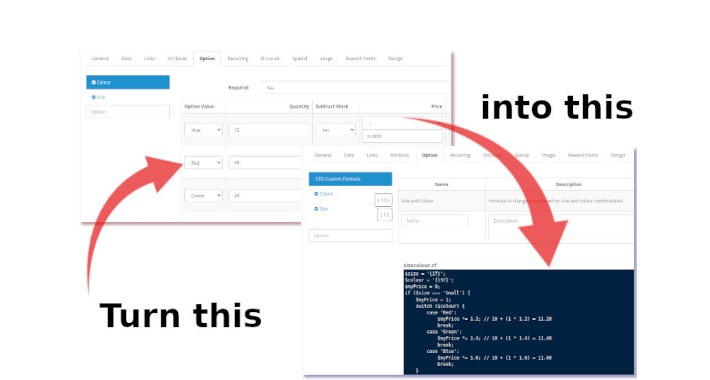
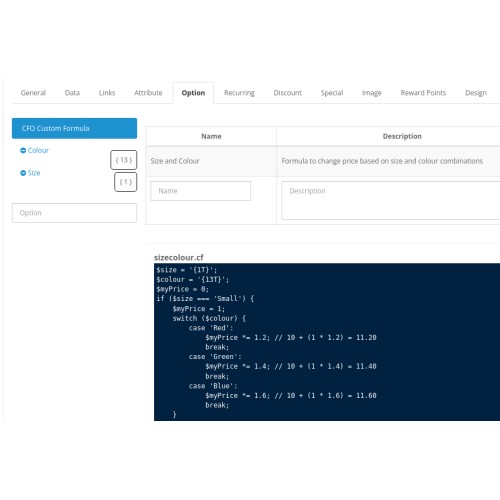
The product options in OpenCart only allow for -/+ changes to price or weight. What if you needed to multipy or divide? Using Custom Formula you can calculate your product prices or weight using your own formula. In fact, a whole lot more is possible. Some basic PHP knowledge is required but don't worry, we can help with that if needed.
Custom Formula can:
Support options are flexible and can be discussed on a pro-rata basis
**NOTE: requires VQMOD 2.3+ to work (see install instructions)
Demo site: here User: demo Pass: demo
When viewing a product (admin), In the options tab select Custom Formula then select Developer Support tab above the editor
Custom Formula can:
- Use individual or multiple option values in one custom formula to calculate the final price or weight - Instead of each option altering the price by either adding or subtracting a simple value you can use one or several options to calculate using a single or multiple formula
- Split up formaula scripts for readability - formulas are stored in files and can be processed in order
- FUTURE RELEASE: Use 3rd-party extensions to extend product options to get multiple prices -Select an extension that will provide an array of objects that can be looped over to provide a 'custom dynamic option'. Returned data (including multiple prices) can be handled with JavaScript. * - requires you to supply JavaScript code to handle the response
- Write formulas in PHP using the on-page editor with edit, save and remove options - The on-screen editor uses CodeMirror to provide a comfortable developer-style editor
- FUTURE RELEASE:Build custom options and output variables in HTML templates
Using objects from other extensions you can insert external data into you page to add unique formula processing
- Create scripts on your computer and upload - When adding a new formula you can choose to upload one that you have saved locally (for example, if you prefer a local PHP editor)
- And more to follow in later releases
Support options are flexible and can be discussed on a pro-rata basis
**NOTE: requires VQMOD 2.3+ to work (see install instructions)
Demo site: here User: demo Pass: demo
When viewing a product (admin), In the options tab select Custom Formula then select Developer Support tab above the editor
Price
$40.00
- Developed by OpenCart Community
- 12 Months Free Support
- Documentation Included
Rating
Compatibility
2.3.0.0, 2.3.0.1, 2.3.0.2
Last Update
11 Jul 2024
Created
10 Jul 2024
0 Sales
1 Comments

Login and write down your comment.
Login my OpenCart Account