Popup on Exit for OpenCart


The Popup on Exit module is designed to help you engage with your website OpenCart visitors at a crucial moment—when they are about to leave your page. This module allows you to display a popup window when a user tries to close the tab or navigate away from the site. The popup can include important information, promotional offers, or discounts, which helps in retaining customers and encouraging them to make a purchase or take other desired actions.
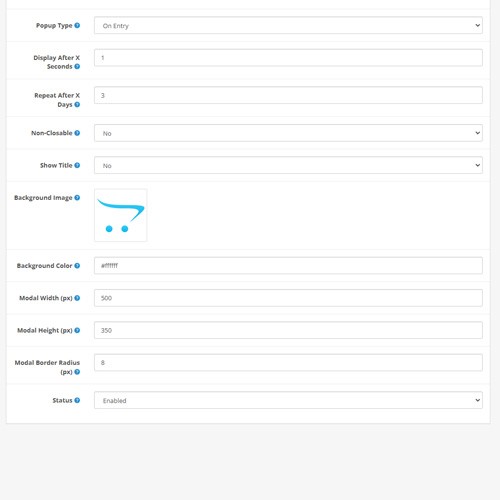
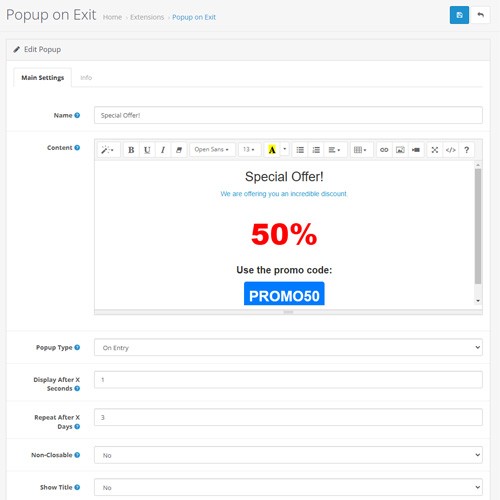
The module is user-friendly and doesn’t require any special skills to set up. You can choose to display the popup either when a user enters the site or when they are about to leave. The popup can be customized to be visually appealing by adding a background image, adjusting its size, and rounding the corners. You can also configure how often the popup is shown to the same user and the delay before it appears after entering the site.
Features:
This module is a powerful tool for increasing conversion rates and keeping customers engaged on your site.
The module is user-friendly and doesn’t require any special skills to set up. You can choose to display the popup either when a user enters the site or when they are about to leave. The popup can be customized to be visually appealing by adding a background image, adjusting its size, and rounding the corners. You can also configure how often the popup is shown to the same user and the delay before it appears after entering the site.
Features:
- - Display a popup when the user is about to leave the site or upon entry.
- Set the time delay for the popup to appear after entering the site.
- Configure the popup to reappear after a specified number of days.
- Control the frequency of the popup display for individual users.
- Option to prevent users from closing the popup.
- Add a background image and customize the popup's background color.
- Adjust the width, height, and border-radius of the popup window.
- Enable or disable the popup's title.
- Easy management and integration through the OpenCart admin panel.
This module is a powerful tool for increasing conversion rates and keeping customers engaged on your site.
Price
$29.99
- Developed by OpenCart Community
- Documentation Included
Rating
Compatibility
3.0.0.0, 3.0.1.0, 3.0.1.1, 3.0.1.2, 3.0.1.3, 3.0.2.0, 3.0.3.0, 3.0.3.1, 3.0.3.2, 3.0.3.3, 3.0.3.5, 3.0.3.6, 3.0.3.7, 3.0.3.8, 3.0.3.9, 3.0.4.0, 3.0.4.1, 3.0.5.0
Last Update
15 Feb 2026
Created
9 Aug 2024
1 Sales
1 Comments

Login and write down your comment.
Login my OpenCart Account