Cash on Delivery (COD) fee
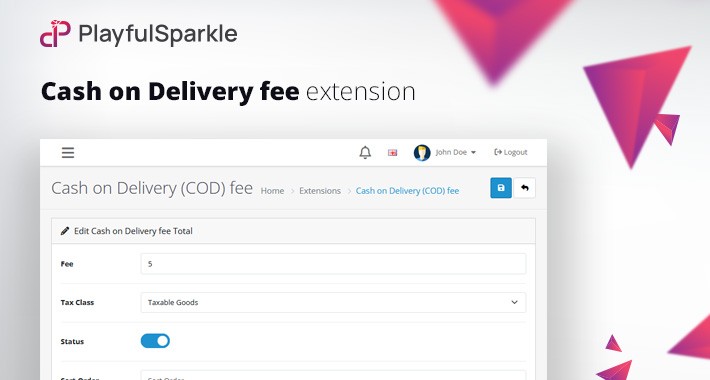
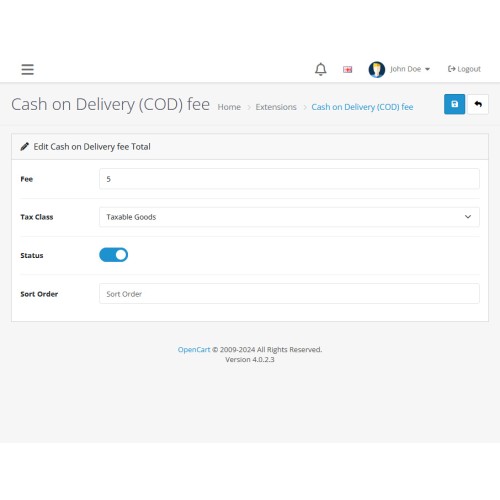
The Playful Sparkle - COD fee extension for OpenCart 3.x+, 4.x+ allows store owners to easily add a customizable fee when customers choose Cash on Delivery (COD) as their payment method. Designed to streamline the payment process, it ensures accurate handling of cash on delivery fees directly within checkout. This extension helps cover transaction costs for businesses, enhancing the overall checkout experience by transparently including the fee where applicable. Perfect for e-commerce businesses of all sizes, it requires no technical expertise to set up and integrates seamlessly with OpenCart 3.x+, 4.x+.
Features
For more information, visit the extension's GitHub page at https://github.com/playfulsparkle/oc3_cod_fee or https://github.com/playfulsparkle/oc4_cod_fee.




Installation Instructions
Installation Instructions for OpenCart 3.x+
MD5 Checksum: a368c3bd1405c7638a521232507a420e
SHA256 Checksum: 8930f01ec7335cc2669ff56efd6f7d48552b9f7bb938d59b300868e646524e2a
Installation Instructions for OpenCart 4.x+
MD5 Checksum: cfb44a381c45a36095d0c9b329dfbb94
SHA256 Checksum: afbcd95522e6e1d0581bc871065dc29ecb152f893567aae55db6e46371f5941e
Support & Inquiries
For assistance or inquiries regarding this extension, please visit our support website or contact us via email at support@playfulsparkle.com.
Features
- Configurable fee options: A fixed amount can be added to the total order value.
- Compatibility: Integrates smoothly with OpenCart 3.x+, 4.x+, supporting a range of online store setups.
- Multilingual Support: Ready for international use with languages including العربية (ar), Български (bg), 中文(简体) (zh-cn), 中文(繁體) (zh-tw), Čeština (cs-cz), English (UK) (en-gb), English (US) (en-us), Français (fr-fr), Deutsch (de-de), Ελληνικά (el-gr), Magyar (hu-hu), Italiano (it-it), 日本語 (ja), 한국어 (ko-kr), Polski (pl-pl), Português (Brasil) (pt-br), Русский (ru-ru), Slovenčina (sk-sk), Español (es-es), and Türkçe (tr-tr).
For more information, visit the extension's GitHub page at https://github.com/playfulsparkle/oc3_cod_fee or https://github.com/playfulsparkle/oc4_cod_fee.
Installation Instructions
Installation Instructions for OpenCart 3.x+
- 1) Download the latest version from the OpenCart Marketplace.
2) Log in to your OpenCart admin panel.
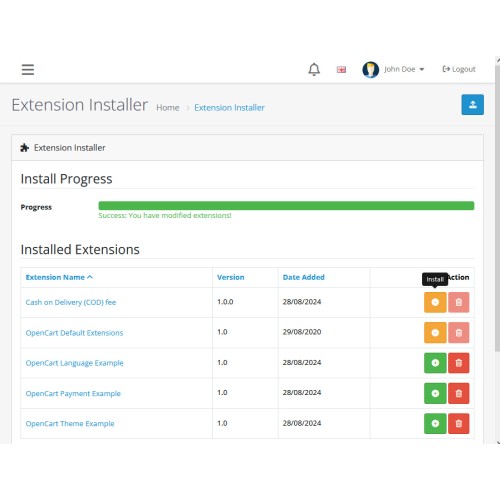
3) Navigate to Extensions > Installer.
4) Click the Upload button and upload the ps_cod_fee.ocmod.zip file.
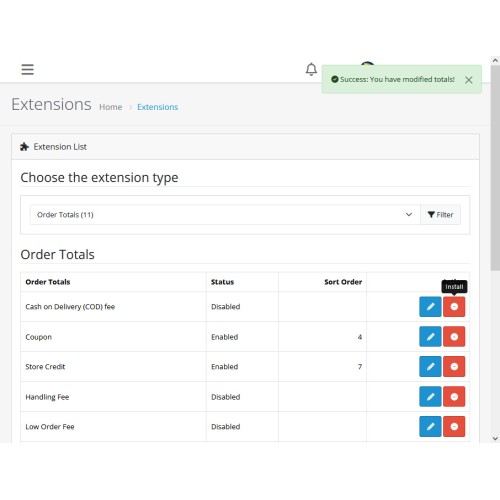
5) Navigate to Extensions > Extensions and select Order Totals from the Choose the extension type dropdown list.
6) Locate the extension in the Order Totals list and click the Install button.
7) Click the Edit button, configure the extension parameters, and click the Save button to save your settings.
MD5 Checksum: a368c3bd1405c7638a521232507a420e
SHA256 Checksum: 8930f01ec7335cc2669ff56efd6f7d48552b9f7bb938d59b300868e646524e2a
Installation Instructions for OpenCart 4.x+
- 1) Download the latest version from the OpenCart Marketplace.
2) Log in to your OpenCart admin panel.
3) Navigate to Extensions > Installer.
4) Click the Upload button and upload the ps_cod_fee.ocmod.zip file.
5) Locate the extension in the Installed Extensions list and click the Install button.
6) Navigate to Extensions > Extensions and select Order Totals from the Choose the extension type dropdown list.
7) Locate the extension in the Order Totals list and click the Install button.
8) Click the Edit button, configure the extension parameters, and click the Save button to save your settings.
MD5 Checksum: cfb44a381c45a36095d0c9b329dfbb94
SHA256 Checksum: afbcd95522e6e1d0581bc871065dc29ecb152f893567aae55db6e46371f5941e
Support & Inquiries
For assistance or inquiries regarding this extension, please visit our support website or contact us via email at support@playfulsparkle.com.
Download
- Developed by OpenCart Community
- 3 Months Free Support
- Documentation Included
Rating
Compatibility
3.0.0.0, 3.0.1.0, 3.0.1.1, 3.0.1.2, 3.0.1.3, 3.0.2.0, 3.0.3.0, 3.0.3.1, 3.0.3.2, 3.0.3.3, 3.0.3.5, 3.0.3.6, 3.0.3.7, 3.0.3.8, 3.x.x.x, 3.0.3.9, 3.0.4.0, 3.0.4.1, 3.0.5.0, 4.x.x.x, 4.0.0.0, 4.0.1.0, 4.0.1.1, 4.0.2.0, 4.0.2.1, 4.0.2.2, 4.0.2.3, 4.1.0.0, 4.1.0.1, 4.1.0.2, 4.1.0.3
Last Update
1 Apr 2026
Created
28 Aug 2024
375 Downloads
1 Comments

Login and write down your comment.
Login my OpenCart Account