Google Product Data Feed

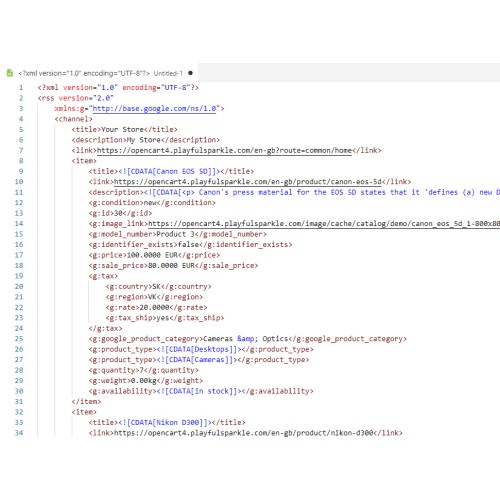
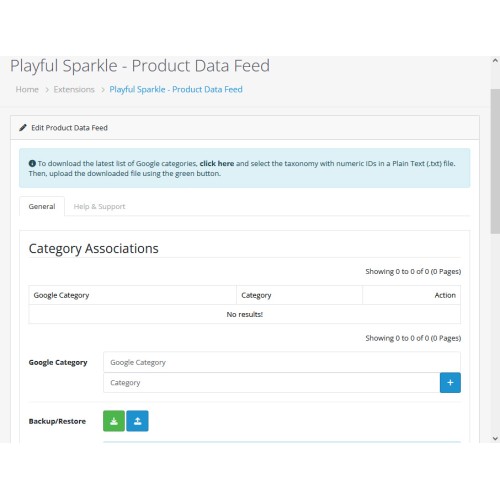
Playful Sparkle - Google Product Data Feed extension for OpenCart 3.x+, 4.x+ enables seamless export of OpenCart product data to Google Merchant Center, ensuring that your products are accurately displayed on the Google Shopping platform. The extension includes key features such as multi-store and multi-language data feed output, the ability to exclude out-of-stock products, support for pre-tax prices, customizable tax definitions, and frontend authentication for secure access, all designed for effortless integration and efficient management.
About Google Merchant Center
Google Merchant Center is a comprehensive platform that allows businesses to upload their product data for display on Google Shopping, reaching a larger customer base. This extension allows OpenCart store owners to easily sync their product catalog with Google Merchant Center, ensuring that all relevant product details—such as pricing, availability, and tax information—are displayed correctly to potential customers. By utilizing Google Merchant Center, the extension improves marketing effectiveness, streamlines product visibility, and ensures a secure, reliable product feed management process across multiple stores and languages.
Features
For more information, visit the extension's GitHub page at https://github.com/playfulsparkle/oc3_product_data_feed or https://github.com/playfulsparkle/oc4_product_data_feed.




Installation Instructions
Installation Instructions for OpenCart 3.x+
MD5 Checksum: 8c39206617e6a2b2ae051d22660c8dff
SHA256 Checksum: 1b016c44397f2f241ebcf4301844bbea368e55d41f2069380d30c5889ccf5dae
Installation Instructions for OpenCart 4.x+
MD5 Checksum: cb8825ec0a782a7becdd2d89c5810396
SHA256 Checksum: 2a3764047470ab49131b5e6ea53e53cc269227fbc45bff410db6e00079df1524
Support & Inquiries
For assistance or inquiries regarding this extension, please visit our support website or contact us via email at support@playfulsparkle.com.
About Google Merchant Center
Google Merchant Center is a comprehensive platform that allows businesses to upload their product data for display on Google Shopping, reaching a larger customer base. This extension allows OpenCart store owners to easily sync their product catalog with Google Merchant Center, ensuring that all relevant product details—such as pricing, availability, and tax information—are displayed correctly to potential customers. By utilizing Google Merchant Center, the extension improves marketing effectiveness, streamlines product visibility, and ensures a secure, reliable product feed management process across multiple stores and languages.
Features
- Multi-store and multi-language data feed output: Support for multi-language product data feed output, ensuring consistency across different stores and languages.
- Exclude out-of-stock products: Only available products are included in the data feed, ensuring accurate listings.
- Pre-tax price support: Provide the option to display prices excluding tax.
- Customizable tax definitions: Define tax settings for selected countries, including region, tax rate, and shipping tax, ensuring compliance with global tax requirements.
- Frontend authentication: Secure access to the product feed by preventing unauthorized users from accessing sensitive data.
- Compatibility: Integrates smoothly with OpenCart 3.x+, 4.x+, supporting a range of online store setups.
- Multi-store Support: Supports multi-store setups by default, making it easy to integrate across multiple OpenCart stores.
- Multilingual Support: Ready for international use with languages including العربية (ar), Български (bg), 中文(简体) (zh-cn), 中文(繁體) (zh-tw), Čeština (cs-cz), English (UK) (en-gb), English (US) (en-us), Français (fr-fr), Deutsch (de-de), Ελληνικά (el-gr), Magyar (hu-hu), Italiano (it-it), 日本語 (ja), 한국어 (ko-kr), Polski (pl-pl), Português (Brasil) (pt-br), Русский (ru-ru), Slovenčina (sk-sk), Español (es-es), and Türkçe (tr-tr) (community contribution Furkan Başkak).
For more information, visit the extension's GitHub page at https://github.com/playfulsparkle/oc3_product_data_feed or https://github.com/playfulsparkle/oc4_product_data_feed.
Installation Instructions
Installation Instructions for OpenCart 3.x+
- 1) Download the latest version from the OpenCart Marketplace.
2) Log in to your OpenCart admin panel.
3) Navigate to Extensions > Installer.
4) Click the Upload button and upload the ps_product_data_feed.ocmod.zip file.
5) Navigate to Extensions > Extensions and select Feeds from the Choose the extension type dropdown list.
6) Locate the extension in the Feeds list and click the Install button.
7) Click the Edit button, configure the extension parameters, and click the Save button to save your settings.
MD5 Checksum: 8c39206617e6a2b2ae051d22660c8dff
SHA256 Checksum: 1b016c44397f2f241ebcf4301844bbea368e55d41f2069380d30c5889ccf5dae
Installation Instructions for OpenCart 4.x+
- 1) Download the latest version from the OpenCart Marketplace.
2) Log in to your OpenCart admin panel.
3) Navigate to Extensions > Installer.
4) Click the Upload button and upload the ps_product_data_feed.ocmod.zip file.
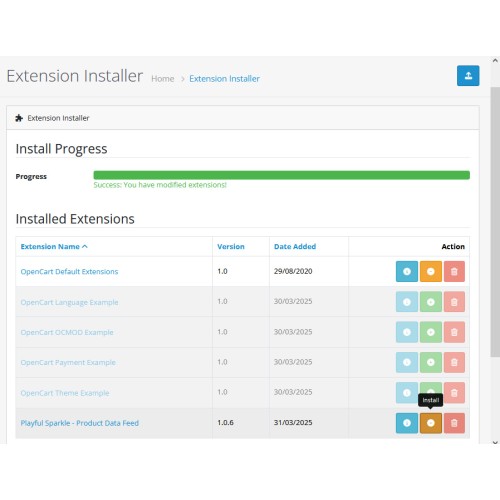
5) Locate the extension in the Installed Extensions list and click the Install button.
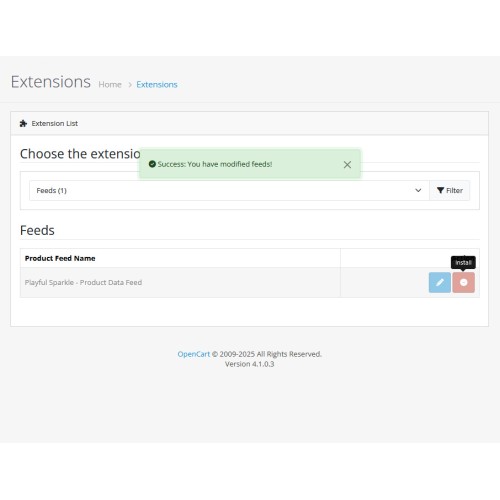
6) Navigate to Extensions > Extensions and select Feeds from the Choose the extension type dropdown list.
7) Locate the extension in the Feeds list and click the Install button.
8) Click the Edit button, configure the extension parameters, and click the Save button to save your settings.
MD5 Checksum: cb8825ec0a782a7becdd2d89c5810396
SHA256 Checksum: 2a3764047470ab49131b5e6ea53e53cc269227fbc45bff410db6e00079df1524
Support & Inquiries
For assistance or inquiries regarding this extension, please visit our support website or contact us via email at support@playfulsparkle.com.
What customers say about Google Product Data Feed

Thank you so much for your extension.
~htwp
~htwp
Download
- Developed by OpenCart Community
- 3 Months Free Support
- Documentation Included
Rating
Compatibility
3.0.0.0, 3.0.1.0, 3.0.1.1, 3.0.1.2, 3.0.1.3, 3.0.2.0, 3.0.3.0, 3.0.3.1, 3.0.3.2, 3.0.3.3, 3.0.3.5, 3.0.3.6, 3.0.3.7, 3.0.3.8, 3.x.x.x, 3.0.3.9, 3.0.4.0, 3.0.4.1, 3.0.5.0, 4.x.x.x, 4.0.0.0, 4.0.1.0, 4.0.1.1, 4.0.2.0, 4.0.2.1, 4.0.2.2, 4.0.2.3, 4.1.0.0, 4.1.0.1, 4.1.0.2, 4.1.0.3
Last Update
1 Apr 2026
Created
4 Oct 2024
531 Downloads
10 Comments

Login and write down your comment.
Login my OpenCart Account