Striper Pro (Stripe Checkout Extension)


Current extension version for OpenCart 3.x.x.x: 1.7
Current extension version for OpenCart 4.x.x.x: 1.7
Overview
Striper Pro is a powerful and easy-to-use extension for OpenCart that allows you to accept payments via Stripe, the secure and seamless way to process credit card payments online. This integration brings Stripe's user-friendly Checkout experience to your OpenCart store, enabling you to effortlessly accept payments.
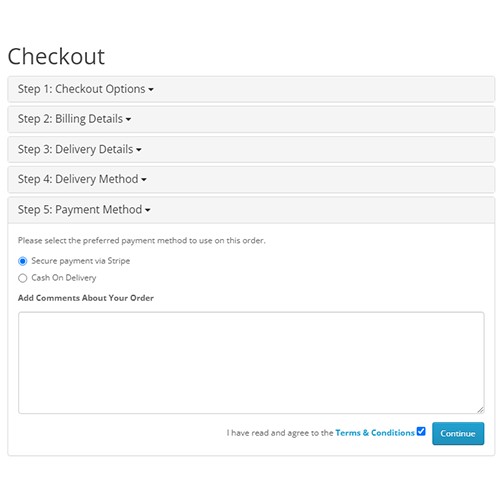
When customers choose to pay, they are securely redirected to Stripe's Checkout page. Once the payment is completed, they are returned to your store. This ensures both maximum security and a smooth transaction process.
Features
Secure Payments: Leverages Stripe's secure payment processing to protect both merchants and customers.
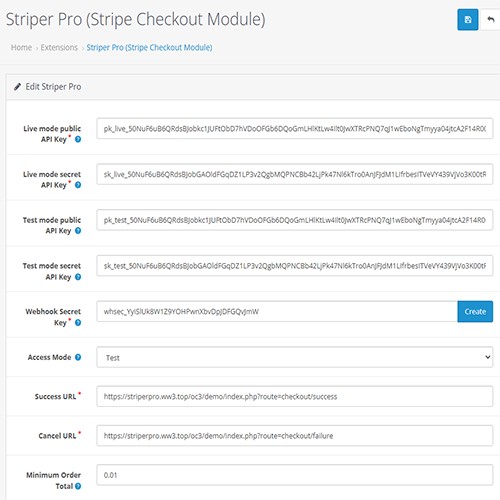
Minimal Setup: Simply install the extension, configure your Stripe API keys, and start accepting payments.
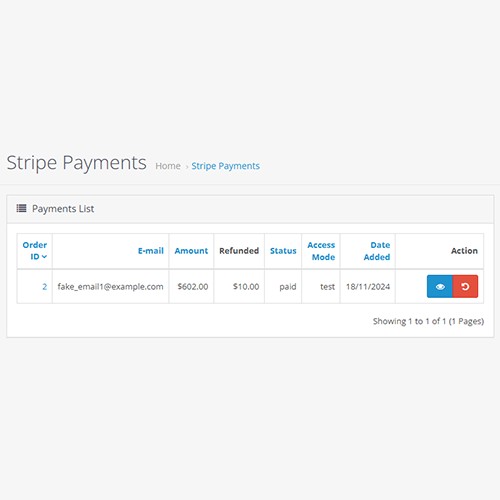
Comprehensive Payment List: Easily view all payments with advanced filtering options by amount, customer email, and date.
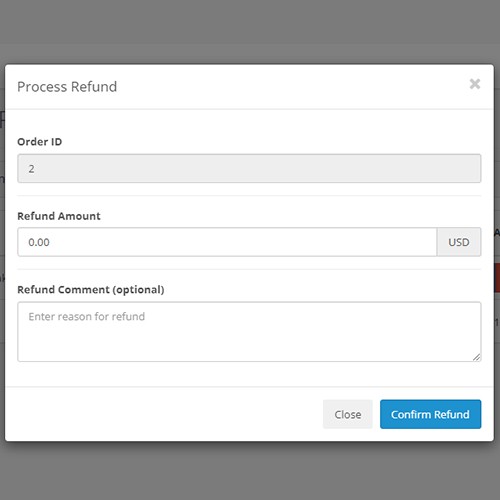
Streamlined Refunds: Process refunds with optional comments directly from the admin panel.
Dual API Key Support: Configure two sets of API keys and seamlessly switch between Live and Test modes.
Custom Payment Method Name: Set a unique payment method name for each store language for better localization.
Multilingual Interface: Includes translations into English, German, French, Italian, Belarusian, Ukrainian and Russian.
Demo




Login: demo
Password: demo
For test scenarios (successful/rejected payments, 3D Secure, etc.), use Stripe test cards: https://docs.stripe.com/testing
System Requirements
Extension for OpenCart 3.x.x.x requires PHP 5.6.0 and higher.
Extension for OpenCart 4.x.x.x requires PHP 8.0 and higher.
This extension embeds the "Stripe PHP Library".
Installation for OpenCart 3.x.x.x
- Download the striperpro_oc3.x.x.x.ocmod.zip file.
- Go to Extensions -> Installer in admin side and upload extension file striperpro_oc3.x.x.x.ocmod.zip.
- In admin side, go to System -> Users -> User Groups and set up permissions to Administrator group.
- In the Access Permission field, check the checkbox for "extension/payment/striperpro".
- In the Modify Permission field, check the checkbox for "extension/payment/striperpro".
- Go to Extensions -> Modifications and refresh modifications cache by clicking the refresh button on top right.
- Go to Extensions -> Extensions, choose the extension type "Payments" and install "Striper Pro (Stripe Checkout Extension)".
Installation for OpenCart 4.x.x.x
- Download the striperpro.ocmod.zip file.
- Go to Extensions -> Installer in admin side, upload extension file striperpro.ocmod.zip and click "Install" button next to "Striper Pro".
- In admin side, go to System -> Users -> User Groups and set up permissions to Administrator group. In the Extensions settings section, check both the `Access` and `Modify` checkboxes for the entry "extension/striperpro/payment/striperpro".
- Go to Extensions -> Extensions, choose the extension type "Payments" and click "Install" button next to "Striper Pro".
Help
For assistance with configuring and using the Striper Pro extension for OpenCart 3.x.x.x, please visit https://striperpro.ww3.top/oc3.
For assistance with configuring and using the Striper Pro extension for OpenCart 4.x.x.x, please visit https://striperpro.ww3.top/oc4.
Usage
Once the extension is installed and configured, your customers will be able to use Stripe Checkout to complete their purchases on your OpenCart store. The checkout process will redirect them to Stripe's secure payment page, and upon successful payment, they will be redirected back to your store.
Support
I make every effort to answer all user questions; however, product support is primarily limited to assistance with the initial installation and fixing identified bugs. Compatibility issues with specific user themes or custom builds based on the OpenCart engine are not covered.
License
This software is distributed under a proprietary software license. Please see License File for more information.
THE SOFTWARE IS PROVIDED "AS IS" WITHOUT ANY WARRANTIES OF ANY KIND, EXPRESS OR IMPLIED, INCLUDING BUT NOT LIMITED TO WARRANTIES OF MERCHANTABILITY, FITNESS FOR A PARTICULAR PURPOSE, OR NON-INFRINGEMENT. LICENSEE ASSUMES ALL RISKS ASSOCIATED WITH THE USE OF THE SOFTWARE.
Current extension version for OpenCart 4.x.x.x: 1.7
Overview
Striper Pro is a powerful and easy-to-use extension for OpenCart that allows you to accept payments via Stripe, the secure and seamless way to process credit card payments online. This integration brings Stripe's user-friendly Checkout experience to your OpenCart store, enabling you to effortlessly accept payments.
When customers choose to pay, they are securely redirected to Stripe's Checkout page. Once the payment is completed, they are returned to your store. This ensures both maximum security and a smooth transaction process.
Features
Secure Payments: Leverages Stripe's secure payment processing to protect both merchants and customers.
Minimal Setup: Simply install the extension, configure your Stripe API keys, and start accepting payments.
Comprehensive Payment List: Easily view all payments with advanced filtering options by amount, customer email, and date.
Streamlined Refunds: Process refunds with optional comments directly from the admin panel.
Dual API Key Support: Configure two sets of API keys and seamlessly switch between Live and Test modes.
Custom Payment Method Name: Set a unique payment method name for each store language for better localization.
Multilingual Interface: Includes translations into English, German, French, Italian, Belarusian, Ukrainian and Russian.
Demo
Login: demo
Password: demo
For test scenarios (successful/rejected payments, 3D Secure, etc.), use Stripe test cards: https://docs.stripe.com/testing
System Requirements
Extension for OpenCart 3.x.x.x requires PHP 5.6.0 and higher.
Extension for OpenCart 4.x.x.x requires PHP 8.0 and higher.
This extension embeds the "Stripe PHP Library".
Installation for OpenCart 3.x.x.x
- Download the striperpro_oc3.x.x.x.ocmod.zip file.
- Go to Extensions -> Installer in admin side and upload extension file striperpro_oc3.x.x.x.ocmod.zip.
- In admin side, go to System -> Users -> User Groups and set up permissions to Administrator group.
- In the Access Permission field, check the checkbox for "extension/payment/striperpro".
- In the Modify Permission field, check the checkbox for "extension/payment/striperpro".
- Go to Extensions -> Modifications and refresh modifications cache by clicking the refresh button on top right.
- Go to Extensions -> Extensions, choose the extension type "Payments" and install "Striper Pro (Stripe Checkout Extension)".
Installation for OpenCart 4.x.x.x
- Download the striperpro.ocmod.zip file.
- Go to Extensions -> Installer in admin side, upload extension file striperpro.ocmod.zip and click "Install" button next to "Striper Pro".
- In admin side, go to System -> Users -> User Groups and set up permissions to Administrator group. In the Extensions settings section, check both the `Access` and `Modify` checkboxes for the entry "extension/striperpro/payment/striperpro".
- Go to Extensions -> Extensions, choose the extension type "Payments" and click "Install" button next to "Striper Pro".
Help
For assistance with configuring and using the Striper Pro extension for OpenCart 3.x.x.x, please visit https://striperpro.ww3.top/oc3.
For assistance with configuring and using the Striper Pro extension for OpenCart 4.x.x.x, please visit https://striperpro.ww3.top/oc4.
Usage
Once the extension is installed and configured, your customers will be able to use Stripe Checkout to complete their purchases on your OpenCart store. The checkout process will redirect them to Stripe's secure payment page, and upon successful payment, they will be redirected back to your store.
Support
I make every effort to answer all user questions; however, product support is primarily limited to assistance with the initial installation and fixing identified bugs. Compatibility issues with specific user themes or custom builds based on the OpenCart engine are not covered.
License
This software is distributed under a proprietary software license. Please see License File for more information.
THE SOFTWARE IS PROVIDED "AS IS" WITHOUT ANY WARRANTIES OF ANY KIND, EXPRESS OR IMPLIED, INCLUDING BUT NOT LIMITED TO WARRANTIES OF MERCHANTABILITY, FITNESS FOR A PARTICULAR PURPOSE, OR NON-INFRINGEMENT. LICENSEE ASSUMES ALL RISKS ASSOCIATED WITH THE USE OF THE SOFTWARE.
Price
$20.00
- Developed by OpenCart Community
- 12 Months Free Support
- Documentation Included
Rating
Compatibility
4.x.x.x, 4.0.0.0, 4.0.1.0, 4.0.1.1, 4.0.2.0, 4.0.2.1, 4.0.2.2, 4.0.2.3, 4.1.0.0, 4.1.0.1, 4.1.0.2, 4.1.0.3, 3.0.0.0, 3.0.1.0, 3.0.1.1, 3.0.1.2, 3.0.1.3, 3.0.2.0, 3.0.3.0, 3.0.3.1, 3.0.3.2, 3.0.3.3, 3.0.3.5, 3.0.3.6, 3.0.3.7, 3.0.3.8, 3.x.x.x, 3.0.3.9, 3.0.4.0, 3.0.4.1, 3.0.5.0
Last Update
1 Jun 2026
Created
19 Nov 2024
14 Sales
1 Comments

Login and write down your comment.
Login my OpenCart Account