Deal of the Day Widget — A Simple Way to Boost Sales

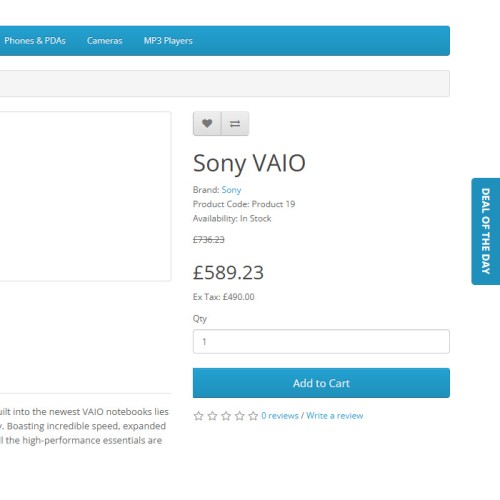
The "Deal of the Day" widget highlights discounted products in your online store. It automatically displays promotional offers with a countdown timer, encouraging customers to make quicker purchase decisions. Its minimalist design seamlessly integrates into the website’s layout without distracting from the main content.
How Does the Widget Work?
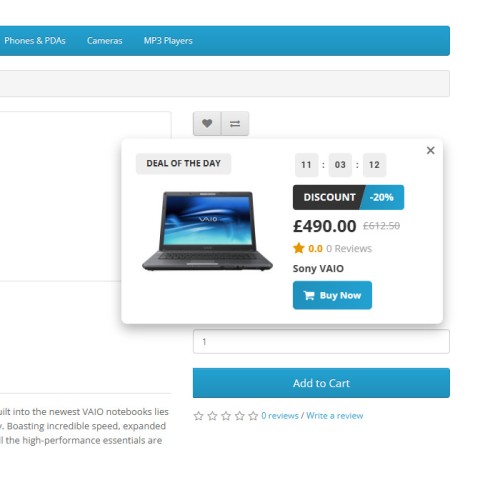
When users click on the "Deal of the Day" label, a pop-up window appears, showing key product details:
The countdown timer indicates how much time is left until the offer expires, emphasizing the promotion’s limited availability.
Widget Benefits
How to Set Up the "Deal of the Day" Widget in OpenCart
1. Log into the OpenCart admin panel: Catalog → Products.
2. Select an existing product or create a new one.
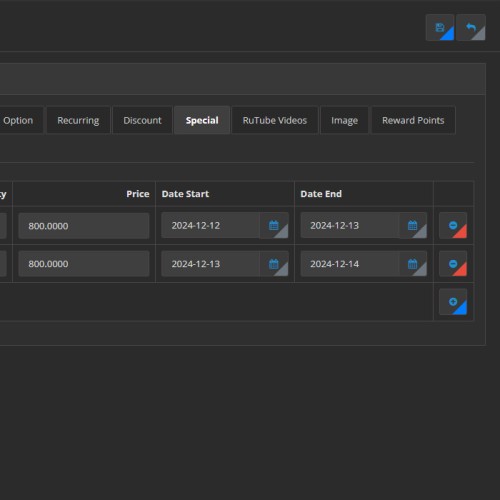
3. Go to the Special (Promotions) tab.
4. Click Add and fill in the following fields:
5. Save your changes.
How Does the Widget Work?
When users click on the "Deal of the Day" label, a pop-up window appears, showing key product details:
- - Product name
- Image
- Original and discounted prices
- Discount percentage
- "Buy Now" button
The countdown timer indicates how much time is left until the offer expires, emphasizing the promotion’s limited availability.
Widget Benefits
- Automatic Updates: Always displays current promotional items.
Countdown Timer: Creates a sense of urgency.
Responsive Design: Works seamlessly on all devices.
Interactive Label: Provides detailed product information with a single click.
User Group Targeting: Offers personalized deals for different customer segments.
How to Set Up the "Deal of the Day" Widget in OpenCart
1. Log into the OpenCart admin panel: Catalog → Products.
2. Select an existing product or create a new one.
3. Go to the Special (Promotions) tab.
4. Click Add and fill in the following fields:
- Customer Group: Specify the target user group.
Price: Enter the discounted price.
Start Date: Set the current date.
End Date: Set a future date (e.g., tomorrow).
5. Save your changes.
Price
$29.99
- Developed by OpenCart Community
- Documentation Included
Rating
Compatibility
2.3.0.0, 2.3.0.1, 2.3.0.2, 3.0.0.0, 3.0.1.0, 3.0.1.1, 3.0.1.2, 3.0.1.3, 3.0.2.0, 3.0.3.0, 3.0.3.1, 3.0.3.2, 3.0.3.3, 3.0.3.5, 3.0.3.6, 3.0.3.7, 3.0.3.8, 3.0.3.9, 3.0.4.0, 3.0.4.1, 3.0.5.0
Last Update
15 Feb 2026
Created
13 Dec 2024
0 Sales
0 Comments

Login and write down your comment.
Login my OpenCart Account