Drag & Drop Layout Manager

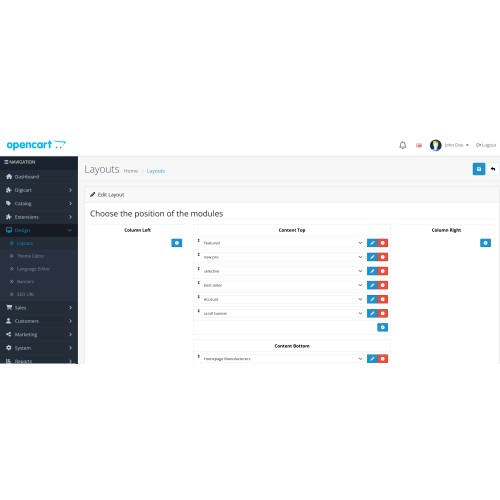

Reorder your OpenCart modules instantly with drag-and-drop—no coding required!
Full Description:
Transform your OpenCart store layout effortlessly! With Drag & Drop Layout Manager, you can visually rearrange modules and sections in any layout. Just drag, drop, and save—your store design updates instantly. Perfect for homepages, category pages, product pages, and more. Mobile-friendly and fully compatible with OpenCart 3.x.
Key Features:
Simple drag-and-drop interface
Works with default and custom layouts
Save positions instantly
Fully mobile-friendly
No coding needed
Why You'll Love It:
Save time managing layouts
Improve store design flexibility
Easy for store owners, designers, and developers
this module has been compatible with opencart 3 and 4.

How to install the extension for V3.x:
1- Installing the module is very simple. for this, you need to select and upload it by clicking the upload button from navigation -> Extensions -> Installer.
2- In the next step, to refresh the changes, click on the eraser and then click reload button from Extensions -> modification
3- From Extensions -> Extensions, select the “Modules” in the filter section and after finding the module, click on the install button.
4- click on edit button for change the module setting and then enable status.
5- click on design/layout/edit layout and then you can drag and drop module
How to install the extension for V4.x:
1- upload module from navigation -> Extensions -> Installer. and click install button for installation.
2- From Extensions -> Extensions, select the “Modules” in the filter section and after finding the module, click on the install button again.
4- click on edit button for change the module setting and then enable status.
5- click on design/layout/edit layout and then you can drag and drop module
You may also like these extensions:


What customers say about Drag & Drop Layout Manager

Does the job
~procheck
~procheck
Download
- Developed by OpenCart Community
- 12 Months Free Support
- Documentation Included
Rating
Compatibility
4.0.0.0, 4.0.1.0, 4.0.1.1, 4.0.2.0, 4.0.2.1, 4.0.2.2, 4.0.2.3, 4.1.0.0, 3.0.0.0, 3.0.1.0, 3.0.1.1, 3.0.1.2, 3.0.1.3, 3.0.3.0, 3.0.3.1, 3.0.3.2, 3.0.3.3, 3.0.3.5, 3.0.3.6, 3.0.3.7, 3.0.3.8, 3.x.x.x, 3.0.3.9, 3.0.4.0, 3.0.4.1
Last Update
3 Oct 2025
Created
6 Feb 2025
224 Downloads
3 Comments

Login and write down your comment.
Login my OpenCart Account