Remove Shopping Cart and Checkout - OpenCart 4.x

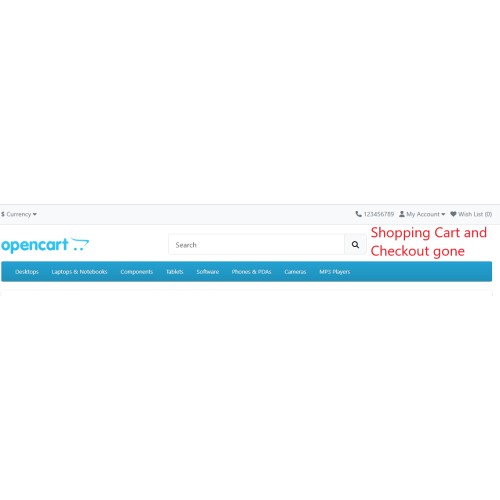
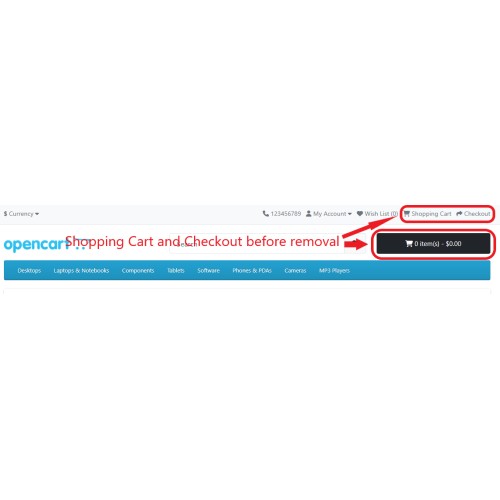
The "Remove Shopping Cart and Checkout" extension removes the shopping cart and checkout links from the site header and from beside the search box at the top of the site. It also prevents the user from typing in index.php?route=checkout/cart and index.php?route=checkout/checkout when trying to manually access the Shopping Cart and Checkout pages respectively. Attempting to add a product to the cart will not work. This extension is especially useful when updating prices and altering products and you want to temporarily prevent anyone from making a purchase.
VQMOD is required for OpenCart version 4. Please note that it has only been tried with the Default theme and may not work with other themes.
NOTES: (1) The extension DOES NOT support the Journal themes. (2) The plugin was created for use with English language sites. Using a different language may result in the extension not working properly. Please read this article.
FEATURES:
INSTALLATION:
OpenCart Version 4.x
(1) Unzip the contents of the zip file.
(2) FTP or upload the vqmod directory to your website root directory. If asked to overwrite files, choose yes.
(3) Refresh your website and the change will be seen.
NOTE: If your site is in Maintenance Mode, do the following:
(1) Go to System > Settings
(2) Click on the "Edit" button of your store.
(3) Select the "Server" tab and scroll down.
(4) Set the "Maintenance Mode" option to "No"
Support Services
If you have any issues with our extensions, have any queries, or need customized solutions, please contact us via our Support Center.
VQMOD is required for OpenCart version 4. Please note that it has only been tried with the Default theme and may not work with other themes.
NOTES: (1) The extension DOES NOT support the Journal themes. (2) The plugin was created for use with English language sites. Using a different language may result in the extension not working properly. Please read this article.
FEATURES:
- Removes the shopping cart and checkout links from the site header
- Removes shopping cart button beside the search box at the top of the site
- Prevents the user from typing in index.php?route=checkout/cart and index.php?route=checkout/checkout when trying to manually access the Shopping Cart and Checkout pages respectively
- Attempting to add a product to the cart will not work
- Extension is especially useful when updating prices and altering products and you want to temporarily prevent anyone from making a purchase
INSTALLATION:
OpenCart Version 4.x
(1) Unzip the contents of the zip file.
(2) FTP or upload the vqmod directory to your website root directory. If asked to overwrite files, choose yes.
(3) Refresh your website and the change will be seen.
NOTE: If your site is in Maintenance Mode, do the following:
(1) Go to System > Settings
(2) Click on the "Edit" button of your store.
(3) Select the "Server" tab and scroll down.
(4) Set the "Maintenance Mode" option to "No"
Support Services
If you have any issues with our extensions, have any queries, or need customized solutions, please contact us via our Support Center.
Price
$30.00
- Developed by OpenCart Community
- Documentation Included
Rating
Compatibility
4.x.x.x, 4.0.0.0, 4.0.1.0, 4.0.1.1, 4.0.2.0, 4.0.2.1, 4.0.2.2, 4.0.2.3, 4.1.0.0, 4.1.0.1, 4.1.0.2, 4.1.0.3
Last Update
20 Feb 2026
Created
28 Feb 2025
0 Sales
0 Comments

Login and write down your comment.
Login my OpenCart Account