Category Add to Cart Text

This OpenCart extension allows you to replace the default "Add to Cart" button text with custom text based on the product's category. This is useful for situations where you need to use different calls to action, such as "Book Now," "Read More," or any other text that is more appropriate for specific categories of products.
Features:
* Category-Specific Text: Define custom text for the "Add to Cart" button based on the product's category.
* Global Enable/Disable: Easily enable or disable the module from the admin panel.
* Unlimited Rules: Create unlimited rules to target different categories with different text.
* Applies to Multiple Pages: The custom text is displayed on category pages, product pages, search result pages, and module listings.
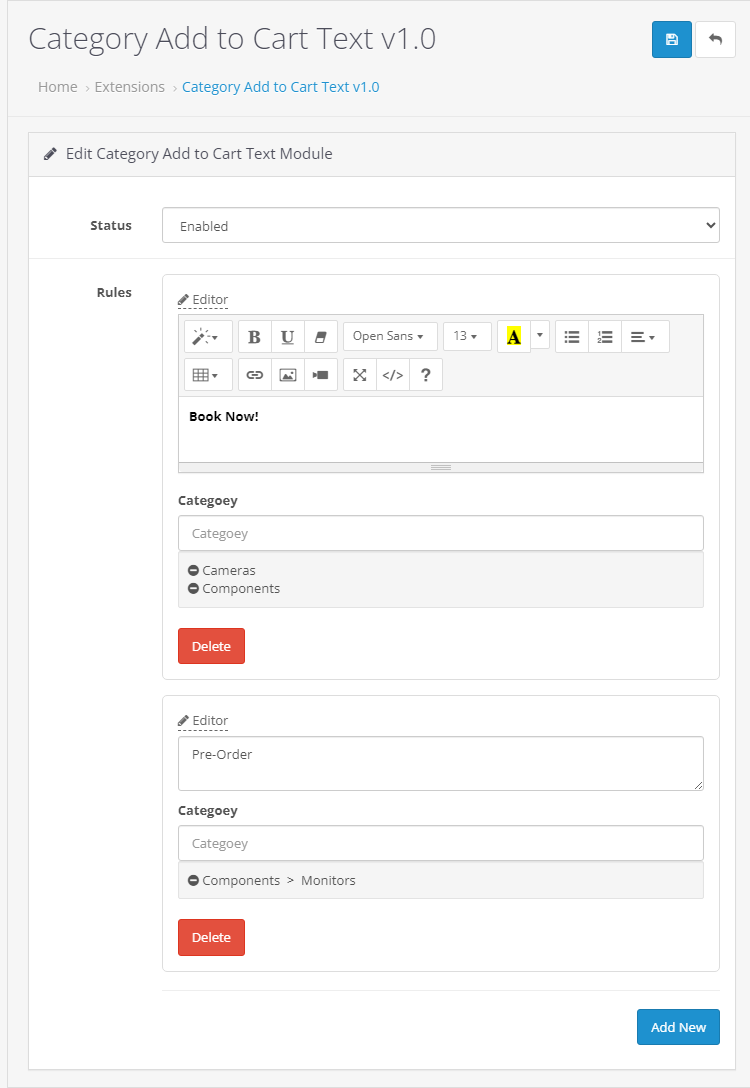
* Rich Text Editor: Rules are written in the admin panel using the editor.
* Uses OCMOD: No core files are overwritten. Uses the OCMOD modification system for easy installation and uninstallation.
How it Works:
The extension adds a module in your OpenCart admin panel where you can create rules. Each rule consists of:
1. Text: The text you want to display instead of "Add to Cart".
2. Category: The category (or categories) to which the rule applies.
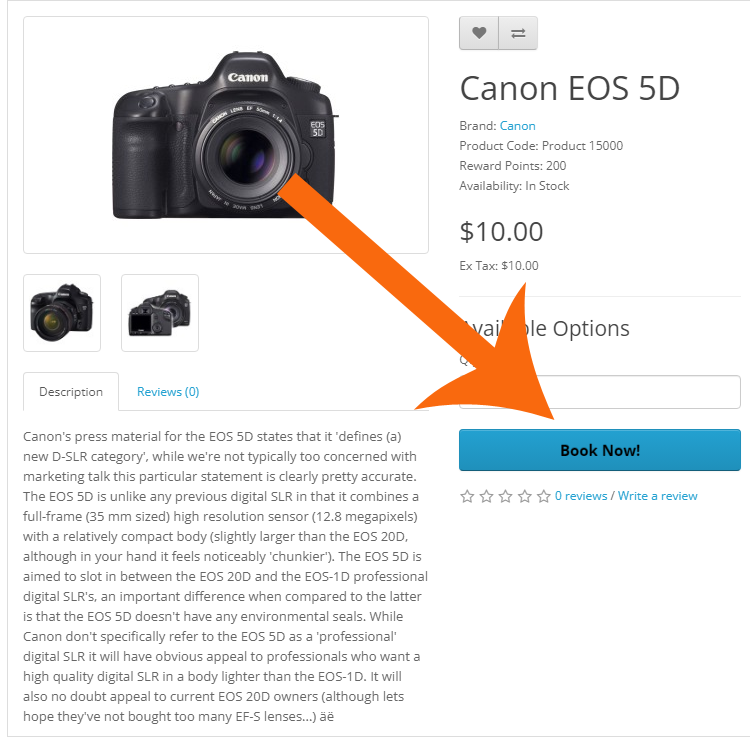
If a product belongs to a category that has a rule defined, the "Add to Cart" button will be replaced with your custom text. If no rule applies, the default "Add to Cart" button will be displayed.
Installation Instructions:
1. Upload the ZIP file through your OpenCart admin panel (Extensions > Installer).
2. Refresh your modifications cache (Extensions > Modifications > Refresh).
3. Install the module (Extensions > Extensions > Modules > Category Add to Cart Text > Install).
4. Edit the module and create your rules.
5. Enable the module.
Screenshots:

Example Use Cases:
* Services: Change "Add to Cart" to "Book Now" for services like appointments or consultations.
* Information Products: Change "Add to Cart" to "Read More" or "Learn More" for books or courses.
* Pre-orders: Change "Add to Cart" to "Pre-order Now" for products that are not yet available.
* Downloadable Products: Change "Add to Cart" to "Download Now" for digital products.
Free Installation and Support
No core files are changed or replaced.
Features:
* Category-Specific Text: Define custom text for the "Add to Cart" button based on the product's category.
* Global Enable/Disable: Easily enable or disable the module from the admin panel.
* Unlimited Rules: Create unlimited rules to target different categories with different text.
* Applies to Multiple Pages: The custom text is displayed on category pages, product pages, search result pages, and module listings.
* Rich Text Editor: Rules are written in the admin panel using the editor.
* Uses OCMOD: No core files are overwritten. Uses the OCMOD modification system for easy installation and uninstallation.
How it Works:
The extension adds a module in your OpenCart admin panel where you can create rules. Each rule consists of:
1. Text: The text you want to display instead of "Add to Cart".
2. Category: The category (or categories) to which the rule applies.
If a product belongs to a category that has a rule defined, the "Add to Cart" button will be replaced with your custom text. If no rule applies, the default "Add to Cart" button will be displayed.
Installation Instructions:
1. Upload the ZIP file through your OpenCart admin panel (Extensions > Installer).
2. Refresh your modifications cache (Extensions > Modifications > Refresh).
3. Install the module (Extensions > Extensions > Modules > Category Add to Cart Text > Install).
4. Edit the module and create your rules.
5. Enable the module.
Screenshots:
Example Use Cases:
* Services: Change "Add to Cart" to "Book Now" for services like appointments or consultations.
* Information Products: Change "Add to Cart" to "Read More" or "Learn More" for books or courses.
* Pre-orders: Change "Add to Cart" to "Pre-order Now" for products that are not yet available.
* Downloadable Products: Change "Add to Cart" to "Download Now" for digital products.
Free Installation and Support
- sabeti05 [AT] gmail.com
- DigitCart Support
No core files are changed or replaced.
Price
$20.00
- Developed by OpenCart Community
- 12 Months Free Support
- Documentation Included
Rating
Compatibility
2.3.0.2, 3.0.0.0, 3.0.1.0, 3.0.1.1, 3.0.1.2, 3.0.1.3, 3.0.2.0, 3.0.3.0, 3.0.3.1, 3.0.3.2, 3.0.3.3, 3.0.3.5, 3.0.3.6, 3.0.3.7, 3.0.3.8, 3.x.x.x, 3.0.3.9, 3.0.4.0, 3.0.4.1, 3.0.5.0
Last Update
26 May 2026
Created
8 Mar 2025
0 Sales
1 Comments

Login and write down your comment.
Login my OpenCart Account