OpenCart 2.3 / 3 Language Translation (Polish - Język Polski)

OpenCart 2.3 / 3 Language Pack Translation (Polish Language - Język Polski) - Version 2.3.0.2 / 3.0.3.9
Release Date: April 4, 2025
Total Files 2.3: 429
Total Files 3: 382
This is a complete translation package for OpenCart 2.3 / 3, fully compatible with version 2.3.0.2 / 3.0.3.9. It includes translations of all official OpenCart 2.3 files, carefully localized to ensure seamless integration with your store. The package comes with 427 PHP files and 2 flag images for easy language identification in your OpenCart admin panel and storefront.
Installation Instructions
Follow these steps to install the Polish language pack on your OpenCart 2.3.0.2 store:
Downloading Localization Files
Adding the Language in OpenCart
Installing via Modification Manager (Optional)
Verifying the Language Setup
Note: Always back up your OpenCart files and database before installation to avoid data loss.
Support & Bug Reporting
I’m committed to providing ongoing support for this language pack. If you find any errors, mistranslations, or compatibility issues, lease let me know!
Your feedback helps improve this product for everyone!
------ Opis w języku polskim ------
Dodawanie języka w OpenCart
Instalacja przez menedżera modyfikacji (opcjonalne)
Weryfikacja ustawień języka
Uwaga: Zawsze wykonaj kopię zapasową plików i bazy danych OpenCart przed instalacją, aby uniknąć utraty danych.
Release Date: April 4, 2025
Total Files 2.3: 429
Total Files 3: 382
PHP 2.3 / 3 Files: 427 / 380
Images: 2 (flag icons included)
This is a complete translation package for OpenCart 2.3 / 3, fully compatible with version 2.3.0.2 / 3.0.3.9. It includes translations of all official OpenCart 2.3 files, carefully localized to ensure seamless integration with your store. The package comes with 427 PHP files and 2 flag images for easy language identification in your OpenCart admin panel and storefront.
Installation Instructions
Follow these steps to install the Polish language pack on your OpenCart 2.3.0.2 store:
Downloading Localization Files
Download the Package: After purchase, download the ZIP file containing the Polish language files from your marketplace account.
Choose Installation Method: You can install the language pack via FTP or through the OpenCart Modification Manager:
Via FTP: Extract the ZIP file and upload the contents directly to your OpenCart root directory (specifically to /catalog/language/ and /admin/language/) using an FTP client or your hosting file manager.
Via Modifications: Extract the ZIP file, locate the uploads folder, and upload it to your server. Then proceed to the Modification Manager (see below).
Adding the Language in OpenCart
- Save Changes: Click "Save" to add the Polish language.
Log in to the Admin Panel: Access your OpenCart admin dashboard.
Navigate to Languages: Go to System > Localization > Languages.
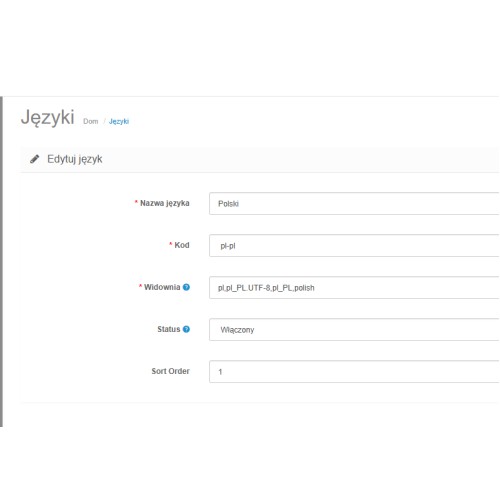
Add New Language: Click the "Add" button and fill in the following fields:
Language Name: Polish
Code: pl-pl
Locale: pl, pl-PL,pl_PL.UTF-8,pl_PL,polish
Status: Enabled
Sort Order: 1
Installing via Modification Manager (Optional)
If you uploaded the uploads folder:
Go to Extensions > Modification Manager.
Click "Refresh" to detect the language pack.
Install the Polish language modification if provided in the package.
Verifying the Language Setup
- Check Display: Visit your website to ensure the Polish language is displayed correctly.
Set as Default: Go to System > Settings, open the "Store" tab, and select "Polish" as the default language for your storefront or admin panel.
Clear Cache: Navigate to Extensions > Modification Manager and clear the cache to apply changes.
Note: Always back up your OpenCart files and database before installation to avoid data loss.
Support & Bug Reporting
I’m committed to providing ongoing support for this language pack. If you find any errors, mistranslations, or compatibility issues, lease let me know!
- Updates: Any reported bugs will be fixed, and updated files will be provided free of charge to existing customers.
How to Report: Leave a comment on this product page or send me a private message (PM) via the marketplace.
What to Include: Provide details about the issue (e.g., file name, line number, or a screenshot) so I can address it quickly.
Your feedback helps improve this product for everyone!
------ Opis w języku polskim ------
Dodawanie języka w OpenCart
- Zapisz zmiany: Kliknij "Zapisz", aby dodać język polski.
Zaloguj się do panelu administracyjnego: Wejdź do swojego panelu administracyjnego OpenCart.
Przejdź do języków: Wybierz System > Lokalizacja > Języki.
Dodaj nowy język: Kliknij przycisk "Dodaj" i wypełnij następujące pola:
Nazwa języka: Polish
Kod: pl-pl
Lokalizacja: pl-PL,pl_PL.UTF-8,pl_PL,polish
Status: Włączony
Kolejność sortowania: 1
Instalacja przez menedżera modyfikacji (opcjonalne)
Jeśli przesłałeś folder uploads:
Przejdź do Rozszerzenia > Menedżer modyfikacji.
Kliknij "Odśwież", aby wykryć pakiet językowy.
Zainstaluj modyfikację języka polskiego, jeśli jest dostępna w pakiecie.
Weryfikacja ustawień języka
- Sprawdź wyświetlanie: Odwiedź swoją stronę internetową, aby upewnić się, że język polski wyświetla się poprawnie.
Ustaw jako domyślny: Przejdź do System > Ustawienia, otwórz zakładkę "Sklep" i wybierz "Polish" jako domyślny język dla sklepu lub panelu administracyjnego.
Wyczyść pamięć podręczną: Przejdź do Rozszerzenia > Menedżer modyfikacji i wyczyść pamięć podręczną, aby zastosować zmiany.
Uwaga: Zawsze wykonaj kopię zapasową plików i bazy danych OpenCart przed instalacją, aby uniknąć utraty danych.
Price
$17.00
- Developed by OpenCart Community
- Documentation Included
Rating
Compatibility
3.0.3.7, 3.0.3.8, 3.x.x.x, 2.3.0.0, 2.3.0.1, 2.3.0.2
Last Update
16 Apr 2025
Created
5 Apr 2025
1 Sales
0 Comments

Login and write down your comment.
Login my OpenCart Account