Google Product Review Feed

Playful Sparkle - Google Product Review Feed is an essential extension for OpenCart 4.x+ that allows store owners to automatically generate and submit a product review feed from their OpenCart store to their Google Merchant Center account. This extension enables you to display verified customer reviews from your store on Google Shopping and other Google platforms, enhancing trust and visibility for your products.
About Google Merchant Center
Google Merchant Center is a platform provided by Google where businesses upload their product data to make it available across Google Shopping, Google Search, and other Google services. In addition to product data, Google Merchant Center also supports product review feeds. This feature allows merchants to display aggregated customer ratings and reviews for their products, improving product visibility, increasing customer trust, and boosting shopper engagement.
With the Google Product Review Feed extension, your OpenCart store will generate a product review feed containing customer reviews collected from your store. You can submit this feed URL to your Google Merchant Center account. Google Merchant Center will periodically fetch updated reviews from the feed according to the frequency you set in your Google Merchant Center settings. This ensures that your product listings are consistently updated with the latest customer reviews.
Features
For more information, visit the extension's GitHub page at https://github.com/playfulsparkle/oc3_product_review_feed or https://github.com/playfulsparkle/oc4_product_review_feed.




Installation Instructions
Installation Instructions for OpenCart 3.x+
MD5 Checksum: fdf8ca9c16e08c67b980a249a45b45e5
SHA256 Checksum: 978f0e3ac8a4884926dae7d016b90cb596fe61e8b6881c29048af2b720c926b3
Installation Instructions for OpenCart 4.x+
MD5 Checksum: 1b7c7890ec9fe0a7f0e566532cd608da
SHA256 Checksum: f40b60d73ba0a55dc25f9cf9a1c3e2a25b182e30cd0d544991a91acb6433d232
Support & Inquiries
For assistance or inquiries regarding this extension, please visit our support website or contact us via email at support@playfulsparkle.com.
About Google Merchant Center
Google Merchant Center is a platform provided by Google where businesses upload their product data to make it available across Google Shopping, Google Search, and other Google services. In addition to product data, Google Merchant Center also supports product review feeds. This feature allows merchants to display aggregated customer ratings and reviews for their products, improving product visibility, increasing customer trust, and boosting shopper engagement.
With the Google Product Review Feed extension, your OpenCart store will generate a product review feed containing customer reviews collected from your store. You can submit this feed URL to your Google Merchant Center account. Google Merchant Center will periodically fetch updated reviews from the feed according to the frequency you set in your Google Merchant Center settings. This ensures that your product listings are consistently updated with the latest customer reviews.
Features
- Opt-in Integration: Prompt customers to participate in a Google survey after checkout, allowing them to rate their shopping experience and contribute to your seller rating.
- Badge Integration: Display the official Google Customer Reviews badge on your storefront. This badge shows your average seller rating and confirms your active participation in the Google Customer Reviews program.
- Product Review Feed Generation: Generates a compliant product review feed that can be submitted to Google Merchant Center for use in Google Shopping and related services.
- Frontend authentication: Secure access to the product feed by preventing unauthorized users from accessing sensitive data.
- Compatibility: Integrates smoothly with OpenCart 3.x+, 4.x+, supporting a range of online store setups.
- Multi-store Support: Supports multi-store setups by default, making it easy to integrate across multiple OpenCart stores.
- Multilingual Support: Ready for international use with languages including العربية (ar), Български (bg), 中文(简体) (zh-cn), 中文(繁體) (zh-tw), Čeština (cs-cz), English (UK) (en-gb), English (US) (en-us), Français (fr-fr), Deutsch (de-de), Ελληνικά (el-gr), Magyar (hu-hu), Italiano (it-it), 日本語 (ja), 한국어 (ko-kr), Polski (pl-pl), Português (Brasil) (pt-br), Русский (ru-ru), Slovenčina (sk-sk), Español (es-es), and Türkçe (tr-tr).
For more information, visit the extension's GitHub page at https://github.com/playfulsparkle/oc3_product_review_feed or https://github.com/playfulsparkle/oc4_product_review_feed.
Installation Instructions
Installation Instructions for OpenCart 3.x+
- 1) Download the latest version from the OpenCart Marketplace.
2) Log in to your OpenCart admin panel.
3) Navigate to Extensions > Installer.
4) Click the Upload button and upload the ps_product_review_feed.ocmod.zip file.
5) Navigate to Extensions > Extensions and select Feeds from the Choose the extension type dropdown list.
6) Locate the extension in the Feeds list and click the Install button.
7) Click the Edit button, configure the extension parameters, and click the Save button to save your settings.
8) Navigate to Extensions > Modifications, select all your modifications and click the Refresh button to update the modification cache and apply the changes.
MD5 Checksum: fdf8ca9c16e08c67b980a249a45b45e5
SHA256 Checksum: 978f0e3ac8a4884926dae7d016b90cb596fe61e8b6881c29048af2b720c926b3
Installation Instructions for OpenCart 4.x+
- 1) Download the latest version from the OpenCart Marketplace.
2) Log in to your OpenCart admin panel.
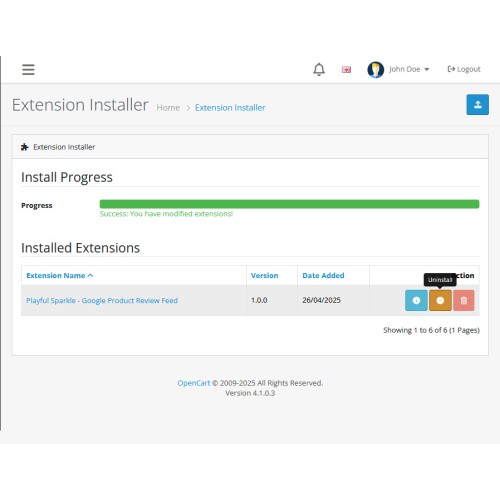
3) Navigate to Extensions > Installer.
4) Click the Upload button and upload the ps_product_review_feed.ocmod.zip file.
5) Locate the extension in the Installed Extensions list and click the Install button.
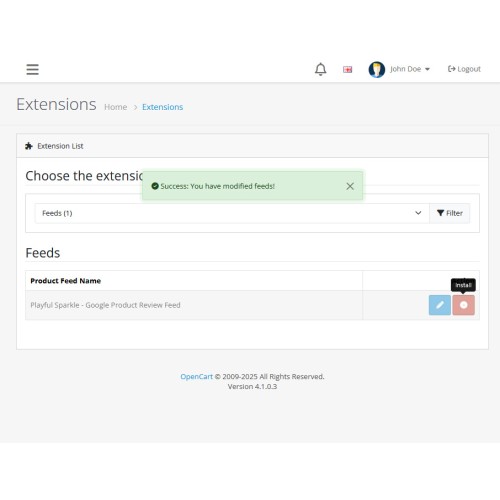
6) Navigate to Extensions > Extensions and select Feeds from the Choose the extension type dropdown list.
7) Locate the extension in the Feeds list and click the Install button.
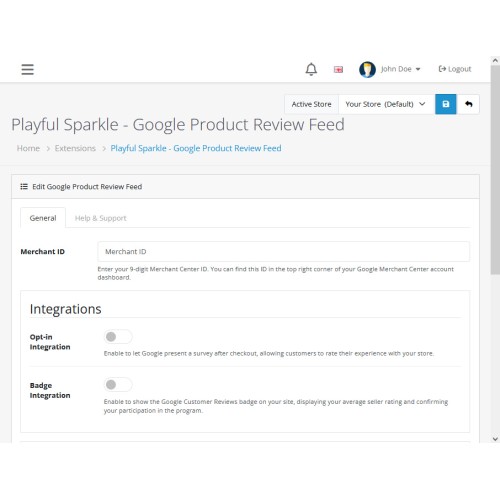
8) Click the Edit button, configure the extension parameters, and click the Save button to save your settings.
MD5 Checksum: 1b7c7890ec9fe0a7f0e566532cd608da
SHA256 Checksum: f40b60d73ba0a55dc25f9cf9a1c3e2a25b182e30cd0d544991a91acb6433d232
Support & Inquiries
For assistance or inquiries regarding this extension, please visit our support website or contact us via email at support@playfulsparkle.com.
Download
- Developed by OpenCart Community
- 3 Months Free Support
- Documentation Included
Rating
Compatibility
4.x.x.x, 4.0.0.0, 4.0.1.0, 4.0.1.1, 4.0.2.0, 4.0.2.1, 4.0.2.2, 4.0.2.3, 4.1.0.0, 4.1.0.1, 4.1.0.2, 4.1.0.3, 3.0.0.0, 3.0.1.0, 3.0.1.1, 3.0.1.2, 3.0.1.3, 3.0.2.0, 3.0.3.0, 3.0.3.1, 3.0.3.2, 3.0.3.3, 3.0.3.5, 3.0.3.6, 3.0.3.7, 3.0.3.8, 3.x.x.x, 3.0.3.9, 3.0.4.0, 3.0.4.1, 3.0.5.0
Last Update
1 Apr 2026
Created
26 Apr 2025
77 Downloads
4 Comments

Login and write down your comment.
Login my OpenCart Account