PDF & Image Watermark for Downloads
Secure your downloadable files with professional watermarking!
This module allows store owners to automatically apply text or image watermarks to PDF and image files before download — adding protection, branding, and legal safeguards.
Key Features
Use Cases
Compatibility
Admin Settings
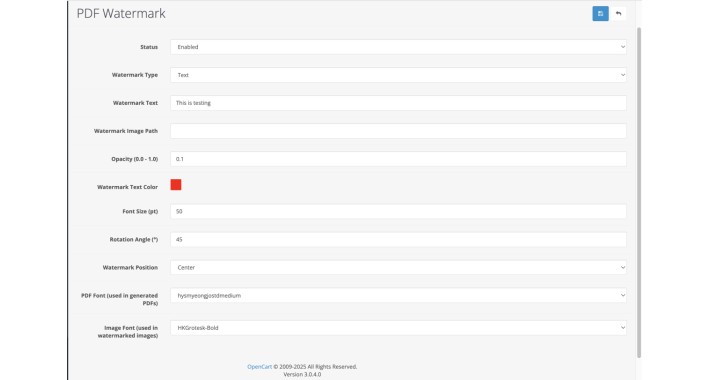
Navigate to: Extensions → Modules → PDF Watermark
Configure the following:
Watermark Type: Text or Image
Watermark Text: Enter your custom text
Upload Watermark Image (PNG recommended)
Font Size, Color (via Color Picker), Angle, Opacity
Watermark Position (Top-Left, Center, etc.)
Choose Fonts for PDF and image rendering
Benefits
Security: Prevent file sharing or misuse
Branding: Maintain brand visibility even in shared files
Professionalism: Elevates customer experience with branded documents
Compliance: Enforce license or distribution restrictions
Installation & Deployment
Upload the files via FTP or Extension Installer
Apply OCMOD modification
Enable the module and configure settings
That's it — your files are now watermarked on-the-fly!
Technical Details
Uses TCPDF + FPDI for PDF manipulation
Uses GD + TTF for image watermarking
No original file is modified — watermarking is done at download time
Uses OpenCart's native $this->log for troubleshooting
Designed to be lightweight, secure, and enterprise-grade
This module allows store owners to automatically apply text or image watermarks to PDF and image files before download — adding protection, branding, and legal safeguards.
Key Features
Automatic Watermarking of PDFs, JPEGs, PNGs before download
Supports both Text & Image Watermarks
Position Control: Place watermark in center, corners, or edges
Customizable Text: Choose your own text and font
Color Picker Integration (via Pickr.js) to select watermark color
Opacity Control: Set transparency from 0.0 to 1.0
Rotation Support: Diagonal, vertical, or horizontal watermark angle
Multi-page PDF Support: Watermark is applied to all pages
Font Selection: Choose from installed PDF and TTF fonts
Customer-Based Access: Only logged-in users can access downloads
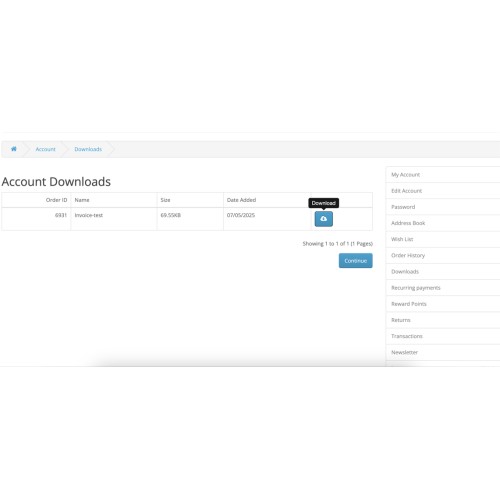
Seamless Integration with Customer Account → Downloads
Original file stays untouched — watermark is applied dynamically
Use Cases
Add your brand, store name, or copyright to invoice PDFs
Protect digital assets such as ebooks, guides, or templates
Prevent unauthorized redistribution of product files
Comply with copyright or licensing terms on digital goods
Insert custom “Demo”, “Confidential”, or “Sample” stamps for visibility
Compatibility
OpenCart 3.x and above
Journal & most popular themes (with standard account download flow)
Works with default OpenCart download system (no 3rd-party dependency)
Admin Settings
Navigate to: Extensions → Modules → PDF Watermark
Configure the following:
Watermark Type: Text or Image
Watermark Text: Enter your custom text
Upload Watermark Image (PNG recommended)
Font Size, Color (via Color Picker), Angle, Opacity
Watermark Position (Top-Left, Center, etc.)
Choose Fonts for PDF and image rendering
Benefits
Security: Prevent file sharing or misuse
Branding: Maintain brand visibility even in shared files
Professionalism: Elevates customer experience with branded documents
Compliance: Enforce license or distribution restrictions
Installation & Deployment
Upload the files via FTP or Extension Installer
Apply OCMOD modification
Enable the module and configure settings
That's it — your files are now watermarked on-the-fly!
Technical Details
Uses TCPDF + FPDI for PDF manipulation
Uses GD + TTF for image watermarking
No original file is modified — watermarking is done at download time
Uses OpenCart's native $this->log for troubleshooting
Designed to be lightweight, secure, and enterprise-grade
Price
$59.90
- Developed by OpenCart Community
- 6 Months Free Support
- Documentation Included
Rating
Compatibility
3.0.0.0, 3.0.1.0, 3.0.1.1, 3.0.1.2, 3.0.1.3, 3.0.2.0, 3.0.3.0, 3.0.3.1, 3.0.3.2, 3.0.3.3, 3.0.3.5, 3.0.3.6, 3.0.3.7, 3.0.3.8, 3.x.x.x, 3.0.3.9, 3.0.4.0
Last Update
8 May 2025
Created
7 May 2025
0 Sales
0 Comments

Login and write down your comment.
Login my OpenCart Account