Cardlink Checkout Payment Gateway (Official)

Cardlink checkout Payment Gateway for Open Cart allows you to accept electronic payments by credit, debit or prepaid card and other available payments with or without variable installments. Connect with Cardlink to start accepting payments quickly and easily.
Recurring payments are not supported. For IRIS payments DO NOT use iframe. For new IRIS activations, IRIS customer code is not needed. Please read carefully the README file before the installation! If you already use IRIS with your own seller id, DO NOT install the new version!
Cardlink Checkout Payment Gateway
Requires at least: 3.0.x.x
[*] Tested up to: 3.0.3.8
Description
Cardlink Payment Gateway allows you to accept payment through various schemes such as Visa, Mastercard, Maestro, American Express, Diners, Discover cards on your website, with or without variable installments. This module aims to offer new payment solutions to Cardlink merchants for their Opencart 3.0.x online store without having web development knowledge. However, for the initial module installation some technical knowledge will be required.
Merchants with e-shops will be able to integrate the Cardlink Payment Gateway to their checkout page using the CSS layout that they want. Also, they can choose between redirect or IFRAME option for the payment environment. Once the payment is made, the customer is returned to the online store and the order is updated. Once you have completed the requested tests and any changes to your website, you can activate your account and start accepting payments.
Features
1. A dropdown option for instance between Worldline, Nexi and Cardlink.
2. Option to enable test environment. All transactions will be re-directed to the
endpoint that represents the production environment by default. The endpoint will be different
depending on which acquirer has been chosen from instance dropdown option.
3. Ability to define the maximum number of instalments regardless the total order
amount.
4. Option for pre-authorization or sale transactions.
5. Option for a user tokenization service. The card token will be stored at the merchant’s e-shop database and will be used by customers to auto-complete future payments.
6. Redirection option: user should have a check box to enable pop up with i-frame without redirection.
7. Order status: Choose order status after successful payment.
8. A text field for providing the absolute or relative (to Cardlink Payment Gateway location on server) url of custom CSS stylesheet, to change CSS styles in payment page.
9. Translation ready for Greek & English languages.
Features (IRIS)
1. A dropdown option for instance between Worldline, Nexi and Cardlink.
2. Option to enable test environment (sandbox). All transactions will be re-directed to the endpoint that represents the production environment by default.
3. Field for Merchand ID.
4. Field for Shared Secret Key.
5. Choose a custom title for payment method.
6. Option to set different order statuses for transactions with a captured payment.
7. Translation ready for Greek & English languages.
8. Not supporting iframe. Supporting only redirect method.
Installation
Firstly, find the plugins in the "INSTALL" folder. cardlink-payment-opencart.ocmod.zip cardlink-payment-opencart-iris.ocmod.zip
From your administration, go to
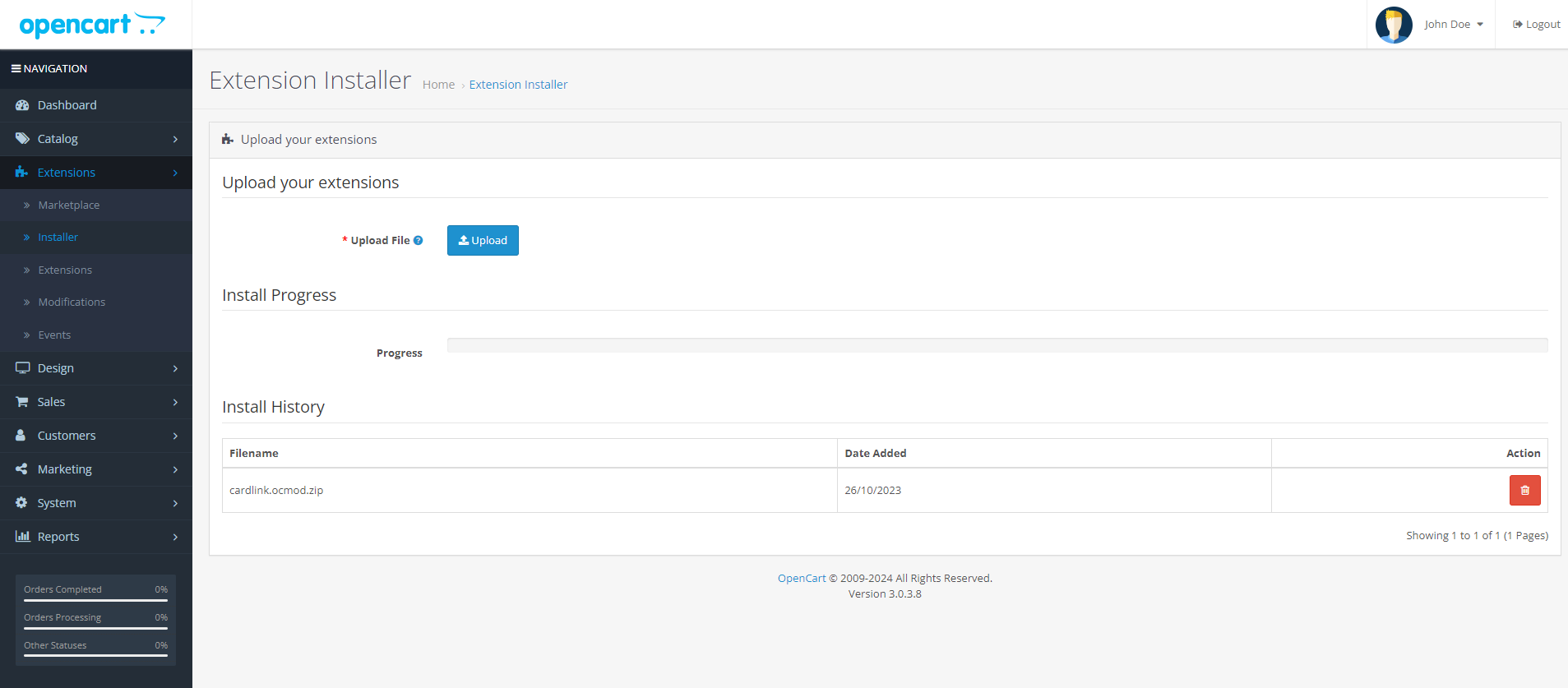
Find it and select it through the popup file browser. Once the module’s
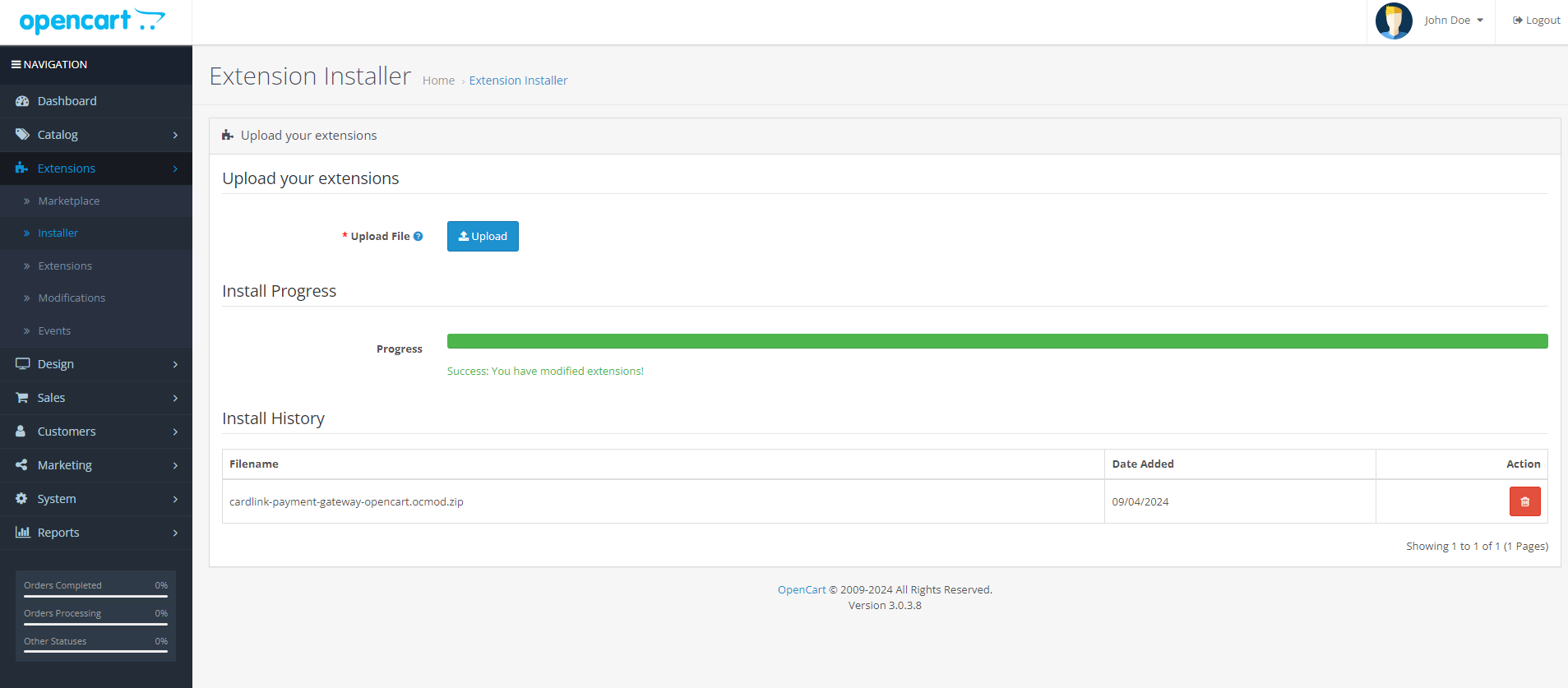
After the success uploading go to
Screenshots
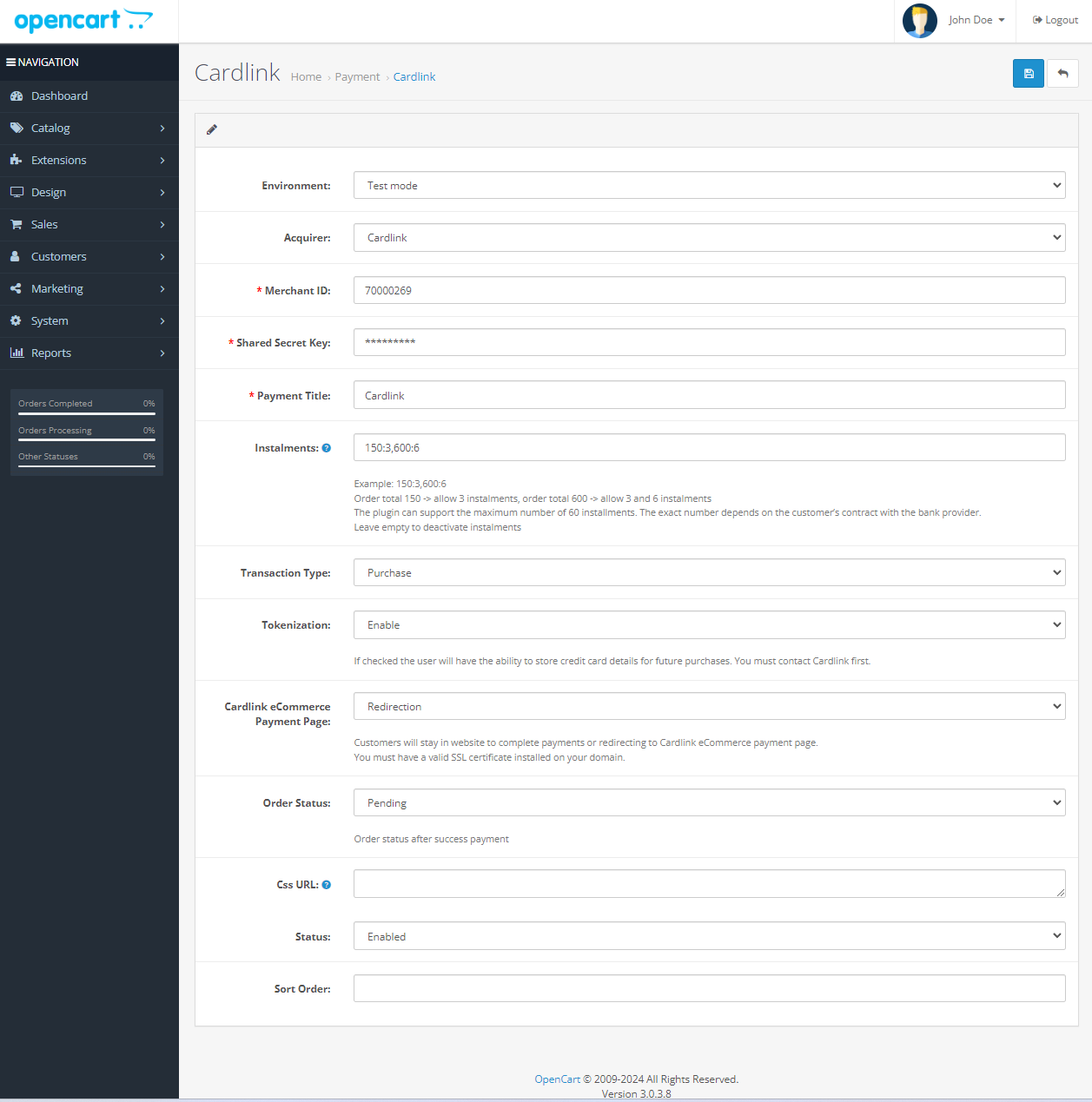
The Cardlink Payment Gateway admin page used to configure the settings (
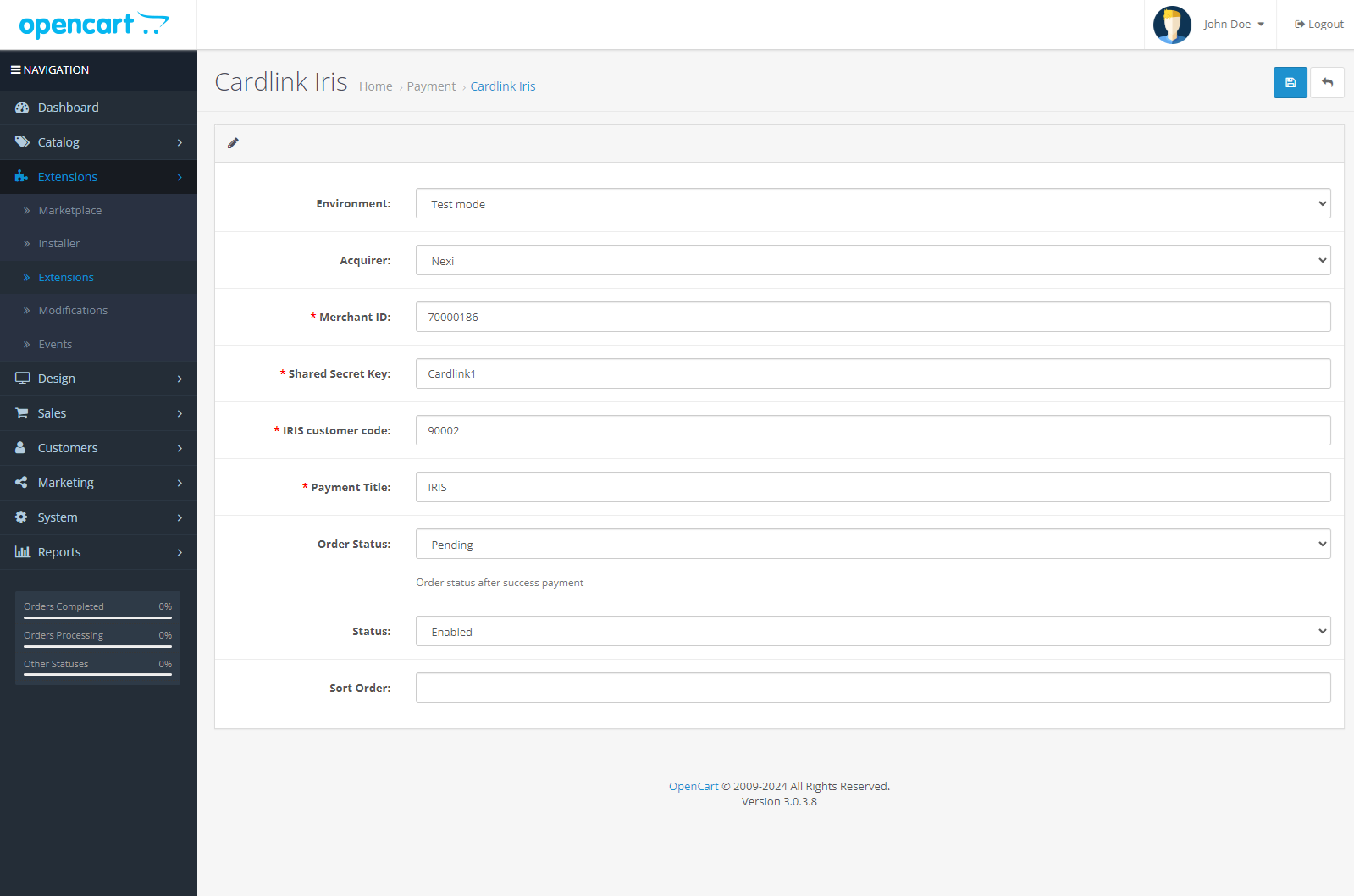
The Cardlink Payment Gateway IRIS admin page used to configure the settings (
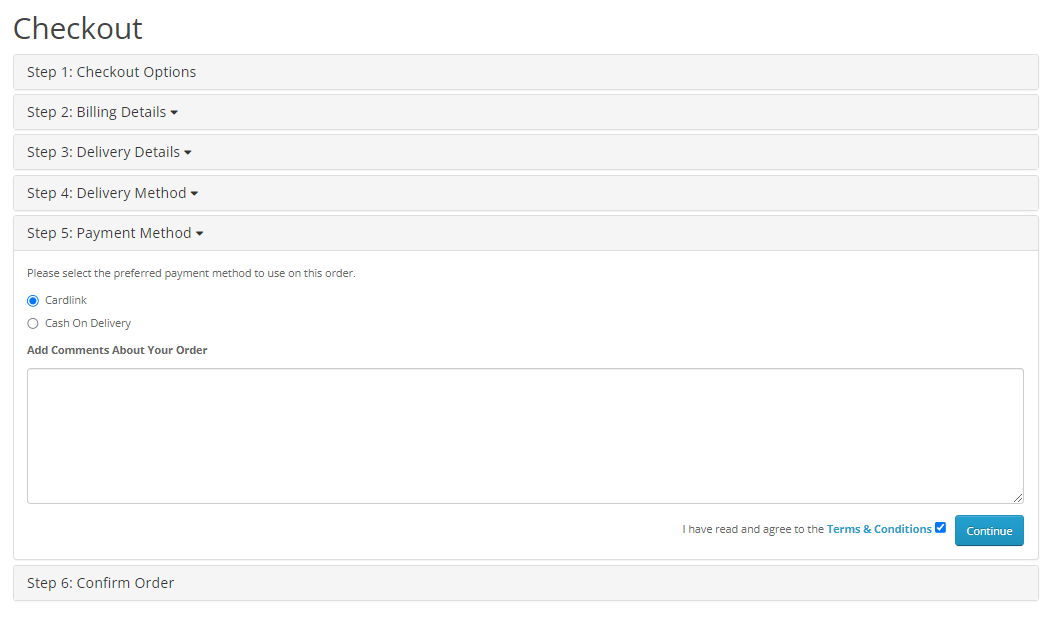
This is the front-end of Cardlink Payment Gateway plugin located in checkout page.
Support tickets
In case that you face any technical issue during the installation process, you can contact the Cardlink e-commerce team at ecommerce_support@cardlink.gr .
Recurring payments are not supported. For IRIS payments DO NOT use iframe. For new IRIS activations, IRIS customer code is not needed. Please read carefully the README file before the installation! If you already use IRIS with your own seller id, DO NOT install the new version!
Cardlink Checkout Payment Gateway
Description
Cardlink Payment Gateway allows you to accept payment through various schemes such as Visa, Mastercard, Maestro, American Express, Diners, Discover cards on your website, with or without variable installments. This module aims to offer new payment solutions to Cardlink merchants for their Opencart 3.0.x online store without having web development knowledge. However, for the initial module installation some technical knowledge will be required.
Merchants with e-shops will be able to integrate the Cardlink Payment Gateway to their checkout page using the CSS layout that they want. Also, they can choose between redirect or IFRAME option for the payment environment. Once the payment is made, the customer is returned to the online store and the order is updated. Once you have completed the requested tests and any changes to your website, you can activate your account and start accepting payments.
Features
1. A dropdown option for instance between Worldline, Nexi and Cardlink.
2. Option to enable test environment. All transactions will be re-directed to the
endpoint that represents the production environment by default. The endpoint will be different
depending on which acquirer has been chosen from instance dropdown option.
3. Ability to define the maximum number of instalments regardless the total order
amount.
4. Option for pre-authorization or sale transactions.
5. Option for a user tokenization service. The card token will be stored at the merchant’s e-shop database and will be used by customers to auto-complete future payments.
6. Redirection option: user should have a check box to enable pop up with i-frame without redirection.
7. Order status: Choose order status after successful payment.
8. A text field for providing the absolute or relative (to Cardlink Payment Gateway location on server) url of custom CSS stylesheet, to change CSS styles in payment page.
9. Translation ready for Greek & English languages.
Features (IRIS)
1. A dropdown option for instance between Worldline, Nexi and Cardlink.
2. Option to enable test environment (sandbox). All transactions will be re-directed to the endpoint that represents the production environment by default.
3. Field for Merchand ID.
4. Field for Shared Secret Key.
5. Choose a custom title for payment method.
6. Option to set different order statuses for transactions with a captured payment.
7. Translation ready for Greek & English languages.
8. Not supporting iframe. Supporting only redirect method.
Installation
Firstly, find the plugins in the "INSTALL" folder. cardlink-payment-opencart.ocmod.zip cardlink-payment-opencart-iris.ocmod.zip
From your administration, go to
Extensions > Installer and click on the Upload button.Find it and select it through the popup file browser. Once the module’s
ocmod.zip file has been uploaded and the module installed, you will see the below success message. After the success uploading go to
Extensions > Extensions and filter the extensions by Payment. Find the Cardlink extension and click on the green icon on the right with the plus icon.Screenshots
The Cardlink Payment Gateway admin page used to configure the settings (
Extensions > Extensions > Payments > Cardlink > Edit).The Cardlink Payment Gateway IRIS admin page used to configure the settings (
Extensions > Extensions > Payments > Cardlink Iris > Edit). This is the front-end of Cardlink Payment Gateway plugin located in checkout page.
Support tickets
In case that you face any technical issue during the installation process, you can contact the Cardlink e-commerce team at ecommerce_support@cardlink.gr .
Download
- Developed by OpenCart Community
- Documentation Included
Rating
Compatibility
3.x.x.x
Last Update
29 Apr 2026
Created
16 May 2025
34 Downloads
1 Comments

Login and write down your comment.
Login my OpenCart Account